Lovable and Cursor both use AI to build software, but they're built for different people. Lovable builds the app for you: you describe it in a chat and get a working web app with a database, logins and hosting, from $25 a month. Cursor is a code editor that writes code with you, from $20 a month, and it assumes you can read and fix what it writes.
For a beginner who doesn't code, Lovable is the better start. For anyone who already writes code, or plans to maintain the app for years, Cursor wins.
How we compared: Lovable's plans, credit costs and docs, and Cursor's pricing and help pages, checked on October 13, 2026. EdGrows, who runs AIVario, uses Cursor on this site's own code; Lovable is covered from documentation and public reports, not our own projects.
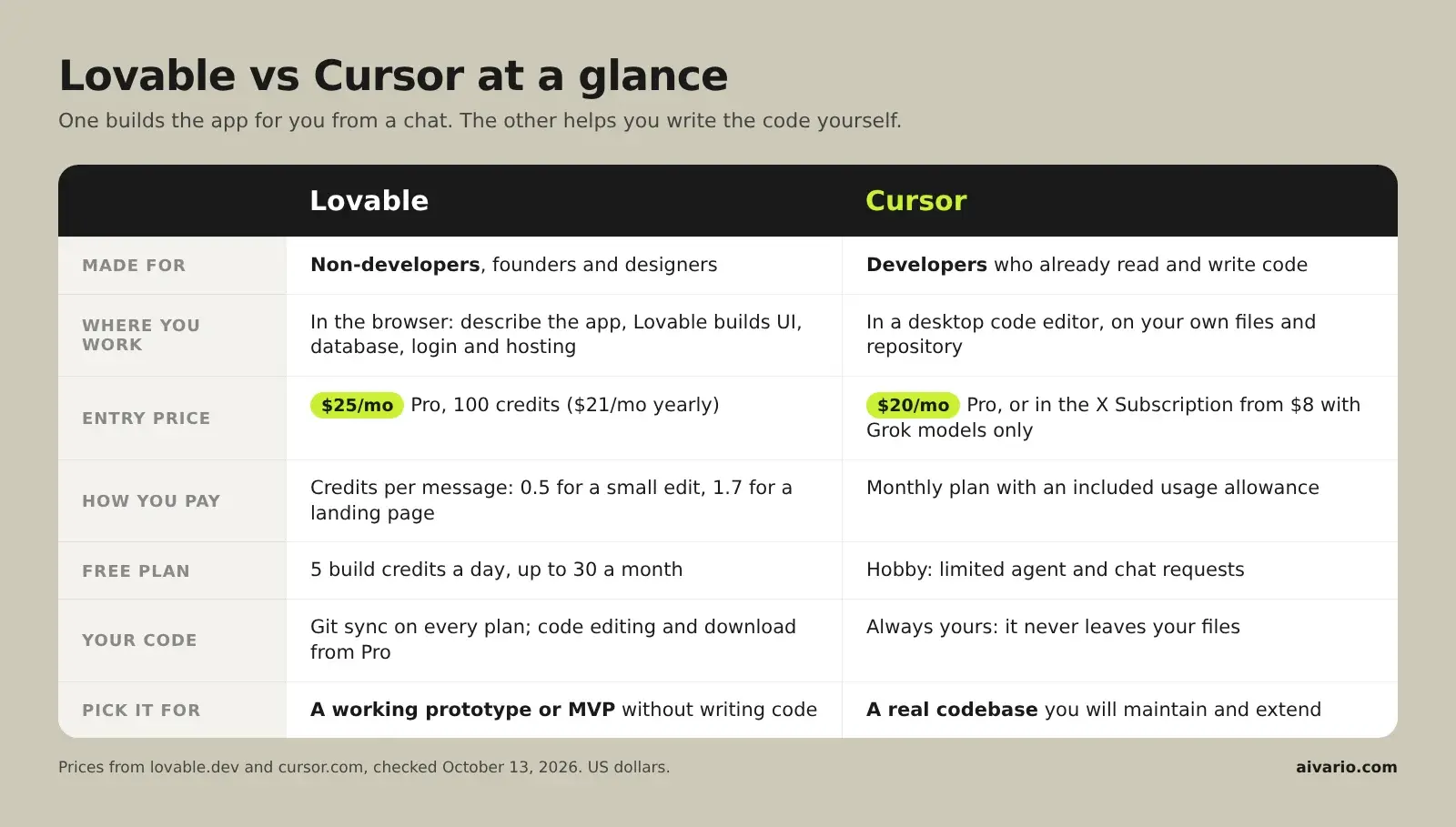
Choose Lovable if, choose Cursor if
Choose Lovable if you don't write code, want a working prototype or MVP this week, and are happy for the AI to make most technical decisions. You describe screens and features; Lovable handles the stack and hosts the result.
Choose Cursor if you can read code, already have a project, or want full control over how the app is built. Cursor works inside your files and repository, and every change is something you can review before it lands.
Start with Lovable and graduate to Cursor if you're learning. Lovable syncs your project to GitHub on every plan, so the same code can move into Cursor once you need custom work.
Lovable is built for founders, designers and product people who can explain what they want but not build it. The default flow is a chat. A Plan mode lets you discuss a change before Lovable makes it, which helps when you're not sure how to describe what you need. The result runs on Lovable Cloud, so there's no server to set up.
Cursor is built for developers. It's a desktop editor based on VS Code, with an agent that can change many files at once, run commands and fix its own errors. A beginner can use it, but every step assumes you understand the files it touches. When Cursor's agent breaks something, you're the one who has to notice.
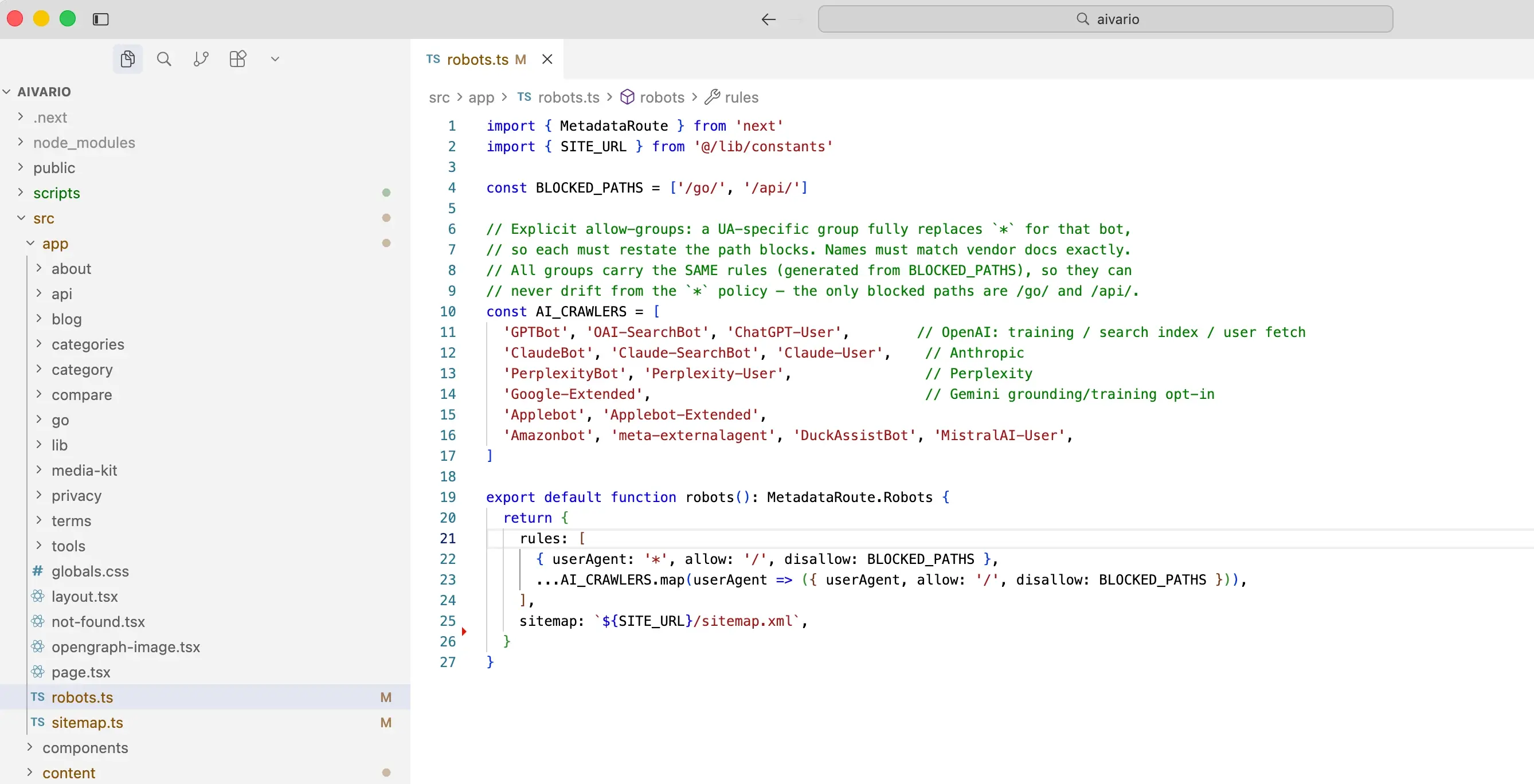
Cursor on AIVario's own codebase: the robots.ts file that sets which AI crawlers can read this site.
What each costs in October 2026
| Lovable | Cursor |
|---|
| Free plan | 5 build credits a day, up to 30 a month | Hobby: limited agent and chat requests |
| Entry paid plan | Pro: $25 a month, or $21 billed yearly, for 100 credits | Pro: $20 a month |
| Higher tiers | Pro scales to 10,000 credits a month; Business from $50 | Pro+ $60, Ultra $200 |
| Teams | Unlimited members share one credit pool; Business adds SSO | Teams from $40 per user a month |
| How usage is counted | Credits per message, by complexity | Usage allowance within the plan |
Lovable prices from Lovable's plans documentation; Cursor prices from Cursor's pricing help page, both checked October 13, 2026.
Cursor's pricing is moving this week. On October 13, 2026 SpaceXSI, which owns Cursor, launched the X Subscription, which bundles Grok, X Premium perks and Cursor. Its Plus tier at $8 a month includes Cursor with Grok models only. Premium at $30 adds third-party models billed at API prices. Cursor's own help center still lists Pro at $20, and our Grok review covers the bundle in detail.
How far $25 goes on Lovable
Lovable charges credits per message, and its pricing page gives four examples. Making a button gray costs 0.5 credits. Removing a footer costs 0.9, and adding sign-up and login costs 1.2. Building a landing page with generated images costs 1.7.
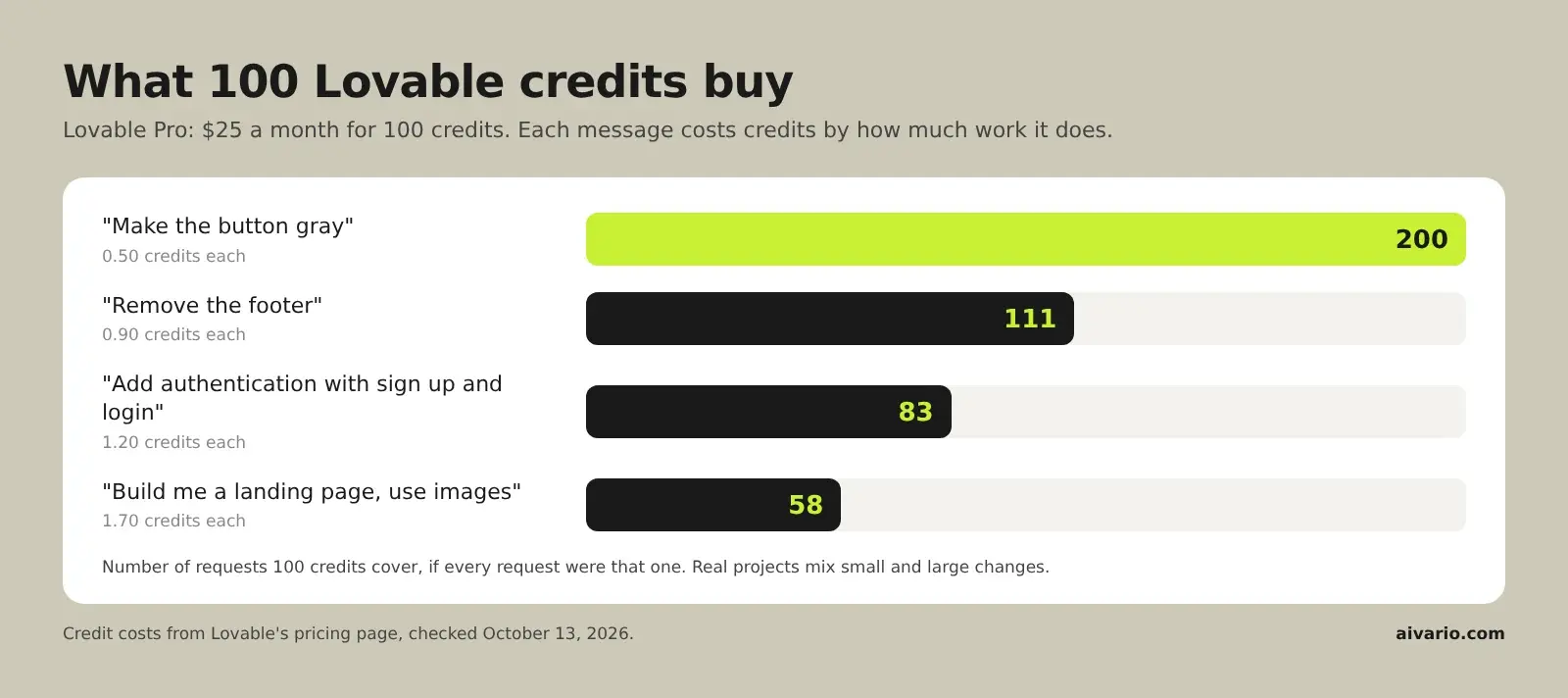
So the 100 credits in Pro cover somewhere between 58 and 200 requests, plus 5 free build credits a day. Monthly credits roll over for two months on a monthly plan. Top-ups on Pro cost $15 for 50 credits. A beginner who iterates in many small steps gets more from a credit pool than one who asks for big changes and then undoes them.
Cursor's cost works differently. You pay a flat plan price with an included usage allowance, and the model you choose decides how fast it runs out. There's nothing to host, because the code runs wherever you deploy it.
Owning and moving your code
Both tools leave you with code you can take elsewhere, but they get there differently.
Lovable syncs projects to GitHub, GitLab or Bitbucket on every plan, and code editing and download start on Pro. Its documentation says you own the code, apps and data you create. Hosting stays on Lovable Cloud unless you move it.
Cursor never holds your code in the first place. It edits files on your own computer, in your own repository, and you deploy them however you like. That's why Cursor is the natural second step for a Lovable project that outgrows chat-based editing.
Lovable or Cursor for a real project
A typical path for a non-technical founder: build the first version in Lovable, test it with users, then hire a developer or learn enough to continue in Cursor. Lovable gets you to something people can use. Cursor is where a product with paying customers gets maintained.
For developers, the order reverses. Cursor is the daily tool, and Lovable can still be useful for throwaway prototypes or landing pages you don't want to code by hand. For other options, see our Lovable vs Bolt comparison, Claude Code vs Cursor (see also the Claude review) and the guide to the best AI vibe coding tools.
Decision matrix
| Your situation | Pick | Why | Monthly cost |
|---|
| Founder with no coding skills, needs an MVP | Lovable | Builds the full app and hosts it | $25 |
| Designer turning mockups into a working prototype | Lovable | Chat-first, visual results, no setup | $25 |
| Developer adding features to an existing app | Cursor | Works in your repo with full control | $20 |
| Beginner learning to code | Lovable first, then Cursor | Get a working app, then learn on its code | $25, then $20 |
| Team of occasional builders | Lovable | Unlimited members share one credit pool | From $25 |
| Developer who mostly uses Grok models | Cursor via the X Subscription | Plus includes Cursor with Grok models | $8 |
Verdict
Lovable is the better pick for most beginners, because it removes the parts of software that stop non-developers: setup, databases, logins and hosting. Cursor is the better pick for anyone who writes code, and the place a serious Lovable project usually ends up.
They work best in sequence rather than as rivals. Build the first version where the AI makes the decisions, then move to the editor where you do.
Try Lovable free (5 credits a day)
Try Cursor's free Hobby plan
Lovable vs Cursor: frequently asked questions
Is Lovable or Cursor better for a beginner who can't code?
Lovable. You describe the app in plain language and it builds the interface, database, login and hosting, so you never have to open a code file. Cursor is a code editor: it writes code with you, but you still need to read, run and fix that code yourself.
How much do Lovable and Cursor cost?
Lovable Pro costs $25 a month for 100 credits, or $21 a month billed yearly. Cursor Pro costs $20 a month, per Cursor's help center. Since October 13, 2026 Cursor is also part of the X Subscription from $8 a month, which covers Grok models only on that tier.
Can I start in Lovable and move to Cursor later?
Yes, and many builders do. Lovable syncs your project to GitHub on every plan, so you can clone the repository and keep working on it in Cursor once the app needs custom work. Lovable says you own the code and apps you create.
What does a Lovable credit buy?
One message's worth of work, priced by complexity. Lovable's own examples: making a button gray costs 0.5 credits, adding sign-up and login 1.2, and building a landing page with images 1.7. So 100 credits cover roughly 58 to 200 requests, depending on their size.
Is Cursor free?
There's a free Hobby plan with limited agent and chat requests, enough to try it on a small project. Regular use needs a paid plan: Pro at $20 a month, or one of the X Subscription tiers that now include Cursor.
Which one makes better code?
They answer different needs. Lovable optimises for a working app fast and makes most decisions for you. Cursor lets a developer review every change, pick the model and keep the project's own structure, which matters more as an app grows.