What is Webflow AI?
Webflow is a visual no-code web design platform with native CMS and hosting, free on the Starter plan with custom-domain Site plans starting at $14/month. The AI suite (Site Builder, Optimize, Content Generation) is layered onto the existing platform rather than being the product itself. Used by designers, agencies, marketing teams, and SaaS companies who want pixel-precise visual control without writing code. Key differentiators: the strongest CSS engine in any visual builder, mature CMS, AWS-grade hosting, and reliable structural HTML output. Best for marketing sites, brand sites, and content-driven businesses.
The honest framing on Webflow's AI features: they are additive, not the headline. Webflow's value has always been the CSS engine and visual control, and it still is. The AI Site Builder, AI Optimize, and content generation features released in 2024-2025 are useful additions but they are not what makes Webflow worth using. For users evaluating Webflow because of the AI marketing, the right expectation is "good visual design platform that has added AI features," not "AI-first site builder that happens to have visual editing."
This matters because the AI website builder category in 2026 is loud. Framer, Wix Studio, Mobirise AI, Hostinger AI, Durable, Mixo — they all promise to generate complete websites from prompts. Most of them produce sites that look fine but feel generic, with shallow CMS, weak design control beyond the initial generation, and limited customization paths once the AI has done its part. Webflow's slower, more conservative AI integration reflects a clear-eyed view that AI generation is good for scaffolding but not for the actual craft of a brand site.
Who is it for?
Webflow is built for designers and design-led teams who want to produce websites with the visual quality of custom development, without the engineering overhead. The clearest fit is freelance designers and small design agencies serving SMB and mid-market clients — Webflow is the production tool that lets a designer hand off a maintainable site to a non-technical client without involving developers.
Marketing teams at SaaS and B2B companies use Webflow to own their marketing site without engineering bottlenecks. The marketing team can publish landing pages, update copy, run experiments, and manage SEO without a sprint blocking on developer time. This is the use case Webflow's "designed for marketers" positioning leans into, and it is genuine — marketing-led Webflow sites are noticeably faster to iterate than equivalent React or WordPress setups.
Content-driven businesses (publishers, online magazines, niche media) use Webflow's CMS for structured content management. The CMS is mature, the editorial UI is good, and the hosting handles traffic spikes without configuration.
Independent professionals (consultants, photographers, writers, designers) use Webflow for personal portfolio sites where visual craft matters and AI-generated templates would feel generic.
Brand-focused SMBs use Webflow for high-quality brand sites that look custom — the kind of work that would have required a full development team five years ago and now sits within reach of a competent designer.
It is not the right tool for: complex web applications (use real frameworks like Next.js or SvelteKit), serious e-commerce at scale (Shopify is better), large content sites with thousands of pages (WordPress with custom development scales further), or pure AI-generated marketing sites where speed beats craft (Framer is often faster).
Key Features
- Visual design canvas — pixel-precise CSS control with the strongest engine in any no-code platform
- CMS — structured content with custom collections, references, and editorial workflows
- Hosting — fast AWS-backed hosting with automatic SSL, CDN, and basic DDoS protection
- AI Site Builder — generates a site draft from a prompt as a starting scaffold
- AI Optimize — SEO and conversion suggestions for existing pages, with one-click apply for many recommendations
- AI Content Generation — placeholder copy, headlines, and basic content drafts within the editor
- Logic — visual workflow builder for forms, conditional fields, and lightweight automation
- Localization — built-in multi-language support with translation workflows
- E-commerce — built-in commerce on Standard plans and above (suitable for SMB stores, not enterprise retail)
- Memberships — gated content and member-only sections without third-party tools
- Marketplace — templates, components, and third-party integrations from the Webflow ecosystem
- Code export — export static HTML/CSS/JS on paid plans (CMS-driven content excluded)
Webflow vs Competitors 2026
| Tool | Visual control | CMS depth | AI-first | Hosting included | Free tier | Site plan $/mo |
|---|
| Webflow | ✅ Strongest | ✅ Mature | ⚠️ Additive | ✅ AWS-backed | ✅ Starter | $14 |
| Framer | ✅ Strong | ⚠️ Lighter | ✅ AI-first | ✅ Vercel-backed | ✅ Free | $5 |
| Wix Studio | ✅ Strong | ✅ Good | ✅ AI-aggressive | ✅ Wix-hosted | ✅ Free | $17 |
| Squarespace | ⚠️ Templated | ⚠️ Limited | ✅ AI-marketed | ✅ Included | ❌ Trial | $16 |
| WordPress + Elementor | ✅ Variable | ✅ Plugin-based | ⚠️ Plugin-based | ❌ BYO | ✅ Free | Variable |
| Shopify | ⚠️ Theme-based | ⚠️ Commerce-focused | ⚠️ Limited | ✅ Included | ❌ Trial | $39 |
| Bubble | ⚠️ App-focused | ✅ Database-native | ⚠️ Limited | ✅ Included | ✅ Free | $32 |
| Durable | ⚠️ Templated | ❌ Minimal | ✅ AI-only | ✅ Included | ❌ Trial | $15 |
Data verified April 2026 from each provider's official pricing pages.
Webflow vs Framer: The most-asked comparison in 2026. Framer has aggressively positioned around AI-first website creation; its Site Builder produces more polished initial drafts than Webflow's, and the iteration loop is faster for AI-driven changes. Webflow has deeper CMS, more granular CSS control beyond what AI generates, and stronger e-commerce. The honest split: Framer for AI-first marketing sites where speed and prettiness beat depth; Webflow for sites that need real CMS, careful CSS, or e-commerce. For agencies producing client work, Webflow's depth wins. For founders shipping a landing page in an afternoon, Framer is often faster.
Webflow vs Wix Studio: Wix Studio is Wix's professional-grade product (renamed and repositioned from Wix's classic builder). It has aggressive AI features, similar visual control depth to Webflow, and competitive pricing. Webflow has cleaner HTML output (which matters for SEO and developer handoff), more mature CSS engine, and a more design-led ecosystem. Wix Studio is genuinely competitive in 2026; the choice often comes down to ecosystem preference and existing familiarity.
Webflow vs Squarespace: Different categories. Squarespace is template-driven with limited visual control beyond template settings; Webflow is canvas-driven with full design control. For non-designers who want a templated site, Squarespace is faster. For anyone who cares about visual craft beyond a template, Webflow is the right tool.
Webflow vs WordPress + Elementor: WordPress with Elementor or Bricks is more flexible and cheaper at scale, but requires hosting setup, plugin maintenance, security updates, and ongoing technical attention. Webflow is more constrained but more managed — no plugin conflicts, no PHP updates, no security patches. For marketing teams without engineering support, Webflow is meaningfully less work. For teams with engineering capacity who want maximum flexibility, WordPress wins.
Webflow vs Shopify: Different jobs. Shopify is built for serious e-commerce and excels at it. Webflow's e-commerce is workable for SMB stores but not in Shopify's league for retail-scale operations. For brand sites with light commerce, Webflow is fine. For commerce-led businesses, Shopify is the right answer (often paired with a separate brand site on Webflow or Framer).
Webflow vs Durable / Mixo / Hostinger AI: These are pure-AI generators that produce a complete site from a prompt in minutes. Output quality is improving but still feels generic compared to designer-led work. They serve a different audience — non-designers who want a basic site fast — and Webflow is overkill for that use case. Webflow is overkill for those users; for designers and design-led teams, those tools are insufficient.
Pricing 2026
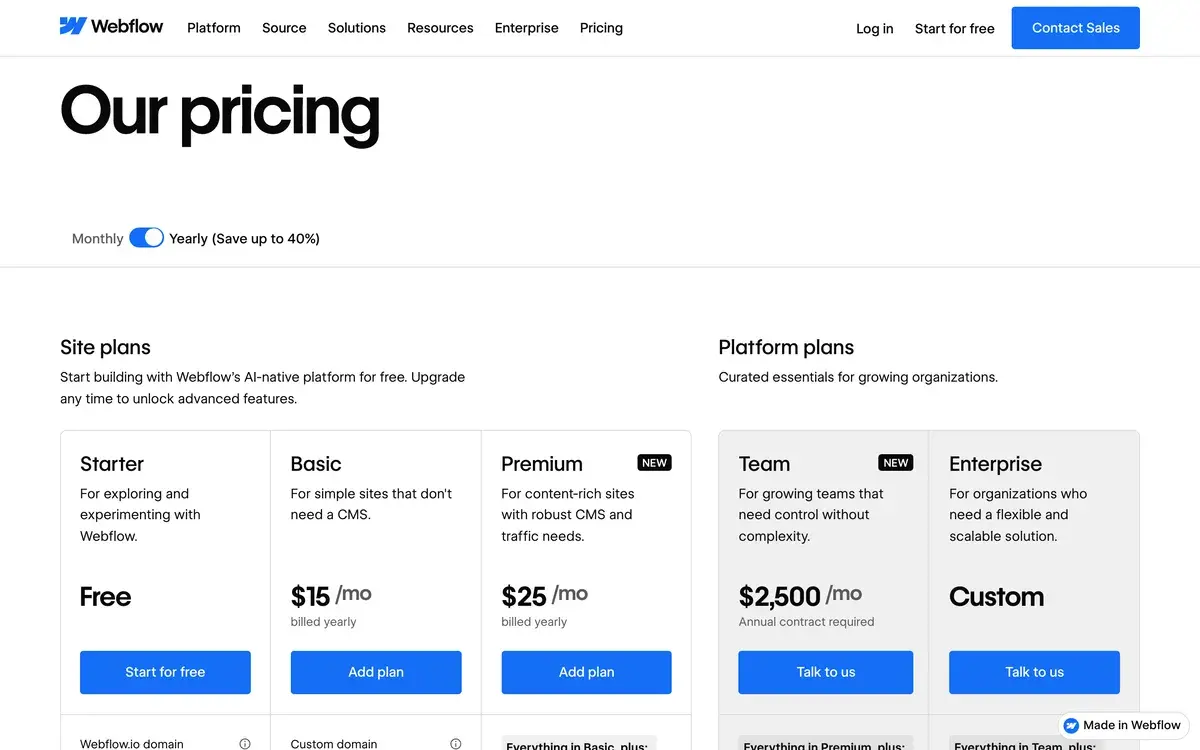
Webflow has separate pricing for Sites (per published site) and Workspaces (per designer). Most users think about the Site plans first.
Site Plans (per site, custom domain hosting)
| Plan | Price/mo | CMS items | Bandwidth | Best for |
|---|
| Starter | Free | 50 | 1GB | Free webflow.io subdomain only |
| Basic | $14 | None | 50GB | Static marketing sites |
| CMS | $23 | 2,000 | 200GB | Content-driven sites, blogs |
| Business | $39 | 10,000 | 400GB | High-traffic content sites |
| Enterprise | Custom | Custom | Custom | Larger sites, SLAs, advanced security |
Workspace Plans (per designer)
| Plan | Price/mo | Sites | Best for |
|---|
| Free | $0 | 2 staging sites | Solo designers learning |
| Starter | $19/seat | Unlimited staging | Active solo designers |
| Core | $29/seat | Unlimited + features | Small agencies, freelancers |
| Growth | $49/seat | Advanced features | Agencies, in-house teams |
E-commerce Plans (replace Site plans for stores)
| Plan | Price/mo | Items | Transaction fee |
|---|
| Standard | $29 | 500 products | 2% |
| Plus | $74 | 1,000 products | 0% |
| Advanced | $235 | 3,000 products | 0% |
Prices verified April 2026 from webflow.com/pricing.
The honest tier guide: pricing complexity is a real issue with Webflow — solo users frequently miscalculate costs by not realizing they need both a Site plan and a Workspace plan for client work. For a single marketing site on a custom domain, Basic at $14/month is the entry point. For content-driven sites, CMS at $23/month is the practical minimum. Designers and agencies layer Workspace pricing on top, which is why Webflow ends up costing more than the headline numbers suggest.
Hands-on Notes
The thing that has always made Webflow worth using is the CSS engine. The control over flexbox, grid, transforms, transitions, and responsive breakpoints is granular enough that a designer can produce work that looks indistinguishable from custom development. After working in Webflow, returning to Squarespace or template-driven builders feels like designing through a keyhole. This is the core feature, and it has not gotten worse as AI features have been added.
The AI Site Builder, when we tested it in current form, produces a starter scaffold that is roughly equivalent to picking a template and lightly customizing it. The site has reasonable structure (hero, features, testimonials, footer), placeholder copy that is grammatically correct but generic, and a layout that works but rarely makes a lasting design impression. As scaffolding for the first hour of work, it earns its place. As a finished product, it is not ready — and Webflow's documentation is honest about this framing, which is more than many AI builders can say.
AI Optimize is the more useful AI feature in our experience. Pointing it at an existing page and getting concrete suggestions on SEO improvements, accessibility issues, and conversion patterns is the kind of feedback loop that actually helps. The suggestions are not always right, but they are specific enough to evaluate and selective enough to apply with one click when they are. Schema markup and Open Graph optimization are particularly well-handled.
The CMS deserves more credit than it usually gets. Defining custom collections, setting up references between collections, building dynamic templates, and handing off the editor experience to a non-technical client — these are mature workflows. Most "AI website builders" have shallow CMS that breaks down the moment you need anything beyond a blog. Webflow's CMS is the feature that lets it serve real content-driven businesses, not just marketing pages.
Where Webflow gets in the way: the learning curve is real. Designers coming from Figma find the basics intuitive, but mastering the box model, position properties, and CMS reference logic takes weeks of regular use. The platform is not "drag-and-drop and you are done" — it is closer to "front-end development in visual form." For non-designers, this is harder than the marketing implies.
The other honest critique: pricing has grown more complex over the years and the per-site / per-workspace dual pricing causes regular confusion. Agency pricing in particular requires careful planning. The platform is not cheap — for a serious project with custom domain and CMS, expect $25-75/month in Webflow costs alone, before designer time and any third-party integrations.
Use Cases
Freelance designer building client marketing sites: A solo designer serves SMB clients across professional services, creative industries, and B2B. Webflow is the production tool — design happens in Figma, build happens in Webflow, handoff is a CMS-trained client who can update content without involving the designer. The Workspace + per-site pricing covers a portfolio of 5-10 active client sites.
SaaS marketing team owning their site: A B2B SaaS marketing team of 4 manages the company website without engineering involvement. Pages are designed and shipped by the team; the CMS handles blog and resource libraries; A/B tests run through Webflow's experiments and third-party tools. Time-to-publish on a new landing page drops from weeks (engineering ticket) to days.
Brand-led content site: A media startup launches a niche editorial site with custom typography, distinct layout, and a structured CMS for articles, contributors, and topics. Webflow's CMS depth handles the structure; the design engine handles the brand expression. The result looks custom-built and runs on managed hosting.
Designer-founder shipping startup landing page: A technical founder with design background launches their startup's marketing site solo. Initial site goes live in a week — landing, product overview, pricing, blog. AI Optimize handles SEO basics; AI Site Builder gives a starting structure for non-priority pages. Engineering effort: zero.
Agency producing white-label client work: A digital agency uses Webflow as the production platform for client builds. Workspace plan handles the agency seat structure; client sites bill independently. White-label features and the ability to give clients editor-only access without designer permissions makes the handoff clean.
Our Verdict
Webflow remains the strongest visual web design platform in 2026, and the addition of AI features has not changed that — they are useful additions to a fundamentally good product, not a reinvention of it. The CSS engine, mature CMS, and reliable hosting are the actual reasons to choose Webflow, and they have aged well.
The honest weaknesses: pricing is more complicated than it should be, the learning curve is real, and the AI Site Builder is more "starter scaffold" than "finished site" despite marketing that sometimes implies otherwise. The platform is also genuinely expensive at scale — agencies serving multiple clients often pay $300+/month between Workspace and Site costs.
For designers, design-led teams, marketing teams owning their site, and content-driven businesses, Webflow is one of the best tools available. For pure AI-generated marketing pages where speed and prettiness matter more than craft, Framer or Durable are faster. For complex applications, real frameworks. For commerce-led businesses, Shopify.
Note: Webflow does not currently have a public affiliate program with AIVario. AIVario earns no commission from sign-ups. Our rating reflects ongoing use of the paid CMS tier on production marketing sites.
Best for: Designers, design agencies, SaaS marketing teams, content-driven businesses, brand-focused SMBs
Not ideal for: Complex web applications (use real frameworks), enterprise e-commerce (use Shopify), pure AI-generated quick sites (use Framer or Durable), users who want zero learning curve
Bottom line: A genuinely strong visual design platform whose AI features are additive rather than transformative — the CSS engine and CMS remain the actual reasons to choose Webflow in 2026.
Related Tools
- Framer — closest AI-first competitor, often paired with Webflow for different site types
- Figma — design tool that pairs naturally with Webflow for the design-to-build workflow
- Wix Studio — competitive professional-grade alternative with stronger AI positioning
- Shopify — e-commerce alternative for retail-scale operations beyond Webflow's commerce
- WordPress — open alternative for teams with engineering capacity who want maximum flexibility
Frequently Asked Questions about Webflow AI
Is Webflow free?
Yes, Webflow has a free Starter plan that includes the visual designer, hosting on a webflow.io subdomain, and 50 CMS items. Custom domain hosting requires a Site plan starting at $14/month for Basic, $23/month for CMS, and $39/month for Business. Workspace plans (for designers and agencies) are separate, starting at free for solo work.
Can Webflow AI build a complete website?
The AI Site Builder generates a starter draft based on a brief description, but it produces a foundation, not a finished site. Real Webflow projects involve substantial visual editing, content work, and CMS structure that the AI does not handle well. Treat the AI as scaffolding that saves the first hour of work, not as a full-site replacement.
Is Webflow better than WordPress?
They serve different needs. WordPress is more flexible (any plugin, any theme, deep customization) but requires technical maintenance. Webflow is more visually constrained but easier to maintain — no plugin conflicts, no security patches, no PHP. For marketing sites and content-driven businesses, Webflow is generally less work. For complex applications or e-commerce at scale, WordPress + WooCommerce or Shopify is often better.
Does Webflow have e-commerce?
Yes, Webflow has built-in e-commerce on Standard ($29/month), Plus ($74/month), and Advanced ($235/month) Site plans. It is suitable for small-to-medium online stores, but Shopify remains the leader for serious e-commerce — better payment integrations, larger app ecosystem, and more retail-specific features. Webflow e-commerce works best when you want one-platform brand consistency.
Can Webflow AI generate copy for my site?
Webflow AI includes content generation for placeholder copy, headlines, and product descriptions, plus the AI Optimize feature for SEO and conversion suggestions. The output is decent for first drafts but generic — most professional projects rewrite the AI-generated copy in their brand voice. The AI is useful for getting past blank-page paralysis, less useful for finished marketing copy.
Is Webflow good for SEO?
Yes, Webflow has strong SEO fundamentals — clean HTML output, fast hosting on AWS, automatic SSL, native sitemap generation, and granular control over meta tags, schema markup, and Open Graph data. The platform is among the better-suited builders for SEO-driven sites. The 2025 AEO additions (FAQ schema generation, structured Q&A blocks) help with AI search visibility.
How does Webflow AI compare to Framer AI?
Framer AI is more aggressive on the AI-first positioning — its Site Builder produces more polished initial drafts and the iteration is faster. Webflow's AI is more conservative and additive. For pure AI-generated marketing pages, Framer is often faster and prettier out of the box. For sites that need real CMS depth, e-commerce, or detailed CSS control beyond what AI generates, Webflow is more capable.
Can I export Webflow code?
Yes, paid Site plans allow exporting the full HTML, CSS, and JavaScript as a static archive. The CMS-driven dynamic content is not exportable — you can only export the rendered static version. For developers who use Webflow as a design tool and want to deploy elsewhere, this is workable; for anyone using the CMS heavily, the export is more of a backup than a migration path.