What is Microsoft Copilot?
Microsoft Copilot is Microsoft's AI assistant available in three distinct contexts. The free Copilot app and Bing search provide general AI chat, image generation, and search assistance at no cost. Copilot Pro at $20/month adds enhanced AI features in personal Microsoft 365 apps for individual users. Microsoft 365 Copilot at $30/user per month provides deep AI integration across Word, Excel, PowerPoint, Teams, Outlook, and SharePoint for enterprise deployment on top of existing Microsoft 365 subscriptions.
The honest evaluation requires distinguishing these tiers because they serve fundamentally different audiences with different value propositions. The free Copilot is a general AI tool competing with ChatGPT free tier, Claude free tier, and Google Gemini. Copilot Pro is a productivity enhancement for individual M365 users. Microsoft 365 Copilot is an enterprise AI deployment tied to Microsoft ecosystem commitment.
This review focuses primarily on the enterprise Microsoft 365 Copilot tier where most meaningful product value and most buyer questions concentrate. The free tier and Pro tier are mentioned where relevant, but the buying decision that matters for most readers is whether to deploy Microsoft 365 Copilot across teams already on Microsoft 365 Business or Enterprise subscriptions.
The buying decision is fundamentally about Microsoft ecosystem commitment rather than standalone AI capability. For organizations deeply tied to Microsoft 365 with employees actively working in Word, Excel, PowerPoint, Teams, and Outlook daily, Copilot's integration depth produces value general AI tools cannot match. For organizations with lighter Microsoft usage or where general AI tools cover practical needs, Copilot's pricing is harder to justify against alternatives at one-third the cost.
The honest Copilot vs general AI comparison
Most reviews of Microsoft Copilot evaluate it as an AI tool to be compared against ChatGPT, Claude, and other general AI alternatives. This framing misses the actual buying decision. Copilot is not really competing on standalone AI quality — the underlying language models are competitive but not uniquely advanced compared to GPT-4, Claude, and Gemini. Copilot is competing on integration into Microsoft 365 workflows, and that is where the buying decision lives.
For users who spend meaningful time daily in Microsoft 365 apps, the integrated AI produces genuine workflow value. Copilot in Word can reference and analyze your actual documents. Copilot in Excel can work with your actual spreadsheets. Copilot in Teams can summarize your actual meetings. Copilot in Outlook can draft replies grounded in your actual email history. Business Chat (the unified Copilot interface) can answer questions across your Microsoft data — your documents, emails, meetings, and chat history together. This integration produces context-grounded AI that general tools cannot match without significant manual data sharing.
For users who do not spend meaningful time in Microsoft 365 apps, this integration is value the user cannot extract. Working in Google Workspace primarily, using Slack for communication, drafting in Notion or other documentation tools — the Copilot value depends on Microsoft 365 being where work actually happens. For users in Google or other ecosystems, Copilot's Microsoft-specific integration is overhead rather than benefit.
The pricing reality matters too. $30/user per month is meaningful enough at scale that the cost-benefit math requires actual productivity gains to justify. ChatGPT Pro at $20/user, Claude Pro at $20/user, and Google Gemini Pro at $20/user all provide capable general AI for general work at one-third the cost. For users where Microsoft-specific integration is not essential, the cheaper alternatives often produce comparable practical outcomes.
This is not a critique of Copilot — the product is well-built and the integration is real. It is a critique of evaluation framing that compares Copilot abstractly against general AI alternatives without considering whether the integration value applies to your specific organization's workflow.
Where Microsoft 365 Copilot earns its place
Enterprise organizations with deep Microsoft 365 deployment where employees actively work in Microsoft apps daily. Sales teams using Outlook for email, marketing teams using Word for content production, finance teams using Excel for analysis, operations teams using SharePoint for documentation, and everyone using Teams for meetings. For organizations where this describes the actual workflow, Copilot produces meaningful productivity gains.
Knowledge workers in roles where Microsoft data informs decisions — analysts working with Excel data, managers reviewing across-team SharePoint documents, executives summarizing across meeting and email content. The Business Chat unified interface provides cross-Microsoft analysis that no other tool matches.
Sales and support organizations where Outlook integration affects daily productivity. Email drafting, response generation, customer history summarization, and outreach personalization all benefit from Copilot integration in ways that general AI tools require manual context-switching to accomplish.
Finance and operations teams where Excel is the primary work environment. Copilot in Excel handles the natural-language data analysis, formula generation, and trend identification that previously required Excel power-user skills. For non-technical Excel users specifically, the productivity uplift is meaningful.
Project management teams where Microsoft Project, Teams, and SharePoint coordinate cross-functional work. The integrated AI handles the coordination overhead (status summaries, follow-up identification, document discovery) that previously consumed meaningful project manager time.
Organizations with substantial meeting volume where Teams meeting summaries reduce post-meeting documentation work. The time savings on meeting follow-up justify the cost for organizations with culture of substantial meeting volume.
Compliance-conscious enterprises where Microsoft's enterprise security, data residency, and compliance posture matters. Copilot inherits Microsoft 365 security configuration; for organizations that have already evaluated and approved Microsoft 365 for sensitive data, Copilot adds AI capability without separate security evaluation.
Microsoft 365 Copilot is not the right pick for: small businesses where the $30/user cost is prohibitive relative to actual use, organizations with light Microsoft 365 usage, users primarily working in Google Workspace or other non-Microsoft ecosystems, individuals who could use Copilot Pro at $20/month or general AI at $20/month, or organizations where general AI tools cover practical needs at lower cost.
Key Features
- Word integration — draft, rewrite, summarize, and analyze documents grounded in your content
- Excel integration — natural language data analysis, formula generation, chart creation, trend identification
- PowerPoint integration — generate presentations from documents or prompts, redesign slides
- Teams integration — meeting summarization, action item extraction, post-meeting analysis
- Outlook integration — email drafting, response generation, summarization, scheduling assistance
- Business Chat — unified AI interface accessing your Microsoft 365 data across apps
- SharePoint integration — document discovery, content analysis, knowledge base queries
- OneDrive integration — file analysis and content summarization across personal documents
- Loop integration — collaborative AI within Microsoft Loop workspaces
- Plugins and connectors — integration with external systems through Microsoft Graph
- Copilot Studio — build custom AI agents and workflows on Microsoft's platform (additional cost)
- Enterprise security — inherits Microsoft 365 compliance, security, and data residency posture
- Admin controls — IT administrative controls for AI usage governance and rollout
Microsoft Copilot vs Competitors 2026
| Approach | Best for | Lock-in level | Total cost | AI scope |
|---|
| Microsoft 365 Copilot | Microsoft-committed enterprises | High (Microsoft-deep) | $30/user (+ M365 cost) | Word, Excel, PowerPoint, Teams, Outlook, SharePoint |
| ChatGPT Team | General AI for any ecosystem | Low | $30/user (Team) | General AI assistance |
| ChatGPT Plus | Individual general AI | Low | $20/user | General AI assistance |
| Claude Team | General AI for any ecosystem | Low | $25/user | General AI assistance |
| Google Workspace + Gemini | Google-aligned organizations | High (Google-deep) | $25-$30/user (varies) | Google Docs, Sheets, Slides, Gmail, Meet |
| Slack + general AI | Tech-aligned organizations | Medium | $8.75 + general AI | Slack workflows + external AI |
| Notion AI | Notion-aligned organizations | Medium | $10 add-on | Notion workspace + general AI |
| Zoom AI Companion | Meeting-focused organizations | Low (Zoom only) | Bundled with Zoom | Meeting summarization, Zoom workflows |
Data verified April 2026 from each provider's pricing pages.
The clearest competitive picture: the choice between Microsoft Copilot, Google Gemini for Workspace, and general AI tools follows ecosystem alignment rather than abstract feature comparison. Microsoft-committed organizations with active M365 use generally find Copilot the highest-leverage AI investment. Google-committed organizations find Gemini for Workspace better. Organizations not committed to either ecosystem often find general AI tools (ChatGPT Team, Claude Team) cover practical needs at similar or lower cost without ecosystem lock-in.
For enterprise buyers specifically, the comparison includes Salesforce Einstein for Salesforce-committed organizations and HubSpot Breeze AI for HubSpot-committed organizations. Each represents the ecosystem AI for its respective platform; the choice follows the underlying platform commitment.
Within the general AI alternatives, ChatGPT Team at $30/user is identically priced to Microsoft Copilot but without Microsoft integration. For users where Microsoft integration matters, Copilot wins; for users where general AI capability matters more than Microsoft-specific integration, ChatGPT Team often serves better.
Claude Team at $25/user serves a similar role — capable general AI without ecosystem lock-in. For users primarily wanting AI capability rather than Microsoft-specific integration, the cost savings matter.
The free Copilot app and ChatGPT free tier compete in the casual general AI category. Both are legitimate options for users wanting free AI assistance; capability is broadly comparable.
Pricing 2026
| Plan | Price | Scope | Best for |
|---|
| Free Copilot | $0 | Web app, Bing integration | Casual general AI use |
| Copilot Pro | $20/user/mo | Personal M365 apps + enhanced AI | Individual users with Microsoft 365 personal |
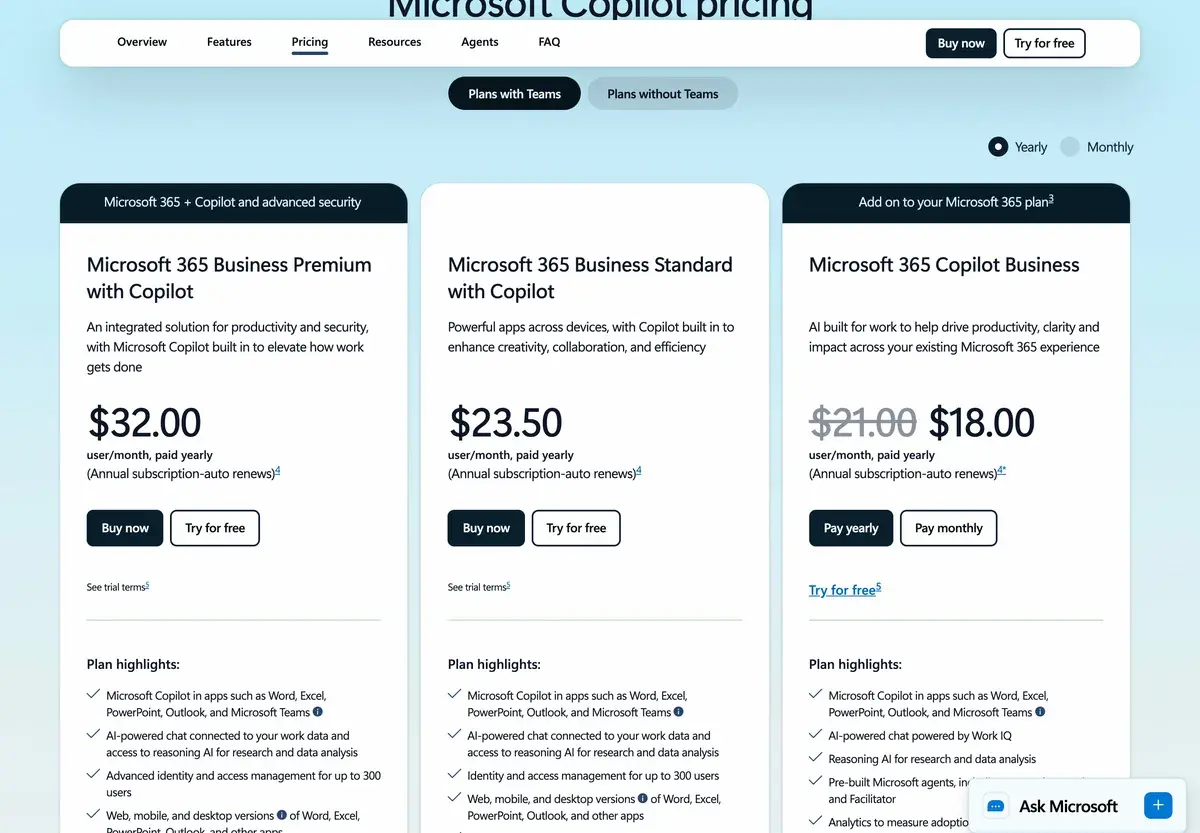
| Microsoft 365 Copilot | $30/user/mo (add-on) | Full M365 integration + Business Chat | Enterprise M365 deployment |
| Copilot for Sales/Service/Finance | $50/user/mo (add-on) | Role-specific Copilot extensions | Specialized enterprise deployments |
| Enterprise Custom | Custom | Custom + Copilot Studio + advanced features | Large enterprises with custom AI needs |
Prices verified April 2026 from microsoft.com/microsoft-365/copilot. The $30/user enterprise price is on top of existing M365 Business Standard/Premium or Enterprise E3/E5 subscriptions.
The pricing reality at the enterprise tier: $30/user for Copilot on top of existing M365 subscriptions creates substantial total cost. M365 E3 ($23/user) + Copilot ($30/user) = $53/user; E5 ($57/user) + Copilot ($30/user) = $87/user. For 1,000-person enterprises on E5 with Copilot, monthly per-user spend approaches $87,000. The pricing is meaningful enough that buying decisions warrant clear productivity metrics to justify ongoing cost.
For organizations with Copilot-eligible roles representing only a subset of total headcount (where some employees would actually use Copilot daily and others would not), selective deployment makes economic sense. Many enterprises deploy Copilot to specific high-leverage roles (sales, marketing, executive support) before broader rollout based on observed value. This selective approach manages the cost while capturing the value.
Copilot Pro at $20/month for individuals serves a different audience — individual Microsoft 365 personal users wanting enhanced AI. For users not in enterprise M365 deployments, this tier provides Copilot value at lower cost than the enterprise pricing.
The free Copilot covers basic general AI use without subscription. For users wanting free AI assistance, this is a legitimate option alongside ChatGPT free tier and Claude free tier.
Hands-on Notes
The first thing that affects practical use is how heavily a user actually lives in Microsoft 365 apps. For users whose work involves substantial Word document writing, Excel spreadsheet analysis, PowerPoint creation, Teams meetings, and Outlook email — the integrated AI produces visible productivity gains across daily work. The same user with the same role using Google Workspace primarily would not extract this value regardless of Copilot capability.
Copilot in Excel is one of the more impressive integrations for non-technical users. Asking "what trends are in this sales data" or "create a chart showing revenue by region by quarter" produces useful outputs without requiring Excel formula or pivot table knowledge. For Excel power users already comfortable with pivot tables and complex formulas, the AI provides incremental help rather than transformation; for non-technical Excel users, the productivity uplift is substantial.
Copilot in Outlook handles email drafting and reply generation reasonably well. The AI drafts grounded in email thread context produce starting points that users edit; the time savings on routine email drafting are meaningful for users with high email volume. For sensitive or important emails, AI drafting produces starting points only; final wording requires human judgment.
Teams meeting summaries work well for clear single-thread meetings; less reliably for chaotic multi-thread discussions. For typical business meetings (status updates, project reviews, decisions on specific issues), the summaries identify decisions and actions accurately. For brainstorming sessions or complex negotiations, the AI may miss nuance and produce summaries that feel correct but flatten important detail. Verification matters for high-stakes meeting content.
Business Chat — the unified interface accessing all your Microsoft data — is the feature most users underestimate before using and find valuable in actual practice. Asking "what are the open action items from my last 5 meetings about the Q1 launch" produces results that synthesize across multiple meetings, documents, and emails in ways that no single-app tool matches. For users with substantial cross-Microsoft work, this capability is genuinely useful.
Where Copilot gets weaker: outputs that require deep contextual understanding of organizational dynamics, history, or unwritten conventions. The AI works from data it can access; situations requiring judgment about factors outside the data sometimes produce confidently-wrong outputs. For high-stakes work, treating Copilot outputs as drafts requiring human review produces better outcomes than relying on them as authoritative.
The other practical observation: adoption matters substantially for value extraction. Organizations deploying Copilot without active adoption work — change management, training, demonstrating value to skeptical users — often find usage drifts low and value-realized falls below expectations. Successful Copilot deployments treat adoption as a meaningful initiative rather than assuming users will discover and use the features autonomously.
For users coming from ChatGPT or Claude expecting Copilot to produce dramatically better outputs on the same prompts, the experience is sometimes disappointing. The output quality is broadly comparable; the value-add is the integration into Microsoft 365 data and workflows rather than uniquely better AI. Calibrating expectations to "AI inside Microsoft 365" rather than "best AI" produces better evaluation outcomes.
Use Cases
A 5,000-person enterprise on Microsoft 365 E5 deploys Microsoft 365 Copilot across executives, sales managers, marketing teams, and finance analysts (~800 users). Productivity gains across this user subset are measurable; selective deployment manages total cost (approximately $24K monthly Copilot add-on) while capturing the highest-leverage value. Broader rollout phases in over time based on demonstrated value.
A B2B SaaS company with 200 employees uses Copilot Pro for individual users wanting enhanced AI in personal Microsoft 365 apps. The $20/user cost is modest; users benefit from AI integration in Word and Excel without enterprise deployment overhead. The company evaluates broader Microsoft 365 Copilot deployment but determines that not all roles would benefit equally; partial deployment makes more sense.
A financial services firm with regulatory data requirements deploys Microsoft 365 Copilot Enterprise across the organization. The Microsoft compliance posture (SOC 2, ISO 27001, HIPAA-ready, data residency) supports the regulatory environment; alternative AI tools would require separate security evaluation that Copilot inherits from existing M365 deployment. The compliance fit affects the buying decision as much as the AI capability.
A solo entrepreneur using Microsoft 365 for personal business uses Copilot Pro for enhanced AI in Word and Excel. The $20/month is affordable; the integration produces meaningful productivity for the individual workflow. Compared to ChatGPT Pro at the same price, Copilot Pro fits the Microsoft-centric workflow better; the user could also justify ChatGPT or Claude alongside, but the budget for one tool favors Copilot Pro for this use case.
A 50-person tech startup on Microsoft 365 Business Premium evaluates Microsoft 365 Copilot at $30/user. After 60-day pilot with 5 users, the company determines that the team's Microsoft usage is too light to justify the cost — sales reps work primarily in HubSpot, engineers work in GitHub and Linear, marketing works in Notion. The pilot users get value from Copilot in Word and Outlook but not enough to justify $30/user across the team. The company stays on basic M365 and uses Claude Team at $25/user for general AI.
Our Verdict
Microsoft 365 Copilot is the right AI investment for organizations deeply committed to Microsoft 365 with employees actively working in Microsoft apps daily. The integration depth produces value general AI tools cannot match for users matched to the use case; the enterprise security posture supports compliance requirements; the unified Business Chat interface enables cross-Microsoft analysis that no other tool provides.
The honest considerations: Copilot is not a CRM-independent AI evaluation. The buying decision is fundamentally about extending Microsoft 365 investment with AI capability rather than choosing AI on standalone merits. For organizations not deeply committed to Microsoft 365, alternatives serve better at lower cost without ecosystem lock-in.
The pricing at $30/user enterprise is meaningful enough that selective deployment often makes more sense than universal rollout. Deploying Copilot to high-leverage roles where Microsoft integration produces clear value, while keeping other employees on basic M365, manages cost while capturing the productivity gains.
For Microsoft-committed enterprises, Copilot deserves serious evaluation alongside the costs. For organizations with light Microsoft usage, individual users, small businesses, or users where general AI tools cover practical needs, alternatives produce better outcomes at lower cost. The free Copilot app and Copilot Pro at $20/month provide intermediate options for users who want some Copilot value without enterprise commitment.
Note: Microsoft does not currently have an active affiliate program with AIVario for Copilot. AIVario earns no commission from sign-ups. Our rating reflects evaluation of Copilot Pro and customer interviews on Microsoft 365 Copilot Enterprise deployments alongside parallel use of ChatGPT Team, Claude Team, and Google Gemini for comparison.
Best for: Microsoft-committed enterprises with deep M365 deployment, knowledge workers in roles requiring cross-Microsoft data analysis, finance and operations teams in Excel-heavy work, organizations with high meeting volume in Teams, compliance-conscious enterprises valuing Microsoft's security posture
Not ideal for: Small businesses with light Microsoft usage, organizations not committed to Microsoft 365, individuals who could use Copilot Pro at $20 or general AI at $20, Google Workspace organizations (use Gemini for Workspace), users where general AI tools cover practical needs at one-third the cost
Bottom line: AI deeply integrated into Microsoft 365 with the buying decision tied to Microsoft ecosystem commitment rather than standalone AI evaluation. For Microsoft-committed enterprises, deserves serious consideration; for everyone else, alternatives often serve better.
Related Tools
- Salesforce Einstein — equivalent AI layer for Salesforce-committed enterprises
- HubSpot AI — equivalent AI layer for HubSpot-aligned organizations
- ChatGPT — general AI alternative for organizations not in Microsoft ecosystem
- Claude — general AI alternative with strong writing capability
- Slack — common collaboration alternative for organizations preferring non-Microsoft messaging
Frequently Asked Questions about Microsoft Copilot
How much does Microsoft Copilot cost?
Microsoft Copilot is free in the standalone Copilot app and Bing search. Microsoft 365 Copilot (the integrated version inside Word, Excel, PowerPoint, Teams, and Outlook) is $30/user per month on top of existing Microsoft 365 Business or Enterprise subscriptions. Copilot Pro for individuals at $20/month adds enhanced AI in personal Microsoft 365 apps. Annual commitments are typical for the $30/user enterprise pricing.
Is Microsoft Copilot worth $30/user per month?
Depends almost entirely on whether your organization is committed to Microsoft 365 and how heavily users actually live in Microsoft apps. For Microsoft-committed organizations where employees spend meaningful time daily in Word, Excel, PowerPoint, Teams, and Outlook, the integrated AI produces real productivity gains that justify the cost. For organizations with light Microsoft use or where general AI tools cover practical needs, the marginal value of Copilot over Claude or ChatGPT is harder to justify at three times the cost.
How is Microsoft Copilot different from ChatGPT or Claude?
The deep integration into Microsoft 365 apps and data is the practical difference. Copilot can analyze your actual Excel spreadsheets, draft based on your actual emails, summarize your actual Teams meetings, and reference your actual SharePoint documents in ways that ChatGPT or Claude cannot without manual data sharing. For analysis grounded in your organization's specific Microsoft data, Copilot produces relevant outputs general AI cannot match. For general analysis where Microsoft-specific context is not essential, ChatGPT or Claude often produce better outputs at one-third the cost.
Is the free Copilot tier any good?
Yes, useful for basic AI assistance and search. The free Copilot app provides chat AI, image generation, and integration with Bing search at no cost. Output quality is competitive with ChatGPT free tier; the integration with Bing for current information is useful. For users wanting free general AI, the Copilot app is a legitimate option alongside ChatGPT free tier, Claude free tier, and Google Gemini free tier.
What does Copilot do in Excel specifically?
Copilot in Excel handles natural-language data analysis (ask questions about your data, get charts and summaries), formula generation (describe what you want, get the formula), data formatting and cleanup, and trend identification. The capability is genuinely useful for non-technical Excel users who would otherwise struggle with formulas and pivot tables. For Excel power users, the AI provides incremental productivity rather than transformation.
Does Copilot work in Teams meetings?
Yes, Copilot in Teams provides real-time meeting summarization, action item extraction, and post-meeting analysis. The summaries identify decisions made, tasks assigned, and key discussion points. Quality is generally good for clear meetings; less reliable for complex multi-thread discussions where the AI may miss nuance. For organizations with significant meeting volume, the time savings on follow-up documentation justify the feature for many users.
Should small businesses use Microsoft 365 Copilot?
Generally not at the $30/user price point. Small businesses with light Microsoft usage often find the cost prohibitive relative to the value. The free Copilot app covers basic AI needs; Copilot Pro at $20/month for individuals serves users who want enhanced AI in personal Microsoft 365 apps. For business deployment at scale with deep Microsoft 365 integration, $30/user is justified for the right use cases; for small businesses in early Microsoft adoption, alternatives serve better.