Zapier

Zapier

★ Top rated
Workflow Automation

The category-defining no-code automation tool — easy to start with, surprisingly expensive at scale, increasingly squeezed from below by Make and from above by n8n.

Free · $19.99/mo
📖 14 min read
Try Zapier for free

Affiliate link — we may earn a commission

Ready to try it?
Zapier
Free · $19.99/mo
Get started →
Affiliate link — we may earn a commission
Our rating
4.5/ 5
AIVario Editor's rating →

What is Zapier?

Should you actually pay for Zapier in 2026?

This is the practical question most people researching Zapier are trying to answer, and the standard reviews mostly do not address it directly. The standard review explains what Zapier is (a no-code automation platform connecting 5,000+ apps), lists the features (Zaps, triggers, actions, filters), shows the pricing tiers, and concludes that Zapier is "the leading automation tool." All true. None of it tells you whether Zapier specifically is the right choice for your situation.

This review takes the opposite approach: walk through the actual buying decision for different categories of users and let the right answer emerge from your specific context.

Decision tree: should you pay for Zapier?

Are you new to automation and don't yet know what you want to build?

Yes → Start with Zapier's free tier. Build 2-3 small Zaps to understand the model. Cost: $0. Time investment: a few hours. After this, you will know whether automation is valuable enough to your workflow to justify a paid tier and whether Zapier's specific approach fits how you think.

Are you a non-technical user with low automation volume (under 1,000 tasks per month)?

Yes → Zapier is probably right for you. Pay for Starter ($19.99/month) or Professional ($49/month) depending on whether you need multi-step Zaps with conditional logic. The premium over Make is small at this volume; the easier UX is worth it.

Are you a non-technical user with high automation volume (5,000+ tasks per month)?

Yes → Seriously evaluate Make.com before defaulting to Zapier. The pricing math at volume favors Make significantly — often 3-5x cheaper per operation. The learning curve is real but manageable. For sustained high-volume automation, the cost savings justify the migration effort.

Are you a developer or technical operator with complex automation needs?

Yes → Evaluate n8n (self-hosted) or Make (hosted) before Zapier. For technical users, Zapier's no-code abstraction is a constraint rather than a feature. n8n's open-source self-hosted model can run free at scale and offers extensive customization. Make offers similar power with a hosted convenience that suits some technical teams.

Are you in an enterprise considering Zapier for organizational deployment?

Yes → Zapier Enterprise is mature and works, but evaluate it against Workato (more enterprise-focused), Tray.io (developer-friendly enterprise), or building integrations with internal tools. Enterprise automation needs often exceed Zapier's strengths at scale.

Are you already using Zapier and considering whether to stay or migrate?

Depends on your current task volume and tolerance for migration work. If your usage is stable under 5,000 monthly tasks, the convenience of staying probably exceeds the savings of migrating. If your usage is growing or already high, the savings from migrating to Make often justify the work within 6-12 months.

What Zapier does well

Where Zapier earns its category-leading position is the breadth and reliability of integrations. The 5,000+ app integration claim is real — almost any SaaS tool you might want to automate has a Zapier integration, often officially maintained by the SaaS company itself. This breadth advantage compounds: most workflows touch multiple tools, and the probability that Zapier integrates with all of them is higher than for any competitor.

The UX for non-technical users is genuinely the best in the category. Building a Zap follows an intuitive pattern (when this happens, do this) that maps cleanly to how non-technical users think about automation. The AI Zap builder lowers the barrier further. For someone who has never automated anything before, Zapier is the most accessible entry point.

The reliability is solid. Zaps run when they are supposed to, integrations stay current with API changes, the platform handles the boring infrastructure work that automation users do not want to think about. Compared to running custom integrations or scripts that break when an API updates, Zapier's managed reliability has real value.

The AI integrations have matured well through 2024-2025. Native steps for OpenAI, Anthropic, and other AI providers let users build AI-augmented workflows without API plumbing. This positions Zapier as the easy default for "send data through AI then do something with it" workflows.

Where Zapier gets weaker

Pricing at scale is the consistent critique. The per-task pricing model is friendly at low volume and increasingly punitive as automation usage grows. Power users running multi-step Zaps with filters and AI steps consume tasks faster than they expect; bills scale faster than usage feels like it should. Make's per-operation pricing is typically 3-5x cheaper at moderate-to-high volume; n8n's self-hosted model is essentially free at scale.

Complex workflows can become unwieldy. Zapier's linear flow design (trigger → action → action → action) handles simple chains well but feels constrained for workflows requiring multiple branches, parallel paths, and complex conditional logic. Make's visual flow design and Power Automate's diagram-based approach handle complexity more elegantly.

Custom code and unusual integrations are second-class citizens. Zapier supports custom code steps (JavaScript, Python) but the experience is less mature than purpose-built developer automation tools. For workflows that require custom logic beyond Zapier's built-in transformations, the developer experience suffers.

The "Tables" and "Interfaces" features — Zapier's attempt to expand beyond pure integration into database-and-UI territory — are functional but underwhelming compared to dedicated tools (Airtable for tables, Bubble or Softr for interfaces). Whether these features eventually mature into compelling differentiation or remain afterthoughts is unclear.

Who is it for?

Non-technical users automating workflows between SaaS tools they already use. Marketing operations, sales operations, customer success, founders, indie operators — anyone whose work involves moving data between apps and where the developer route is unavailable.

Small businesses and startups where a few automation workflows produce meaningful productivity gains and the investment in learning a more complex automation tool is not justified by current automation needs.

Mid-market companies in evaluation stage, before automation usage has scaled enough to justify the migration to cheaper alternatives. Many companies start on Zapier, scale up, and then face the migration decision; Zapier captures meaningful value during the early years before this transition.

Enterprise users specifically valuing integration breadth and managed reliability over cost optimization. The Enterprise tier serves organizations where "the automation just works" matters more than the price tag.

Zapier is not the right pick for: technical teams comfortable with self-hosted tools (use n8n), high-volume automation users where cost matters (use Make), workflows requiring complex branching logic (use Make or Power Automate), enterprise integrations requiring deep customization (consider Workato or Tray.io), or anyone for whom developer-built integrations are realistic.

Key Features

  • 5,000+ app integrations — the broadest integration coverage in any automation platform
  • AI Zap builder — describe an automation in plain English and Zapier generates the structure
  • Multi-step Zaps — chain triggers and actions across multiple apps in a single workflow
  • Filters and paths — conditional logic to route data through different actions based on conditions
  • Formatter — built-in data transformation (date formatting, text manipulation, number operations)
  • Tables — built-in database for storing data accessible across Zaps
  • Interfaces — simple no-code forms and pages powered by Zaps
  • Native AI integrations — direct support for OpenAI, Anthropic, Perplexity, and other AI APIs
  • Custom code steps — JavaScript and Python for transformations Zapier's built-in tools cannot handle
  • Webhooks — receive and send arbitrary HTTP requests for non-standard integrations
  • Sub-Zaps and Storage — modular Zap design and persistent storage across executions
  • Team collaboration — shared workspaces, shared Zaps, and admin controls for team accounts

Zapier vs Competitors 2026

ToolIntegration breadthUX friendlinessPrice at volumeDeveloper features
Zapier✅ Best (5,000+)✅ Best in class⚠️ Expensive⚠️ Limited
Make.com✅ Strong (1,800+)⚠️ Steeper learning✅ 3-5x cheaper✅ Good
n8n✅ Strong (400+)⚠️ Developer-friendly✅ Free self-hosted✅ Best
Workato✅ Enterprise focus⚠️ Enterprise-positioned✅ Enterprise pricing✅ Strong
Tray.io✅ Strong⚠️ Developer-leaning⚠️ Enterprise pricing✅ Strong
Microsoft Power Automate✅ Strong (Microsoft + 1,000+)✅ Good✅ Bundled with M365⚠️ Mid
Pipedream✅ Developer-focused⚠️ Code-friendly✅ Generous free✅ Strong
IFTTT⚠️ Consumer-focused✅ Best for consumer✅ Cheap❌ Limited

Data verified April 2026 from each provider's pricing pages.

The two competitors that matter most are Make.com and n8n. Make.com is the cost-effective alternative at scale — meaningfully cheaper per operation, more powerful for complex visual flows, modestly steeper learning curve. n8n is the developer-friendly alternative — open source, self-hostable, extensive customization, free at scale (with hosting costs).

The Zapier-Make-n8n triangle covers most automation needs in 2026. The right choice depends on your scale, technical comfort, and budget priorities. Zapier wins on UX; Make wins on cost-at-scale; n8n wins on flexibility and ownership.

Power Automate is the right choice for organizations deep in Microsoft 365 — bundled with M365 subscriptions, deeply integrated with Microsoft tools, increasingly capable as Microsoft has invested. For Microsoft-aligned organizations, Power Automate often makes the Zapier purchase unnecessary.

Pricing 2026

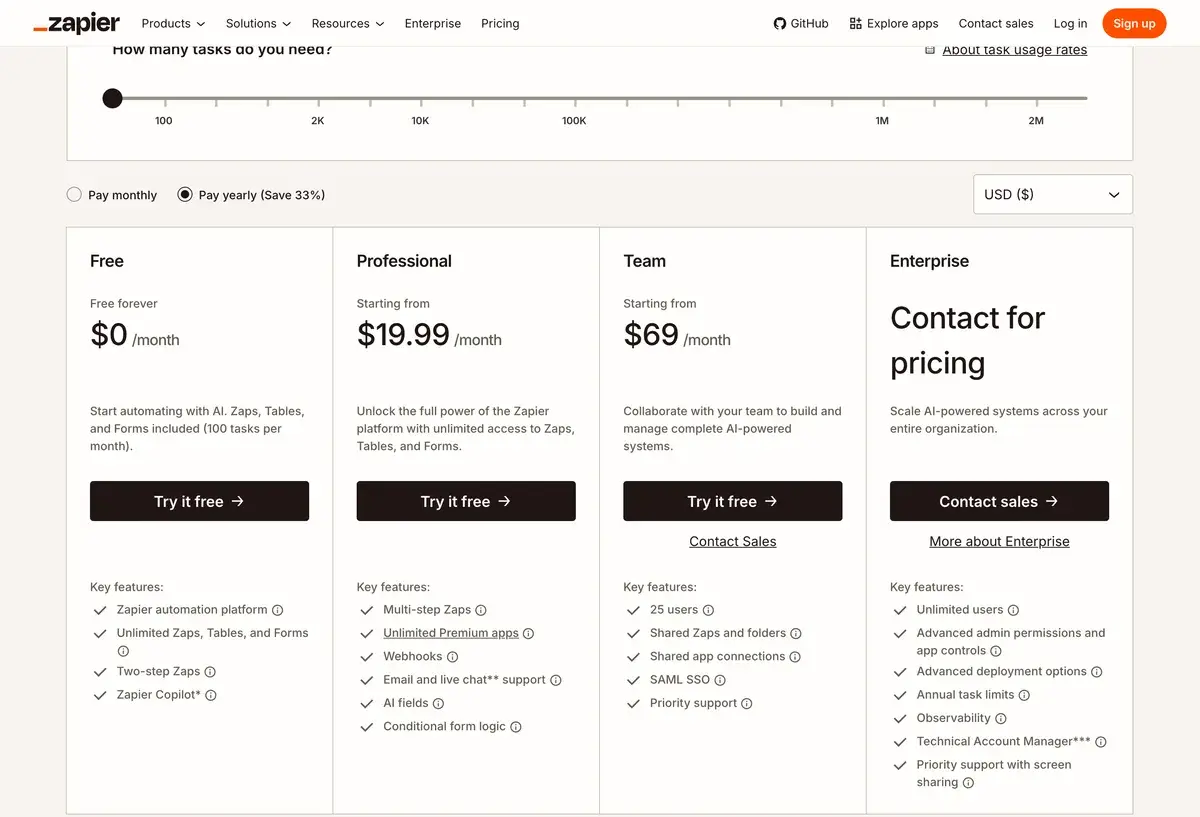
PlanPriceTasks/moKey featuresBest for
Free$01005 single-step ZapsEvaluation, very light use
Starter$19.99/mo750Multi-step Zaps, premium appsSolo users, low-volume automation
Professional$49/mo2,000Paths, custom logic, advanced featuresActive solo users, small teams
Team$69/moUnlimited users + 50,000 tasksShared workspace, admin controlsTeams 3+
EnterpriseCustomCustomSSO, SAML, advanced security, dedicated supportLarger organizations

Prices verified April 2026 from zapier.com/pricing. Annual billing offers ~30% off, which is meaningful enough that most paying users move to annual quickly.

The pricing critique that defines Zapier's market position: per-task pricing made sense when tasks meant simple automations, but in 2026, multi-step Zaps with AI integrations consume tasks fast. A workflow that runs 200 times per month with 5 steps consumes 1,000 tasks — exceeding the Starter tier's allowance after a single moderately-used Zap. The Professional tier's 2,000 tasks fills similarly fast for active automation users. The pricing scales unfavorably for the use cases where Zapier is most valuable.

Hands-on Notes

Zapier's UX really is the best in the category for non-technical users. Building a first Zap follows an intuitive pattern; the visual editor handles the complexity gracefully; the testing flow before activation prevents the common "I built a Zap that fired 500 times before I noticed" mistake. For someone evaluating no-code automation for the first time, Zapier produces the best initial experience.

The reliability has been good in our use. Zaps fire when they should, integrations stay current with API changes, the platform handles infrastructure invisibly. Compared to maintaining custom integrations that break when APIs update, Zapier's managed reliability is genuinely valuable. This is the unsexy infrastructure that earns retention even when cheaper alternatives are available.

Where Zapier gets in the way: complex workflows that require careful branching logic, parallel paths, or custom data transformations push against Zapier's design constraints. The platform is optimized for linear flows; complex topologies are possible but feel forced. Make's visual flow design handles this complexity more elegantly.

Task consumption is the consistent surprise for new users. A Zap that "feels small" — trigger plus 3 actions plus a filter step — consumes 4-5 tasks per execution. A Zap running 50 times per month consumes 200-250 tasks. Active automation usage burns through tier allowances faster than first-time users expect; the Professional tier ends up being the realistic minimum for sustained use, and even Professional fills up.

The AI integrations are well-implemented. Native steps for OpenAI, Claude, and Perplexity make it straightforward to build "send data through AI then do something with it" workflows without API plumbing. The AI-step task consumption is standard Zapier task usage; the AI provider API costs are paid separately, which can compound on usage.

Tables and Interfaces are useful but feel like incomplete products. For genuine database needs, Airtable is more capable. For interface-building, Bubble or Softr are more capable. Zapier's versions work for casual use cases but are not where the platform's actual strength lies.

Use Cases

A solo founder runs 6-8 automation workflows on Zapier Professional ($49/month) — lead enrichment from forms to CRM, customer onboarding sequences, calendar booking syncs, and operational notifications. Total monthly task consumption: about 1,800. The friction-free setup justifies the cost compared to building custom integrations.

A marketing operations manager at a Series B company manages 30+ Zapier workflows on Team ($69/month for 5 seats and 50,000 tasks). Workflows handle lead routing, campaign attribution, sales notifications, and content distribution. Migration to Make would save meaningful money but the operational disruption is not worth it given current scale.

A growth-stage company evaluates moving from Zapier to Make.com after hitting 80,000 monthly tasks on Zapier (cost approaching $400/month). Make.com pricing for comparable usage runs around $80/month. The migration takes about a month; ongoing savings are roughly $4,000/year. The math justifies the migration; the engineering team handles the transition.

A non-technical operator at a small e-commerce business uses Zapier Starter ($19.99/month) for order notifications, customer follow-ups, and inventory alerts. The 750 tasks cover their volume comfortably. The setup runs reliably for years without modification — exactly the use case Zapier serves best.

A technical team at a startup chooses self-hosted n8n over Zapier for cost reasons and customization needs. Setup costs more time upfront; ongoing costs are essentially zero. After 6 months, the team's automation footprint has grown to scale that would cost hundreds of dollars monthly on Zapier. The decision pays back many times over.

Our Verdict

Zapier remains the right starting point for most users new to automation, and for non-technical users with low-to-moderate automation volume, it remains the right ongoing choice. The integration breadth, UX quality, and managed reliability earn the price premium for users in this band.

For users at scale, the math gets uncomfortable. Per-task pricing punishes the use cases Zapier is most valuable for; cheaper alternatives produce comparable results at meaningfully lower cost. The migration friction is real but often worth it for sustained high-volume use.

The honest framing: Zapier is excellent at what it does, and the question is whether what it does matches your specific situation. The decision tree at the top of this review is the more useful framing than abstract feature comparison. Match your situation to the right tool, and Zapier may or may not be that tool depending on where you sit.

Note: Zapier does not currently have an active affiliate program with AIVario. AIVario earns no commission from sign-ups. Our rating reflects ongoing use of paid Professional and Team tiers across multiple workflows and migration evaluations against Make and n8n.

Best for: Non-technical users new to automation, solo operators and small teams with low-to-moderate volume, organizations valuing integration breadth and managed reliability over cost optimization Not ideal for: High-volume automation (use Make), technical teams wanting customization (use n8n), Microsoft 365 organizations (consider Power Automate), enterprise integrations requiring deep customization (Workato or Tray.io) Bottom line: The friendly default that scales unfavorably. Right tool for many users; wrong tool for many of those who scale beyond the comfortable range. Use the decision tree, not the brand recognition.

Related Tools

  • Make — primary cost-effective alternative for users at moderate-to-high volume
  • n8n — open-source self-hostable alternative for technical teams
  • Notion — common automation destination paired with Zapier for workflow integrations
  • HubSpot AI — common CRM integrated with Zapier for marketing and sales workflows
  • Slack — common notification destination for Zapier-driven automation

Frequently Asked Questions about Zapier

How much does Zapier cost?

Zapier's free tier includes 100 monthly tasks and 5 single-step Zaps. Paid plans start at $19.99/month for Starter (750 tasks, multi-step Zaps), $49/month for Professional (2,000 tasks, paths and filters), $69/month for Team (unlimited users), and Enterprise custom pricing. Annual billing offers ~30% off. The pricing scales primarily with task volume, which catches users who underestimate how many tasks their automations actually consume.

Should I use Zapier or Make.com?

Zapier is friendlier and faster to start with; Make is significantly cheaper at scale and more powerful for complex workflows. The honest split: low-volume users (under 1,000 monthly tasks) often pick Zapier for the easier UX. Mid-to-high volume users (5,000+ tasks monthly) often switch to Make for the cost savings. Power users building complex multi-step workflows often prefer Make's visual flow design.

Should I use Zapier or n8n?

Different audiences. n8n is open-source, self-hostable, and developer-friendly with extensive customization. Zapier is no-code, hosted, and friendlier for non-technical users. For technical teams that want control and can self-host, n8n is the better answer. For non-technical operators who need automation to just work, Zapier is the easier path.

What counts as a task in Zapier?

A task is each single action your Zap takes. A multi-step Zap (trigger + 3 actions) counts as 3 tasks per execution. Filter and formatter steps also count as tasks in most cases. This is critical for cost planning — a Zap that runs 100 times per month with 5 actions consumes 500 tasks, which exceeds the Starter tier's 750-task allowance quickly. Most users who hit unexpected upgrades did so by underestimating task consumption.

Does Zapier work with AI tools?

Yes, Zapier has native integrations with OpenAI, Claude (Anthropic), Perplexity, and most major AI APIs. The AI integrations let you build automations that pass data through AI processing — generate content, classify inputs, summarize documents, extract structured data from unstructured text. The AI-step pricing counts as standard Zapier tasks; the underlying API costs are paid separately to the AI provider.

Can Zapier replace a developer for automation work?

For straightforward integrations between major SaaS tools — yes, often. For complex workflows with intricate logic, custom data transformations, or unusual API requirements — Zapier hits limits where developer work becomes more efficient. The honest framing: Zapier handles the 'boring middle' of automation (well-documented APIs, common integration patterns, simple conditional logic) and developers remain better for the long tail.

Is Zapier good for high-volume automation?

Functional but expensive. Zapier's pricing model (per-task) makes high-volume workflows costly relative to alternatives like Make (per-operation pricing typically 3-5x cheaper at volume) or self-hosted n8n (essentially free at scale, just hosting costs). For automations exceeding 10,000 tasks per month, the cost differential against alternatives becomes large enough to justify migration effort.

What is the AI Zap builder?

The AI Zap builder lets you describe an automation in plain English and have Zapier generate the Zap structure automatically. Useful for users who know what they want but do not know which integration triggers and actions to chain. The output usually requires customization but compresses the from-scratch building phase. Most experienced users still build Zaps manually because the customization overhead matches the time saved.