GitHub Copilot is GitHub's AI coding assistant for VS Code, JetBrains IDEs, Visual Studio, Xcode, Neovim, Eclipse, Zed, the command line and github.com. Since June 1, 2026, chat, agent mode, code review and the cloud agent spend GitHub AI Credits, worth one cent each, while code completions stay unlimited on paid plans. Free includes 2,000 completions a month; Pro costs $10 a month with $15 of credits, Pro+ $39 with $70 and premium models such as Claude Opus, and Max $100 with $200. Business costs $19 per user and Enterprise $39, with credits pooled across the organization.
✓Best for: Developers and teams who want AI in the editor they already use, at the lowest price among the major coding assistants
✗Skip if: You live in agent mode all day and dislike metered usage, or you want an editor designed around AI from the ground up
This analysis is based on documentation, public user reports, and vendor materials — not yet on our own hands-on testing. How we rate
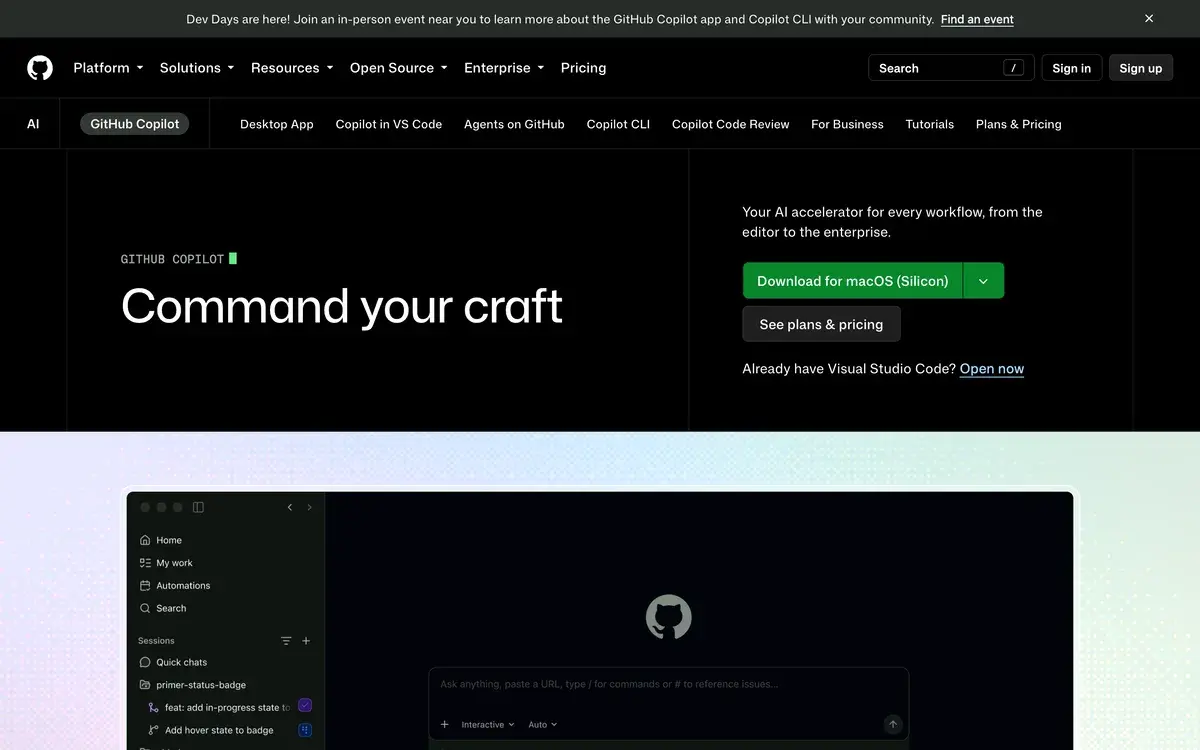
GitHub Copilot homepage, captured Sep 29, 2026.
Completions are free; agents spend credits
GitHub Copilot started in 2021 as autocomplete, and that part of the product is still the cheapest thing in AI coding. On every paid plan, code completions and next-edit suggestions are unlimited and cost nothing beyond the subscription. Everything built since then, including chat, agent mode in the IDE, code review, the cloud agent that turns a GitHub issue into a pull request, the Copilot CLI and the Copilot desktop app, runs on GitHub AI Credits.
That split dates from June 1, 2026, when GitHub replaced premium requests with credits. One credit is worth one cent, and each request is charged by the tokens it actually processes, input, output and cached, at the model's listed rate. Plan prices did not move, but the value of those prices changed: a quick chat question costs a fraction of a cent, while a long agent session across a repository can cost dollars. The trade press summed up the reaction as "you will get less, but pay the same price."
So there are two Copilots. The completion engine that made it the default assistant for millions of developers is as cheap as ever. The agentic Copilot is metered, and understanding the meter is the main thing to learn before choosing a plan.
Base credits, flex credits and the four individual plans
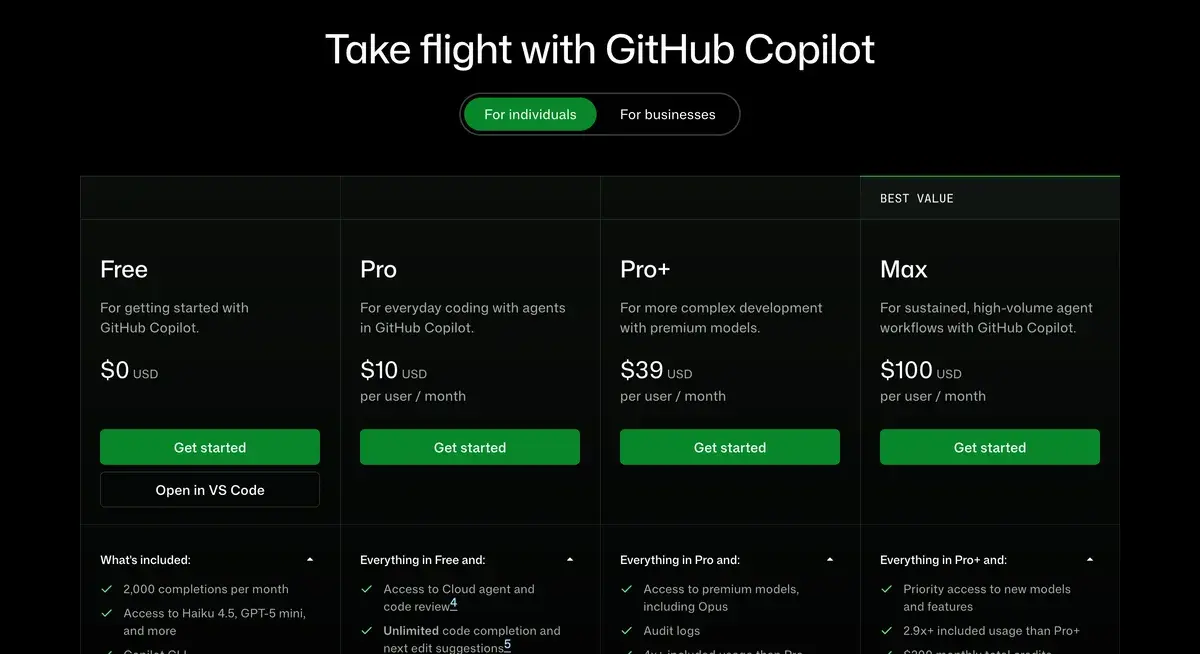
GitHub's Copilot plans page for individuals, checked September 29, 2026.
Plan
Price
AI Credits a month
What it adds
Free
$0
Limited chat and agent use
2,000 completions, Claude Haiku 4.5, GPT-5 mini and more, Copilot CLI
Pro
$10
$15 ($10 base + $5 flex)
Unlimited completions, cloud agent and code review, model selection, Claude Code and Codex agents
Pro+
$39
$70 ($39 base + $31 flex)
Premium models including Claude Opus, audit logs, 4x+ Pro's usage
Max
$100
$200 ($100 base + $100 flex)
Priority access to new models and features, 2.9x+ Pro+'s usage
Business
$19 per user
$19 per user, pooled
Organization-wide pooling, admin spending controls, IP indemnity
Enterprise
$39 per user
More credits per user, pooled
GitHub Enterprise features and controls
The individual plans hand back more credit than they cost, because of the flex allotment: variable additional usage on top of base credits equal to the price. GitHub warns that flex allotments may change over time, so the safe budget is the base figure, with flex as a bonus that could shrink. Paid plans can buy more credits when the allowance runs out, except for subscriptions bought through in-app purchase on GitHub Mobile, which cannot buy extra credits there.
How fast $15 goes
Pro's $15 lasts as long as your habits allow. A developer who mostly accepts completions and asks the occasional chat question spends little, since completions are free and short chats cost fractions of a cent. Agent mode is different: one task means planning, reading files, editing several of them, running commands, reading output and trying again, and every step spends tokens. Choosing a premium model multiplies the cost again, because credits follow each model's rate.
The practical advice from GitHub's own tooling is to watch early. The billing dashboard shows usage and projected costs, admins can set budgets, and checking after the first two weeks of a month is more useful than discovering the overage on the invoice. Developers who regularly run out on Pro have two choices: buy more credits at the one-cent rate, or move to Pro+, whose $39 includes $70 of credits and the premium models.
Annual subscribers kept the old system, with steeper multipliers
The June change treated prepaid customers oddly. Annual Pro and Pro+ subscribers did not move to credits; they stay on premium requests until their plan expires. At the same time, the model multipliers under that system rose sharply: a prompt to a Claude Opus-class model went from counting as 7.5 requests to 27, and a GPT-5-class prompt from 1 to 6. Under the legacy rules, a Copilot code review counted as 13 premium requests on its own.
Prepaying for a year therefore did not lock in a rate; it locked subscribers into a system that became more expensive for frontier models. When an annual plan ends it converts to Copilot Free, with the option to upgrade monthly, and GitHub offers prorated credits to anyone who converts to monthly billing before expiry. For an annual subscriber who uses premium models heavily, switching early may cost less than serving out the term.
Claude Code and Codex inside a $10 plan
One of the less-noticed features of Pro is access to third-party agents. Alongside Copilot's own agent mode and cloud agent, Pro and above let you run Claude Code from Anthropic and Codex from OpenAI from inside Copilot. For developers curious about those agents but not ready for separate subscriptions, the $10 plan is the cheapest way to try both in the same workflow.
Model choice follows the same logic as the pricing. The free plan includes Claude Haiku 4.5 and GPT-5 mini, Pro adds model selection, and Pro+ unlocks premium models including Claude Opus, which spend credits faster. Copilot also works in more places than any rival: VS Code, Visual Studio, JetBrains IDEs, Xcode, Neovim, Eclipse, Zed, Raycast, SQL Server Management Studio, github.com, GitHub Mobile, the terminal and its own desktop app.
Business and Enterprise seats
For companies, Copilot's appeal is price and control. Business costs $19 per user a month and pools AI Credits across the organization, with admin controls over spending and IP indemnity for generated code. Enterprise costs $39 per user, adds more credits per seat and GitHub's enterprise features, and works with SAML single sign-on through GitHub Enterprise Cloud.
Unlike the individual plans, business seats carry no flex bonus: the credits roughly match the price. For an engineering organization already paying for GitHub, adding Copilot is an administrative decision rather than a procurement project, which is much of why it is so widely deployed.
Copilot against Cursor, Claude Code and Devin Desktop
Cursor, owned by SpaceX since August 2026, is the main alternative for individuals: an AI-first editor built on VS Code, with agent limits described as multiples of its $20 Pro plan and its own Composer model. It costs twice as much at every tier and works only in its own app, while Copilot follows you into any editor. Our Cursor vs GitHub Copilot comparison goes through the trade-off.
Claude Code is the stronger choice for developers who want to delegate long tasks from the terminal, and comes with Claude Pro at $20. Devin Desktop, formerly Windsurf, pairs an agent-first editor with Devin's cloud agents from $20. Gemini Code Assist is free for individual developers and costs $19 per user for businesses, the same as Copilot Business. For the full field, see our guide to the best AI coding tools.
What changed in Copilot's pricing on June 1, 2026?
GitHub replaced premium requests with GitHub AI Credits, where one credit equals one cent and usage is charged by the tokens each model actually processes, at its listed rate. Plan prices stayed the same, but agent mode, code review and long repository-wide tasks now cost what they consume. Code completions were left out of the meter and remain unlimited on paid plans.
What do Copilot's plans include?
Free costs nothing and includes 2,000 completions a month, limited chat and agent use, models such as Claude Haiku 4.5 and GPT-5 mini, and the Copilot CLI. Pro costs $10 a month with $15 of AI Credits, Pro+ $39 with $70 and premium models including Claude Opus, and Max $100 with $200 and priority access to new models. Business costs $19 per user and Enterprise $39.
Do code completions use AI Credits?
No. Code completions and next-edit suggestions are unlimited on Pro and above and never touch your credits. Chat, agent mode, code review, the cloud agent, the Copilot CLI and Copilot apps are what spend credits. A developer who mostly accepts completions barely uses the allowance, while one who lives in agent mode can use it up in days.
What is the flex allotment in Copilot's credits?
Each individual plan's credits come in two parts: base credits equal to the plan price and a flex allotment on top. Pro's $15 is $10 base plus $5 flex, Pro+'s $70 is $39 plus $31, and Max's $200 is $100 plus $100. GitHub says the flex allotment is variable additional usage that may change over time, so budget on the base figure.
I'm on an annual plan. What happens to me?
Annual Pro and Pro+ subscribers stayed on premium requests until their plan ends, and from June 1 the model multipliers under that system rose steeply, with Claude Opus-class models going from 7.5x to 27x and GPT-5-class models from 1x to 6x. When the plan expires it converts to Copilot Free, and GitHub offers prorated credits to anyone who switches to monthly billing early.
Can I use Claude Code or Codex through Copilot?
Yes. Copilot Pro and above include access to third-party agents, Claude Code from Anthropic and Codex from OpenAI, from inside Copilot. That makes Pro at $10 a low-cost way to try both agents alongside Copilot's own agent mode and cloud agent, with usage drawn from your plan.
Is Copilot free for students?
Verified students get the GitHub Copilot Student plan, separate from the public Free plan, through GitHub Education. Teachers and maintainers of popular open-source projects have historically qualified for free access too; check GitHub's current eligibility rules, since they change.
Is Copilot cheaper than Cursor?
Yes, at every individual tier. Copilot Pro is $10 against $20 for Cursor Pro, Pro+ is $39 against $60, and Max is $100 against $200 for Cursor Ultra. For teams, Copilot Business is $19 per user and Cursor Teams $40 ($32 billed yearly). Cursor's case is its AI-first editor and agent workflow, not price.