Windsurf still exists under a new name: Cognition renamed it Devin Desktop on June 2, 2026, and windsurf.com now redirects to devin.ai. It is a VS Code-based AI code editor for Mac, Windows and Linux built around an Agent Command Center for local and cloud agents. The free plan has unlimited Tab completions and inline edits with a light agent quota; Pro costs $20 a month with frontier models, Devin Cloud and free use of SWE-2 through October 16, 2026; Max costs $200; Teams costs $80 a month plus $40 per full seat. Cascade was removed on September 8, 2026, and Devin Local is now the only built-in agent.
✓Best for: Developers who run several coding agents at once, including Devin Cloud, Codex or Claude agents, and want them on one board inside a full editor
✗Skip if: You relied on Cascade or the JetBrains plugin, need predictable usage limits, or mainly want autocomplete and chat, which Copilot covers for $10
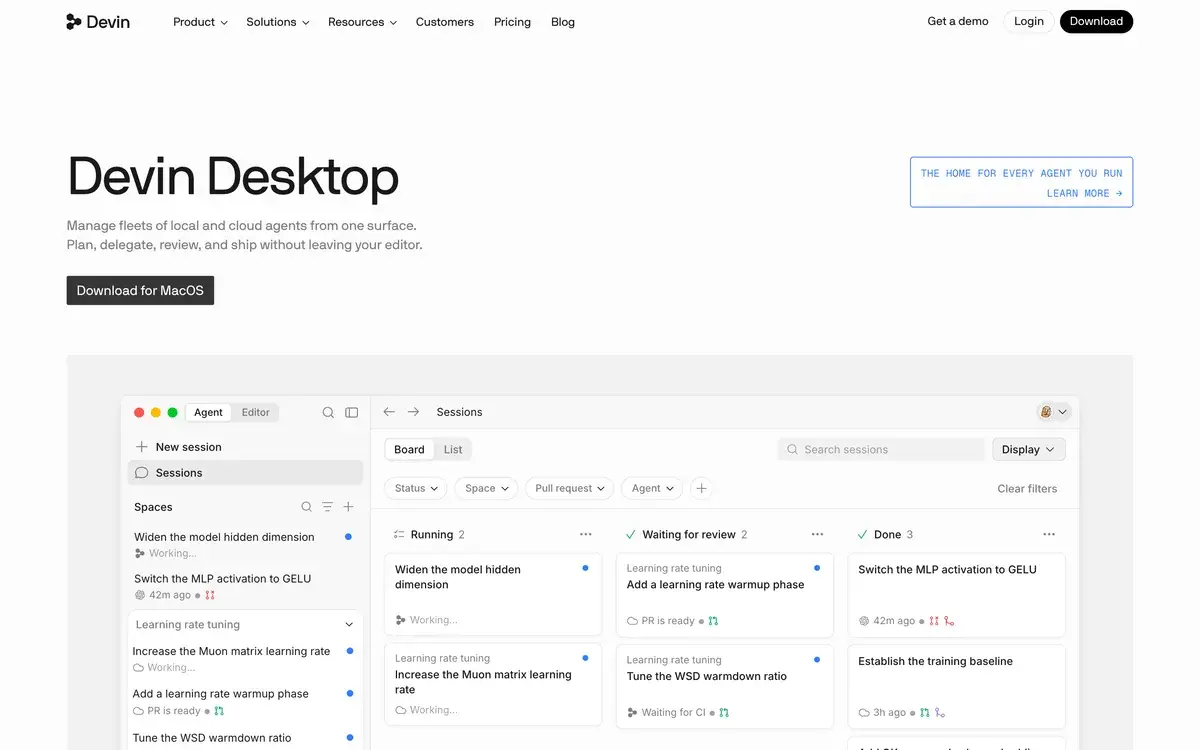
Windsurf (Devin Desktop) homepage, captured Oct 1, 2026.
Windsurf still exists, as Devin Desktop
If you went looking for Windsurf and landed on devin.ai, you are in the right place. Cognition renamed the editor Devin Desktop on June 2, 2026, shipping the change as an ordinary update: projects, plans, settings, extensions and keybindings carried over, and windsurf.com now redirects to devin.ai. A few traces of the old name remain, such as the Windsurf plugin for JetBrains and legacy surf commands kept for old scripts.
The product's history explains the name changes. It launched in November 2024 as the Windsurf Editor from Codeium, which renamed itself Windsurf in April 2025. In July 2025 Google hired Windsurf's chief executive and licensed its technology, and Cognition, maker of the Devin agent, bought the rest of the company days later. Cognition has since grown quickly, raising $2 billion at a $48 billion valuation in September 2026.
Under the new name, Devin Desktop is still a full VS Code-based editor for Mac, Windows and Linux. What changed is the default view: the Agent Command Center, a board of every local and cloud agent you have running, now opens first, with the classic editor one shortcut away.
Free, Pro, Max or Teams: what the quotas buy
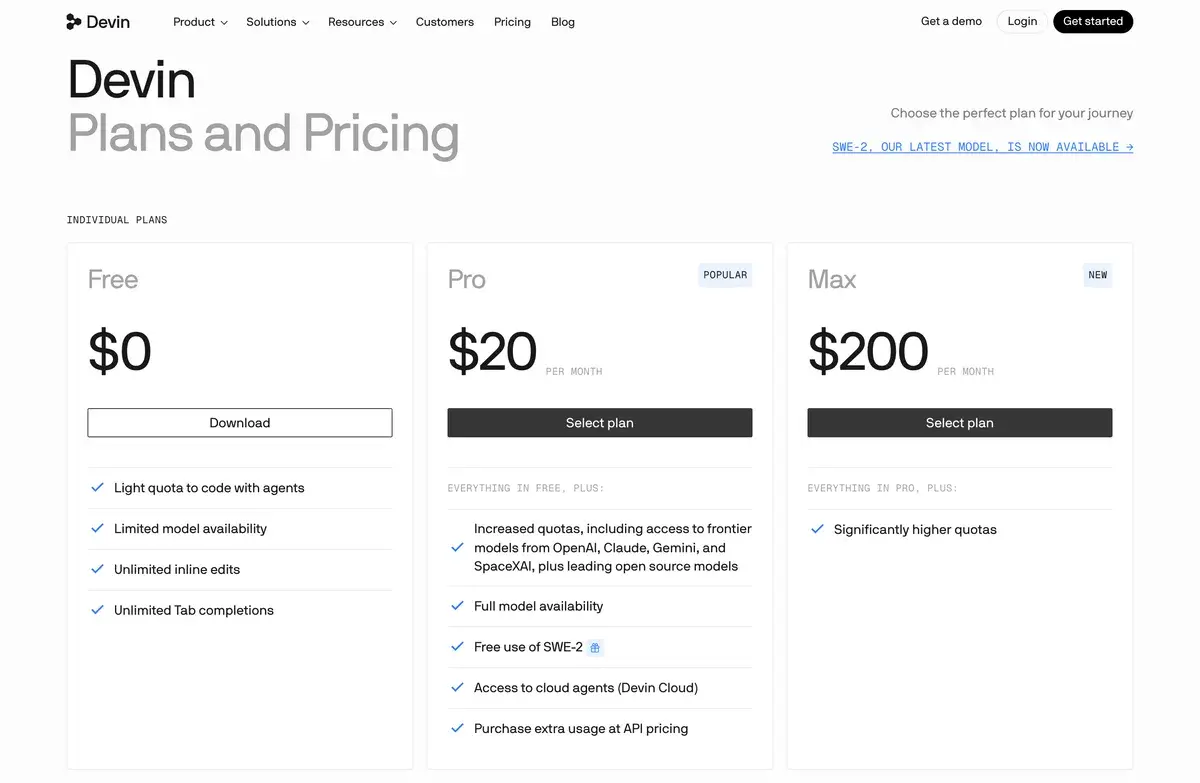
Devin's pricing page, which now covers Devin Desktop as of October 1, 2026. Cognition said the rename left every plan and price unchanged.
Higher quotas with OpenAI, Anthropic, Google and SpaceXAI models plus open-source models, SWE-2 free through October 16, 2026, Devin Cloud agents, extra usage at API prices
Max
$200 a month
Significantly higher quotas
Teams
$80 a month plus $40 per full seat
Up to 200 users; each full seat adds Devin Desktop and $40 of usage across Devin products, admin analytics, priority support
Enterprise
By quote
SAML or OIDC single sign-on, enterprise admin controls, an option to deploy in your own cloud
Paid plans run on a usage allowance that refreshes daily and weekly, and what a message costs depends on the model, the size of the task and how much reasoning it takes. When the allowance runs out, Pro and Max users can keep going by buying usage at API prices. Cognition's own advice for stretching it is to keep prompts tight and send routine work to smaller models such as Claude Haiku, GPT 5.2 Mini or Kimi K2.5. Older accounts still on Windsurf's prompt credits keep that billing.
The gap in the ladder is between $20 and $200. Max is described only as "significantly higher quotas", and there is no middle tier like Cursor's $60 Pro+, so a heavy user who outgrows Pro either buys extra usage or pays ten times as much.
Devin Local replaced Cascade
Cascade, the agent that made Windsurf popular, is gone. Devin Desktop 3.9.19, released on September 8, 2026, removed it and left Devin Local as the only built-in agent, with a prompt to move old conversations across. An update two days later removed the remaining Cascade features, including Vibe and Replace, the Deploy command and workflow commands, so older tutorials that rely on them no longer apply.
Devin Local runs the same architecture as Devin CLI. Cognition says it has up to 30% better token efficiency than Cascade and adds subagents and sandboxing, and the August release added a plan mode that writes a full Markdown plan you can review before clicking Implement. It still reads your old Windsurf rules alongside the new .devin/ rule files.
The bigger shift is that Devin Local is one agent among several. Through the Agent Client Protocol, Devin Desktop also runs OpenAI's Codex, Anthropic's Claude Agent, OpenCode and agents a company builds itself, and they all appear on the same board. Cognition's own SWE-2 model, released in September 2026, is free on Pro through October 16, and since September 29 you can sign in with ChatGPT and bill GPT requests to a ChatGPT Plus or Pro plan. September also brought remote agent hosts, so agents can run on another machine over SSH.
Using it next to Cursor
I've spent time in Windsurf alongside Cursor, which is my main editor, and the two solve slightly different problems well.
Agent orchestration is where it stands out, and the Agent Command Center is the clearest interface I've used for running more than one agent at a time. Seeing what's running, what's waiting on me and what's finished on one board removes the overhead of tracking parallel work, and if you've ever lost an agent session in a pile of tabs, the Kanban layout fixes that.
Fast Context lives up to its name: code retrieval across the repository is quick enough that the agent feels like it already knows the project rather than searching it. With Codemaps for visual navigation, finding my way around unfamiliar code was smoother than I expected.
The free tier is a real product, with unlimited Tab completions and inline edits rather than a short trial, so you can judge the editing experience properly before paying.
The weak spot is the one most users report: limits you can't forecast. Allowances that refresh daily and weekly, with costs that vary by model and task, make it hard to plan a heavy day, and billing support is mostly automated when something goes wrong.
Windsurf or Cursor in late 2026
Both editors cost $20 a month for Pro, both are VS Code forks, and both now treat agents as the main event. Cursor, owned by SpaceX since August 2026, has the broader plan ladder, with Pro+ at $60 and Ultra at $200, its own Composer models and the larger user community. Devin Desktop's case is orchestration: one board for its own local and cloud agents plus Codex and Claude agents, with Devin Cloud included from Pro.
For a cheaper or lighter setup, GitHub Copilot costs $10 a month for Pro inside the stock VS Code, Zed Editor is a fast native editor with a $10 Pro plan, and Cline is a free open-source agent that runs on any model you bring. Our Cursor vs Windsurf comparison goes through the two head to head.
Frequently Asked Questions about Windsurf (Devin Desktop)
Does Windsurf still exist?
Yes, as Devin Desktop. Cognition renamed Windsurf on June 2, 2026 through a regular update, and existing installs, plans, settings, extensions and keybindings carried over. windsurf.com now redirects to devin.ai, the old surf terminal command became devin-desktop, and the JetBrains plugin still carries the Windsurf name.
What do you get on Windsurf's free plan?
Unlimited Tab completions and unlimited inline edits, plus a light quota for coding with agents and a limited choice of models. The full model list, Devin Cloud agents, SWE-2 and the option to buy extra usage at API prices start with Pro at $20 a month.
What happened to Cascade?
Cascade, Windsurf's original agent, was removed in Devin Desktop 3.9.19 on September 8, 2026, and Devin Local is now the only built-in agent. Cognition says Devin Local has up to 30% better token efficiency and adds subagents and sandboxing. A later update on September 10 removed legacy Cascade features such as Vibe and Replace, Deploy and workflow commands.
Does Windsurf use Claude?
Yes. Pro includes models from Anthropic, OpenAI, Google and SpaceXAI plus open-source models, and Devin's Fusion mode can use Claude Fable 5.1 as its lead model. Anthropic's Claude Agent can also run inside Devin Desktop through the Agent Client Protocol, alongside Codex and OpenCode.
Can I use my ChatGPT subscription in Devin Desktop?
Since September 29, 2026, yes. You can sign in to Devin with ChatGPT and bill GPT model requests in Devin Desktop to an eligible ChatGPT Plus or Pro plan instead of your Devin quota. Other models still draw on Devin's own allowance.
Does Devin Desktop run on Linux?
Yes. Cognition publishes builds for Linux x64 as a .tar.gz archive and a Debian package, for Windows on x64 and Arm, and for Macs with Apple silicon or Intel chips. JetBrains users get a separate Windsurf plugin, which is now in maintenance mode.
Does Windsurf have a CLI?
Cognition offers Devin CLI, which runs the same agent architecture as Devin Local from the terminal, and SWE-2 is free on Pro in both Devin Desktop and the CLI until October 16, 2026. The old surf command for opening files from a terminal has been replaced by devin-desktop.
What happened to Windsurf for JetBrains?
The Windsurf JetBrains plugin is in maintenance mode, Cascade inside it is being deprecated, and Cognition warns that newer JetBrains releases can break it. Its recommendation is to run Devin in JetBrains IDEs through the Agent Client Protocol instead.
Who owns Windsurf now?
Cognition, the company behind the Devin agent. Windsurf began as Codeium's editor; in July 2025 Google hired its chief executive and licensed its technology, and Cognition bought the rest of the company days later. Cognition raised $2 billion at a $48 billion valuation in September 2026.