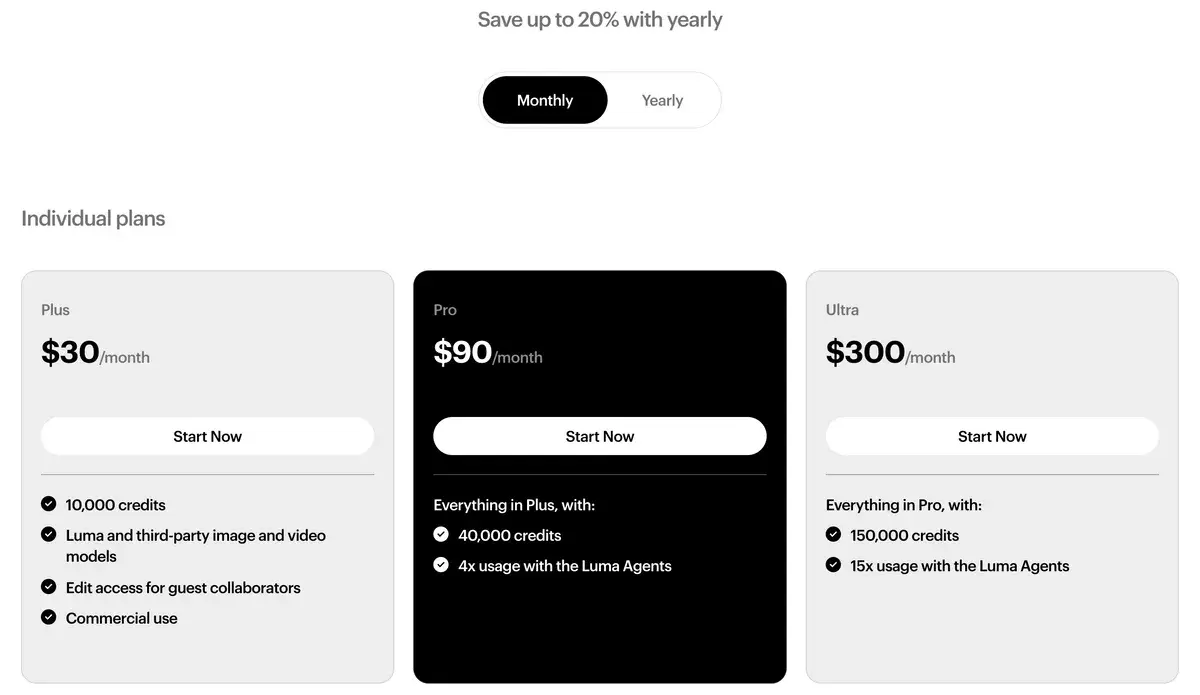
Luma AI, the company behind Dream Machine, now sells an agent-based creative app that runs its own Ray3.2 and Ray3.14 video models next to Veo 3.1, Kling 3.0, Seedance and MiniMax H3 in one credit pool. Plus costs $30 a month ($25 yearly) for 10,000 credits, Pro $90 for 40,000 and Ultra $300 for 150,000. Ray3.14 at 720p uses 20 credits a second, so Plus buys about 8 minutes of it. The pricing page no longer lists a free plan.
✓Best for: Creative teams that want several video models, keyframe control and HDR output from one account and one credit pool
✗Skip if: You mostly use one third-party model, which costs less direct, or you need a free plan or native audio from Luma's own model
This analysis is based on documentation, public user reports, and vendor materials — not yet on our own hands-on testing. How we rate
Luma AI homepage, captured Sep 25, 2026.
Luma in 2026: from Dream Machine to creative agents
Luma made its name with Dream Machine, one of the first widely used AI video apps, and with the Ray models behind it. In March 2026 it rebuilt the product around agents. The Luma app now takes a brief, plans the work, picks models for each step and generates images, video and audio in parallel, and you refine the result in plain language. You can still choose a model yourself from the toolbar, which is how most people coming from Dream Machine will use it.
The model list is the part that has changed most. On September 25 the pricing page listed Luma's own Ray3.2 and Ray3.14 for video and Uni-1 for images, next to Seedance 2.0 and 2.5, Kling 3.0 and Kling Omni, Veo 3.1, MiniMax H3 (the model behind Hailuo AI), Flux 3, Gemini Omni Flash, several lip-sync models, GPT Image, Nano Banana and ElevenLabs audio. Sora 2 was on the list in March and is gone now that OpenAI has shut Sora down.
So Luma sells two things at once: its own models, which are strongest on control and post-production output, and access to most of the other leading models from one account.
Ray3.2 and Ray3.14, Luma's own models
Ray3.2 arrived on June 9, 2026, with an API on the same day. Its selling point is direction rather than raw realism:
Up to 16 keyframes inside one image-to-video clip, so you set what changes and what holds across the shot.
Modify Video V2, which restyles footage you already have (the set, the wardrobe, the lighting) for up to 20 seconds at 1080p while keeping the performance.
Reframe to any aspect ratio, motion transfer between clips and facial performance transfer.
Native 16-bit HDR and EXR frame export in ACES2065-1, formats a colorist or compositor can use directly.
Native generations of 5 or 10 seconds, at up to 1080p.
It does not make sound. Luma's own FAQ says text-to-video and image-to-video output has no native audio, so voice, music and effects are a separate step; Modify Video and Reframe keep the source audio.
Ray3.14 is the cheaper workhorse. It costs 4 credits a second in draft, 10 at 540p, 20 at 720p and 80 at 1080p, can extend clips in 5-second steps, and quadruples the price in HDR. For most drafting, Ray3.14 in draft or at 540p is the right starting point.
Luma's older 3D capture app, known for Gaussian splatting, is a separate product and not part of this review.
Pricing and what the credits buy
Luma's individual plans on monthly billing, screenshot taken September 25, 2026. Yearly billing saves up to 20%.
Plan
Monthly
Yearly (per month)
Credits
Cost per 1,000 credits
Plus
$30
$25
10,000
$3.00 monthly, $2.50 yearly
Pro
$90
$75
40,000
$2.25 monthly, $1.88 yearly
Ultra
$300
$250
150,000
$2.00 monthly, $1.67 yearly
Team, Enterprise
Custom
Custom
Shared pool
SSO, analytics, custom fine-tuning
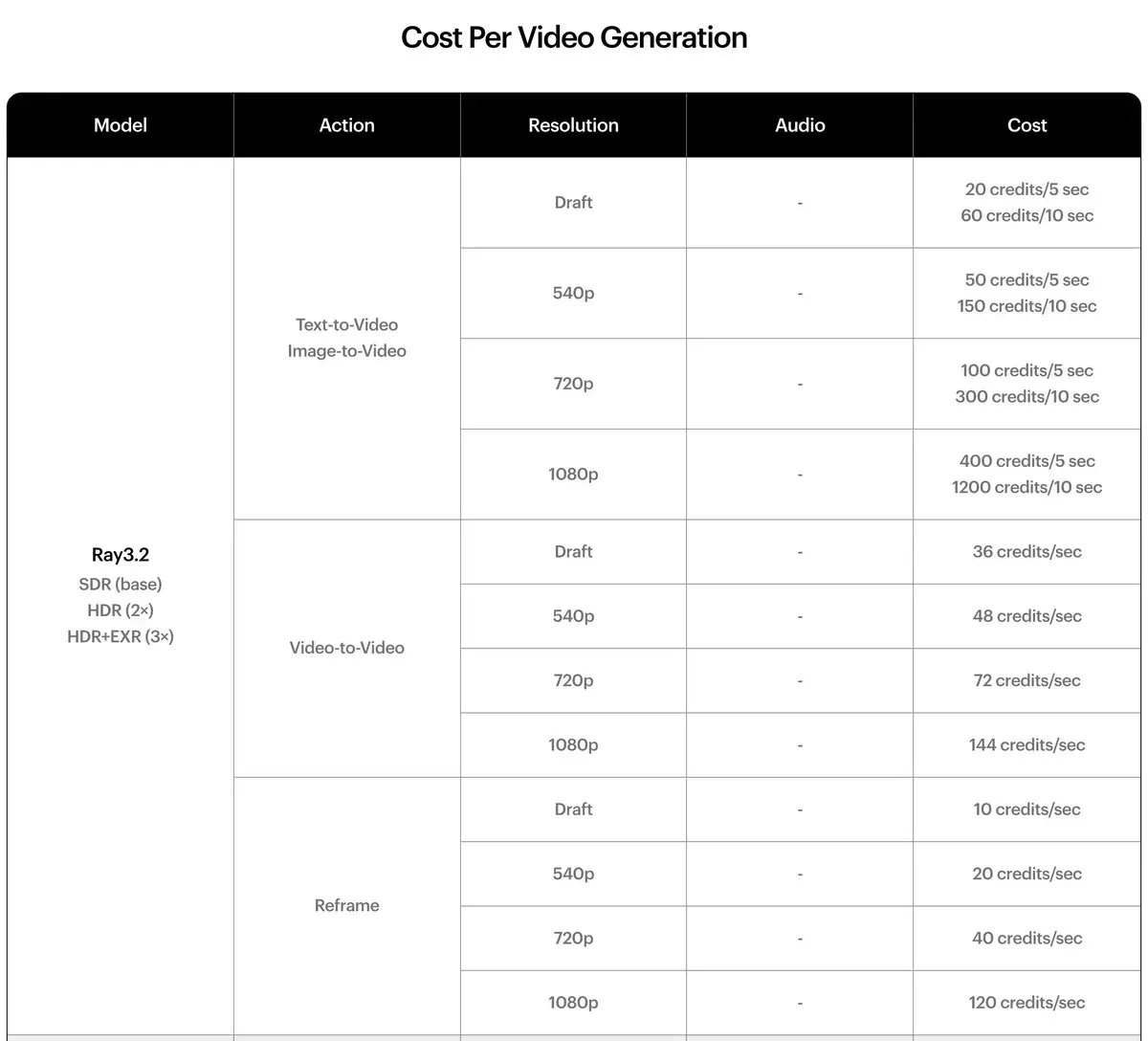
Every generation costs credits at a model-specific rate, published in a long table below the plans.
The top of Luma's per-model credit table, September 25, 2026. HDR doubles Ray3.2 prices and HDR with EXR triples them.
What a month on Plus buys, and what each model costs per second at Plus and Ultra rates:
Model and setting
Credits per second
Seconds on Plus (10,000)
Per second on Plus, monthly
Per second on Ultra, yearly
Ray3.14, draft
4
2,500
$0.012
$0.007
Ray3.14, 720p
20
500
$0.06
$0.033
Ray3.14, 1080p
80
125
$0.24
$0.13
Ray3.2, 720p, 5-second clip
20
500
$0.06
$0.033
MiniMax H3, 768p with audio
28
357
$0.084
$0.047
Kling 3.0, 1080p with audio
49
204
$0.147
$0.082
Seedance 2.0, 1080p with audio
126
79
$0.378
$0.21
Veo 3.1 with audio
280
36
$0.84
$0.47
Two details change the arithmetic. Ray3.2's 10-second clips cost three times its 5-second clips, so each second costs 50% more; at 1080p a 10-second clip costs 1,200 credits, an eighth of the Plus allowance. And Gemini Omni Flash reserves up to 370 credits per clip of 3 to 10 seconds, so check the reservation before generating in bulk.
The price of convenience
Luma's model menu is its biggest draw and its most expensive habit. Every third-party model costs more inside Luma than from its maker.
Veo is the clearest case. Luma charges 280 credits a second for Veo 3.1 with audio, about $0.84 a second on Plus and $0.47 on Ultra billed yearly. Google's Gemini API charges $0.40 for Veo 3.1 Standard and $0.10 to $0.30 for Fast. Kling 3.0 at 1080p with audio costs about $0.147 a second on Luma's Plus plan against roughly $0.098 on Kling's own yearly Pro plan.
What the premium buys is one workspace, one bill, and agents that move a project between models without exporting and re-uploading. For an agency producing a campaign across images, video and audio, that can be worth more than the per-second difference. For someone who uses one model most of the time, it is money left on the table.
The fine print on credits
Monthly credits do not roll over; they reset with each billing cycle. Top-up credits start at $4 for 1,200, stay valid for 12 months, roll over and are spent after the monthly allowance, but you can only buy them on an active paid plan. There is also a spending limit in account settings: Luma keeps working past your allowance up to the amount you approve and then pauses.
Subscription credits and API credits are separate, so a Plus plan does not pay for API calls. Payments are final and non-refundable unless Luma decides otherwise, which makes starting on monthly billing the safer choice.
Rights follow the plan you were on when you generated. Plus and above include commercial use with no watermark, and those rights stay with the asset if you cancel. Free generations are for personal use, keep their watermark even after an upgrade, and may be used by Luma to train its models.
Luma against Runway and the direct route
Runway is the closest match: another multi-model workspace, with its own Gen-4.5 next to Kling and Veo. Runway starts lower, at $15 a month ($12 yearly) for 625 credits, and adds strong editing tools. Luma starts at $30 but goes further on its own models, where Ray3.14 drafts cost about a cent a second, and its HDR and EXR output suits post-production pipelines better.
Higgsfield and Krea also resell third-party models, each with its own emphasis. Luma's difference is that it builds frontier models of its own and wraps them in an agent that runs whole projects.
The direct route is cheaper for anyone loyal to one model. Kling, Hailuo AI and Google's Veo all cost less per second from their makers, and Kling and Hailuo include native audio. For the wider field, see the best AI video generators of 2026.
Who Luma suits
Luma fits creative teams and agencies that produce multi-asset campaigns, want several models under one bill, and value control: keyframes, modifying real footage, reframing for every format, and HDR or EXR output that drops into a grading pipeline. Pro is the natural plan for that work, since it quadruples the credits and the agent usage for three times the price of Plus.
It suits solo creators less well. There is no free plan to grow into, Luma's own models are silent, and a creator who lives on one model pays a premium for the menu. If that sounds like you, start with the model's own app and come back to Luma when a project needs several models at once.
AIVario has no affiliate relationship with Luma AI, so this review earns no commission from it.
Frequently Asked Questions about Luma AI
What do Luma's Plus, Pro and Ultra plans include?
Plus costs $30 a month, or $25 billed yearly, for 10,000 credits, commercial use, guest collaborators and access to Luma's and third-party models. Pro costs $90 ($75 yearly) for 40,000 credits and four times the agent usage. Ultra costs $300 ($250 yearly) for 150,000 credits and fifteen times the agent usage. Team and Enterprise plans are priced on request. Monthly credits do not roll over.
How many seconds of video do 10,000 Luma credits make?
It depends on the model. Ray3.14 costs 4 credits a second in draft, 20 at 720p and 80 at 1080p, so Plus's 10,000 credits make about 2,500, 500 or 125 seconds. Kling 3.0 at 1080p with audio costs 49 credits a second, about 204 seconds, and Veo 3.1 with audio costs 280, about 36 seconds. Every retry comes out of the same pool.
Is there still a free Luma plan?
Not on the pricing page, which lists only paid plans. Luma says you can try the platform free before choosing one. Its help center describes free use as limited to images and Ray3.14 drafts, with watermarks and personal use only, and free-plan generations can be used by Luma to train its models. For anything you plan to publish, budget for Plus.
What is new in Ray3.2?
Ray3.2 launched on June 9, 2026, with an API. It accepts up to 16 keyframes in one image-to-video clip, modifies existing footage for up to 20 seconds at 1080p, reframes to any aspect ratio, transfers motion and facial performance between clips, and exports 16-bit HDR and EXR frames. Native generations run 5 or 10 seconds, and it does not generate sound.
Does Luma generate sound with its videos?
Luma's own Ray models do not: text-to-video and image-to-video output from Ray3.2 is silent, while Modify Video and Reframe keep the original audio. Sound comes from third-party models in the same app, such as Kling 3.0, Veo 3.1, Seedance and MiniMax H3, or from ElevenLabs tools billed in credits: music at 98 credits a minute and sound effects at 25.
Is Veo 3.1 cheaper through Luma or through Google?
Through Google. Luma charges 280 credits a second for Veo 3.1 with audio, about $0.84 a second on Plus billed monthly and about $0.47 on Ultra billed yearly. Google's Gemini API charges $0.40 a second for Veo 3.1 Standard and $0.10 to $0.30 for Fast. Luma's price buys one workspace and one bill for several models, not a cheaper Veo.
Can I buy more Luma credits when I run out?
Yes, two ways. Top-up credits start at $4 for 1,200, last 12 months, roll over and are used after your monthly allowance, but only while you have an active paid plan. You can also set a spending limit in your account settings; Luma keeps generating up to that amount and pauses when you reach it.
Can Luma videos be used commercially?
Yes, on Plus and above, with no watermark, and the rights stay attached to anything you made while subscribed even if you cancel later. Free and Lite generations are for personal use only and carry a watermark that cannot be removed by upgrading. Luma's terms also say payments are final and non-refundable unless Luma decides otherwise.