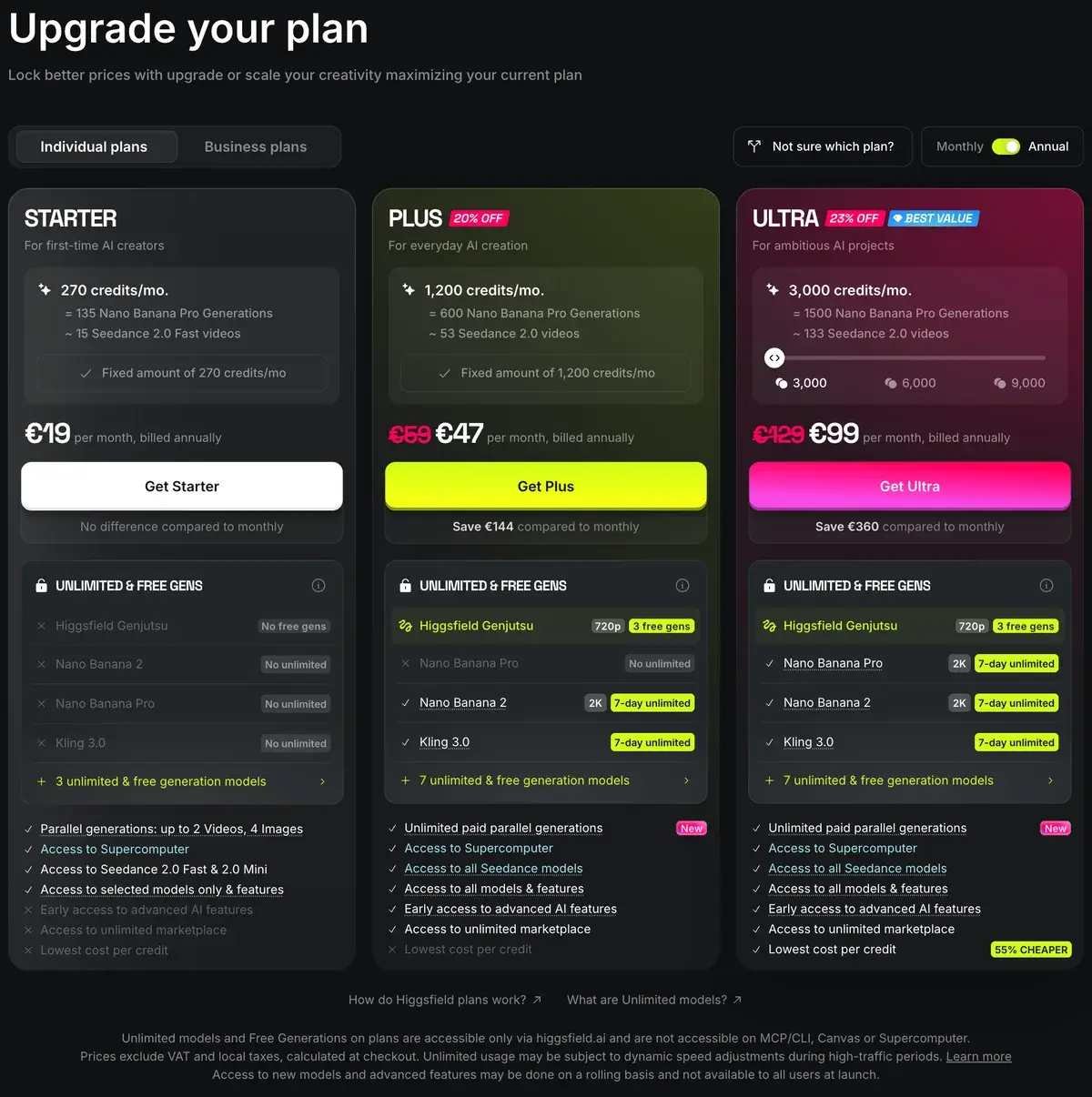
Higgsfield is an AI creative suite that runs dozens of third-party video and image models, including Kling 3.0, Veo 3.1, Seedance and Wan 3.0, alongside its own Soul and DoP models, Cinema Studio and an agent called Supercomputer. The plans we were shown cost 19 a month for 270 credits (Starter), 59 or 47 billed yearly for 1,200 (Plus) and 129 or 99 yearly for 3,000 (Ultra), in euros; prices vary by country and test group. Kling 3.0 at 1080p costs about 8 credits per 5 seconds.
✓Best for: Marketers and social creators who use Kling or Wan heavily and want many models, templates and effects on one balance
✗Skip if: You want transparent, stable pricing, or you rely on Veo, which costs no less here than from Google
This analysis is based on documentation, public user reports, and vendor materials — not yet on our own hands-on testing. How we rate
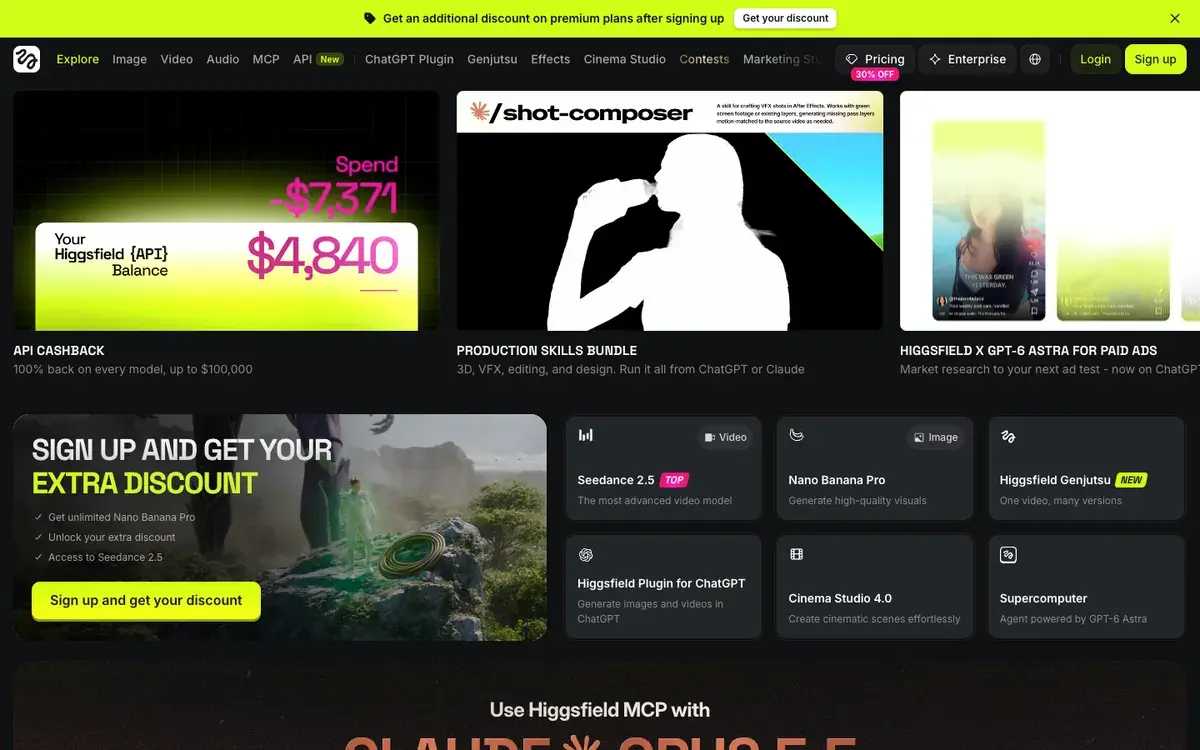
Higgsfield homepage, captured Sep 25, 2026.
What Higgsfield is in September 2026
Higgsfield made its name with camera moves. Its early presets, crash zooms, dolly shots and bullet-time orbits applied with one click, gave AI clips a cinematic look that plain prompting could not, and those effects are still in the product. A year and a half later, the presets are a small part of what the homepage calls an AI-native creative suite.
The suite has three layers. There are the models: dozens of third-party video and image models, from Kling 3.0, Veo 3.1 and Seedance to Wan 3.0, MiniMax Hailuo and Grok Video, next to Higgsfield's own Soul image models and DoP video models. There are the tools built on top: Cinema Studio 4.0 for multi-shot scenes, Genjutsu for turning one video into many versions, Marketing Studio for ads, effects and templates. And there are the new ways in: an agent called Supercomputer, which the homepage says runs on OpenAI's GPT-6 Astra, an MCP server for Claude, a ChatGPT plugin and an API.
The model list is also changing under subscribers' feet. Higgsfield's own notices say Sora 2 left the platform after September 24, when OpenAI discontinued it, Kling 2.1 and 2.1 Master were removed on September 15, and Veo 3 and Gemini Omni Flash 1.0 retire after September 30. Seedance 2.0 Fast and Seedance 2.0 Mini are not available in the US at all, which matters because the Starter plan advertises itself in Seedance 2.0 Fast videos.
Pricing depends on who is asking
Higgsfield's individual plans on annual billing, as served to us in euros on September 25, 2026. Prices exclude VAT.
Plan
Monthly
Billed yearly (per month)
Credits per month
Cost per credit, yearly
Free
0
0
Limited daily credits
Starter
19
19
270
7.0 cents
Plus
59
47
1,200
3.9 cents
Ultra
129
99
3,000
3.3 cents
Ultra, largest tier
310
270
9,000
3.0 cents
Euros. Team and Scale plans for groups share a credit pool.
Three things make Higgsfield's prices hard to pin down. It localizes them: the page above came up in euros, and US reviews report the same figures in dollars. It tests them: the plan configuration its pricing page loads contains more plans than any visitor sees, including Basic, Pro, Ultimate, Creator, Max and a two-day trial with 40 credits, so two people can see different offers on the same day. And it changes them often, with plans restructured several times in 2026 and a steady stream of time-limited deals; the site's own schedule for July and August listed free Seedance 4K generations, all-model unlimited trials and a Seedance 2.5 sale.
The table's last column is the useful one. Starter costs more than twice as much per credit as Ultra billed yearly, and yearly billing cuts Plus by a fifth. If you will use Higgsfield every week, Plus on yearly billing is where the price per credit stops being punitive.
What a credit buys
Credit prices come from the plan comparison on Higgsfield's pricing page. The last two columns convert them at the Plus yearly rate of 3.9 cents per credit and compare with buying from the model's maker:
Model and setting
Credits
Per second on Plus, yearly (euro cents)
Direct from the maker (US cents)
Kling 3.0, 1080p
~8 per 5 s
about 6 cents
about 10 cents on Kling's yearly Pro
MiniMax Hailuo 2.3, 1080p
~10 per 6 s
about 7 cents
Higgsfield DoP Standard, 720p
~7 per 3 s
about 9 cents
Wan 3.0, 1080p
17.5 per 5 s
about 14 cents
20 cents on Alibaba Cloud
Veo 3.1 Fast
~16 per 4 s
about 16 cents
12 cents at 1080p on the Gemini API
Seedance 2.0, 1080p
~45 per 5 s
about 35 cents
Veo 3.1
~40 per 4 s
about 39 cents
40 cents on the Gemini API
The pattern is clear. Higgsfield is a bargain for Kling, where it charges well under Kling's own subscription price, and cheaper than Alibaba's list price for Wan AI's Wan 3.0. For Veo it offers no saving at all. Images are cheap everywhere: 2 credits for a Nano Banana Pro image and 0.12 for Higgsfield's own Soul 2.0.
In clip terms, Plus's 1,200 monthly credits make about 150 five-second Kling 3.0 clips at 1080p, 26 Seedance 2.0 clips at 1080p or 30 four-second Veo 3.1 clips, before retries.
Unlimited, with conditions
Higgsfield advertises unlimited generations prominently, and they are real, within limits that sit in small print under the plans.
On the plans we saw, Plus and Ultra include seven days of unlimited Kling 3.0 and Nano Banana 2 generations at up to 2K, and Ultra adds Nano Banana Pro. Plus also includes three free Genjutsu generations at 720p and a large allowance of free Soul 2.0 images. The conditions: unlimited and free generations work only on higgsfield.ai, not through the MCP server, CLI, Canvas or Supercomputer; unlimited use may be slowed during busy periods; and new models roll out gradually rather than to everyone at launch.
Treat unlimited as a strong trial of a model rather than a permanent entitlement, and budget your month in credits.
Credits and billing rules
Subscription credits do not roll over. On monthly plans they refresh on the date you first paid; on annual plans they refresh every 30 days from the start of the subscription. All paid plans include commercial rights for generated content, including advertising. The free plan's daily credits are limited to selected models.
Before paying, check two things at checkout: the currency and credit amount you are actually being offered, since those vary by segment, and whether the models you want are available in your country.
Higgsfield against Luma, Pika and the direct route
Luma AI is the premium alternative: its own Ray models, HDR output and agents that run whole projects, with commercial use from $30 a month. It charges far more for third-party models, about $0.84 a second for Veo 3.1 with audio on its Plus plan.
Pika, relaunched in September as a multi-model studio, sits closest to Higgsfield's audience of social creators and small brands. Its Wan 3.0 price, about $0.37 for a 5-second 720p clip on the Creator plan, is similar to Higgsfield's; Higgsfield's model list and effects library are broader, while Pika's pricing is simpler and the same for everyone.
Runway is the choice when editing matters as much as generation.
Going direct makes sense for Veo, where Google's own prices are as low or lower, and for anyone who wants a stable, published price. For the full field, see the best AI video generators of 2026.
Is Higgsfield worth it?
For creators and marketers who generate a lot of Kling or Wan video, yes: Plus on yearly billing buys Kling 3.0 for about 6 cents a second, and the templates, effects and Genjutsu add real range for ads and social content.
For everyone else, the reservations are about trust in the price rather than the product. Plans differ by country and test group, change several times a year and come wrapped in promotions and unlimited offers with conditions. Buy yearly only after a month on monthly billing, check what your checkout page actually offers, and skip it entirely if Veo is your main model.
AIVario has no affiliate relationship with Higgsfield, so this review earns no commission from it.
Related Tools
Kling AI: the model that makes Higgsfield good value, also sold direct
Luma AI: multi-model studio with its own Ray models and agents
Pika: simpler multi-model studio for social creators, relaunched in September 2026
Frequently Asked Questions about Higgsfield
What do Higgsfield's Starter, Plus and Ultra plans cost?
In the plan set we were shown on September 25, in euros: Starter 19 a month for 270 credits, Plus 59 a month or 47 billed yearly for 1,200 credits, and Ultra 129 a month or 99 yearly for 3,000 credits, with larger Ultra tiers of 6,000 and 9,000 credits up to 310 a month. US reviews report the same figures in dollars. All paid plans include commercial use.
Why do Higgsfield prices differ between reviews?
Because Higgsfield changes them by country, by test group and over time. Its site localizes currency, and its own plan configuration contains more plan names than any single visitor sees, including Basic, Pro, Ultimate, Creator, Max and a two-day trial with 40 credits. Plans were also restructured several times in 2026. Trust the checkout page over any review, this one included.
What does unlimited mean on Higgsfield?
Something narrower than it sounds. On the plans we saw, Plus and Ultra include seven days of unlimited Kling 3.0 and Nano Banana 2 generations, and Ultra adds Nano Banana Pro. Unlimited use works only on higgsfield.ai, not through the MCP server, CLI, Canvas or Supercomputer, and Higgsfield says speed may be throttled when traffic is high.
How many videos do Higgsfield credits buy?
It depends on the model. Kling 3.0 at 1080p costs about 8 credits per 5 seconds, so Plus's 1,200 credits make roughly 150 clips. Seedance 2.0 at 1080p costs about 45 credits per 5 seconds, about 26 clips, and Veo 3.1 about 40 credits per 4 seconds, 30 clips. A Nano Banana Pro image costs 2 credits and a Soul 2.0 image 0.12.
Is Higgsfield cheaper than using Kling or Veo directly?
For Kling, yes. At the Plus yearly rate we were shown, Kling 3.0 at 1080p works out to about 6 euro cents a second, against roughly 10 US cents on Kling's own yearly Pro plan. For Veo, no: Veo 3.1 costs about 39 cents a second on Higgsfield and 40 cents on Google's Gemini API, and Veo 3.1 Fast costs more on Higgsfield than from Google.
Can you use Higgsfield without paying?
There is a free plan with limited daily credits and access to selected models only, without parallel generations or most features. It is enough to try the interface and a few cheap models. Anything regular needs a paid plan, and the cheapest, Starter, has the highest price per credit, about 7 cents against about 3 to 4 cents on Plus and Ultra billed yearly.
Which video models are on Higgsfield right now?
The pricing page lists Kling 3.0 and Kling Omni, Seedance 2.0, Veo 3.1 and Veo 3.1 Fast, Wan 3.0, MiniMax Hailuo 2.3, Grok Video and Higgsfield's own DoP models, among others. Sora 2 left after September 24 when OpenAI shut it down, Kling 2.1 was removed on September 15, and Veo 3 retires after September 30. Seedance 2.0 Fast and Mini are not available in the US.
What are Higgsfield Genjutsu and Supercomputer?
Genjutsu turns one video into many versions, for example transferring its motion to a new character or replacing an object while the rest of the scene stays. Supercomputer is Higgsfield's agent, which the homepage says runs on OpenAI's GPT-6 Astra and handles multi-step jobs such as ad research and test variants. Neither uses the plans' unlimited generations.