Veo 3.1 is Google DeepMind's video model with native audio: clips of 4, 6 or 8 seconds at 720p, 1080p or 4K, extendable to 148 seconds through the API. Developers pay per second on the Gemini API, from $0.05 (Lite, 720p) to $0.60 (Standard, 4K). Everyone else reaches it in Flow through Google AI plans: Plus at $4.99 a month includes 200 credits, Pro at $19.99 includes 1,000, and Ultra includes 10,000 or 25,000 at $99.99 or $199.99. Google now recommends its newer Gemini Omni Flash as the default video model.
✓Best for: Clips that need matching sound, people already paying for Google AI, and developers who need long extensions or first-and-last-frame control
✗Skip if: You want one standalone video subscription, or you mostly revise clips, where Google now points to Omni Flash
This analysis is based on documentation, public user reports, and vendor materials — not yet on our own hands-on testing. How we rate
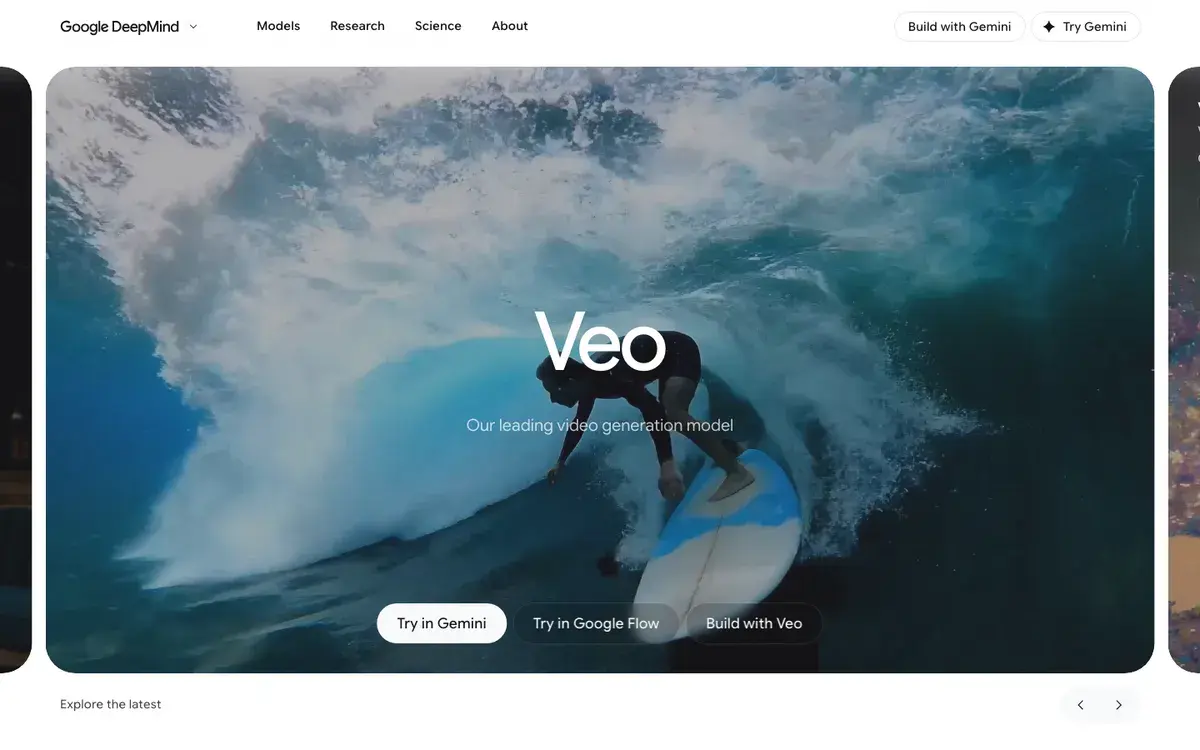
Veo homepage, captured Sep 25, 2026.
Where Veo stands in September 2026
Veo 3.1 arrived in October 2025 and is still the version Google sells, now in three variants: Standard (which Flow calls Quality), Fast, and Lite, added in March 2026. The older Veo 3 and Veo 2 API models were shut down on June 30, 2026, so any tutorial or cost sheet built on veo-3.0 or veo-2.0 model names describes endpoints that no longer answer.
The bigger change sits next to Veo. Google's developer documentation now tells developers to use Gemini Omni Flash as the default model for video generation, and to pick Veo 3.1 when they need scene extension, last-frame control or an existing Veo pipeline. Google's consumer plan page points the same way: every paid tier advertises Flow credits for Gemini Omni Flash, and Veo no longer appears on the plan cards at all.
So this review answers two questions. What does Veo 3.1 cost and do today, and when is it still the right pick over the model Google now puts first?
Sound, references and 148-second shots
Veo generates the sound with the picture: dialogue, sound effects and ambient audio that match what is on screen. Veo 3 made native audio mainstream in 2025, and most rivals have since caught up (Kling 3.0, Hailuo's H3 and PixVerse V6 all generate sound), but on the Gemini API you never pay extra for it. Every Veo price includes audio.
The specs, from Google's API documentation updated September 17:
Clips of 4, 6 or 8 seconds at 24 frames per second, landscape (16:9) or portrait (9:16).
720p, 1080p or 4K output. Lite stops at 1080p, and 1080p, 4K and reference-image clips must be 8 seconds long.
Up to three reference images to keep a person, character or product looking the same.
First and last frame: supply a start image and an end image, and Veo animates between them.
Extension: Veo 3.1 and Veo 3.1 Fast can continue a Veo-generated clip by 7 seconds at a time, up to 20 times, for one continuous video of up to 148 seconds. Lite cannot extend.
SynthID, Google's invisible watermark for AI-generated content, on every video.
Flow applies its own rules per variant. Google's Flow help lists Veo 3.1 Lite with 4, 6 and 8 second lengths and extension, while Veo 3.1 Quality in Flow supports neither reference images (Flow calls them ingredients) nor extension. Gemini Omni Flash 1.1, the other model in the same menu, runs up to 10 seconds and can edit existing video.
Route one: Google AI plans and Flow credits
Most people meet Veo through a Google AI subscription, which pays for Flow, Google's AI filmmaking studio, and video generation in the Gemini app.
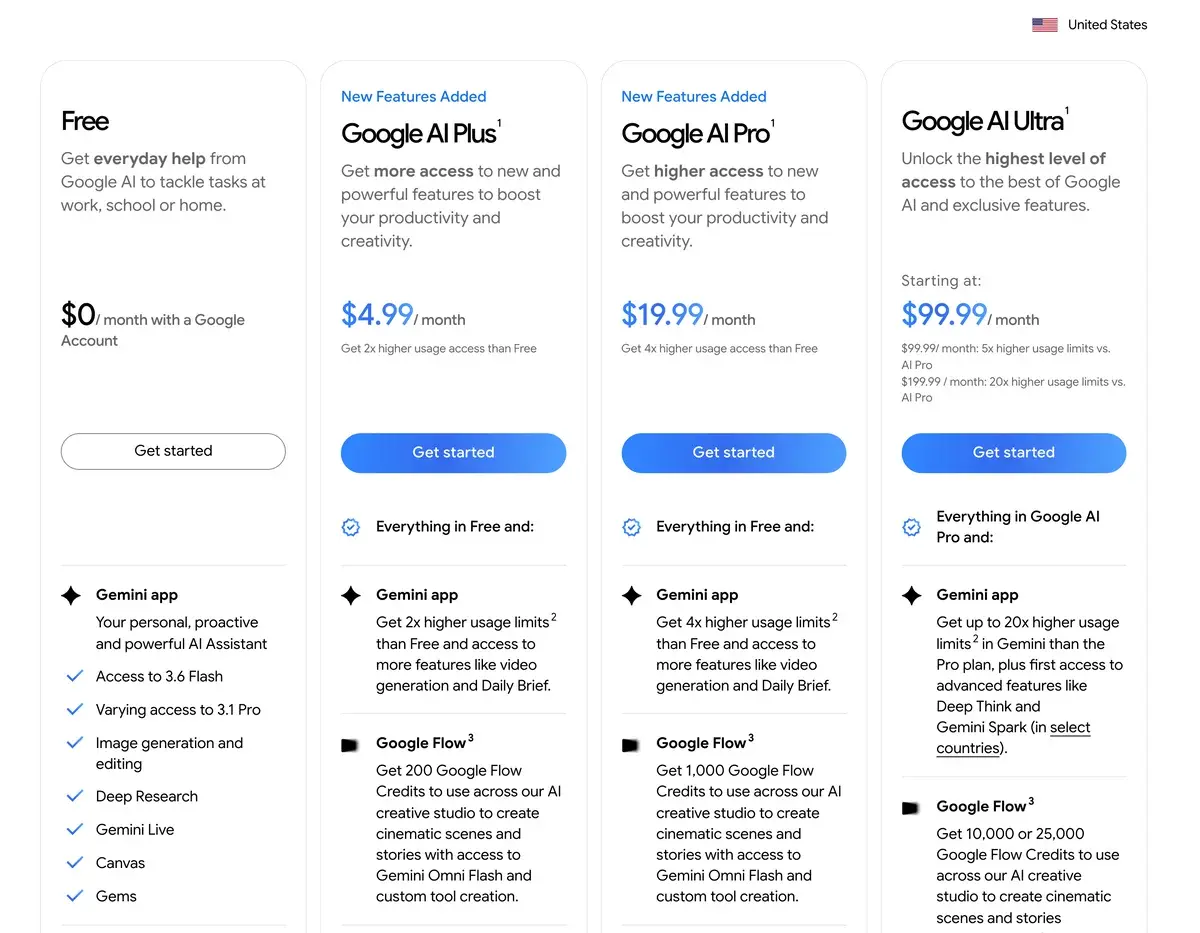
Google AI plans for the United States, screenshot taken September 25, 2026.
Plan
Price
Monthly Flow credits
Notes for video
Free
$0
None listed
Flow access with limited image generation
AI Plus
$4.99/mo
200
Adds video generation in the Gemini app
AI Pro
$19.99/mo
1,000
Plan FAQ mentions a limited Veo 3.1 Lite trial in Gemini
AI Ultra
$99.99/mo
10,000
5x Pro's usage limits
AI Ultra
$199.99/mo
25,000
20x Pro's usage limits
Google does not say on its plan page what a Veo clip costs in credits. Third-party trackers reported these rates in September 2026:
Model in Flow
Credits per clip (reported)
Plus (200)
Pro (1,000)
Ultra (10,000)
Veo 3.1 Lite
10, or 5 on Ultra
20 clips
100 clips
2,000 clips
Veo 3.1 Fast
20, or 10 on Ultra
10 clips
50 clips
1,000 clips
Veo 3.1 Quality
100
2 clips
10 clips
100 clips
Reported rates, not Google's. Counts assume 8-second clips and no retries.
Model choice matters more than plan choice: Quality costs ten times Lite on Pro and twenty times on Ultra, so draft on Lite or Fast and spend Quality credits only on the few shots someone will study. Ultra is priced for volume: at the reported rates, $99.99 buys 1,000 Fast clips a month, twenty times what Pro buys for a fifth of the price.
Free access is thin: reports of about 50 free daily Flow credits for unpaid accounts circulate, but Google's plan page lists none, so treat any free allowance as a bonus that can vanish. College students can get AI Pro free for a year, which is the cheapest serious way in.
Route two: the Gemini API, per second
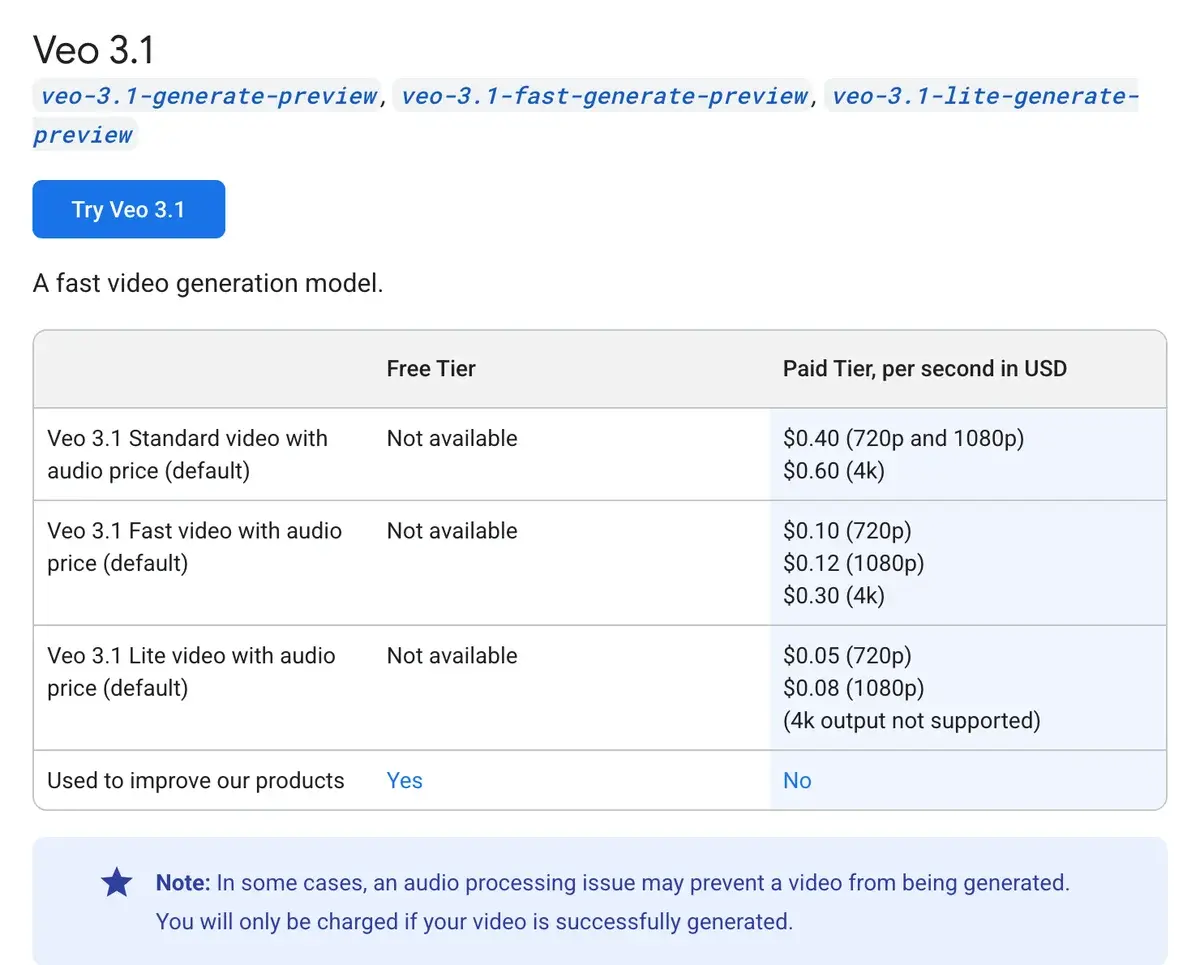
Veo 3.1 on Google's Gemini API pricing page, screenshot taken September 25, 2026. All prices include audio.
Variant
720p
1080p
4K
8-second clip at 1080p
Veo 3.1 Standard
$0.40/s
$0.40/s
$0.60/s
$3.20
Veo 3.1 Fast
$0.10/s
$0.12/s
$0.30/s
$0.96
Veo 3.1 Lite
$0.05/s
$0.08/s
Not available
$0.64
There is no free tier for Veo on the API, and Google bills only videos that generate successfully. Successfully means the render finished, not that you liked it: a take you throw away costs the same as one you keep. Vertex AI offers the same models to Google Cloud projects.
For hand-made clips, API seconds cost more than plan credits. On AI Pro, at the reported rates, a Fast clip uses 20 credits, about $0.40 of the $19.99 plan; the same 8 seconds at 720p cost $0.80 on the API. On the $99.99 Ultra plan the gap widens to $0.10 against $0.80. The API makes sense when software generates the clips, when every request needs its own resolution and length, or when volume swings too much for a fixed plan.
What a finished minute costs
Clip prices hide the unit that matters, which is footage you keep. Suppose you keep one take in three, a normal rate for directed shots. A finished minute then needs about 180 seconds of generation, or 23 clips of 8 seconds.
Route
One finished minute
API, Lite at 720p
$9.00
API, Fast at 1080p
$21.60
API, Standard at 1080p
$72.00
API, Standard at 4K
$108.00
Flow on AI Pro, Fast
About 450 credits, nearly half the month
Flow on AI Ultra ($99.99), Fast
About 225 credits, about 2% of the month
A two-minute brand film drafted on Fast and finished on Standard lands between those rows. Budget with the keep rate you actually get: complex motion and on-screen text push it down, simple scenes push it up.
Veo 3.1 or Gemini Omni Flash?
Google's documentation presents Omni Flash as the default and Veo 3.1 as the specialist, and the split is easy to follow.
Omni Flash is built for iteration. It takes text, images, audio and video as input together, keeps characters consistent, and edits across turns: generate a clip, then ask for different lighting, a swapped object or a new style without starting over. It generates at 720p by default, produces 1080p and 4K by upscaling, runs up to 10 seconds in Flow, and costs about $0.10 a second through the API.
Veo 3.1 keeps the jobs that need continuity or native resolution. It renders 1080p and 4K natively, extends one shot to 148 seconds, animates between a first and last frame you supply, and Lite at $0.05 a second is the cheapest Google video model on the API.
The practical rule: for social clips, product shots you expect to tweak and anything you want to edit by conversation, start with Omni Flash. For long continuous shots, native 4K deliverables, exact start and end frames or the lowest cost per draft, use Veo 3.1. Both come with the same Google AI plans, so subscribers can switch per shot.
No Veo-only plan, short clips and opaque credits
There is no Veo-only subscription: you either buy a Google AI plan, with Gemini, storage and other extras attached, or you build against the API.
Budgeting is harder than it should be. Google does not publish Flow credit costs on its plan page, rates differ between Pro and Ultra, and the API variants still carry preview model names, which leaves Google room to change them.
Base clips are short, since eight seconds per generation means longer pieces are extensions or edits, and each extension is another paid generation. Kling and Hailuo AI generate up to 15 seconds in one take.
The API is strict for casual use. Generated videos are deleted from Google's servers after 2 days, generation of people is limited to adults in the EU, UK, Switzerland and the Middle East and North Africa, and discarded takes bill in full.
Veo against Kling, Runway and the rest
Kling is the closest rival for realistic motion with sound. It is a standalone subscription billed per second, 12 credits a second for 1080p with audio on Kling 3.0, which works out to about $0.098 a second on yearly Pro: between Veo 3.1 Lite and Fast at 1080p. If video is all you need and you do not already pay Google, Kling is the simpler purchase.
Runway sells Veo 3.1 inside its workspace at 40 credits a second with audio. That is about $0.50 a second on Runway's Pro plan billed yearly and $0.32 on Max, against $0.40 for Veo 3.1 Standard direct from Google. The premium buys Runway's editing tools and other models in the same account; how Runway's own model compares is in Runway vs Kling.
Luma AI also runs Veo next to its own Ray models in one credit system, for people who want several models without a Google plan.
Hailuo AI and PixVerse cost far less for short social clips. Hailuo's H3 makes 4 to 15 second 2K clips with stereo sound from $10.50 a month, and PixVerse refills 30 free credits a day. Neither outputs 4K.
Developers moving off Sora, whose app OpenAI closed in April and whose API followed on September 24, 2026, will find Veo 3.1 and Omni Flash the closest like-for-like replacements. For the rest of the field, see the best AI video generators of 2026.
Who should use Veo now
If you already pay for Google AI Pro or Ultra, use it: the credits are there, and Lite or Fast drafts cost little. Developers who need 148-second extensions, native 4K or exact first and last frames should build on Veo 3.1 rather than Omni Flash. And anyone chasing the most convincing sound on an 8-second shot has good reason to start here.
Everyone else has cheaper or simpler options. For a single video subscription, Kling or Hailuo cost less. For clips you will revise again and again, Omni Flash is the model Google itself now recommends, on the same plans.
AIVario has no affiliate relationship with Google, so this review earns no commission from Veo or Google AI plans.
Related Tools
Kling AI: standalone plans, per-second billing and native audio
Runway: a workspace that runs Veo 3.1 next to its own models
Hailuo AI: 15-second 2K clips with sound from $10.50 a month
PixVerse: 30 free credits a day for short social clips
Frequently Asked Questions about Veo
What does Veo 3.1 cost per second on the Gemini API?
Veo 3.1 Standard costs $0.40 a second at 720p or 1080p and $0.60 at 4K. Veo 3.1 Fast costs $0.10 at 720p, $0.12 at 1080p and $0.30 at 4K. Veo 3.1 Lite costs $0.05 at 720p and $0.08 at 1080p and has no 4K. Audio is included, there is no free tier, and only videos that finish rendering are charged. An 8-second 1080p clip costs $0.64 on Lite, $0.96 on Fast and $3.20 on Standard.
Which Google AI plans include Flow credits for Veo?
Every paid plan. In the US, AI Plus costs $4.99 a month with 200 Flow credits, AI Pro $19.99 with 1,000, and AI Ultra $99.99 with 10,000 or $199.99 with 25,000. The free plan includes Flow with limited image generation, but Google lists no Flow credits for it. Credits are spent across Flow, on Veo 3.1 as well as Gemini Omni Flash, and college students can get AI Pro free for a year.
How many Veo clips do 1,000 Flow credits make?
Google does not publish Veo credit costs on its plan page. Third-party trackers reported about 10 credits for a Veo 3.1 Lite clip, 20 for Fast and 100 for Quality in September 2026, with Lite and Fast at half those rates on Ultra. At those rates, AI Pro's 1,000 credits make roughly 100 Lite clips, 50 Fast clips or 10 Quality clips of up to 8 seconds, and every discarded take counts.
Is Google replacing Veo with Gemini Omni Flash?
Partly. Google's developer documentation now names Gemini Omni Flash the default model for video generation, citing coherence, character consistency and multi-turn editing, and keeps Veo 3.1 for scene extension, last-frame control and existing pipelines. Google AI plan cards advertise Omni Flash rather than Veo. Omni Flash costs about $0.10 a second at 720p on the API, while Veo 3.1 Lite starts at $0.05.
How long can a Veo 3.1 video be?
One generation is 4, 6 or 8 seconds, and 1080p, 4K and reference-image clips must be 8 seconds. Through the Gemini API, Veo 3.1 and Veo 3.1 Fast can extend a Veo-generated video by 7 seconds at a time, up to 20 times, for a single video of up to 148 seconds. Lite cannot extend, and every extension is another paid generation.
Can Veo 3.1 make 4K video?
Yes. On the Gemini API, Veo 3.1 Standard and Fast output 4K directly, at $0.60 and $0.30 a second, while Lite stops at 1080p. Gemini Omni Flash also offers 4K, but as an upscale of its 720p output. In Flow, third-party trackers report 4K upscaling at about 50 credits on Ultra. Higher resolutions take longer to render.
Is there a free way to try Veo?
Not a reliable one. The API has no free tier for video, and Google's free plan includes Flow without any listed Flow credits. Reports of about 50 free daily credits could not be confirmed on Google's plan page in September 2026. The cheapest confirmed route is AI Plus at $4.99 a month with 200 credits, which covers about 20 Lite clips at reported rates.
What happened to the Veo 3 and Veo 2 API models?
Google shut down veo-3.0-generate-001, veo-3.0-fast-generate-001 and veo-2.0-generate-001 on June 30, 2026. The current models are veo-3.1-generate-preview, veo-3.1-fast-generate-preview and veo-3.1-lite-generate-preview. Code, tutorials and cost estimates built on the old names no longer work as written.