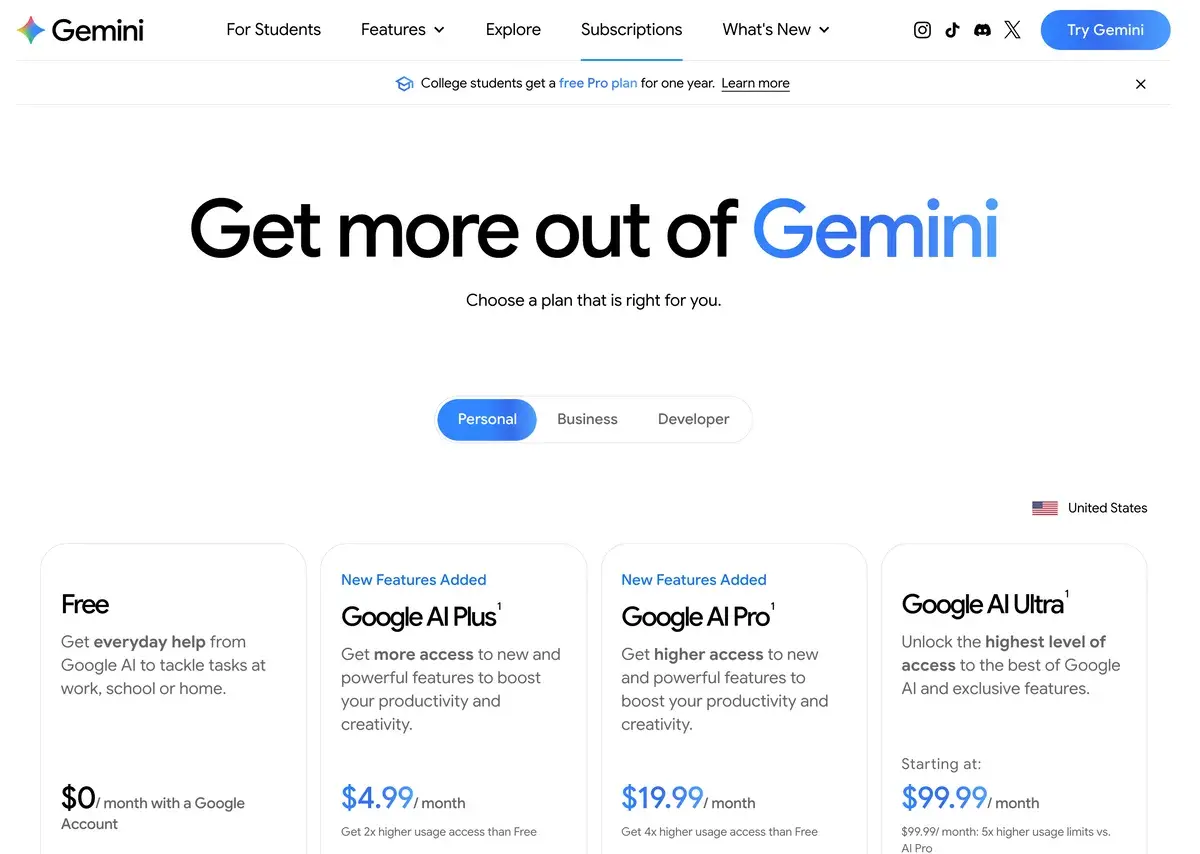
Gemini is Google's AI assistant, sold as part of Google AI plans that also include storage and other Google services. Free gets Gemini's Flash models with varying access to 3.1 Pro and a 32K-token context window. Google AI Plus costs $4.99 a month with twice the free limits, video generation, 200 Flow credits, a 128K context and 400 GB. Pro costs $19.99 with four times the free limits, a 1 million token context, 1,000 Flow credits, Gemini in Gmail and Docs, 5 TB and YouTube Premium Lite. Ultra costs $99.99 or $199.99 for five or twenty times Pro's limits and Deep Think.
✓Best for: People whose work lives in Gmail, Docs and Drive, and anyone who wants a large context window, video generation and storage in one subscription
✗Skip if: Your work happens outside Google's apps, or you need the widest third-party ecosystem more than bundled extras
Gemini is Google's AI assistant, and its pricing only makes sense once you see what it is bundled with. The paid plans are Google One subscriptions: alongside higher Gemini limits, they include cloud storage shared across Gmail, Drive and Photos, Gemini inside Gmail, Docs and other Google apps, and on Pro, YouTube Premium Lite and Google Home Premium. Google AI Plus is sold in more than 160 countries and Pro and Ultra in more than 150.
The assistant itself covers the usual ground and a few Google specialities. Deep Research runs multi-step, cited research reports; Gemini Live holds spoken conversations; Canvas and Gems handle documents and custom assistants; and image and video generation run through Google Flow, the company's AI studio, on monthly credits. On the paid plans, Gemini works directly with your Gmail, Docs and Drive, which is the feature no rival can match for Google users.
Using Gemini day to day
Using Gemini alongside ChatGPT and Claude for day-to-day work, the integration is what keeps it in rotation rather than the raw model quality, which is competitive but not decisively ahead of either rival.
The Workspace connection is the part that changes behaviour. Asking it to pull details out of an email thread, or to work from a document sitting in Drive without exporting anything first, removes a copy-paste step that sounds trivial and isn't when it happens twenty times a day. Nothing else offers that for Google accounts, because nothing else has the access.
Deep Research earns its place as a first-draft tool. Give it a broad question and it comes back with a structured, cited report that's a useful starting point for a research task, better at coverage and organisation than at judgement. The sources need checking, and occasionally a claim in the summary is a looser reading of the source than it should be. Used as scaffolding rather than as an answer, it saves real time.
The Veo video generation being included is a pleasant surprise rather than a core feature: useful for quick visual ideas without opening a separate subscription, and quick to exhaust if you take it seriously.
The friction is the plan structure. Working out which tier gives which context window, which credits apply where, and what changed at I/O took longer than it should. That's a documentation problem rather than a product one, but it's the part most likely to leave someone paying for the wrong thing.
The context window is the real upgrade
Most articles about Gemini mention its million-token context window. Far fewer mention that you only get it from Google AI Pro upward. Google's help center lists the numbers plainly: 32,000 tokens without a paid plan, 128,000 on AI Plus and 1 million on AI Pro and Ultra. Google puts a million tokens at around 1,500 pages, which makes the free window roughly 50 pages.
That inverts the usual upgrade logic, because people normally upgrade when they hit message limits, but with Gemini the moment that forces a decision is pasting in a long report, a contract or a codebase and being told it will not fit. AI Plus does not solve that: 128,000 tokens is generous for conversation and still short for a book-length document. If long documents are the reason you want Gemini, Pro is the plan.
Usage limits come on top, and Google describes them as compute-based, depending on the model, the feature and the length of the chat, refreshing every five hours up to a weekly cap: Plus gets twice the free limits, Pro four times, and Ultra five or twenty times Pro's. Deep Think, Google's slowest and most thorough reasoning mode, is reserved for Ultra.
Plans from $4.99 to $199.99
Google's Gemini subscriptions page for the United States, checked September 30, 2026.
Plan
US price a month
Context window
Flow credits
Storage
Also included
Free
$0
32K tokens
Limited access
15 GB
Flash models, varying access to 3.1 Pro, Deep Research, Gemini Live, Canvas, Gems
Google AI Plus
$4.99
128K
200
400 GB
2x free limits, video generation, Daily Brief, Gemini in Gmail and Vids
Google AI Pro
$19.99
1 million
1,000
5 TB
4x free limits, Gemini in Gmail and Docs, Antigravity coding limits, YouTube Premium Lite, Google Home Premium
Google AI Ultra
$99.99 or $199.99
1 million
10,000 or 25,000
20 TB or more
5x or 20x Pro limits, Deep Think, Gemini Spark in some countries, Project Genie, YouTube Premium
The ladder changed twice in 2026: in May, the single Ultra tier split into today's $99.99 and $199.99 versions, and in June Google cut AI Plus from $7.99 to $4.99 while doubling its storage to 400 GB. Prices vary by country: in euros, Pro was €21.99 and Ultra €99.99 or €219.99 when we checked. College students in the US could get Pro free for a year.
The value case for Pro is arithmetic. For the same money as ChatGPT Plus or Claude Pro, it adds 5 TB of storage and YouTube Premium Lite, which many households already pay for separately, on top of the 1 million token context and Workspace access.
Credits, Flow and video generation
Image and video generation sit partly outside the chat limits. Google Flow, Google's AI studio for cinematic scenes and stories, runs on Flow credits: 200 a month on Plus, 1,000 on Pro, and 10,000 or 25,000 on Ultra, with access to the Gemini Omni Flash video model. The free plan gets limited Flow access with image tools.
Video generation uses credits quickly, so anyone planning regular video work should treat the included allowance as a sampler and compare it with dedicated tools such as Veo through Flow or other AI video generators. Google also lets users buy extra AI credits when the included usage runs out.
For developers: the Gemini API and the January price change
The Gemini API is billed separately from any subscription. Google's newest Flash models, Gemini 3.8 Flash, 3.7 Flash and 3.6 Flash, cost $0.75 per million input tokens and $3.75 per million output tokens through December 31, 2026, rising to $1.50 and $7.50 on January 1, 2027. The free tier of the API lets developers experiment without charge, with the caveat that free-tier data can be used to improve Google's products.
Anyone building on Flash should put the January change into their cost forecasts now, since it doubles the price of every call.
Gemini next to ChatGPT, Claude, Perplexity and Copilot
ChatGPT Plus costs about the same, $20, with a wider ecosystem, custom GPTs and Codex, while Gemini answers with native Workspace access, the larger context window on Pro and bundled storage and YouTube. The decision is mostly about where your files live. Claude is the stronger partner for long-form writing and careful reasoning at the same price, and many people run Claude for writing and Gemini for everything tied to Google; our Claude vs Gemini comparison covers that choice.
Perplexity is the specialist for sourced answers and current research, and NotebookLM, renamed Gemini Notebook in July 2026, works from documents you choose. Microsoft Copilot is the mirror image of Gemini: the same integration argument applied to Microsoft 365 instead of Google Workspace, so whichever suite your organization runs usually settles it.
Note: Google does not have an affiliate program with AIVario for Gemini. We earn no commission, and this rating carries no commercial incentive.
In the US, Google AI Plus costs $4.99 a month, Pro $19.99 and Ultra $99.99 for five times Pro's usage or $199.99 for twenty times. Plus includes 200 Flow credits and 400 GB of storage, Pro 1,000 credits and 5 TB, and Ultra 10,000 or 25,000 credits and 20 TB or more. Prices differ by country; in euros, Pro was €21.99 when we checked.
Does the free version of Gemini get the 1 million token context?
No. Google's help center lists a 32,000-token context window without a paid plan, 128,000 on AI Plus and 1 million on AI Pro and Ultra. Google puts a million tokens at around 1,500 pages, which makes the free tier's window roughly 50 pages. If long documents are why you want Gemini, Pro is the plan to buy.
Is Google AI Plus at $4.99 worth it?
For light users, yes. It doubles the free usage limits, adds video generation and 200 Flow credits, raises the context window to 128,000 tokens and includes 400 GB of storage, for a quarter of Pro's price. What it does not include is the 1 million token context, Gemini in Docs or YouTube Premium Lite, which start at Pro.
What is Deep Research in Gemini?
A research agent that plans a multi-step search, reads many sources and returns a structured report with citations. It is available even on the free plan within usage limits, and paid plans get more of it. Treat its reports as a well-organized first draft and check the sources, since a summary can occasionally overstate what a source says.
Does Gemini include video generation?
From Google AI Plus upward. Plus and Pro list video generation in the Gemini app, and Google Flow, Google's AI studio for cinematic scenes, runs on monthly Flow credits: 200 on Plus, 1,000 on Pro and 10,000 or 25,000 on Ultra, with access to the Gemini Omni Flash model. The free plan includes limited access to Flow with image tools.
How does Gemini compare with ChatGPT?
They cost about the same at the main tier, $19.99 for Google AI Pro and $20 for ChatGPT Plus. ChatGPT has the wider ecosystem, custom GPTs and Codex; Gemini has native access to Gmail, Docs and Drive, a 1 million token context on Pro, and bundles 5 TB of storage and YouTube Premium Lite. Where your files live usually decides it.
Is the free tier of Gemini good enough?
For many people, yes. It includes Gemini's Flash models with varying access to 3.1 Pro, image generation and editing, Deep Research, Gemini Live, Canvas and Gems, and 15 GB of storage. Its limits are the 32,000-token context window and compute-based usage caps that refresh every five hours up to a weekly limit.
Can students get Gemini for free?
Google was offering college students a free year of Google AI Pro in the US when we checked in September 2026, and in some other countries a free year of Google AI Plus. Eligibility and availability vary by country, so check Gemini's student page for the current offer where you study.