Kling is Kuaishou's video generator, now on Kling 3.0 with physics-accurate motion, multi-shot storytelling and 4K output, used by more than 60 million creators. It bills credits per second of video: 6 credits a second at 720p without audio, 12 at 1080p with native audio. Standard lists at $10 a month (currently $6.99 for the first month, then $8.80). The catch worth knowing: failed generations consume credits in the app but not through the API.
✓Best for: Creators who need realistic motion and native audio, and will use Draft Mode before committing credits
✗Skip if: You iterate heavily in the web app: failed attempts cost credits there but not through the API
This analysis is based on documentation, public user reports, and vendor materials — not yet on our own hands-on testing. How we rate
Kling AI homepage, captured Sep 24, 2026.
What Kling is
Kling is Kuaishou's video generator and, by usage, one of the largest in the world: more than 60 million creators and over 600 million videos generated. Kling 3.0 added physics-accurate motion, multi-shot sequences of up to six connected shots, 4K at 60fps and native audio with lip sync.
Motion is the reason to use it. Objects move with convincing weight, characters follow realistic body mechanics, and interactions with the environment behave the way physics says they should. Next to competitors whose output looks beautiful but slightly floaty, the difference is obvious side by side, and it is what people are paying for.
What they pay is the harder question, because Kling bills by the second and shows three prices for every plan.
Credits burn per second, not per clip
Everything else follows from this mechanic.
On Kling 3.0:
Output
Credits per second
720p, no audio
6
1080p + native audio
12
A 5-second 720p clip costs 30 credits. A 10-second 1080p clip with audio costs 120, and that is one attempt. A realistic version of that shot, with three tries before you are happy, runs to about 360 credits.
Now set that against the free tier: 66 credits a day, expiring after 24 hours, capped at 720p. That is two 5-second clips a day.
It is enough to judge whether Kling's motion suits your work, which is what a free tier should do. Anyone reading "66 daily credits" as generous will be surprised within ten minutes.
The paid plans follow the same arithmetic. Standard's 660 monthly credits buy 110 seconds of 720p video without audio, or 55 seconds at 1080p with audio. Budget in seconds of finished video, not in clips.
The asymmetry: failed clips
This finding should shape how you use Kling, and few guides mention it.
In the web app, failed generations consume credits. Through the API, they do not.
AI video has a real failure rate. Complex prompts, unusual camera moves and specific character actions sometimes produce nothing usable. In the app you pay for each of those; through the API you pay only for what generates.
For careful, considered generation the difference is small. For experimental work (testing prompt variations, exploring what the model can do, iterating toward a shot) it compounds quickly, and the API becomes much cheaper for the same output.
Inside the app, the best mitigation is Draft Mode. It generates previews at roughly 5 to 20 times normal speed, so you can check composition and motion before spending full credits on a high-quality render. Prompt in draft, confirm it works, then render.
Skipping Draft Mode is how people burn a month's allowance on a shot that was never going to land.
Three prices, one plan
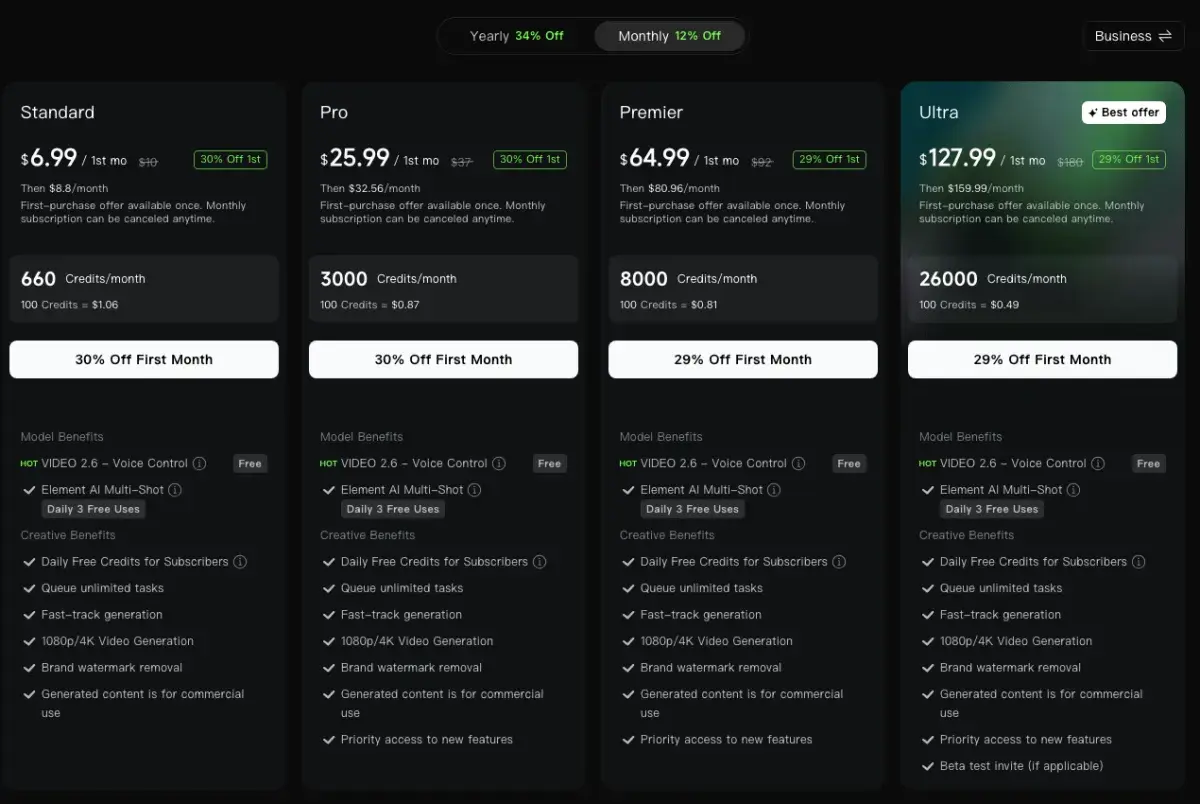
Kling's pricing page shows three numbers for each tier:
a list price, struck through;
a first-month offer, about 30% off, for the first billing period only;
a renewal price, about 12% below list.
In September 2026 that meant Standard at $10 list, $6.99 for the first month and $8.80 per month after it.
Yearly billing is the clean path: a flat 34% off list, every renewal, with no introductory pricing to track. It now covers all four tiers, including Ultra, which had no annual option earlier in 2026.
Credits do not roll over. Subscription credits expire at the end of each billing month: use 600 of Standard's 660 and the last 60 vanish. That penalises uneven production. A quiet month wastes allowance and a busy one means buying top-ups, so size your plan for your busiest month or use the API's pay-as-you-go billing.
Bigger plans buy much cheaper credits. On yearly billing, 100 credits cost $1.00 on Standard and $0.46 on Ultra, less than half. Start a tier lower than you think, track real consumption for 30 days, then upgrade on actual data.
Where it fits
Kling suits creators who need realistic motion and native audio in short-form video: product shots where physics matters, character movement that has to look plausible, anything where the floaty look of weaker models breaks the illusion. Multi-shot sequences make it viable for short scenes rather than isolated clips.
It is also strong for image-to-video, available on free and paid tiers alike and often the more controllable workflow.
It is a weaker choice for character consistency across complex multi-scene work, which Runway handles better and reviewers flag repeatedly; for long extensions, where quality degrades; and for heavy in-app iteration, which belongs on the API for the credit reason above.
Reviewers also note that Kling's prices have trended upward over time, so budget with some headroom.
Runway, PixVerse, Luma, Hailuo and Vidu instead
Against Runway:Runway has more mature creative tooling and better character consistency across complex sequences. Kling wins on motion physics and includes native audio, which Runway does not generate. For narrative work with recurring characters, Runway; for physics-driven shots with sound, Kling. More in Runway vs Kling.
Against PixVerse:PixVerse is cheaper, with a daily free allowance that refills and native audio, aimed at high-volume social output. Kling produces more realistic motion. For volume on a budget, PixVerse; for quality where motion has to convince, Kling. See PixVerse vs Kling.
Against Luma:Luma is now a multi-model platform running Ray 3 alongside Veo and Kling itself, so you can reach Kling through Luma's credits. Luma's own edge is physics in product and architectural shots.
Against Hailuo and Vidu:Hailuo and Vidu compete in the same short-form bracket at similar entry prices. Hailuo renders more realistic faces and does not charge for failed generations, Vidu keeps multiple referenced elements consistent, all three now generate audio, and Kling has the stronger motion. Test your own prompts on all three: Hailuo vs Kling and Kling vs Vidu cover the details.
Kling plans, first-month offers and API rates
Kling's membership page on monthly billing, screenshot taken September 24, 2026.
Plan
Credits / month
Monthly (first month → renewal, list)
Yearly
100 credits (yearly)
Free
66 a day, expire in 24h
$0
n/a
n/a
Standard
660
$6.99 → $8.80 (list $10)
$79.20
$1.00
Pro
3,000
$25.99 → $32.56 (list $37)
$293.04
$0.81
Premier
8,000
$64.99 → $80.96 (list $92)
$728.64
$0.76
Ultra
26,000
$127.99 → $159.99 (list $180)
$1,429.99
$0.46
API
Pay per second
~$0.084 to $0.112/sec via fal.ai
n/a
Failed tasks don't bill
Prices from kling.ai on September 24, 2026. First-month offers are one-time; yearly billing is 34% off list. Free output caps at 720p; paid plans add 1080p and 4K, watermark removal and commercial use. Credits expire monthly with no rollover.
The tier logic, plainly:
Free is a daily test allowance: two short clips.
Standard suits light creation, about a minute of 1080p video with audio a month if you use Draft Mode well.
Pro and Premier are for regular and high-volume production, where fast-track generation and cheaper credits start to matter.
Ultra makes sense only at agency volume, where its $0.46 per 100 credits on yearly billing pays off.
The API is the right answer for heavy iteration or product integration, because failed tasks do not bill and pay-as-you-go avoids the rollover problem.
Kling produces the most physically convincing motion in AI video, and for creators whose work depends on movement looking right (product demos, character action, anything where floaty output breaks the shot) that is the differentiator worth paying for. Kling 3.0's multi-shot sequences, 4K output and native audio with lip sync keep it near the top of the category, and the 60 million-creator user base reflects that.
The cost model needs managing rather than trusting. Credits burn per second, so duration, resolution, audio and retries all multiply. The 66 free daily credits are two clips. Credits expire monthly. The price you see first is usually a one-month offer. And failed generations bill you in the app but not through the API, which makes experimental work much cheaper on the developer side.
Use Draft Mode on every shot, take yearly billing if you are staying, and track real consumption for a month before choosing a tier. For character consistency across complex sequences, Runway still edges ahead.
Disclosure: AIVario earns a commission if you sign up through our link. This does not affect our rating or review; we rate on output quality, credit economics and stated limitations.
Related Tools
Runway: better character consistency across complex sequences
PixVerse: cheaper, with a daily free tier that refills
Luma AI: multi-model platform that includes Kling in its credit system
Hailuo AI: the most realistic faces in the short-form bracket
Vidu: multi-reference consistency and audio in one pass
Per second of generated video, not per clip, which is what catches people out. On Kling 3.0, a 720p clip without audio costs 6 credits per second and 1080p with native audio costs 12. A 5-second 720p clip is 30 credits; a 10-second 1080p clip with audio is 120, and three attempts at it cost 360. Duration, resolution, audio, model version and retries all multiply, so a flat cost-per-video estimate rarely survives real work.
Is Kling's free tier usable?
For evaluation, barely. Logged-in users get 66 credits a day, which expire after 24 hours instead of accumulating, and free output caps at 720p. At 30 credits for a 5-second 720p clip, that is two clips a day: enough to judge Kling's motion quality, not enough to produce anything. Treat it as a daily test allowance rather than a plan.
Do failed generations cost credits?
In the web app, yes. Through the API, no: failed tasks do not consume credits. That matters because complex prompts fail often in AI video. If your work is experimental, the API charges only for output that actually generates, while the same experiments in the app bill every attempt.
Why does Kling show three prices for the same plan?
Because there are three: a struck-through list price, a first-month offer about 30% off, and a renewal price about 12% below list. In September 2026 Standard showed $10 list, $6.99 for the first month and $8.80 after that. Yearly billing is a flat 34% off list on every tier, now including Ultra: Standard costs $79.20 a year and Ultra $1,429.99.
Do unused credits roll over?
No. Subscription credits expire at the end of each billing month, so if you use 600 of Standard's 660 credits the other 60 disappear. That makes uneven production expensive: a quiet month wastes allowance and a busy one means buying top-ups. Size your plan for your busiest month, or use the API's pay-as-you-go billing.
What is Draft Mode and why does it matter?
Draft Mode generates quick previews at roughly 5 to 20 times normal speed, so you can test a prompt before spending full credits on a high-quality render. Because credits burn per second and failed app generations still bill, it is the most effective cost control Kling offers. Prompt in draft, check composition and motion, then render properly.
What's new in Kling 3.0?
Physics-accurate motion is the headline: objects move with convincing weight and characters follow realistic body mechanics. Kling 3.0 also connects up to six shots into one multi-shot sequence, outputs 4K at 60fps and carries over native audio with lip sync from 2.6. Subscribers currently get Video 2.6 with Voice Control free and three daily free uses of Element AI Multi-Shot.
Kling or Runway for character work?
Runway, generally. Kling's advantages are motion physics and native audio, and it is strong on realistic human movement in single shots. Character consistency across complex multi-scene sequences is still weaker than Runway's, and quality drops on longer extensions. For physics-driven single shots with audio, Kling; for recurring characters across a story, Runway.
How much does the Kling API cost?
About $0.084 per second for Standard and $0.112 for Pro through fal.ai, both without audio, with third-party resellers offering Kling 3.0 from around $0.075 per second. The official API pricing page is login-gated, so developer docs and reseller price lists are easier to check. Because failed tasks do not bill, the API is the cheaper route for volume or experimental work.