Runway has turned into a workspace that runs other companies' models, Kling's among them, next to its own. Kling sells its own model directly and charges less for each second of video. So the real question is whether the workspace is worth paying for.
How we compared: both pricing pages checked on September 24, 2026. Runway's per-model credit rates come from the model table on its pricing page. We have not run side-by-side generations.
The short answer
You edit in CapCut, Premiere or DaVinci anyway: Kling AI. Cheaper seconds, native audio, and a daily free allowance.
You want generation, editing and many models in one place: Runway. Gen-4.5, Aleph, Act-Two, Kling, Veo and audio tools share one credit pool.
You compare shots across several models: Runway, the only one of the two that offers more than one model family.
What a second of video costs
Runway's September pricing page lists Gen-4.5, its flagship, at 12 credits per second, half the rate it charged earlier in 2026. Kling bills 12 credits per second for 1080p with audio. Converted into dollars on yearly billing:
| Plan level, yearly billing | Runway Gen-4.5 (silent) | Kling 3.0 Pro with audio, inside Runway | Kling direct, 1080p with audio |
|---|
| Entry | $0.230/s (Standard, $12) | $0.326/s | $0.120/s (Standard, $6.60) |
| Mid | $0.149/s (Pro, $28) | $0.212/s | $0.098/s (Pro, $24.42) |
| Top | $0.096/s (Max, $76) | $0.136/s | $0.055/s (Ultra, $119.17) |
Calculated from each plan's price and credits and the published credit rates: Gen-4.5 at 60 credits per 5 seconds and Kling 3.0 Pro with audio at 85 credits per 5 seconds on Runway; 12 credits per second on Kling. Checked September 24, 2026.
Two things follow. Kling direct costs at least a third less per second than Runway's own Gen-4.5 at every level, and it includes sound, which Gen-4.5 does not. And the same Kling model costs roughly twice as much through Runway as it does from Kling.
On monthly billing the order holds: Runway Pro at $35 works out to $0.187 a second for Gen-4.5, Kling Pro at $32.56 after its first month to $0.130 a second with audio.
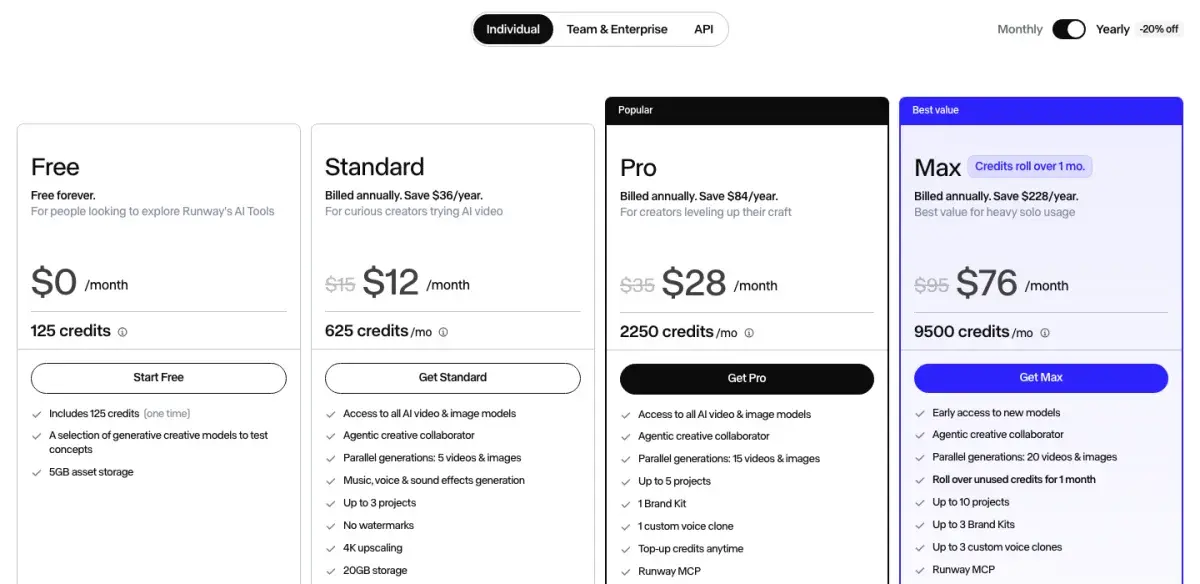
Runway's individual plans on yearly billing, September 24, 2026.
What Runway's workspace adds
Runway's case is everything around the generation. A single subscription reaches Gen-4.5, the Aleph 2.0 editing model, Act-Two performance capture, and third-party models including Kling 3.0, Kling O3, Veo 3.1, Seedance and WAN, plus music, voice and sound-effect generation. Standard and above remove the watermark and include 4K upscaling; Pro adds a custom voice clone and brand kit; Max adds studio formats such as HDR and ProRes.
That matters for two kinds of user. Anyone who shot-matches across models, using Kling for physics, Veo for photorealism and Gen-4.5 for camera work, can do it from one account. And anyone delivering finished work, rather than raw clips, keeps more of the pipeline in one place.
Kling has added breadth too: image generation, motion control, multi-shot scenes and an API. But it remains a generation product. Finished edits happen in another application.
Motion, sound and length
Kling's reputation rests on motion physics. Kling 3.0 is built around physics-accurate movement, with objects that carry weight and characters that follow real body mechanics. Reviewers credit Runway with stronger directed camera movement and consistency across longer takes. Kling for how bodies move, Runway for how the camera moves around them, is a fair summary of public comparisons.
On sound, Kling 3.0 generates dialogue, effects and ambience with lip sync, with dialogue in Chinese, English, Japanese, Korean and Spanish. Runway's Gen-4.5 is silent; you add sound with Runway's audio tools or switch to a model with audio, such as Kling 3.0 or Veo 3.1 at 320 credits per 8-second clip.
On length, a Kling 3.0 generation runs 3 to 15 seconds and can be split into up to six shots.
Free plans and unused credits
Kling gives logged-in users 66 credits a day, enough for two 5-second 720p clips, with output capped at 720p. Runway's free plan is a one-time deposit of 125 credits, about 10 seconds of Gen-4.5, that never renews. Kling is the one you can keep testing on.
Unused paid credits behave differently. Kling's subscription credits expire at the end of each billing month. Runway's Standard and Pro credits reset within 24 hours of the billing date, but Max rolls up to one month of unused credits forward, and top-up credits, sold from 1,000 at a time, never expire. Kling charges failed generations in its web app but not through its API, so experimental work belongs on the API or behind Draft Mode previews.
Runway and Kling side by side
| Runway | Kling AI |
|---|
| What you buy | A multi-model creative workspace | Kling's own model, app and API |
| Entry plan | $15/mo, or $12 yearly, 625 credits | $6.99 first month, then $8.80, 660 credits |
| Mid plan | $35/mo, or $28 yearly, 2,250 credits | $25.99 first month, then $32.56, 3,000 credits |
| Top plan | Max: $95/mo, or $76 yearly, 9,500 credits | Ultra: $127.99 first month, then $159.99, 26,000 credits |
| Flagship rate | Gen-4.5: 12 credits/s, silent | 12 credits/s at 1080p with audio |
| Free plan | 125 credits, once | 66 credits a day |
| Native audio | Via audio tools or third-party models | ✅ Dialogue in 5 languages, lip sync |
| Other models | ✅ Kling, Veo, Seedance, WAN and more | ❌ Kling only |
| Credit rollover | Max only, one month; top-ups never expire | No |
| Try Runway | Try Kling free |
Verdict
Kling AI for most people, and the reason is arithmetic. It costs at least a third less per second than Runway's Gen-4.5 at every plan level, includes sound in that price, and gives 66 free credits a day where Runway gives 125 once. If you already edit in another application, the workspace is not worth the premium.
Runway when you want one place for generation, editing and many models. The gap is narrower than it was in July, now that Gen-4.5 costs 12 credits a second and Max carries 9,500 credits with rollover, and access to Kling, Veo and Seedance from one account is something Kling cannot offer.
For client work, the two combine sensibly: Kling direct for volume generation, Runway Standard for finishing and for shots that need another model. That comes to about $19 a month on yearly billing.
Full reviews: Runway and Kling AI. For the whole category, see the best AI video generators of 2026.
Disclosure: AIVario earns a commission if you sign up through our links. This does not affect our ratings or verdict.
Try Kling AI free
Try RunwayRunway vs Kling AI: frequently asked questions
Is Runway or Kling better in 2026?
Runway is the better workspace, Kling the better price per second. Runway puts Gen-4.5, Aleph, Act-Two, Kling 3.0, Veo 3.1 and audio tools in one subscription. Kling direct generates 1080p video with audio for about $0.098 a second on yearly Pro, against $0.149 for Runway's own Gen-4.5, which is silent. If you finish work inside one tool, Runway; if you edit elsewhere, Kling.
Can I use Kling inside Runway?
Yes. Runway's paid plans include Kling 3.0, Kling O3 and older Kling models alongside Gen-4.5 and Veo 3.1. It costs more than going direct: Kling 3.0 Pro with audio uses 85 Runway credits per 5 seconds, about $0.21 a second on Runway Pro billed yearly, against roughly $0.10 on Kling's own Pro plan billed yearly.
How much do Runway and Kling cost?
Runway Standard is $15 a month or $12 on yearly billing for 625 credits, Pro $35 or $28 for 2,250, and Max $95 or $76 for 9,500 credits that roll over for one month. Kling Standard lists at $10 but costs $6.99 for the first month and $8.80 after that for 660 credits; Pro is $25.99, then $32.56, and yearly billing takes 34% off list.
Which has the better free plan, Runway or Kling?
Kling. It gives logged-in users 66 credits a day, enough for two 5-second 720p clips. Runway's free plan is a one-time deposit of 125 credits, about 10 seconds of Gen-4.5, that never renews. Runway's free credits do not expire, but once they are spent the free plan is finished.
Does Runway generate audio like Kling?
Differently. Kling 3.0 generates dialogue, effects and ambience with lip sync in the same pass as the video. Runway's own Gen-4.5 video is silent, but paid plans include music, voice and sound-effect tools, plus third-party models with audio such as Kling 3.0 and Veo 3.1. On Runway, sound is either a separate step or a more expensive model.
Do Runway and Kling credits roll over?
Mostly not. Kling subscription credits expire at the end of each billing month. Runway's Standard and Pro credits reset within 24 hours of the billing date, but the Max plan rolls up to one month of unused credits forward, and credits bought as top-ups never expire.