Both tools refill free credits every day and both start near $10, which makes them look alike on a pricing page. In use they pull in opposite directions. PixVerse is built for many quick clips; Kling is built for fewer clips that have to move convincingly.
How we compared: Kling's pricing page checked on September 24, 2026, plus Kling's Video 3.0 guides. PixVerse figures come from AIVario's own account in August 2026, with plan prices last verified in April 2026 because PixVerse's plan page blocks automated checks.
The short version
Choose PixVerse if you:
- post short clips to TikTok, Reels or Shorts most days;
- want to stay on a free plan for as long as possible;
- test many styles or ad variants and care about render speed.
Choose Kling if you:
- need people or objects to move with real weight and momentum;
- want spoken dialogue in several languages;
- deliver in 4K, or build scenes from several shots.
EdGrows, who runs AIVario, makes 10 to 12 second clips for YouTube, Instagram and TikTok in PixVerse, and it works well even on the free plan. That is the job PixVerse does best.
Two daily allowances, compared
On paper the free plans are close. PixVerse gives 90 credits at signup plus 60 a day, refilled at midnight UTC. Kling gives logged-in users 66 a day. Both cap free output at 720p with a watermark, and unused credits expire at the end of the day on both.
What the credits buy is different. Kling bills per second: 6 credits a second at 720p without audio, so a 5-second clip costs 30 and the daily allowance covers two. PixVerse drafts are cheaper: in AIVario's account in August 2026, a 1-second 540p V6 clip with audio cost 8 credits, so the allowance covers several quick tests a day. Longer 1080p PixVerse clips cost much more, which brings sustained free output closer to one finished clip a day.
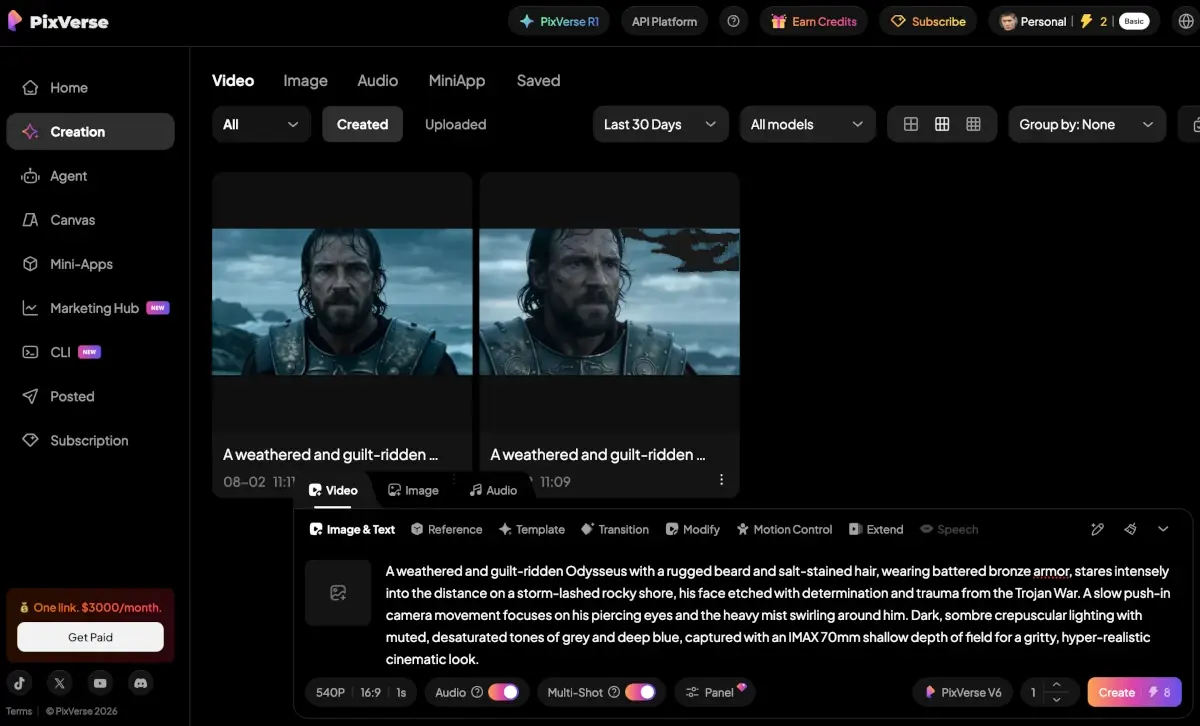
A PixVerse V6 generation at 540p with audio, 8 credits, in AIVario's account in August 2026.
For learning the medium without paying, PixVerse's allowance goes further.
Motion realism
This is Kling's ground. Kuaishou built Kling 3.0 around physics-accurate motion: objects that carry weight, characters that follow real body mechanics, fabric and water that behave. Next to models whose output looks slightly floaty, the difference is obvious when a person walks, turns or picks something up.
PixVerse is optimised for something else. Its Realistic style produces credible short cuts, and V6 improved portraits, but its strengths are stylised, fast-paced and effects-driven clips. In an edit that cuts every two seconds, the gap mostly disappears; in a five-second shot of someone moving, it does not.
Speed and iteration
PixVerse finishes a generation in roughly 30 to 60 seconds. Standard Kling renders take a few minutes. Kling's answer is Draft Mode, which renders previews at roughly 5 to 20 times normal speed so you can check a prompt before paying for the full render.
Speed matters more than it sounds, because most AI video attempts are drafts. It also matters for money on Kling: failed generations in Kling's web app still cost credits (the API does not charge for them), so previewing first is the habit that keeps a plan from running dry.
Sound
Both generate sound in the same pass as the picture, aimed at different jobs. PixVerse added native audio with V5 in August 2025: automatic soundtracks, effects and lip sync that let a social clip publish without an audio stage. Kling generates dialogue, effects and ambience with lip sync, with dialogue in Chinese, English, Japanese, Korean and Spanish, plus dialect and accent support.
A clip that needs a soundtrack is PixVerse's job. A clip that needs a character to speak a scripted line is Kling's.
Plans and prices
| PixVerse | Kling AI |
|---|
| Free | 90 at signup + 60 credits a day, 720p | 66 credits a day, 720p |
| Entry | Standard: $10/mo ($8 yearly), 1,200 credits, 720p | Standard: $6.99 first month, then $8.80 (list $10), 660 credits |
| Mid | Pro: $30/mo ($24 yearly), 6,000 credits, 1080p | Pro: $25.99 first month, then $32.56 (list $37), 3,000 credits |
| Higher | Premium $60 (15,000); Ultra $149 billed yearly (25,000, 4K) | Premier $64.99, then $80.96 (8,000); Ultra $127.99, then $159.99 (26,000) |
| Yearly discount | About 20% | 34% off list on every tier |
| How credits are spent | Per generation, by model, length and resolution | Per second: 6 at 720p silent, 12 at 1080p with audio |
| Failed generations | Not stated | Charged in the app, not via the API |
Kling checked on September 24, 2026. PixVerse plan prices last verified in April 2026; confirm in the app before subscribing.
At the entry level PixVerse gives more credits for the money, Kling gives 1080p and 4K on paid plans, and PixVerse's plan table lists 4K output on its $149 Ultra plan. Kling Standard's 660 credits buy 55 seconds of 1080p video with audio a month, so anyone producing daily will outgrow it quickly.
PixVerse wraps its model in a toolbox for social formats: Realistic, Anime, Clay and 3D styles, an Agent for plain-language prompting, multi-shot, motion control and extend, and Mini-Apps such as Storyboard, VibeMV for music videos, Avatar Lip Sync and Ad Master.
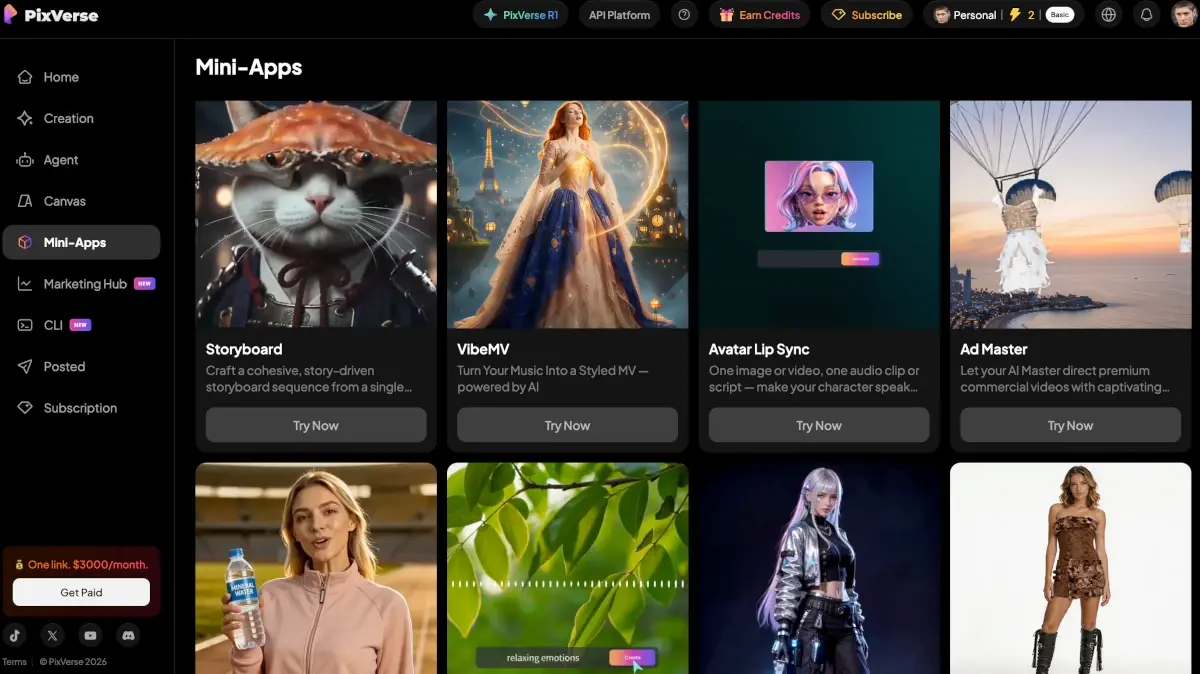
PixVerse Mini-Apps: ready-made workflows for storyboards, music videos, lip sync and ads.
Kling's tools are aimed at directing a scene: multi-shot generation of up to six shots within a 15-second clip, image-to-video on every plan, and an extend feature for continuing a clip, with quality that drifts on long extensions.
PixVerse and Kling side by side
| PixVerse | Kling AI |
|---|
| Maker | Aishi Technology, Beijing | Kuaishou |
| Current model | PixVerse V6 | Kling 3.0 |
| Free credits | 60 a day (+90 at signup) | 66 a day |
| Render speed | 30 to 60 s | A few minutes; Draft Mode previews |
| Clip length | Up to about 12 s, multi-shot | 3 to 15 s, up to 6 shots |
| Native audio | ✅ Soundtracks, effects, lip sync | ✅ Dialogue in 5 languages, lip sync |
| Motion realism | ⚠️ Good for short cuts | ✅ Category-leading |
| Top resolution | 1080p (4K on Ultra) | 4K on paid plans |
| Styles and templates | ✅ 4 styles, Agent, Mini-Apps | ⚠️ Scene tools rather than templates |
| Try PixVerse free | Try Kling free |
Our pick
PixVerse for most people making short social video. The free allowance lasts longer on short drafts, renders finish in under a minute, and the styles and Mini-Apps are built for exactly the clips that fill TikTok and Reels. You can learn the medium and publish for months before paying anything.
Kling AI for fewer clips that have to hold up: realistic motion, dialogue in five languages, multi-shot scenes and 4K delivery. Use Draft Mode on every shot, because failed attempts in the app still cost credits.
Many creators use both: PixVerse as the daily workhorse, Kling for the occasional shot that needs convincing movement. PixVerse Standard plus Kling Standard on yearly billing comes to about $15 a month.
Full reviews: PixVerse and Kling AI. For the wider field, see the best AI video generators of 2026, and for the rest of a creator's toolkit, the best AI tools for YouTubers.
Disclosure: AIVario earns a commission if you sign up through our links. This does not affect our ratings or which tool we recommend.
Try PixVerse free (60 credits a day)
Try Kling AI freePixVerse vs Kling AI: frequently asked questions
Is PixVerse or Kling better in 2026?
PixVerse for daily social volume, Kling for shots that need realistic motion. PixVerse gives 60 free credits a day, renders in 30 to 60 seconds and ships styles and templates built for TikTok and Reels. Kling 3.0 has the strongest motion physics in the accessible tier, five-language dialogue and 4K on paid plans. Most short-form creators are better off starting with PixVerse.
Which free plan goes further, PixVerse or Kling?
PixVerse, on short drafts. Both refill daily: PixVerse gives 60 credits (plus 90 at signup) and Kling 66, both at up to 720p, and unused credits expire each day. Kling bills 6 credits per second at 720p without audio, so one 5-second clip uses 30. In AIVario's PixVerse account, a 1-second 540p V6 draft with audio cost 8 credits.
Which produces more realistic motion, PixVerse or Kling?
Kling. Kuaishou built Kling 3.0 around physics-accurate movement: objects with weight, characters that follow real body mechanics, fabric that behaves. PixVerse's Realistic style is credible for short cuts, but its strengths are stylised, fast-paced and effects-driven clips. When a person moves across the frame for several seconds, Kling holds together better.
How much do PixVerse and Kling cost per month?
PixVerse Standard is $10 a month ($8 yearly) for 1,200 credits at 720p, and Pro is $30 for 6,000 credits at 1080p, prices last verified in April 2026. Kling Standard lists at $10 but costs $6.99 for the first month and $8.80 after that, for 660 credits; Pro is $25.99, then $32.56, for 3,000. Kling bills 12 credits per second for 1080p with audio.
Do PixVerse and Kling generate audio?
Both do. PixVerse has generated soundtracks, sound effects and lip sync since V5 in August 2025, aimed at social clips that publish without an audio pass. Kling generates dialogue, effects and ambience with lip sync, with dialogue in Chinese, English, Japanese, Korean and Spanish. For a soundtrack, PixVerse; for scripted dialogue, Kling.
Which renders faster, PixVerse or Kling?
PixVerse, typically in 30 to 60 seconds per generation. Standard Kling renders take a few minutes, although Draft Mode produces quick previews at roughly 5 to 20 times normal speed. When most attempts are drafts, faster renders mean more attempts per hour.