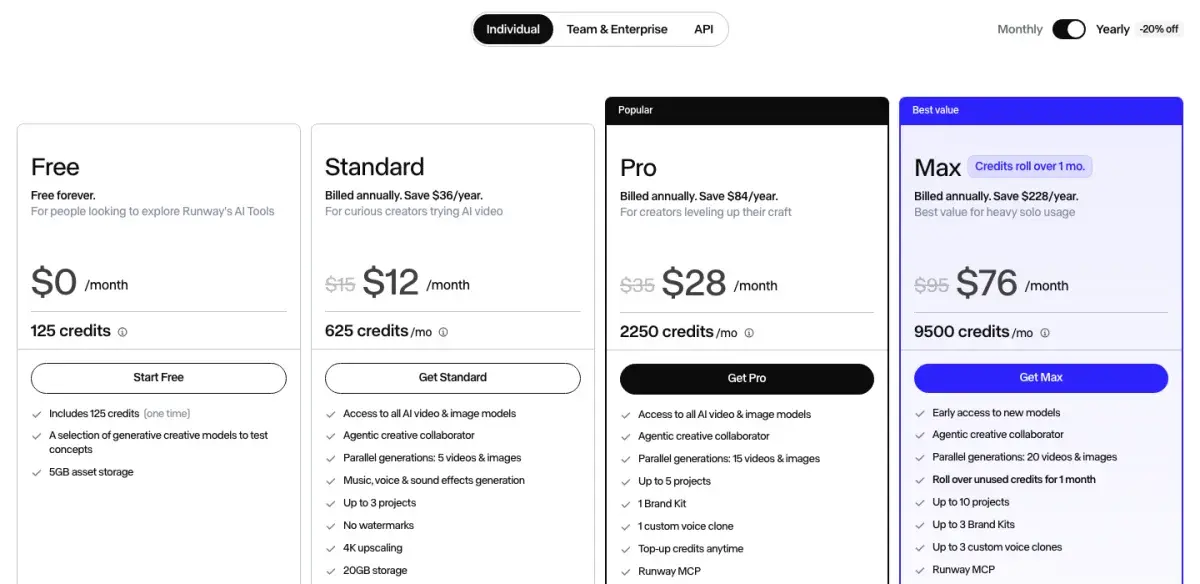
Runway is an AI video workspace that runs its own Gen-4.5, Aleph and Act-Two models alongside third-party models such as Kling 3.0, Veo 3.1 and Seedance. Standard costs $15 a month ($12 yearly) for 625 credits, about 52 seconds of Gen-4.5; Pro costs $35 ($28) for 2,250; Max costs $95 ($76) for 9,500 credits that roll over for a month. The free plan is 125 credits, once.
✓Best for: Creators and agencies who want generation, editing and several video models in one workspace
✗Skip if: You only need raw clips and edit elsewhere: Kling direct costs less per second
This analysis is based on documentation, public user reports, and vendor materials — not yet on our own hands-on testing. How we rate
Runway homepage, captured Sep 24, 2026.
What Runway is now
Runway was the default answer to "what do professionals use for AI video" before most of its competitors existed. In 2026 it is less a single model than a workspace. One subscription reaches Runway's own Gen-4.5, the Aleph 2.0 editing model and Act-Two performance capture, plus third-party models including Kling 3.0, Kling O3, Veo 3.1, Seedance and WAN, and tools for music, voice and sound effects. An agentic creative collaborator and a Runway MCP connector sit on top, and there are iOS and Android apps next to the web app.
Runway says more than 60 million creators use it. The practical point is simpler: if you pay separately for Runway, Kling and some route to Veo, one Runway plan can replace all three bills, at a higher price per second for the third-party models.
What changed in 2026
Three changes make most older Runway coverage, including an earlier version of this review, out of date.
Gen-4.5 got cheaper: the pricing page now lists it at 12 credits per second (60 credits per 5-second clip), roughly half the rate reported earlier in the year.
Unlimited is gone: the $95 tier used to carry the same 2,250 credits as Pro plus a relaxed Explore Mode, and users noticed. Its replacement, Max, costs the same $95 a month ($76 yearly) and carries 9,500 credits, with up to one month of unused credits rolling over.
Standard does more, since the $15 plan now includes every AI video and image model, music, voice and sound-effect generation, no watermarks and 4K upscaling.
What the credits buy
Credits are spent per generation, and the rate depends on the model. Selected rates from Runway's plan table:
Model
Credits
Per second
Standard (625)
Pro (2,250)
Max (9,500)
Gen-4.5
60 per 5 s
12
~52 s
~187 s
~791 s
Gen-4 Turbo
25 per 5 s
5
~125 s
~450 s
~1,900 s
Kling 3.0 Std, with audio
65 per 5 s
13
~48 s
~173 s
~730 s
Kling 3.0 Pro, with audio
85 per 5 s
17
~36 s
~132 s
~558 s
Veo 3.1, with audio
320 per 8 s
40
~15 s
~56 s
~237 s
Aleph 2.0
140 per 5 s
28
~22 s
~80 s
~339 s
From runway.com/pricing, September 24, 2026. Runway's plan cards quote 104 seconds of Gen-4 Turbo on Standard and 375 on Pro, which implies 6 credits a second; the table uses the 25 credits per 5 seconds listed in its model table.
Those are seconds generated, not seconds kept. AI video fails often on complex shots, so a month of Pro is 187 seconds of Gen-4.5 output including every attempt that did not work.
Images and audio draw from the same pool: a 1080p Gen-4 image costs 8 credits, a Nano Banana Pro image at 2K 20, text to speech 1 credit per 50 characters, and text to sound effects 1 credit per second.
Runway plans: Standard, Pro, Max and Team
Runway's individual plans on yearly billing, screenshot taken September 24, 2026.
Plan
Monthly
Yearly (per month)
Credits
What stands out
Free
$0
$0
125, once
A selection of models, 5 GB storage
Standard
$15
$12
625/mo
All models, audio tools, no watermark, 4K upscaling, 20 GB
One month of rollover, HDR and ProRes, 20 parallel jobs, 500 GB
Team
$69 per seat
$55 per seat
165,600/yr for 2 seats
Shared pool for 2 to 9 members, SSO, 1 TB
Enterprise
Custom
Custom
Custom
SOC 2 and ISO 27001, no training on your data
Yearly billing saves 20%. Standard and Pro credits reset within 24 hours of the billing date; Max and Team roll one month forward. Top-up credits are sold from 1,000 and never expire.
The tier logic is clearer than it used to be. Free is a demo: 125 credits is about 10 seconds of Gen-4.5, and it never renews. Standard at $12 yearly is the cheapest plan for clean, deliverable footage. Pro gives 3.6 times Standard's credits for 2.3 times the price. Max now earns its name: 4.2 times Pro's credits for 2.7 times the price, with rollover.
The habit that stretches credits
Gen-4 Turbo costs 25 credits per 5 seconds against 60 for Gen-4.5. Block out a scene on Turbo, check composition, camera movement and whether the idea works, and re-render only the takes you keep on Gen-4.5. On Standard, that turns about 52 seconds of flagship output into enough drafts to find the shots worth rendering.
The same logic applies across models. Test a shot on a cheaper model before sending it to Veo 3.1, which costs 40 credits per second, more than three times Gen-4.5.
The workspace against the price per second
Runway's advantage is everything around generation. Aleph edits existing video, Act-Two maps a recorded performance onto a character, and the workspace keeps projects, brand kits and voice clones together, with frame-accurate comments and shared projects on Team plans. Picking Kling 3.0 for physics, Veo 3.1 for photorealism with sound or Gen-4.5 for directed camera work from one account and one credit pool is something no single-model tool offers, and reviewers consistently rate Runway above Kling for keeping characters and lighting steady across multi-scene work.
The disadvantage is cost per second. Kling direct generates 1080p video with audio for about $0.098 a second on yearly Pro, while Runway's silent Gen-4.5 costs about $0.149 on the same kind of plan, and the same Kling model costs about twice as much inside Runway as from Kling. Gen-4.5 has no sound, so audio means another tool or a pricier third-party model, and the free plan's 125 one-time credits are an evaluation next to PixVerse's 60 and Kling's 66 daily credits.
Kling, Luma, Hailuo or Descript instead
Against Kling: Kling has the stronger motion physics, native audio in five languages and a lower price per second; Runway has the workspace, the other models and stronger consistency across sequences. For raw clips edited elsewhere, Kling. For finishing work in one place, Runway. The numbers are in Runway vs Kling.
Against Luma AI: Luma is also a multi-model platform, running Ray 3 next to Veo and Kling, with plans from $30 a month. Luma leans on physics for product and architectural shots; Runway on editing tools and team features.
Against Hailuo AI and PixVerse: both are far cheaper for short social clips, and both generate sound with the video. Hailuo leads on realistic faces, PixVerse on free daily volume. If you are making TikToks rather than client deliverables, start there.
Against Descript: Descript edits footage you already have, by editing the transcript. Different job, and the two pair well: generate in Runway, assemble and caption in Descript.
Is Runway worth it?
For filmmakers, agencies and teams who want generation, editing and several video models in one place, yes, and the 2026 changes make the case stronger. Gen-4.5 costs half what it did, Max finally delivers more credits than Pro, rollover exists on Max and Team, and Standard includes every model and the audio tools.
For raw generation on a budget, no. Kling, Hailuo and PixVerse cost less per second and generate sound in the same pass, and Runway's workspace goes unused if you edit in CapCut or Premiere anyway.
Start on Standard, draft on Gen-4 Turbo, and move to Pro or Max once you know how many seconds a month you really keep.
Runway does not have an affiliate arrangement with AIVario. We earn no commission from it, and this rating carries no commercial incentive.
Related Tools
Kling AI: stronger motion physics at a lower price per second, also available inside Runway
Luma AI: another multi-model platform, strong on physics
Hailuo AI: realistic people in 2K with native sound, from $10.50 a month
PixVerse: 60 free credits a day for short social clips
Veo: Google's top model with native audio, also available inside Runway
Descript: assemble and caption what Runway generates
What do Runway's Standard, Pro and Max plans cost?
Free gives 125 one-time credits. Standard costs $15 a month or $12 billed yearly for 625 credits, Pro $35 or $28 for 2,250, and Max $95 or $76 for 9,500 credits that roll over for one month. The Team plan costs $69 a seat per month, or $55 yearly, with a shared credit pool; Enterprise is priced on request.
How many seconds of video do Runway credits buy?
It depends on the model. Gen-4.5 and Gen-4 use 12 credits per second, Gen-4 Turbo 5, Kling 3.0 Pro with audio 17 and Veo 3.1 with audio 40. So Standard's 625 credits buy about 52 seconds of Gen-4.5, Pro's 2,250 about 187 seconds and Max's 9,500 about 791 seconds, and Gen-4 Turbo stretches each plan more than twice as far. Those totals include failed attempts.
What happened to Runway's Unlimited plan?
It has been replaced. Earlier in 2026 Unlimited cost $95 a month and carried the same 2,250 credits as Pro plus a relaxed Explore Mode, which drew complaints from users. The September 2026 pricing page lists Max instead: the same $95 a month ($76 yearly), 9,500 credits, one month of credit rollover, 20 parallel generations and studio formats such as HDR and ProRes.
Can I use Kling and Veo inside Runway?
Yes. Paid plans include third-party models such as Kling 3.0, Kling O3, Veo 3.1, Seedance and WAN alongside Runway's own Gen-4.5, Aleph and Act-Two. They cost more than going direct: Kling 3.0 Pro with audio uses 85 credits per 5 seconds, about $0.21 a second on Pro billed yearly, against roughly $0.10 on Kling's own Pro plan.
Do Runway credits roll over?
On Standard and Pro, no: monthly credits reset within 24 hours of your billing date. Max and Team roll up to one month of unused credits forward. Credits you buy as top-ups, from 1,000 at a time, never expire, which makes them the better buffer for uneven production.
Does Runway generate audio?
Not with its own Gen-4.5 model, which produces silent video. Paid plans include music, voice and sound-effect generation (text to sound effects costs 1 credit per second), plus third-party models with native audio such as Kling 3.0 and Veo 3.1. On Runway, sound is either a separate step or a more expensive model.
Are Runway credits shared across a team?
On the Team plan, yes. It pools credits for 2 to 9 members in one workspace, with 165,600 credits a year for two seats and one month of rollover. Everyone draws from the same pool, so size the plan for the team's combined output rather than its headcount.
Is Runway worth it compared with Kling?
If you want one workspace for generation, editing and several models, yes. If you only need raw clips and edit elsewhere, Kling direct is cheaper: about $0.098 a second for 1080p with audio on yearly Pro, against $0.149 for Runway's silent Gen-4.5. Runway's advantage is everything around the generation.