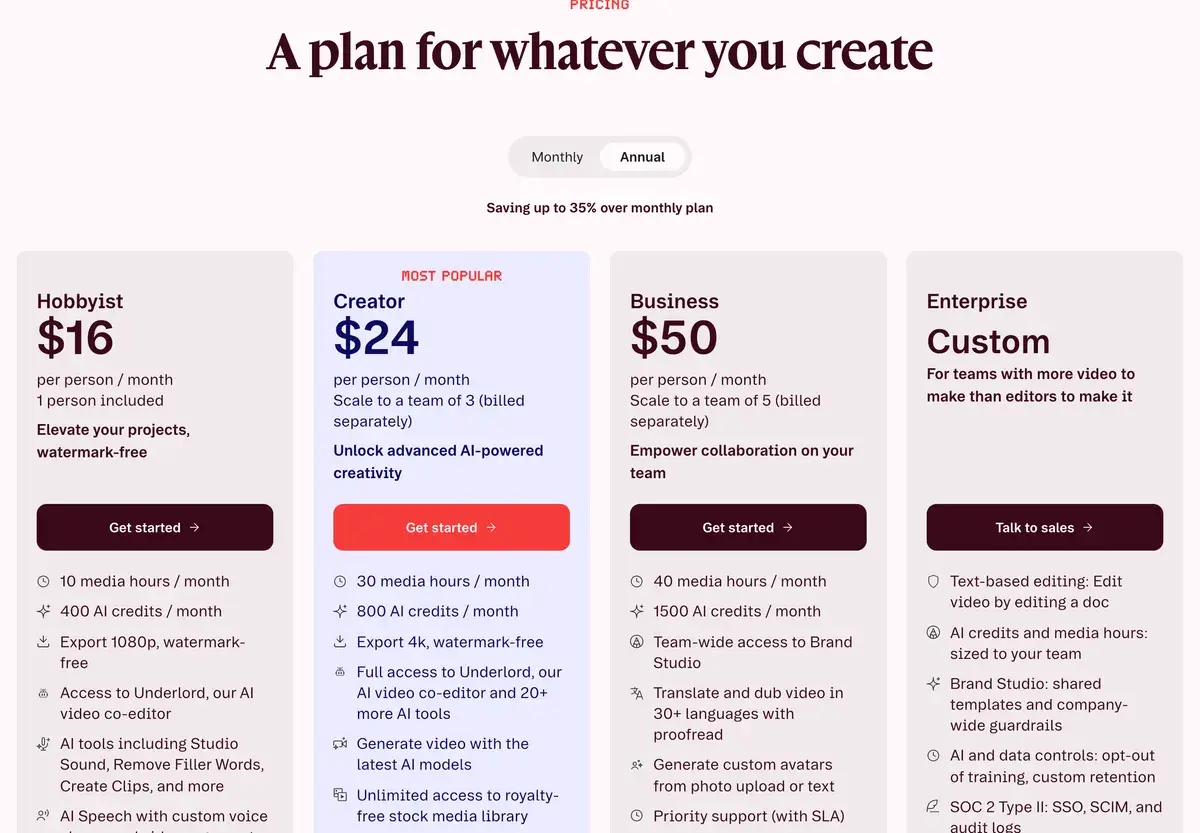
Descript edits video and podcasts by editing a transcript, with an AI co-editor called Underlord that removes retakes and filler words, cleans audio and cuts clips on request. Billed yearly, Hobbyist costs $16 a month for 10 media hours and 400 AI credits, Creator $24 for 30 hours, 800 credits and 4K export, and Business $50 for 40 hours, 1,500 credits, dubbing and custom avatars; monthly billing costs $24, $35 and $65. The free plan gives 60 media minutes a month and 100 AI credits once.
✓Best for: Podcasters, YouTubers and teams whose videos are mostly people talking, from interviews to tutorials
✗Skip if: You edit music videos, cinematic footage or effects-heavy shorts, where a timeline editor fits better
This analysis is based on documentation, public user reports, and vendor materials — not yet on our own hands-on testing. How we rate
Descript homepage, captured Sep 28, 2026.
Editing video by editing the transcript
Descript turns recordings into documents. Upload or record audio and video, and Descript transcribes it; delete a sentence from the transcript and it disappears from the video. That model makes editing talk-driven content, podcasts, interviews, tutorials, webinars and talking-head videos, far faster than working on a timeline, and Descript says more than 6 million creators and teams use it.
On top of transcript editing, Descript has built an AI co-editor called Underlord. You tell it what you want in plain language, and it removes repeated takes and long pauses, applies Studio Sound, cuts clips for social media or drafts show notes, leaving the result for you to review. The toolkit around it includes Remove Filler Words, Eye Contact correction, Green Screen, automatic multicam, AI voices and voice clones, avatars, translation and dubbing, remote recording in Rooms and screen recording.
Hobbyist, Creator and Business compared
Descript's plans on annual billing as of September 28, 2026.
Plan
Yearly (per person, per month)
Monthly
Media hours a month
AI credits a month
Export
Seats
Free
$0
$0
1
100, one time
720p
1
Hobbyist
$16
$24
10
400
1080p
1
Creator
$24
$35
30
800
4K
Up to 3
Business
$50
$65
40
1,500
4K
Up to 5
Enterprise
Custom
Custom
Custom
Custom
4K
Custom
Extra seats on Creator and Business are billed separately. Descript offers special rates for students, educators and non-profits.
Two meters: media hours and AI credits
Descript meters two things, and it pays to know which one you will hit first.
Media hours count what you bring in: every file you upload and everything you record in Descript, transcribed or not. A weekly one-hour video podcast with two camera angles already uses 8 to 10 hours a month, which is the whole Hobbyist allowance.
AI credits count what the AI does. Studio Sound and Remove Filler Words are capped at 30 credits per file, so they stay predictable. Underlord is the variable one: Descript says each request may use a different model and there is no fixed price per action, with the real cost shown afterwards in the Usage tab. Neither meter rolls over, and top-ups are available on Creator and Business.
Limits beyond the meters
Limit
Free
Hobbyist
Creator
Business
Remote recording in Rooms
2 hours
5 hours a month
15 hours a month
25 hours a month
Web link video length
1 hour
1 hour
3 hours
3 hours
Upload size per file
1 GB
10 GB
20 GB
50 GB
Cloud storage
5 GB
100 GB
1 TB
2 TB
Stock media search
First 5 results
First 12 results
Unlimited
Unlimited
Transcription covers 25 languages on every plan. Business adds translation and dubbing into 30+ languages with proofreading, custom avatars from a photo or text, team-wide Brand Studio and priority support with an SLA.
Why podcasters stay, and what pushes some away
For speech, Descript is hard to beat. Cutting an interview by deleting words, stripping filler words and retakes in one pass and repairing audio with Studio Sound saves hours on every episode, and Underlord makes its edits inside your project rather than generating something separate, so the final cut stays yours. Timeline export to Premiere, Final Cut Pro, Pro Tools, Logic and Audition lets Descript serve as the rough-cut tool in a professional pipeline.
The friction comes from the meters and the format. A long recording can use up media hours before the credits run low, while heavy Underlord sessions drain credits in ways that are hard to predict. Motion graphics, color work and effects-heavy short-form are easier in a timeline tool such as CapCut, and the free plan, with one hour of media a month, a one-time credit grant and 720p export, works as a trial rather than a tier.
Recording in Riverside, editing in Descript
The most common pairing among podcasters is to record in Riverside, which captures each remote guest locally in up to 4K, and edit in Descript, although Riverside now has text-based editing of its own. Async, formerly Podcastle, covers recording and AI editing for less money. For screen recordings that edit themselves, Tella is more focused, and ElevenLabs leads for AI voices and dubbing on their own.
Picking a plan by how much you record
A solo audio podcast or a few short videos a month fit Hobbyist's 10 media hours. A weekly video show with two cameras fills that allowance, which is why Creator, with 30 hours, 4K export and more credits, is the plan most regular video podcasters end up on. Business is worth it for teams that dub content into other languages, need custom avatars or want shared brand templates.
Related Tools
Riverside: remote recording in up to 4K with AI editing
CapCut: template-driven editor for short-form video
Podcastle: now Async, podcast recording and AI editing
Free gives 60 media minutes a month, 100 AI credits once and 720p export. Hobbyist costs $16 a month billed yearly ($24 monthly) for 10 media hours, 400 AI credits and 1080p export. Creator costs $24 ($35) for 30 hours, 800 credits, 4K export and unlimited stock media. Business costs $50 ($65) for 40 hours, 1,500 credits, Brand Studio, dubbing and custom avatars. Enterprise is custom.
What are media hours and AI credits in Descript?
Two separate allowances. Media hours count the audio and video you upload or record in Descript, whether or not you transcribe it. AI credits pay for AI features such as Underlord, Studio Sound, Green Screen, Eye Contact and AI-generated media and avatars. Both reset each billing cycle and do not roll over; Creator and Business can buy top-ups.
How many AI credits does a Descript feature use?
It depends on the feature and the length of the media. Descript's help center says Studio Sound and Remove Filler Words cost at most 30 credits per file, while Underlord has no fixed price: each request can use a different model, so two similar requests may cost different amounts. The Usage tab shows what every run cost.
What is Descript Underlord?
Descript's AI co-editor. You describe what you want in plain language, such as removing retakes and long pauses, enhancing the audio or cutting clips for social media, and Underlord makes the edits in your project, which you can then review and adjust. Every paid plan includes it; Free has limited access.
Can Descript record remote interviews?
Yes, through Descript Rooms, with up to 10 participants and cloud backup recordings for every session. Recording time is capped per drive: 2 hours on Free, 5 hours a month on Hobbyist, 15 on Creator and 25 on Business. For interviews where each guest's local recording matters most, Riverside is the specialist.
Does Descript work with Premiere Pro and other editors?
Yes. Descript can export a timeline to Adobe Premiere, Final Cut Pro, Pro Tools, Logic, Adobe Audition, Reaper and Samplitude, so you can cut the story in Descript and finish color or sound in a dedicated editor.
Which Descript plan suits a weekly video podcast?
Usually Creator. A weekly one-hour show with two cameras uses around 8 to 10 media hours a month before clips and retakes, which fills Hobbyist's 10 hours; Creator's 30 hours, 4K export and extra AI credits leave room for social clips. A solo audio podcast fits Hobbyist.
Is Descript better than Riverside?
They lead in different steps. Riverside is the stronger recorder, capturing each remote guest locally in up to 4K. Descript is the deeper editor, with transcript editing, Underlord and more AI tools. Many podcasters record in Riverside and edit in Descript, although both now cover recording and editing.