Canva AI

Canva AI

★ Top rated
AI Design Platform

The world's most popular design tool, now AI-powered. Magic Design, Magic Write, text-to-image, and one-click design from text prompts.

Free · $15/mo Pro · $30/user/mo Teams · Custom Enterprise
📖 14 min read
Try Canva AI for free

Affiliate link — we may earn a commission

Ready to try it?
Canva AI
Free · $15/mo Pro · $30/user/mo Teams · Custom Enterprise
Get started →
Affiliate link — we may earn a commission
Our rating
4.7/ 5
AIVario Editor's rating →

What is Canva AI?

Canva is the world's most popular design platform, used by over 200 million people monthly across consumer, small business, and enterprise contexts. Founded in 2013, Canva democratized design by making professional-quality outputs accessible to non-designers through templates, drag-and-drop interface, and extensive asset libraries. The platform's AI evolution through 2023-2026 with Magic Studio brought generative AI features into the mainstream design workflow used by hundreds of millions of users.

The platform's distinguishing characteristic is the combination of accessibility and professional output. Users without design training can create work that looks professionally designed because Canva's templates and AI features handle the principles of good design. The trade-off is less customization and more "Canva-looking" output than dedicated design tools — but for most users, this trade-off favors Canva clearly.

Canva's AI features (Magic Studio) are integrated throughout the platform rather than separate AI tool. Magic Design generates complete designs from prompts; Magic Write creates copy; Magic Eraser removes objects from images; Magic Edit modifies images with text instructions. The integration matters — users don't switch between tools but use AI within their existing design workflow.

Who is it for?

Canva fits anyone needing design output without dedicated design skills. The audience is genuinely broad — from teenagers creating social media graphics to enterprise marketing teams producing campaigns. The pricing structure (generous free tier, reasonable Pro tier) accommodates this breadth. Specific user types where Canva fits:

  • Small business owners creating marketing materials, social posts, and basic branding.
  • Content creators on social media (Instagram, TikTok, YouTube) producing graphics for their content.
  • Marketing professionals creating campaign assets, social posts, and presentations.
  • Startups without dedicated designers producing brand materials and marketing collateral.
  • Educators creating classroom materials, presentations, and visual aids.
  • Non-profits and community organizations with limited budget for professional design.
  • Real estate agents and small service businesses producing property listings, ads, and promotional materials.
  • Newsletters and bloggers creating header images, social shares, and visual content.

User types where Canva may not fit:

  • Professional designers producing high-end work where custom design matters strategically.
  • Brand-heavy enterprises needing strict brand consistency beyond template-driven design.
  • Ecommerce brands needing professional product photography editing (use Photoshop or specialized tools).
  • Print designers producing complex print materials with specific technical requirements.
  • Advanced photo editing workflows requiring layers, masking, and detailed manipulation.
  • Very high-volume design production where automation through APIs matters.
  • Brand guidelines requiring custom typography and fully unique design.

Key Features

The Canva feature set is extensive. The features below cover the most differentiating capabilities.

Massive template library with millions of templates across hundreds of design types. Social media posts, presentations, posters, business cards, newsletters, videos, animations, and more. Templates accelerate work for typical design needs substantially. Quality varies but premium templates are competitive with custom design.

Magic Design AI generates complete designs from text prompts. Specify design type and content; AI produces design with appropriate template, imagery, and copy. Available on free tier with limits, fully on Pro. Quality is consistently good for typical marketing and social design.

Magic Studio AI features including Magic Write (copy generation), Magic Eraser (object removal), Magic Edit (image modification), Magic Switch (format conversion), Magic Resize, AI background remover, and AI image generation. The AI capability spans most common design tasks beyond just generation.

Brand Kit for consistent brand application across designs. Upload logos, set brand colors, define brand fonts. Templates use brand kit automatically. Available on Pro plan and above. Useful for businesses producing consistent branded materials.

Stock library with over 100 million premium photos, videos, and elements. Available on Pro and above; free tier has limited but adequate selection. The combined library size exceeds dedicated stock services for most needs.

Video editing with timeline-based interface, transitions, animations, and stock video. Less powerful than dedicated video editors (Premiere, Final Cut) but adequate for social video, marketing videos, and presentations. Video AI features include captions and translation.

Presentation tools competitive with PowerPoint and Google Slides. Templates focused on professional presentations with modern design. Smart shapes and AI-suggested layouts speed presentation creation.

Document creation for newsletters, reports, ebooks, and other text-heavy materials. Less full-featured than Google Docs or Word but optimized for visual content. Useful for marketing materials and creative documents.

Print services integration for ordering printed materials directly from Canva. Business cards, posters, t-shirts, mugs, and more. Convenient workflow for users producing physical materials.

Team collaboration with shared brand kits, real-time collaboration on designs, comment threads, and approval workflows. On Pro and Teams plans.

Content Planner for scheduling social media content directly from Canva. Replaces separate scheduling tools (Buffer, Hootsuite) for users wanting integrated workflow. Less feature-rich than dedicated scheduling but adequate for basic needs.

Mobile apps with full functionality across iOS and Android. Mobile-first creation workflow possible for users primarily on phones and tablets.

Education-specific features including Canva for Education with free Pro features for teachers and students, classroom management, and education-focused templates.

Canva vs Competitors 2026

ToolStrengthPricingBest For
CanvaLargest template library, accessible UXFree / $15+/moGeneral design needs across all audiences
Adobe ExpressAdobe ecosystem integrationFree / $9.99-22.99Adobe Creative Cloud users
FigmaProfessional design toolFree / $12-45/moProfessional designers, design systems
Adobe PhotoshopPhoto editing depth$22.99/moProfessional photo editing
VismeData visualization focusFree / $15-29/moInfographics, data design
Beautiful.aiPresentation focus$12-40/moPure presentation creation
PitchModern presentationsFree / $20/moStartup presentations
Crello/Vista CreateCanva alternativeFree / $7.99+Budget-conscious Canva alternative

Pricing verified April 2026.

Canva vs Adobe Express. Most direct comparison. Both target similar audience with template-driven design. Canva has larger template library, more polished UX, and broader user adoption. Adobe Express has tighter Adobe Creative Cloud integration. For users not invested in Adobe, Canva. For Adobe ecosystem users, Express integration matters. Pricing is similar at low tiers; Canva is generally preferred outside Adobe-committed users.

Canva vs Figma. Different audiences entirely. Figma targets professional designers building design systems and complex interfaces. Canva targets non-designers needing accessible design. For professional product design, Figma. For marketing and social design, Canva. Some teams use both — Figma for product, Canva for marketing.

Canva vs Photoshop. Different categories. Photoshop is professional photo editing and complex design. Canva is template-driven accessible design. For professional photography work, Photoshop. For marketing and template-driven design, Canva. Most modern marketing teams use Canva primarily with occasional Photoshop for advanced photo work.

Canva vs Visme. Visme focuses more heavily on data visualization, infographics, and report design. Canva is broader general design. For data-driven content specifically, Visme has stronger features. For general design, Canva's breadth matters more.

Canva vs Beautiful.ai. Beautiful.ai focuses specifically on presentations with AI-suggested layouts. Canva handles presentations alongside everything else. For pure presentation focus, Beautiful.ai may produce slightly better presentation-specific output. For broader design needs, Canva is more flexible.

Canva vs Pitch. Pitch is modern presentation tool with collaboration features popular among startups. Canva is broader design tool that includes presentations. For startup-focused presentation work, Pitch. For mixed design needs, Canva.

Canva vs Crello/Vista Create. Crello (now Vista Create) is direct Canva alternative at lower price. Smaller template library and less polished UX but adequate for basic needs at budget pricing. For cost-sensitive users wanting Canva-like experience, Vista Create may fit. For most users, Canva's slight premium delivers significantly better experience.

Pricing 2026

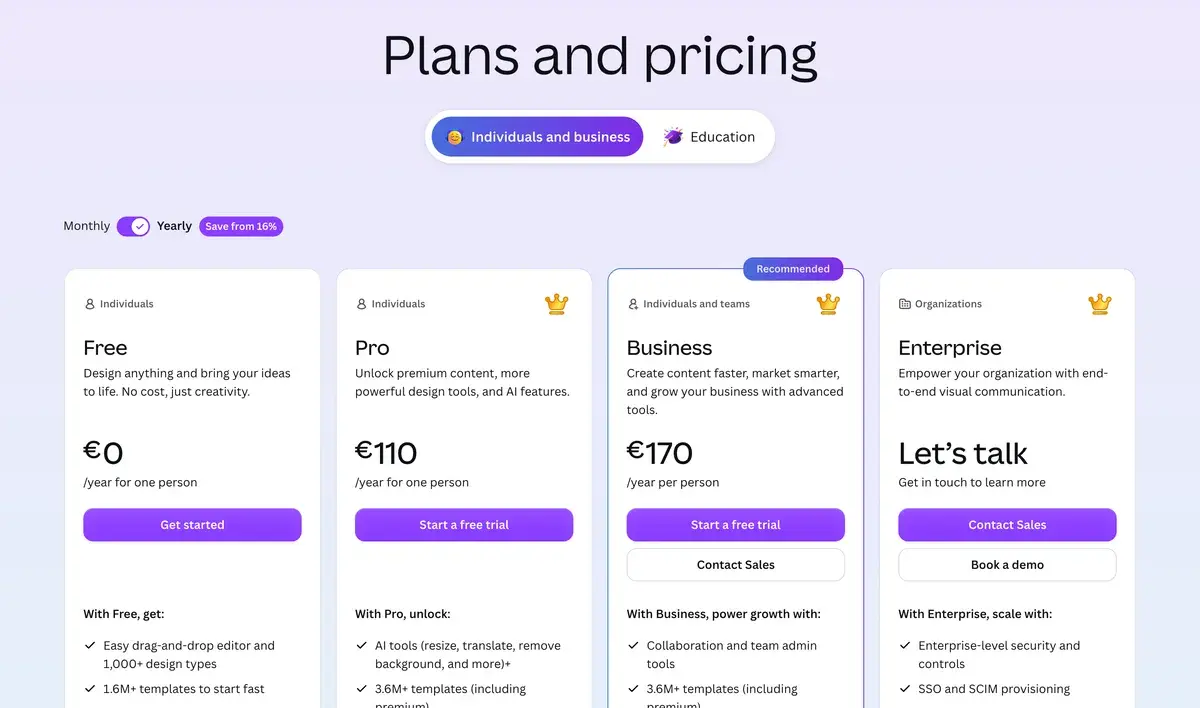
PlanMonthly CostKey FeaturesBest For
Free$0Millions of templates, basic AI, unlimited designsCasual users, small businesses with simple needs
Pro$15/moMagic Studio AI, brand kit, premium content, background removerMost active users, small businesses
Teams$30/user/mo (5 users min)All Pro + team collaboration, admin controlsMarketing teams, agencies
EnterpriseCustomCustom features, advanced security, dedicated supportLarge organizations

Pricing verified April 2026 from canva.com/pricing. Annual billing offers ~20% discount.

The Free tier is genuinely the most generous in the design platform category. Millions of templates, basic AI features, unlimited designs without time limits. For casual personal use and small businesses with simple design needs, Free works indefinitely. Most casual users never need to upgrade.

Pro at $15/mo is Canva's primary tier and where most active business users settle. Unlocks Magic Studio AI features fully, brand kit management, premium content library, and advanced features. Reasonable price for active design tool used regularly.

Teams at $30/user/mo (minimum 5 users = $150/mo) handles agency and team workflows. Real-time collaboration, shared brand kits, admin controls. Per-user economics work for teams of 5-20 people; larger teams may need Enterprise pricing.

Enterprise pricing handles larger organizations with custom needs. Pricing typically starts $300+/mo and scales with organization size.

The Education tier provides Canva Pro free for teachers and students (must verify educational status). This generates significant goodwill in education market and creates pipeline of users familiar with Canva as they enter professional contexts.

The pricing structure has remained stable through 2024-2026 despite competitive pressure and new AI features. Canva's pricing reflects market leadership rather than competing on cost with cheaper alternatives.

What I think about Canva

I evaluated Canva for AIVario research and have used the free tier briefly for various design needs. AIVario's brand graphics and OG images are produced through other workflows (typically using Figma for custom design and AI image generation tools), so Canva isn't core to our process — but I understand the platform's massive value proposition for its target audience.

What works well based on research and limited usage: the template library is genuinely impressive. Millions of templates cover essentially every common design need. Quality varies but premium templates rival custom design for typical use cases. For users who would otherwise hire designers or struggle with blank canvas, Canva's templates remove design friction substantially.

The Magic Studio AI features are integrated thoughtfully. Magic Design generating complete designs from prompts produces serviceable starting points faster than browsing templates. Magic Write generates marketing copy for designs. AI background remover and Magic Eraser handle image editing tasks that would require Photoshop in traditional workflows.

The mobile experience is unusually good for design tools. Many Canva users primarily work on phones and tablets — the mobile apps support full creation workflows rather than just viewing.

What I would honestly flag based on research: the trade-off for accessibility is "Canva-looking" output. Trained eyes can typically identify Canva-produced designs through stylistic patterns. For brands wanting strongly differentiated visual identity, Canva's template-driven approach may produce designs that look like everyone else's Canva designs rather than distinctly your brand.

The free tier's limits create natural upgrade pressure. Premium photos and elements (the highest quality assets) require Pro. Brand kit features require Pro. For active business use, Pro at $15/mo is essentially required to unlock the full Canva value proposition.

For professional designers, Canva isn't typically primary tool. The template-driven approach optimizes for accessibility rather than custom design. Designers using Canva often do so for client requirements (clients standardized on Canva) rather than design preference.

For AIVario specifically, our visual identity focuses on editorial quality with custom design choices. Canva's template-driven approach wouldn't serve our specific brand goals. For organizations with simpler visual needs or where speed matters more than design distinctiveness, Canva is excellent fit.

For someone evaluating today: try Canva free for actual design needs. The free tier reveals whether the platform fits your workflow. If you're a non-designer producing marketing materials regularly, Canva's combination of templates and AI is genuinely transformative. If you're a designer or have strict brand requirements, alternatives may fit better.

Use Cases

Small business owner producing marketing materials. Pro at $15/mo. Creates social posts, flyers, business cards, and basic marketing collateral. Brand kit ensures consistent appearance. Magic Design accelerates content creation. Replaces freelance designer costs ($500-2000/project) with subscription tool that produces adequate output for most small business needs.

Marketing manager at startup producing campaign assets. Pro at $15/mo. Generates social posts, email graphics, presentation slides, and ad creative. Magic Studio features speed creation across formats. Brand kit ensures consistency across materials. Replaces "ask designer for everything" with self-service marketing capability.

Content creator making YouTube thumbnails and social graphics. Free tier or Pro at $15/mo. Produces thumbnails, channel art, Instagram posts, and TikTok graphics. Templates accelerate consistent visual identity. AI features speed routine work. Replaces complex tools (Photoshop) with accessible alternative for content creator needs.

Educator creating classroom materials. Free Education tier (Pro free for verified educators). Produces presentations, handouts, classroom posters, and visual aids. Education-specific templates align with classroom needs. Replaces traditional educational publisher materials with custom-created content.

Real estate agent producing listing materials. Pro at $15/mo. Creates property listing graphics, social media announcements, business cards, and marketing materials. Real estate templates accelerate work for listing announcements. Replaces hiring designers per listing with subscription tool.

Non-profit organization with limited budget. Canva for Nonprofits free tier (full Pro features for verified non-profits). Produces fundraising materials, social campaigns, donor communications, and event collateral. Canva's free non-profit tier is significant value for organizations with constrained design budgets.

My Verdict

Canva is the right choice for non-designers and small-to-mid businesses needing accessible design tools without dedicated design expertise. The combination of massive template library, AI features, generous free tier, and reasonable Pro pricing makes it the dominant choice for the broad design audience that doesn't have professional designers on staff.

For professional designers, Canva isn't typically primary tool. Figma serves professional design needs with custom approach; Adobe Creative Cloud serves comprehensive professional workflows. Canva specifically wins for accessibility and template-driven approach where these match user needs.

The competitive landscape includes Adobe Express, various Canva alternatives (Vista Create, Visme), and specialized tools (Beautiful.ai for presentations, Visme for data viz). For most general use cases, Canva's market leadership reflects genuine product advantages — broader templates, more polished UX, better mobile experience, better AI integration.

The pricing structure makes Canva accessible across audiences. Free tier serves casual users and small businesses with simple needs indefinitely. Pro at $15/mo unlocks full value for active business users. Teams plan handles agency and team workflows. Enterprise covers larger organization needs.

The trade-off for accessibility is "Canva-looking" output that trained eyes can identify. For brands prioritizing distinctive visual identity, this trade-off may not work. For most users producing marketing and social content, the trade-off is excellent — accessible, fast, professional-enough output without dedicated design investment.

For AIVario readers specifically: if you're a non-designer producing marketing content for your business or content creation, Canva should be on your tool stack. The free tier removes evaluation friction completely. If you're a professional designer, Figma or Adobe tools likely fit your workflow better.

Note: Canva has an affiliate program. AIVario application status pending. Our rating reflects evaluation based on platform research, market position, and competitive analysis, not affiliate considerations.

Best for: Small business owners producing marketing materials, content creators on social media, marketing professionals at startups, educators creating classroom materials, non-profits with limited design budget, real estate agents and service businesses, newsletters and bloggers, anyone needing design output without dedicated design skills Not ideal for: Professional designers producing high-end custom work, brand-heavy enterprises requiring strict consistency, ecommerce needing professional product photography editing, print designers with specific technical requirements, advanced photo editing workflows, very high-volume API-driven design production Bottom line: The world's most popular design platform with strong AI integration. Best for non-designers and small-to-mid businesses needing accessible design without dedicated design expertise. Generous free tier supports evaluation; Pro at $15/mo reasonable for active business use.

Related Tools

  • Adobe Firefly — AI image generation that integrates with Canva or Adobe ecosystem
  • Figma — professional design alternative for custom work
  • CapCut — alternative for video-focused content creation
  • Beehiiv — newsletter platform that pairs with Canva for graphics
  • Beautiful AI — alternative focused on presentations specifically

Frequently Asked Questions about Canva AI

Is Canva free?

Yes, Canva has a generous free tier with millions of templates, basic AI features, and unlimited designs. Sufficient for casual users and small businesses with simple design needs. Pro at $15/mo unlocks Magic Studio AI features fully, premium templates, brand kits, and unlimited image storage. The free tier is genuinely useful — most casual users never need to upgrade.

How does Canva compare to Adobe Express?

Both target similar audience (small businesses, marketers, creators) with template-driven design. Canva has stronger template library and more polished UX; Adobe Express has tighter integration with Adobe Creative Cloud ecosystem. For users not invested in Adobe, Canva is generally preferred. For users already using Adobe products, Express integration may matter. Both have similar AI feature sets in 2026.

What is Magic Design?

Magic Design is Canva's AI feature that generates complete designs from text prompts. Type 'Instagram post about summer sale 30% off, beach theme' and Canva produces fully-designed posts you can refine. Output uses appropriate templates with custom imagery, copy, and layout. Available on free tier with limits and fully on Pro. Quality is competitive with manually-designed content for typical social and marketing graphics.

Does Canva have video AI?

Yes, Canva Magic Studio includes text-to-video generation, AI background remover for video, automatic captions, and video translation features. Magic Switch transforms designs from one format to another (Instagram post to story, blog header to email banner). Video AI is less sophisticated than dedicated tools like Runway but adequate for typical social and marketing video needs.

Can Canva replace Photoshop?

For most marketing and social media design needs, yes. Canva handles 80% of typical design work that previously required Photoshop. For advanced photo editing (compositing, masking, color grading at professional level), Photoshop remains stronger. For brand-consistent template-driven design, Canva is faster and easier. Most modern marketing teams use Canva primarily with occasional Photoshop for advanced work.

What is Canva Pro vs Free really?

Canva Pro at $15/mo unlocks: 100M+ premium photos and elements (vs ~250K free), Magic Studio AI features (Magic Write, Magic Eraser, etc.) without limits, brand kits with logo/color/font management, background remover, resize tool to convert designs across formats, content scheduling, advanced templates. For active business use, Pro is worth the cost. For occasional personal use, free tier suffices.

Is Canva good for ecommerce?

Yes, Canva is widely used for ecommerce visuals. Product mockups, social media product posts, banner ads, email graphics, and basic product photography editing all work well in Canva. For dedicated ecommerce platforms like Shopify, Canva integrates for product image creation and marketing materials. Limitations include lack of advanced photo editing for professional product photography and limited template variations specific to certain ecommerce niches.