Gamma

Gamma

🔥 Hot
AI Presentation & Documents

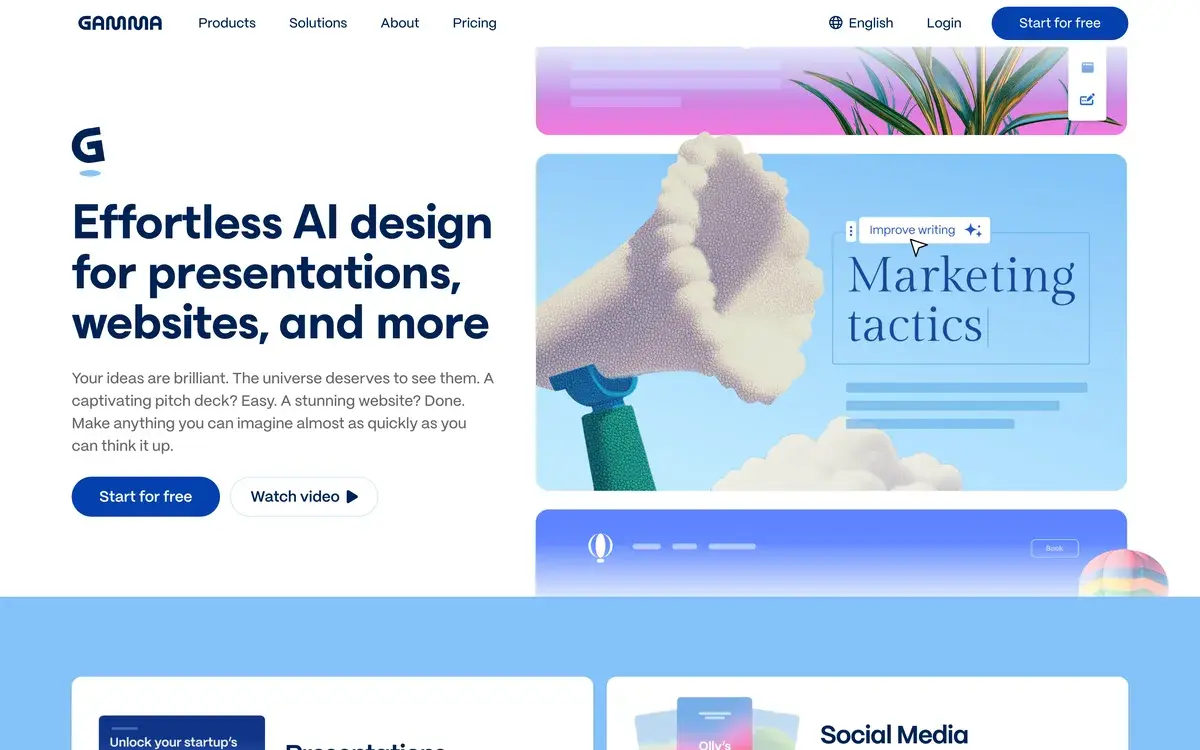
AI generates beautiful presentations, documents, and webpages from text prompts in seconds. The fastest way from idea to professional deck.

Free · $10/mo Plus · $20/mo Pro · Custom Enterprise
📖 13 min read
Try Gamma for free

Affiliate link — we may earn a commission

Ready to try it?
Gamma
Free · $10/mo Plus · $20/mo Pro · Custom Enterprise
Get started →
Affiliate link — we may earn a commission
Our rating
4.7/ 5
AIVario Editor's rating →

What is Gamma?

Gamma is an AI-powered presentation and document tool that generates complete content from text descriptions. Founded in 2020 by ex-Optimizely team and growing rapidly through 2023-2026, Gamma has become one of the leading AI presentation tools alongside Beautiful.ai and others. The platform's distinguishing characteristic is the breadth — generating presentations, web pages, documents, and other content from same AI engine rather than specializing in single content type.

The product evolved from "AI generates better PowerPoint" into broader content creation platform. Initial product focus was AI-generated presentations replacing slow PowerPoint workflows. Subsequent releases added document generation, web page creation, and AI image generation integrated into content. By 2026, Gamma serves as multi-purpose AI content tool for users who need polished output across formats.

Gamma's positioning targets the "presentations should be faster and look better" sweet spot. Most knowledge workers spend significant time creating presentations that don't look great despite the time investment. Gamma's value proposition: better-looking presentations in fraction of the time. The combination of speed and quality is what drives Gamma's adoption among non-designer professionals creating content regularly.

Who is it for?

Gamma fits anyone creating presentations, documents, or web pages who isn't a professional designer. The audience spans multiple professional contexts where content creation is regular but not core skill. Specific user types where Gamma fits:

  • Marketing professionals creating campaign decks, sales presentations, and marketing materials.
  • Business consultants producing client decks and project deliverables.
  • Sales teams creating prospect presentations and proposal documents.
  • Educators producing lecture slides, course materials, and student resources.
  • Founders and startup teams creating pitch decks, internal presentations, and team documents.
  • Product managers building product overviews, roadmap presentations, and stakeholder updates.
  • Content creators generating long-form content with mixed text and visual elements.
  • Conference speakers preparing keynote and breakout session presentations.
  • Internal teams creating training materials, onboarding documents, and process documentation.

User types where Gamma may not fit:

  • Professional designers preferring full design control through Figma or Adobe tools.
  • Brand-strict enterprises requiring precise design system compliance.
  • Technical documentation teams needing complex documentation features (use Notion or specialized tools).
  • Code-heavy presentations with extensive technical content (use specialized tools).
  • Print designers producing complex print materials with specific technical requirements.
  • Users wanting full WYSIWYG control without AI generation involvement.

Key Features

The Gamma feature set focuses on AI content generation across formats with consistent design quality.

AI presentation generation is the headline feature. Type description; Gamma produces complete presentation with appropriate slides, content, layouts, and visuals. Output is more polished than PowerPoint defaults. Quality varies with prompt specificity but typically delivers usable starting points.

AI document generation for long-form content like reports, articles, and technical documentation. Different layout patterns from presentations — text-heavy with strategic visuals. Useful for content that doesn't fit presentation format but benefits from visual design.

AI webpage generation creates web-style content for landing pages, project pages, or content sites. Less powerful than dedicated website builders but adequate for content-driven pages. Useful for internal team pages, project showcases, and similar content.

AI image generation integrated directly into content creation. Generate matching visuals for slides and pages without leaving Gamma. Useful for concept illustrations, abstract graphics, and visual elements that complement content. Quality is good for typical presentation imagery.

Iteration and refinement through conversational editing. Generated content not quite right? Tell Gamma what to change ("make this slide more concise, add a visual showing growth trends, change the color palette to blue"). Refines existing content rather than starting over.

Templates and starting points for common content types. Pitch decks, sales presentations, project plans, marketing campaigns, educational content, and many more. Templates accelerate creation when matching common patterns.

Brand kit (Pro tier) for consistent visual identity across content. Upload logos, set brand colors, define brand fonts. Generated content uses brand kit automatically. Useful for organizations producing consistent branded materials.

Sharing and collaboration with shareable links, embed codes, comment threads, and live presenting. Replaces "send PowerPoint file via email" with web-native sharing. Recipients can view in browser without specific software.

Analytics and engagement tracking how viewers interact with content. Useful for sales decks where engagement signals matter. Slide-level analytics show what content holds attention vs gets skipped.

Live presenting mode for delivering content in meetings or webinars. Replaces switching to PowerPoint for actual presentation with web-based presentation tools. Includes presenter notes, timer, and audience-facing view controls.

Embed media including videos, GIFs, charts, and interactive elements. Modern content with media beyond static slides. Useful for engaging presentations and content that benefits from interactive elements.

Mobile applications for iOS and Android with full creation and viewing capability. Useful for editing on the go and presenting from mobile devices.

Gamma vs Competitors 2026

ToolStrengthPricingBest For
GammaAI generation across content typesFree / $10-20/moMixed content needs, fast creation
Beautiful.aiProfessional presentation focus$12-40/moPure presentation work, polish
PitchModern startup-focused presentationsFree / $20+/moStartup pitch decks, modern teams
TomeAI presentation + storytellingFree / $20+/moNarrative-driven presentations
SlidebeanAI pitch deck specialist$29-149/moInvestor pitch decks
PowerPoint with CopilotMicrosoft ecosystemM365 subscriptionMicrosoft-standardized orgs
Google SlidesFree, simple presentationsFreeBasic presentations, Google ecosystem
CanvaBroad design with presentationsFree / $15+Mixed design needs beyond presentations

Pricing verified April 2026.

Gamma vs Beautiful.ai. Most direct competition for AI presentation. Beautiful.ai focuses specifically on professional presentations with smart layouts ensuring design consistency. Gamma is broader with web pages and documents alongside presentations. For pure professional presentation work, Beautiful.ai may produce slightly more polished output. For mixed content needs, Gamma's flexibility wins.

Gamma vs Pitch. Both modern presentation tools. Pitch emphasizes startup and team collaboration with strong real-time editing. Gamma emphasizes AI generation with content-first approach. For startup teams collaborating on pitch decks, Pitch's collaboration is meaningful. For users prioritizing AI generation speed, Gamma.

Gamma vs Tome. Tome positions presentations as storytelling with strong narrative emphasis. Gamma is more general content creation. For pure storytelling content (narratives, journeys, case studies), Tome's approach fits well. For mixed content types, Gamma's breadth matters.

Gamma vs Slidebean. Slidebean specializes in pitch decks for investor presentations. Different positioning from Gamma's general content. For investor pitch decks specifically, Slidebean's specialization may produce better outcomes. For broader presentation needs, Gamma.

Gamma vs PowerPoint with Copilot. Microsoft Copilot adds AI features to PowerPoint at no additional cost for M365 subscribers. For Microsoft-standardized organizations, the included Copilot may suffice. Gamma produces more polished output and covers broader content types. For Microsoft-only environments where compatibility matters, PowerPoint+Copilot. For broader tool exploration, Gamma.

Gamma vs Google Slides. Different categories. Google Slides is free basic presentation tool. Gamma is AI-powered modern presentation generator. For simple presentations and Google ecosystem use, Slides. For polished AI-generated content, Gamma.

Gamma vs Canva. Different positioning. Canva is broad design platform with presentations as one capability. Gamma focuses on AI generation with strong presentation focus. For users wanting one tool for all design needs, Canva's breadth matters. For users prioritizing AI-generated presentations specifically, Gamma's focus delivers better presentation-specific results.

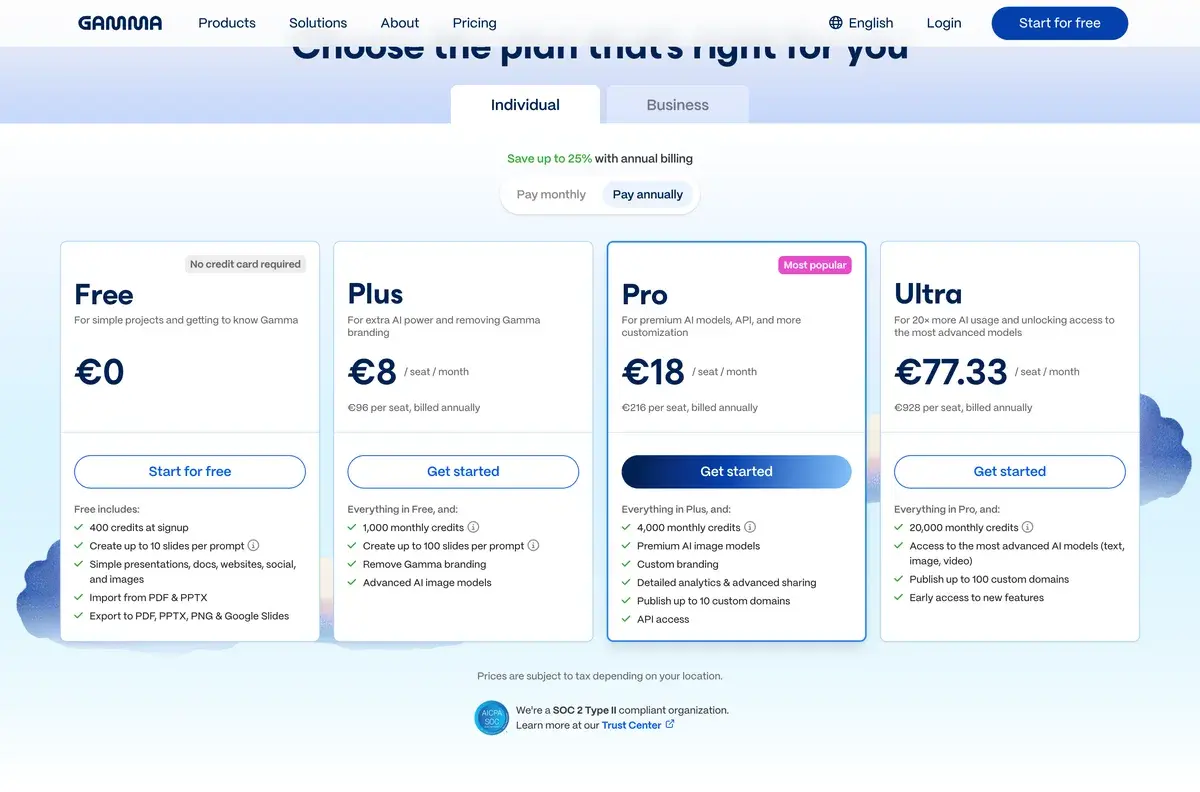
Pricing 2026

PlanMonthly CostKey FeaturesBest For
Free$0400 starting credits, monthly refresh, basic featuresCasual users, evaluation
Plus$10/moUnlimited AI generations, custom branding, advanced featuresActive users wanting full features
Pro$20/moAll Plus + team features, brand kit, advanced exportsProfessional teams, agencies
EnterpriseCustomCustom features, advanced security, dedicated supportLarge organizations

Pricing verified April 2026 from gamma.app/pricing. Annual billing offers ~30% discount.

The Free tier is genuinely useful for evaluation and casual use. 400 starting credits handle several content generations; monthly refresh provides ongoing access. For casual users producing occasional presentations, free tier works indefinitely.

Plus at $10/mo unlocks unlimited generations and removes Gamma branding from output. Reasonable price for active users producing presentations regularly. Most active users settling on Gamma upgrade to Plus.

Pro at $20/mo adds team features, brand kit management, and advanced exports. The premium over Plus is modest for the additional capability. Useful for teams producing consistent branded content or agencies serving clients.

Enterprise pricing handles larger organizations with custom needs. Pricing typically starts $200+/mo and includes dedicated support and custom integration.

The pricing structure positions Gamma accessibly. Free tier supports adoption; paid tiers reasonable for professional use. The aggressive pricing relative to Beautiful.ai ($12+) and similar alternatives partially explains Gamma's growth — comparable capability at lower price point.

What I think about Gamma

I evaluated Gamma for AIVario research and have used it briefly for testing AI presentation generation. AIVario doesn't currently use Gamma — most of our content is web-based articles rather than presentations — but the platform deserves coverage given its market position.

What works well based on usage and research: Gamma's AI generation is genuinely fast. From description to working presentation takes minutes for typical content. The output quality is consistently above PowerPoint defaults — modern layouts, coherent typography, integrated visuals. For users producing content under time pressure, the speed advantage is real.

The breadth across content types is strategically smart. Same AI engine generates presentations, documents, and web pages. Users learn the platform once and apply across content needs. The consistency of design language across formats creates coherent brand experience.

The iteration through conversational editing matters in practice. Generated content rarely matches exactly what you want; refining through prompts ("make this section shorter, add a chart showing growth, change the color palette") feels natural and works well.

What I would honestly flag based on usage: Gamma's design choices are opinionated. Output looks "Gamma-ish" similar to how Canva output is identifiable. For brands wanting strongly differentiated visual identity, the AI-generated style may not align with desired brand expression.

For complex business presentations with specific data visualization requirements, Gamma's templates may not handle complexity well. Detailed financial models, complex org charts, technical architecture diagrams sometimes work better in dedicated tools (Excel, specialized chart tools, technical diagramming tools).

The web-first approach is mostly advantage but creates friction for users requiring offline access or specific PowerPoint compatibility. Most Gamma exports translate to PowerPoint reasonably but some Gamma-specific features (interactive elements, embedded video) don't preserve.

For AIVario specifically, Gamma might be useful if we expand into webinar content, sales decks for partnership conversations, or speaker presentations for conference appearances. For our current text-and-image article-driven content, presentation tool isn't needed. But for the moments when presentations matter, Gamma is reasonable choice for non-designer fast creation.

For someone evaluating today: try Gamma free with real content you need to create. The platform either accelerates your workflow meaningfully or doesn't match your style preferences. Most non-designers find Gamma useful for at least some presentation work even if they don't use it for everything.

Use Cases

Marketing manager creating campaign launch deck. Plus at $10/mo. Generates initial campaign deck from brief description; iterates on specific slides; adds team brand elements. Replaces 4-6 hours of PowerPoint work with 30-45 minute Gamma creation. Quality consistently better than PowerPoint default.

Founder preparing investor pitch. Plus at $10/mo. Generates initial pitch deck structure; refines specific slides for company specifics; iterates based on advisor feedback. Replaces "starting from PowerPoint template" inefficiency. Output looks professional without needing designer involvement.

Consultant producing client deliverable. Pro at $20/mo with brand kit. Each client engagement produces presentations and reports through Gamma with consistent agency branding. Faster turnaround on routine deliverables. Replaces design contractor costs for routine work; preserves contractor budget for high-stakes deliverables.

Educator preparing course content. Plus at $10/mo. Creates lecture slides for course modules with AI generation. Adds instructor-specific examples and cases. Replaces "redesign every semester" with rapid generation that updates easily as course evolves.

Product manager creating feature overview. Free or Plus. Generates feature presentations for stakeholder updates and team education. Quick turnaround for routine PM communications. Replaces "boring PowerPoint" with engaging visual content.

Content creator producing educational material. Plus at $10/mo. Creates webinar slides, course content, and downloadable resources for audience. Mixed content types (presentations plus documents plus web pages) all generated through single platform. Replaces multiple separate tools with consolidated workflow.

My Verdict

Gamma is the right choice for non-designers needing fast, polished presentation and content creation. The AI generation, breadth across content types, and reasonable pricing make it strong choice for the broad audience producing presentations regularly.

For pure professional presentation work where design polish matters strategically, Beautiful.ai may produce slightly better outcomes. For startup team collaboration on pitch decks, Pitch fits better. For comprehensive design needs beyond presentations, Canva's breadth matters more. Gamma specifically wins for AI-generated content across mixed types.

The free tier removes evaluation friction. Try Gamma with real content needs. Generate a presentation, document, or web page from actual brief; assess fit with your workflow. Most non-designers find at least occasional value; many become regular users.

The competitive landscape for AI presentation tools is broader in 2026 than it was 2-3 years ago. Beautiful.ai, Pitch, Tome, Slidebean, PowerPoint Copilot all serve overlapping audiences. Choice depends on specific priorities — pure presentation vs broader content, professional polish vs creative expression, Microsoft compatibility vs modern web-first.

For organizations evaluating AI content tools beyond presentations, Gamma's breadth (presentations + documents + webpages) reduces tool sprawl. One tool covering multiple content types is operationally simpler than separate tools per format despite some specialized capability loss.

Pricing at $10-20/mo is accessible for individual users and small teams. The free tier serves casual evaluation indefinitely. Paid tiers unlock genuine value for active users without prohibitive cost.

For AIVario readers specifically: if your work involves regular presentation or mixed content creation but you're not a designer, Gamma deserves evaluation. The combination of speed and quality typically delivers more value than fighting PowerPoint's defaults.

Note: Gamma has an affiliate program. AIVario application status pending. Our rating reflects evaluation based on platform research and competitive analysis, not affiliate considerations.

Best for: Marketing professionals creating campaign decks, business consultants producing client deliverables, sales teams creating prospect presentations, educators producing lecture materials, founders creating pitch decks, product managers building stakeholder updates, content creators generating mixed content types, conference speakers preparing presentations, internal teams creating training and documentation Not ideal for: Professional designers preferring full design control, brand-strict enterprises requiring precise compliance, technical documentation needing complex features, code-heavy presentations with extensive technical content, print designers with technical requirements, users wanting WYSIWYG control without AI involvement Bottom line: The leading AI content generation platform spanning presentations, documents, and web pages. Best for non-designers wanting polished output faster than building manually. Free tier supports evaluation; Plus at $10/mo reasonable for active users.

Related Tools

  • Beautiful AI — alternative focused on professional presentations
  • Pitch — alternative for startup teams and modern collaboration
  • Canva AI — broader design platform alternative
  • Microsoft Copilot — Microsoft ecosystem alternative
  • Notion AI — alternative for document-heavy content needs

Frequently Asked Questions about Gamma

Is Gamma free?

Yes, Gamma has a generous free tier with 400 AI credits when you sign up plus monthly credit refresh. Sufficient for evaluation and creating several presentations or documents. Plus at $10/mo provides unlimited AI generations and removes Gamma branding. Pro at $20/mo adds advanced features. Most casual users can stay on free tier indefinitely; active users benefit from Plus.

How does Gamma compare to Beautiful.ai?

Different positioning. Beautiful.ai focuses on professional presentations with smart layouts and design system. Gamma is broader — generates presentations, web pages, and documents from prompts. Beautiful.ai produces more polished business presentations; Gamma produces more variety of content types. For pure professional presentation work, Beautiful.ai. For mixed content needs (presentations plus web pages plus documents), Gamma's flexibility matters.

Can Gamma create webpages?

Yes, Gamma generates simple webpages alongside presentations and documents. Useful for landing pages, internal team pages, project documentation, and similar content. Less powerful than dedicated website builders (Framer, Webflow) but adequate for content-driven pages without heavy customization needs. The same AI engine generates pages and presentations.

Does Gamma have AI image generation?

Yes, Gamma includes AI image generation for slide visuals and document graphics. Generated images appear directly in your content rather than requiring separate workflow. Quality is good for typical presentation imagery — concept illustrations, abstract graphics, business visuals. For specialized image generation needs (photorealistic, specific styles), dedicated tools like Midjourney or Adobe Firefly may produce better results.

Can Gamma export to PowerPoint?

Yes, Gamma exports to PowerPoint (.pptx), PDF, and other standard formats. Useful for organizations standardized on PowerPoint or contexts requiring offline presentation. Some Gamma-specific features (interactive elements, embedded video, web-only animations) don't translate to PowerPoint but core content and design preserve well.

How is Gamma's image quality?

Gamma outputs are generally polished and professional. Layouts are modern, typography is clean, color palettes are coherent. Output looks like work of decent designer rather than amateur attempt. The trade-off is less customization flexibility than building manually — users get good design by default but harder to achieve specifically custom visual identity.

Is Gamma good for marketing teams?

Yes, marketing teams use Gamma for sales decks, internal presentations, campaign briefs, and similar work. The speed advantage matters when producing many marketing materials. Brand kit features (Pro tier) help maintain visual consistency. For teams needing many presentations with reasonable design quality, Gamma is meaningful productivity improvement over PowerPoint.