Ideogram is an AI image generator known for readable text in images and, since Ideogram 4.5, for precise multi-step editing. Eligible free accounts get weekly slow credits, and free images are public. Plus costs $20 a month, or $15 billed yearly, for 2,400 priority credits, private images and unlimited slow credits. Pro costs $60, or $42 yearly, for 7,500 credits, batch generation and quality export. Team costs $30 per user, or $20 yearly, for at least two users. Priority credits expire every month, top-up credits carry over, and subscriptions come without free trials or discounts.
✓Best for: Designers and marketers who need images with accurate text, such as posters, ads, packaging and social graphics
✗Skip if: You want to try paid features before buying, or you mostly make photorealistic images without text and already pay for another generator
This analysis is based on documentation, public user reports, and vendor materials — not yet on our own hands-on testing. How we rate
Ideogram homepage, captured Oct 3, 2026.
Ideogram made its name on something image generators used to get badly wrong: readable text. A poster with a headline, a label on a bottle, a logo with the company name spelled correctly. In 2026 it's pushing a second idea as well, edits that don't drift, and its newest model, Ideogram 4.5, is sold as its most precise editor yet.
The pricing is simple on the surface. The detail that matters is the difference between priority credits, which are fast and limited, and slow credits, which are unlimited on paid plans but come with a wait.
Free, Plus, Pro or Team
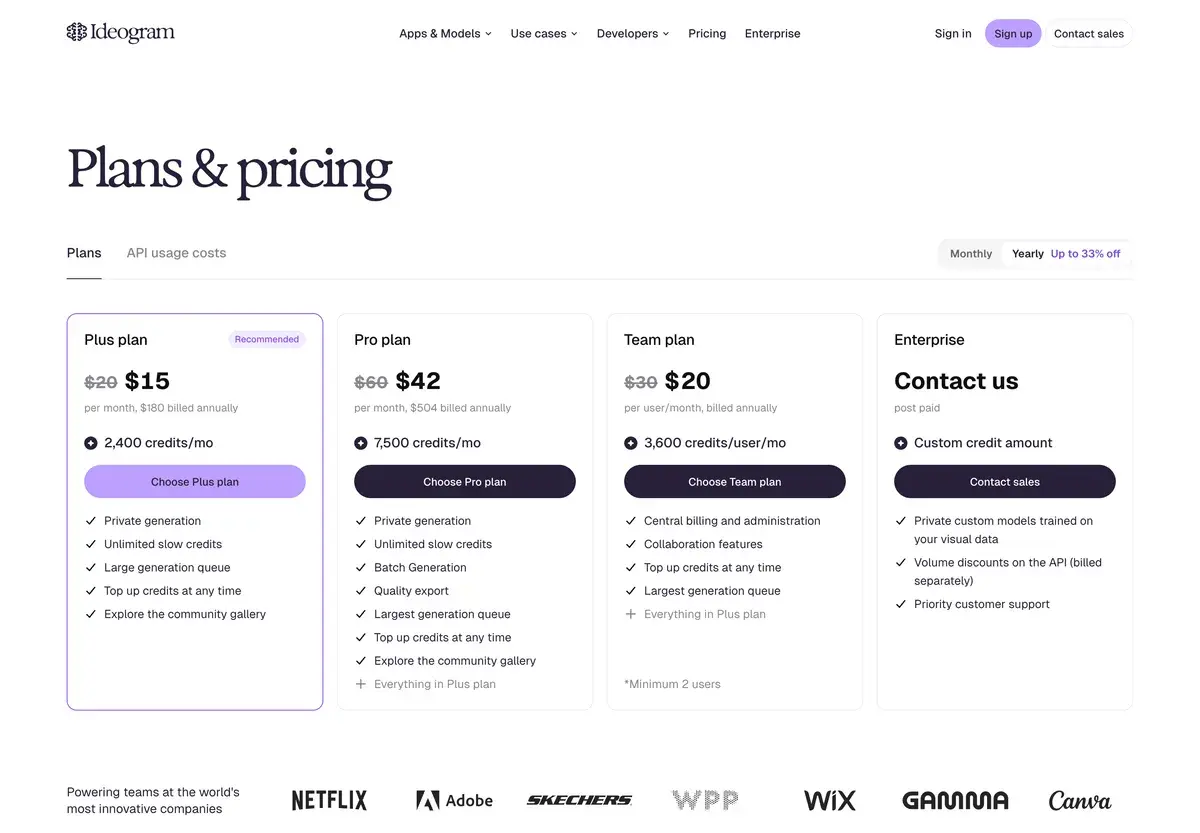
With yearly billing on, the monthly price appears crossed out beside each plan. Captured October 3, 2026.
Free
Plus
Pro
Team
Billed monthly
$0
$20
$60
$30 per user
Billed yearly, per month
$0
$15
$42
$20 per user
Priority credits
None
2,400 a month
7,500 a month
3,600 per user a month
Slow credits
Weekly, for eligible accounts
Unlimited
Unlimited
Unlimited
Generations running or queued
1
8
32
Largest queue
Private images
No
Yes
Yes
Yes
Also included
Community gallery
Top-ups at any time
Batch generation, quality export, limited custom model training
Central billing, collaboration, two users minimum
Enterprise is post-paid with a custom credit amount. It adds private custom models trained on your own images, volume discounts on the API and priority support. Yearly billing saves between 25% and 33%, depending on the plan.
What a credit buys
Credit costs depend on the model and the rendering mode:
Model
Turbo
Balanced or Default
Quality
Ideogram 4.0 (2K)
1 credit per image
2 credits per image
3 credits per image
Ideogram 3.0
2 credits per 4 images
4 credits per 4 images
6 credits per 4 images
Ideogram 2a
0.5 credits per 4 images
1 credit per 4 images
1.5 credits per 4 images
Ideogram's published credit table on October 3, 2026. Upscaling costs 1 credit per image on paid plans.
So Plus's 2,400 credits cover 2,400 Turbo images on Ideogram 4.0, or 800 at Quality. The older 3.0 model is cheaper per image because it renders four at once. The published table doesn't list a credit cost for 4.5 yet.
Unused priority credits from your plan expire at the end of each billing cycle. Top-up credits are different: they carry over, and Ideogram uses them only after the plan's credits are gone.
Life in the slow queue
When priority credits run out, generations move to the slow queue. Waiting times depend on how busy Ideogram's servers are, so the same prompt can take seconds at one hour and much longer at another. The bigger limit is what stops working. Editing with AI and Image Reference need priority credits, so heavy editors effectively live on their credit allowance.
Free accounts sit in that slower lane by default. Ideogram gives eligible free accounts weekly credits when they sign in with Google, Apple or Microsoft, says the amount may vary, and offers no free trials or discounts on paid plans.
Ideogram 4.5 and the editing tools
Ideogram 4.5 is built for repeated edits. Change a product's color, fix a line of text or swap a background, and earlier edits usually leave small damage behind: shifted pixels, altered colors, texture artifacts. Ideogram says 4.5 reduces that drift. It can also edit a region of an image up to 4,016 by 6,016 pixels without downsizing it, and keeps the edges clean enough to stitch the edited crop back into the original.
Around the models sits a set of single-purpose apps: Ad Resizer, Background Remover, Colorways, Material Swap and Object Remover. Developers get an API and an MCP server, and there's an iPhone app.
Before you use it for client work
Everything you generate on Ideogram is public by default and appears in the community gallery. Paid subscribers can generate private images, unpublish older ones and delete their work, which is reason enough to pay if the images are for a client. Ideogram says it doesn't claim ownership of what you make and allows commercial use under its terms.
Billing runs through Stripe and accepts cards only, with no PayPal, and prices exclude tax. You can cancel at any time and keep the plan until the end of the period, and upgrades are prorated.
When the picture has no words in it
Then Ideogram's main advantage matters less. Midjourney is still the pick for one polished house style, at $10 a month. Adobe Firefly leans on commercial safety and bundles models from several labs, and FLUX suits developers who'd rather pay per image through an API. Recraft is built for vector graphics and brand assets. When the job is a layout rather than a new image, Canva gets there faster. Our image generator guide narrows the choice with three questions.
Choose Ideogram when the words in the image matter, or when you expect to edit the same picture many times and need it to stay intact.
Frequently Asked Questions about Ideogram
Can you use Ideogram for free?
Yes, within limits. Eligible free accounts get weekly slow credits when they sign in with Google, Apple or Microsoft, and Ideogram says the amount may vary. Free images are public, only one generation runs at a time, and AI editing features need priority credits from a paid plan.
What happens when Ideogram priority credits run out?
Generations move to the slow queue, where waiting times depend on how busy the servers are. Editing with AI and Image Reference stop working, because they need priority credits. You can buy a top-up, upgrade, or wait for the next billing cycle.
Do Ideogram credits roll over?
Subscription credits don't. Priority credits from your plan expire at the end of each billing cycle. Top-up credits do carry over, and Ideogram only spends them once the plan's credits are gone.
Can I use Ideogram images commercially?
Yes. Ideogram says it doesn't claim ownership of generated images and allows any use, including commercial use, under its terms. Images are public by default, though. Paid subscribers can generate private images and delete their work, which matters for client projects.
What is Ideogram 4.5?
Ideogram's newest model, pitched as its most precise for editing. Ideogram says it reduces the drift that builds up over repeated edits, such as shifted pixels, changed colors and texture artifacts, and that it can edit regions of images up to 4,016 by 6,016 pixels without shrinking them first.