Pika relaunched on September 17, 2026 as a multi-model creative studio: its own Pika 2.5 sits next to Seedance 2.5, Wan 3.0, MiniMax H3, Veo 3.1 and Gemini Omni Flash, with apps for multi-shot video, product ads and Pikaffects. Starter costs $10 a month ($8 yearly) for 900 credits but has no commercial license; Creator at $35 ($28 yearly) adds it with 3,150 credits. The Free plan now has no monthly credits, only paid packs from $50.
✓Best for: Social creators and small brands who want several video models, Pikaffects and ready-made ad and short-film apps in one place
✗Skip if: You need commercial rights on the cheapest plan, or free generations to test before paying
This analysis is based on documentation, public user reports, and vendor materials — not yet on our own hands-on testing. How we rate
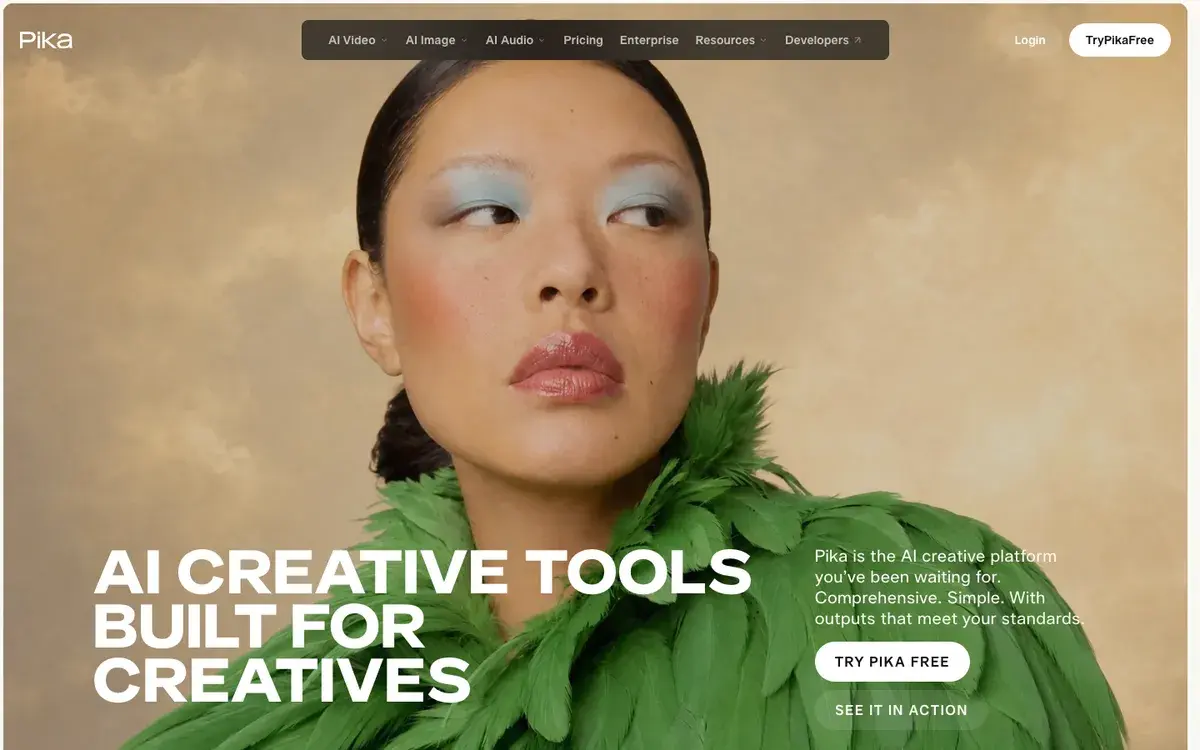
Pika homepage, captured Sep 25, 2026.
Pika after the September relaunch
Pika built its reputation on speed, low prices and effects: Pikaffects clips of objects melting, squishing and inflating were a fixture of social feeds in 2024 and 2025. On September 17, 2026 it changed what it is. The new pika.art is a creative studio that routes each job to the model it judges best, including ByteDance's Seedance 2.5, Alibaba's Wan 3.0, MiniMax H3, Google's Veo 3.1 and Gemini Omni Flash, xAI's Grok Imagine and Pika's own Pika 2.5. You can let it choose or pick the model yourself.
Accounts, plans and past creations moved to the new version automatically, and the previous app still runs at old.pika.art. Prices changed with the relaunch, which is why reviews quoting an $8 Standard plan with 700 credits, or 80 free credits a month, describe a Pika that no longer exists.
What you can make with it
The studio is organized as apps rather than a single prompt box:
Video Studio generates anything from a short clip to a 30-second multi-shot sequence.
Editing apps reshoot a clip from a new camera angle (Camera Director), recast a subject while keeping the performance (Swap Anything), relight, extend, upscale, trim and transfer motion from a reference video.
Kits build complete pieces from a brief: a product ad from one image, a multi-shot short film from a premise, or a two-host podcast video from a topic or script.
Pika's own tools remain: Pikaffects, Pikaframes (animate between up to five stills) and Pikadditions (drop a new element into existing footage).
Audio covers speech, music and Pika Soundtrack, which scores a clip with music, ambience and foley matched to the action.
Image generation runs on GPT Image 2.5, Nano Banana, Seedream and Grok Imagine. The breadth is the point: a small brand can go from product photo to ad with soundtrack without leaving the app.
Pricing: four plans and one catch
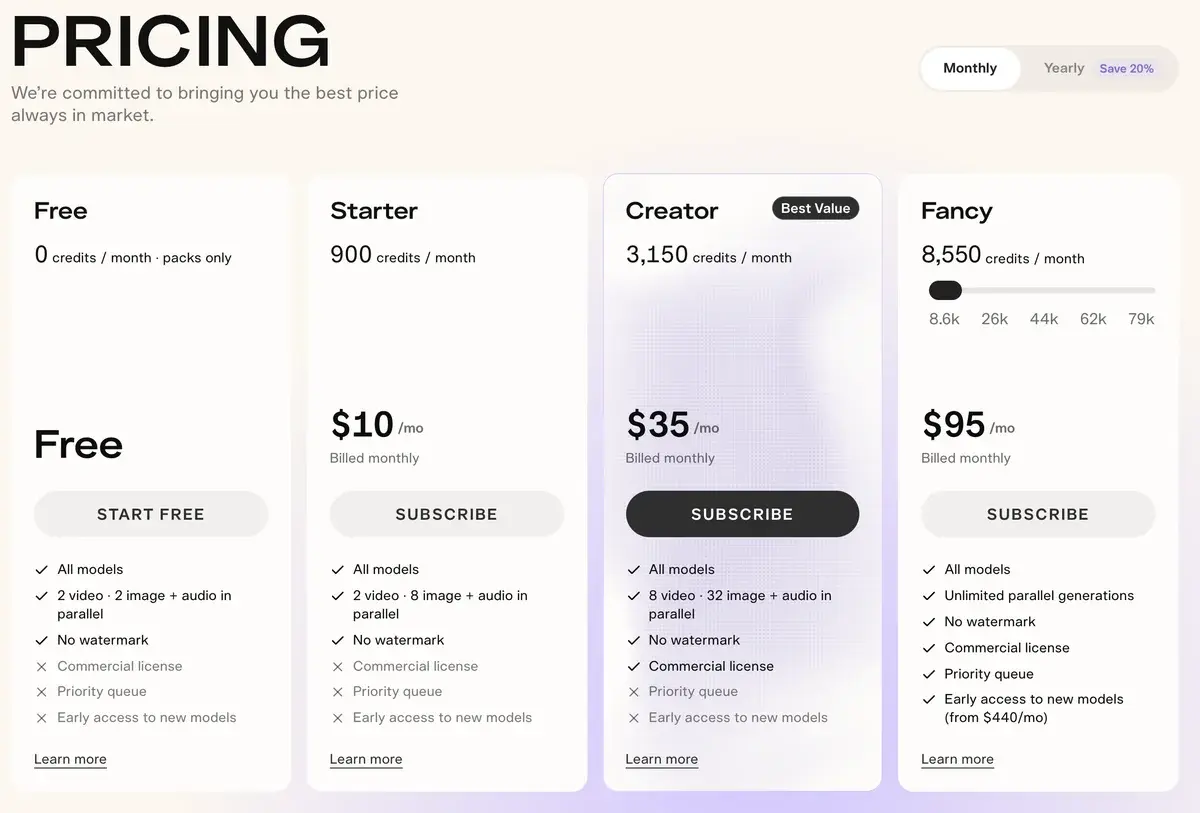
Pika's plans on monthly billing, checked September 25, 2026.
Plan
Monthly
Yearly (per month)
Credits per month
Commercial license
Parallel video jobs
Free
$0
$0
0, packs only
No
2
Starter
$10
$8
900
No
2
Creator
$35
$28
3,150
Yes
8
Fancy
$95 to $880
$76 to $704
8,550 to 79,000
Yes
Unlimited
The catch is the license. Every plan, even Free, now exports without a watermark, so Starter output looks ready to publish. It is not licensed for commercial use. Anyone posting to a monetized channel, running ads or delivering client work needs Creator, which makes $28 to $35 a month the real entry price.
The second thing the table hides is that bigger plans do not buy cheaper credits. Starter, Creator and Fancy all work out to 90 credits per dollar on monthly billing and 112.5 on yearly billing. Fancy buys more credits, a priority queue and unlimited parallel jobs; it does not lower the price of a clip. Yearly billing is the only discount.
What the credits buy
Pika publishes what a month of credits makes on a few models:
Model and setting
Credits
Starter (900)
Creator (3,150)
Fancy (8,550)
Cost on Creator, monthly
Seedance 2.5, 720p, 5 s
122
7 clips
25 clips
70 clips
$1.36
Wan 3.0, 720p, 5 s
33
27 clips
95 clips
259 clips
$0.37
Nano Banana 2, one 1K image
8
112 images
393 images
1,068 images
$0.09
GPT Image 2.5, one 1K image
2
450 images
1,575 images
4,275 images
$0.02
Wan 3.0 is the value pick. At 33 credits for 5 seconds of 720p video, it costs about $0.37 a clip on Creator, and Pika describes it as a multi-shot model with native audio. Seedance 2.5 costs almost four times as much.
That gap suggests how to spend a Creator month. Draft 60 five-second takes on Wan 3.0 (1,980 credits), re-render the 8 best on Seedance 2.5 (976 credits) and make 20 Nano Banana 2 stills for thumbnails and product frames (160 credits). That is 3,116 of the 3,150 credits, and it yields roughly 40 seconds of Seedance footage plus a stack of Wan drafts, which is about right for a creator posting a few short videos a week. Doing everything on Seedance would buy 25 clips and no room for drafts.
Pika says its Seedance generations cost roughly half what other creation platforms charge. Against Luma AI the numbers do not support that: a 5-second 720p Seedance 2.5 clip with audio costs 390 Luma credits, about $1.17 on Luma's $30 Plus plan, against about $1.36 of Creator credits on Pika, or $1.08 on yearly billing.
Credits and billing rules
Plan credits refresh each billing period and do not roll over. Credit packs give 60 credits per dollar on any plan, from $50 for 3,000 up to $1,000 for 66,000, and last 365 days. They cost 50% more per credit than monthly plan credits and work only in the pika.art web app, not in the API, the iOS app or old.pika.art.
You can cancel any time and keep the plan until the period ends, but payments are non-refundable. Upgrades apply immediately; downgrades wait for the next billing period.
For developers, the Pika API Club is a separate $10-a-month membership with $10 of credit in the first month and more than 100 models behind one API, from Seedance 2.5 and Kling 3.0 to Veo 3.1 and several LLMs. Pika lists MiniMax H3 text-to-video at 2K for $0.13 a second there, including its 5% platform fee.
Pika against Luma, Higgsfield and the model makers
Against Luma AI, the other big multi-model studio, Pika is the social and small-business option. Luma has its own frontier Ray models, HDR output and agents that run whole projects, with commercial use from $30. Pika has the ready-made apps (product ads, podcast videos, Pikaffects) and commercial use from $35.
Against Higgsfield, which also bundles third-party models behind social-first templates, the choice comes down to which app library suits your content.
Against the model makers themselves, Pika's convenience costs money on every clip, and its missing free allowance stands out. PixVerse refills 60 free credits a day and Kling 66, while Hailuo AI sells MiniMax H3 direct from $10.50 a month. If one model covers what you make, buy it from its maker. For the full field, see the best AI video generators of 2026.
Who should pay for Pika
Pika makes sense for creators and small brands who post often, want effects and ready-made formats, and like switching between Wan for volume and Seedance or Veo for hero shots without juggling accounts. For them, Creator at $28 a month billed yearly is the plan to buy; Starter's missing license makes it a hobby plan.
It makes less sense for anyone testing the waters, since there is nothing free to test with, or for anyone who sticks to one model. The relaunch made Pika more capable and less of a bargain, and the old reputation as the cheap option no longer holds.
AIVario has no affiliate relationship with Pika, so this review earns no commission from it.
Related Tools
Luma AI: multi-model studio with its own Ray models and commercial use from $30
Higgsfield: social-first templates on top of several video models
PixVerse: 60 free credits a day for short social clips
Kling AI: realistic motion with native audio, direct from the maker
Frequently Asked Questions about Pika
What changed when Pika relaunched in September 2026?
On September 17 Pika turned pika.art into a multi-app studio. Instead of one in-house model, it now routes each request to a model such as Seedance 2.5, Wan 3.0, MiniMax H3, Veo 3.1 or its own Pika 2.5, or lets you pick one yourself. Existing accounts, plans and past creations carried over automatically, and the previous app still runs at old.pika.art.
How much do Pika's Starter, Creator and Fancy plans cost?
Starter costs $10 a month, or $8 billed yearly, for 900 credits. Creator costs $35 ($28 yearly) for 3,150 credits and adds a commercial license. Fancy starts at $95 ($76 yearly) for 8,550 credits and scales to $880 ($704) for 79,000, with a priority queue and unlimited parallel jobs; early access to new models starts at the $440 tier. Plan credits do not roll over.
Can I use Pika videos commercially on the Starter plan?
No. The commercial license starts at Creator, $35 a month or $28 billed yearly. Free and Starter output has no watermark, which makes it look publishable, but neither plan includes commercial rights. For a monetized channel, an ad or client work, Creator is the real entry price.
Does Pika still have a free plan?
In name only. The Free plan includes zero monthly credits and exists so you can buy credit packs without a subscription, starting at $50 for 3,000 credits. Output is watermark-free but not licensed for commercial use. If you want to try AI video without paying, PixVerse and Kling still refill free credits every day.
How many videos do 900 Pika credits make?
Pika's own table puts a 5-second 720p Seedance 2.5 clip at 122 credits, so Starter's 900 credits make about 7 of them. Wan 3.0 costs 33 credits for the same clip, about 27 per month. Images cost far less: 8 credits for a 1K Nano Banana 2 image and 2 for GPT Image 2.5. Creator's 3,150 credits make about 25 Seedance or 95 Wan clips.
Are Pika credit packs worth buying?
Only as a buffer. Packs give 60 credits per dollar on every plan, while monthly plan credits work out to 90 per dollar and yearly ones to about 112, so packs cost 50% more per credit than a monthly plan. They last 365 days and roll over, but only in the pika.art web app, not the API, the iOS app or old.pika.art.
What are Pikaffects and Pikaframes?
Pikaffects are Pika's one-tap viral effects: upload a photo and get a short clip of it melting, inflating or exploding. Pikaframes animates between up to five still images with Pika 2.5, and Pikadditions adds a new element into an existing video. All three survived the relaunch as apps alongside the new multi-model tools.
Does Pika have an API?
Yes, through the Pika API Club, a membership at $10 a month that includes $10 of credit in the first month. It offers more than 100 models through one API, including Seedance 2.5, Kling 3.0, Veo 3.1, MiniMax H3 and Pika 2.5, with prices that include a 5% platform fee. Credit packs bought on pika.art cannot be spent through the API.