Monday AI

Monday AI

★ Top rated
AI Project Management

Visual work OS with AI features added — strong for sales ops and customizable workflows, less polished than Asana for traditional project management.

$9/seat
📖 14 min read
Try Monday AI for free

Affiliate link — we may earn a commission

Ready to try it?
Monday AI
$9/seat
Get started →
Affiliate link — we may earn a commission
Our rating
4.4/ 5
AIVario Editor's rating →

What is Monday.com?

Monday.com is a visual work management platform — what the company calls a "Work OS" — used by 225,000+ companies across project management, sales operations, marketing campaign tracking, HR processes, and other work coordination use cases. The product distinguishes itself from traditional project management tools through highly customizable column-based work design that adapts to many work types beyond the standard project-and-task model. Monday AI features (added through 2024-2025) add automation, risk detection, formula generation, and natural language queries to this foundation.

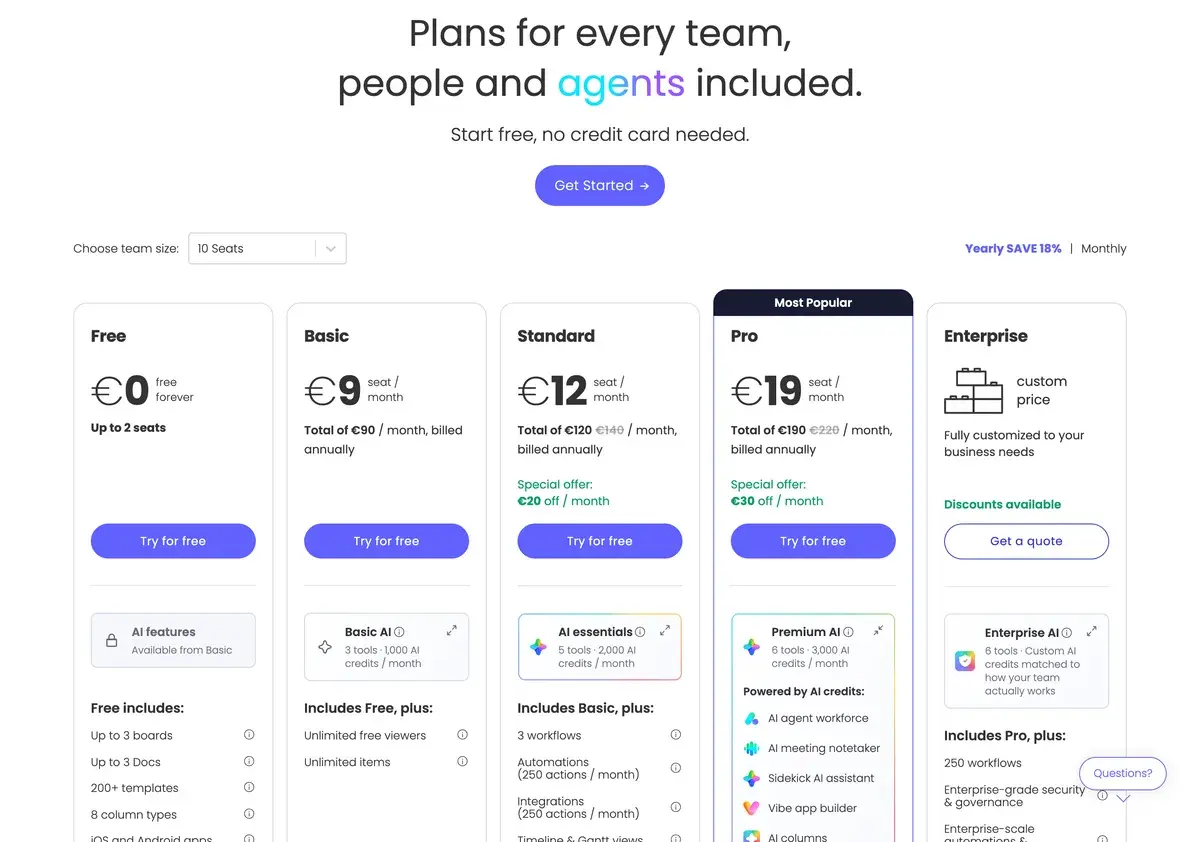
Pricing starts at $9/seat per month for Basic, $12/seat for Standard (where most AI features unlock), $19/seat for Pro, and Enterprise custom pricing for larger deployments. The pricing is competitive within the project management category and slightly more affordable than Asana at equivalent tiers, with the AI features genuinely accessible on Standard tier rather than gated to higher pricing.

Whether Monday.com is the right tool for your team depends on what kind of work you actually do. The visual customization and column-based design fit sales operations, marketing campaign tracking, recruiting workflows, and CRM-adjacent work better than traditional project management tools. For these use cases, Monday is often the right choice. For traditional cross-functional project management — initiative tracking, complex projects with phases and dependencies, formal PMO operations — Asana's cleaner UX and project-focused design typically serves better. The platforms overlap but have meaningfully different optimal use cases.

The Work OS positioning

The project management software category has stratified into clearer positions over the past few years. Asana anchors traditional cross-functional project management with clean UX. Linear anchors engineering team execution with deep developer-tool integration. ClickUp anchors feature-density and tool consolidation. Notion anchors document-centric knowledge work that includes some project tracking. Monday.com anchors visual customization and column-based work design that adapts to varied work types.

The "Work OS" framing — Monday's preferred positioning — reflects this column-based flexibility. Where most PM tools assume a project-and-task hierarchy, Monday's columns can represent any data type (status, owner, date, file, person, formula, dropdown) and rows can represent any work unit (task, lead, candidate, campaign, deal, request). This flexibility supports use cases where the work does not naturally fit traditional project structures.

For sales operations, this matters substantially. Sales pipelines do not map well to project-and-task models — leads are not tasks, deals are not subtasks, and the work involves data tracking more than work execution. Monday's column-based design fits sales operations work directly; Asana's project-and-task model fits awkwardly. For sales-focused teams specifically, Monday often produces better outcomes than traditional PM tools.

For marketing campaign tracking, similar logic applies. Campaigns involve content production, channel coordination, performance tracking, and stakeholder management that benefit from columnar visualization. Monday's design supports this work pattern better than project-task tools.

For traditional project management — initiative tracking with phases, milestones, and dependencies; cross-functional projects requiring portfolio visibility; PMO operations requiring formal project structures — Asana's project-focused design typically serves better. The customization that helps Monday for sales ops becomes overhead for traditional project work where the project model fits the work naturally.

This positioning split is genuine rather than marketing. Match the buying decision to the kind of work your team actually does; both Monday and Asana are strong for their respective use cases and weaker for the use cases where the other excels.

Where Monday earns its place

Sales operations teams managing pipelines, lead workflows, deal progression, and sales enablement coordination. The visual columnar design fits sales ops work directly; the AI features (risk detection, status automation) reduce operational overhead.

Marketing operations and campaign management teams coordinating content production, channel execution, performance tracking, and stakeholder communication. The customizable columns support varied campaign data; the workflow automation reduces coordination overhead.

Recruiting and HR teams managing candidate pipelines, interview coordination, employee onboarding, and HR process tracking. The column-based design fits recruiting workflows directly where project-task models fit awkwardly.

Customer success and account management teams tracking customer health, account activities, expansion opportunities, and renewal pipelines. The customizable views support diverse customer success workflows.

Operations teams managing recurring processes, vendor relationships, asset tracking, and operational workflows that do not fit traditional project structures. Monday's flexibility accommodates these varied work types.

Cross-functional teams where work types vary substantially across team members. The customization supports different team members configuring views that fit their specific work patterns within shared workspace structure.

Mid-market businesses (50-500 employees) where Monday fits the gap between simple task tools (insufficient at scale) and enterprise PMO platforms (overkill for many use cases). This is Monday's sweet spot.

Monday is not the right pick for: pure software development teams (Linear is better), traditional cross-functional project management (Asana's clean PM focus serves better), document-centric knowledge work (Notion is better), individuals or very small teams whose needs simpler tools satisfy, or organizations needing deep workflow logic that ClickUp may handle better.

Key Features

  • Customizable columns — flexible column types (status, person, date, formula, file, dropdown) supporting varied data structures
  • Multiple board views — list, kanban, timeline (Gantt), calendar, dashboard, chart, and form views of the same data
  • Monday AI — automated status updates, risk detection, formula generation, natural language queries
  • Automation builder — no-code workflow automation across boards
  • Workflow templates — pre-built templates for common use cases (sales, marketing, recruiting, etc.)
  • Dashboards — visual analytics across boards with chart and metric widgets
  • Integrations — 200+ integrations with major SaaS tools (Slack, Microsoft Teams, Google Workspace, HubSpot, Salesforce)
  • Forms — public-facing forms that create board items automatically
  • Time tracking — built-in time tracking for billable work
  • File management — file storage and management within boards
  • Mobile apps — full functionality on iOS and Android
  • Monday Sales CRM — dedicated CRM offering built on Monday platform
  • Monday Dev — software development workflow product (engineering teams)
  • Enterprise security — SOC 2, ISO 27001, GDPR, HIPAA-ready Enterprise tier

Monday vs Competitors 2026

ToolBest forVisual customizationAI featuresFree tierPrice/seat
Monday.comSales ops, marketing, customizable work✅ Best in class✅ Decent (Standard+)✅ 2 users$9
AsanaCross-functional PM, marketing, ops⚠️ Mid✅ Mature✅ 10 users$13.49
ClickUpFeature density, tool consolidation✅ Strong✅ Strong✅ Generous$10
NotionDocument-centric, knowledge work✅ Strong (different style)✅ With Notion AI✅ Generous$10
LinearEngineering teams⚠️ Focused⚠️ Decent✅ Limited$10
SmartsheetSpreadsheet-style PM, enterprise✅ Strong✅ Decent❌ Trial$19
AirtableDatabase-style work, custom apps✅ Strong✅ Strong✅ Generous$24
TrelloLightweight visual, kanban⚠️ Card-focused⚠️ Limited✅ Generous$5

Data verified April 2026 from each provider's pricing pages.

The clearest comparisons are Monday vs Asana vs ClickUp — three direct competitors targeting overlapping markets with different positioning. The choice often follows the actual work pattern:

  • Sales ops, customizable workflows, column-based work → Monday
  • Cross-functional PM, traditional project work, marketing initiatives → Asana
  • Tool consolidation, feature-dense workflows, "everything in one tool" → ClickUp

Notion is the relevant alternative for document-driven work that includes some project tracking. For knowledge-management-with-projects, Notion fits; for projects-with-some-documentation, Monday or Asana fit better.

Airtable is closer to Monday in spirit — both prioritize customizable column-based work design — but Airtable leans more toward database-style use cases and custom application building. For users wanting database flexibility with project capabilities, Airtable. For users wanting work management with database-like flexibility, Monday.

Smartsheet is enterprise-focused with spreadsheet-style PM; for organizations preferring spreadsheet-familiar interfaces, Smartsheet works. For most modern teams, Monday's UX is preferred.

For Microsoft-aligned organizations, Microsoft Project and Planner are the bundled alternatives that capture the Microsoft 365 economic benefit. They are functional but generally less polished than Monday for the same use cases.

Pricing 2026

PlanPrice (annual)UsersAI featuresBest for
Free$02Evaluation
Basic$9/seat/moMin 3Small teams, basic work management
Standard$12/seat/moMin 3✅ Most featuresMid-market teams, AI users
Pro$19/seat/moMin 3✅ FullActive teams, advanced analytics
EnterpriseCustomCustom✅ Full + adminLarger organizations

Prices verified April 2026 from monday.com/pricing. Annual billing prices shown; monthly billing adds ~18%. Minimum seat counts apply on paid tiers.

The pricing is positioned competitively against Asana at the equivalent tiers, slightly cheaper than Asana on like-for-like comparison. The AI features availability on Standard tier ($12/seat) rather than higher tiers is genuinely user-friendly — many competitors gate AI to premium pricing. For mid-market teams, this AI accessibility matters.

The free tier (2 users) is too restrictive for real team use beyond evaluation. The Basic tier ($9/seat) is the practical entry point for small teams without AI needs; Standard ($12/seat) is the realistic operational tier for teams wanting AI features.

The minimum seat count (3 seats) on paid tiers means very small teams hit the floor at $27-$36/month minimum even for 1-2 actual users. For solo users or pairs, this floor effectively prices Monday out — alternatives without minimum seat requirements (Notion, Trello) may serve better.

Hands-on Notes

The first thing that affects daily use is how the column-based design fits the work. For sales operations work, the design feels natural — columns for status, owner, deal stage, contact, value, last activity, next action all map to how sales ops thinks about work. For traditional project management work — projects with phases, dependencies, milestones — the column-based design feels less natural; Asana's project-focused design serves these use cases better.

The visual customization is genuinely strong. Multiple board views (list, kanban, timeline, calendar, dashboard, form) of the same data accommodate different team members' working preferences. Switching between views is fast and intuitive. For teams where different members prefer different visualization styles, this flexibility matters.

Monday AI features work as advertised but feel like incremental improvements rather than transformative additions. Automated status updates compress the operational overhead of keeping boards current; risk detection identifies projects deviating from plans; AI formula generation translates plain-English requests into Monday formulas. Each feature is useful; none changes how Monday fundamentally works.

Natural language queries against project data are the AI feature that produces the most "wow" moments in actual use. Asking "what deals are at risk this quarter" or "show me marketing campaigns missing creative assets" produces useful answers faster than building reports manually. For users with substantial Monday data, this query interface compresses report-building work.

The 200+ integrations are mature and reliable. Slack, Microsoft Teams, Google Workspace, HubSpot, Salesforce, and major SaaS tools sync cleanly. The HubSpot and Salesforce integrations are particularly mature given Monday's sales operations focus.

Where Monday gets weaker: the customization that helps for non-traditional work creates overhead for traditional project work. Setting up a basic project management board in Monday requires more configuration decisions than equivalent setup in Asana; the flexibility cuts both ways.

The other practical observation: Monday's UX has more cognitive overhead than Asana's. The flexibility means more options are visible; the column-based design requires more upfront decisions about board structure. For teams comfortable with this overhead and benefiting from the flexibility, the trade-off is worthwhile; for teams wanting cleaner PM-focused UX, Asana feels more accessible.

For Asana users evaluating Monday or vice versa, the practical comparison is whether the column-based flexibility produces enough benefit for your specific work to justify the cognitive overhead difference. For sales ops and customizable work, yes; for traditional PM, generally no.

Use Cases

A B2B SaaS sales operations team manages pipelines, lead routing, account assignments, and sales process tracking in Monday Standard. Custom columns reflect the team's specific tracking needs (lead source, qualification stage, owner, last touch, next action, deal value); the AI features automate operational overhead. Total Monday spend is meaningful but justified by the operational efficiency gains.

A marketing operations team tracks campaign execution across multi-channel campaigns using Monday Pro. The customizable boards handle diverse campaign data (content production, channel deployment, performance tracking, stakeholder reviews); the AI features support coordination across the campaign portfolio. Monday's visual customization fits marketing ops work better than traditional PM tools.

A recruiting team manages candidate pipelines, interview coordination, and offer tracking in Monday Standard. The custom columns handle recruiting-specific data (sourcing channel, candidate stage, interview feedback, offer status); the workflow automation reduces coordination overhead. Compared to dedicated ATS systems, Monday offers more flexibility but less recruiting-specific feature depth; for recruiting teams happy with this trade-off, Monday works.

A growing tech startup uses Monday across multiple functions — sales ops, marketing, recruiting, and operations — with team-specific boards under shared workspace. The flexibility supports varied work types in one platform; the cost is reasonable at the company's 30-person scale. As the team grows, evaluating whether Monday continues to fit or whether function-specific tools serve better remains an ongoing question.

A traditional project management organization (PMO) evaluates Monday vs Asana for cross-functional initiative tracking. After 90-day pilot with both platforms, the team selects Asana — the project-and-task model fits initiative tracking more naturally; the cleaner UX reduces team training overhead; the portfolio management features handle cross-initiative reporting better. This use case reveals where Monday's positioning is least competitive — for traditional PMO work where project-focused design matters more than column-based flexibility.

Our Verdict

Monday.com is the right work management platform for sales operations, marketing campaign management, recruiting workflows, customer success, and operations work where the column-based flexibility produces real value over traditional project-focused tools. For these use cases, Monday belongs in the consideration set alongside Asana and ClickUp; the choice often comes down to whether your work fits the column-based model.

The honest considerations: for traditional project management — initiative tracking, cross-functional project work, formal PMO operations — Asana's project-focused design typically serves better. The customization that helps Monday for varied work types becomes overhead for traditional PM work. The buying decision should be honest about which work pattern your team actually does.

The pricing is competitive at the Standard tier where AI features unlock; the AI feature availability at $12/seat rather than premium tiers is user-friendly. Free tier (2 users) is too restrictive for real use; minimum seat requirements (3 seats) on paid tiers create a floor for very small teams.

For sales operations and customizable workflow needs, Monday earns its place. For traditional PM, Asana fits better. For tool consolidation, ClickUp fits better. For document-centric work, Notion fits better. Match the buying decision to the actual work pattern; Monday is strong for some use cases and weaker for others.

Note: Monday.com does not currently have an active affiliate program with AIVario. AIVario earns no commission from sign-ups. Our rating reflects evaluation across sales operations and marketing workflow use cases alongside parallel evaluation against Asana, ClickUp, and Notion.

Best for: Sales operations teams, marketing operations and campaign management, recruiting and HR workflows, customer success and account management, mid-market businesses with varied work types, teams wanting visual customization Not ideal for: Pure software engineering teams (use Linear), traditional cross-functional PM work (Asana fits better), document-centric knowledge work (use Notion), individuals or very small teams (minimum seat floors apply), tool consolidation needs (ClickUp serves better) Bottom line: A flexible work OS with strong sales ops and marketing positioning. Match the buying decision to whether column-based flexibility fits your work; right tool for some teams, wrong tool for others.

Related Tools

  • Asana — primary alternative with stronger traditional project management positioning
  • Notion — alternative for document-centric work that includes some project tracking
  • ClickUp — alternative for users wanting feature density and tool consolidation
  • HubSpot AI — common CRM that integrates with Monday for sales workflows
  • Slack — common collaboration tool that pairs with Monday via native integration

Frequently Asked Questions about Monday AI

How much does Monday.com cost?

Monday.com has a free tier for up to 2 users. Basic is $9/seat per month with core features. Standard is $12/seat per month with AI features and timeline view. Pro is $19/seat per month with advanced analytics, automations, and more AI capabilities. Enterprise pricing is custom for larger deployments. AI features are available primarily on Standard tier and above. Annual billing offers ~18% off.

Is Monday.com better than Asana or ClickUp?

Different positioning across overlapping markets. Monday.com is more visually customizable with stronger column-based work design — fits well for sales operations, marketing campaign tracking, and CRM-adjacent workflows. Asana is more focused on traditional project management with cleaner UX for cross-functional project work. ClickUp is more feature-dense with everything-in-one-tool positioning. For sales ops and visual workflow customization, Monday often fits better. For traditional project management, Asana fits better. For tool consolidation, ClickUp fits better.

What does Monday AI actually do?

Monday AI features include automated status updates based on activity, risk detection that flags projects falling behind, AI formula generation (describe what you want, get the formula), natural language queries against project data, and AI-assisted item composition. The features are useful additions to active Monday workflows but not transformative — they compress common work rather than enabling new working patterns.

Is Monday.com good for sales operations?

Yes, sales operations is one of Monday's stronger use cases. The visual columnar design works naturally for pipeline management, lead tracking, and sales process visualization. The AI features automate the operational overhead (status updates, follow-up reminders, risk identification) that consumes sales ops manager time. For sales-focused teams, Monday often produces better outcomes than traditional PM tools.

Should small teams use Monday.com?

Depends on the work. For small teams with sales operations, marketing campaign tracking, or CRM-adjacent workflows, Monday's customization fits well. For small teams doing traditional project management, Asana's cleaner UX or simpler tools may serve better. The free tier (2 users) is too restrictive for real team use; the Basic tier ($9/seat) is the practical entry point for serious team use.

How is Monday AI different from Asana AI or ClickUp AI?

Roughly comparable AI features across the three platforms — automated status updates, risk detection, formula generation, natural language queries. The AI capabilities are competitive at similar tiers. The differentiation between platforms remains in core PM positioning (Monday's visual customization, Asana's traditional PM polish, ClickUp's feature density) rather than in AI capability gaps. AI improves each platform incrementally without changing the underlying choice between platforms.

Can Monday handle CRM functions?

Sort of, but with caveats. Monday Sales CRM is a dedicated CRM offering built on the Monday platform; it covers basic CRM functionality (contacts, deals, pipelines, activities) and integrates with the broader Monday workspace. For full-featured CRM (sophisticated automation, complex reporting, third-party integrations), dedicated tools (HubSpot, Salesforce, Pipedrive) serve better. For light CRM needs alongside other Monday work, Monday Sales CRM is reasonable; for serious CRM operations, evaluate dedicated alternatives.