Adobe Podcast

Adobe Podcast

★ Top rated
AI Audio Enhancement

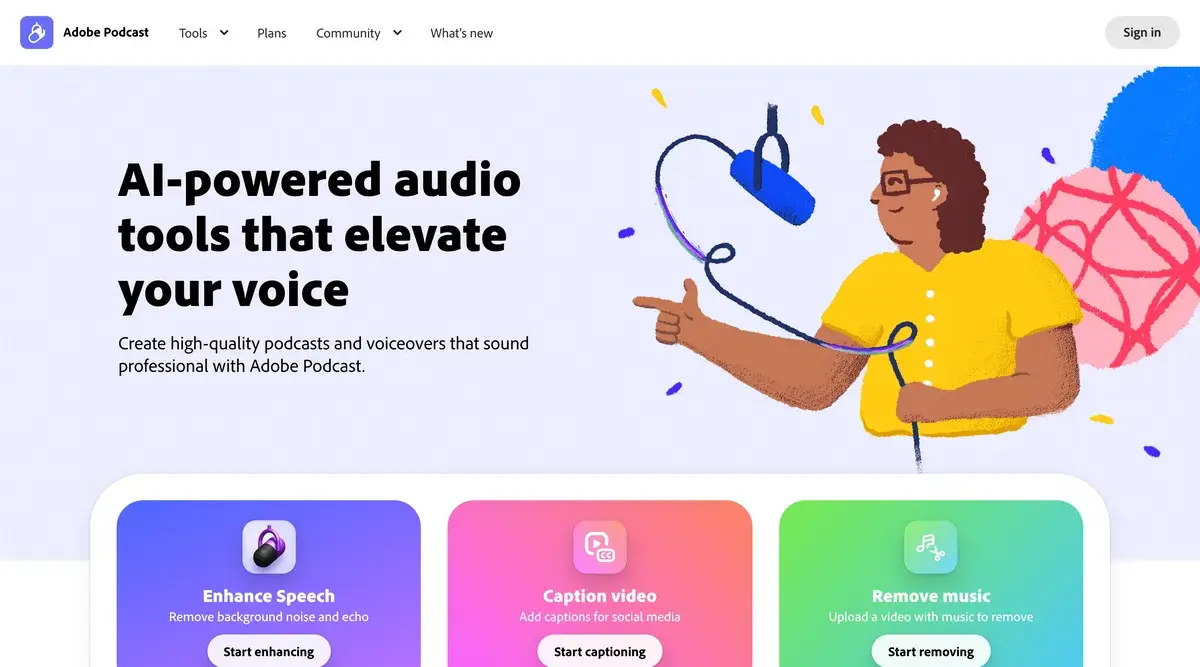
Adobe's free Enhance Speech tool removes background noise and makes amateur audio sound studio-quality.

Free · $5.99/mo
📖 10 min read
Try Adobe Podcast for free

Affiliate link — we may earn a commission

Ready to try it?
Adobe Podcast
Free · $5.99/mo
Get started →
Affiliate link — we may earn a commission
Our rating
4.7/ 5
AIVario Editor's rating →

What is Adobe Podcast?

Adobe Podcast is a free web-based AI audio enhancement tool that removes background noise, echo, and reverb from voice recordings to make them sound studio-quality. The flagship feature, Enhance Speech, is one of the most genuinely impressive free AI tools available in 2026, used by podcasters, video creators, and anyone working with imperfect audio.

The pitch is simple: upload a recording made on any microphone in any room, and download a cleaned-up version that sounds like it was recorded in a professional studio. Bad acoustics, ambient noise, even laptop microphone limitations get smoothed over by the underlying AI model. For solo creators and content teams without access to treated recording spaces, this changes the cost equation of producing acceptable-quality audio.

What sets Adobe Podcast apart from typical "AI audio enhancement" tools is that it is genuinely free for the most useful feature, with no paid upsell required to access core functionality. Most competing tools either charge significant monthly fees or apply such restrictive free tier limits that the free version is unusable. Adobe Podcast's free tier covers most realistic workflows indefinitely.

Who is it for?

Adobe Podcast fits anyone whose work involves recorded speech where audio quality matters but a professional studio is not available. That covers a surprisingly large group: podcasters recording at home, YouTubers without acoustic treatment, content creators producing voiceovers, journalists processing interview audio, course creators recording lessons, and remote teams cleaning up meeting recordings before sharing.

The tool is particularly useful for solo creators on budget. A $30 USB microphone processed through Adobe Podcast often produces audio quality that rivals what a $200 microphone delivers untreated. For people just starting podcasts or video channels, this lowers the equipment investment threshold meaningfully.

It is not the right tool for music production, audio engineering work where preserving original sonic character matters, or live use cases. The model is trained on speech, treats music as noise to remove, and only processes pre-recorded files (not live meetings or calls). For live noise cancellation, Krisp fits the use case better. For music work, dedicated audio software like Audacity or Adobe Audition serves the purpose.

Key Features

The Adobe Podcast feature set is intentionally narrow, focused on a few things done very well rather than broad audio editing capability.

Enhance Speech is the flagship and reason most users sign up. Upload a recording, the AI removes background noise, echo, reverb, and microphone artifacts, and returns a cleaned-up version. Processing typically takes a few minutes for a podcast-length file. The improvement is usually dramatic on poorly recorded source material and subtle on already-good audio.

Background noise removal specifically targets ambient noise (HVAC hum, traffic, room tone) that traditional audio editing struggles with. The AI is more aggressive than typical noise gates and produces fewer artifacts than threshold-based noise reduction.

Echo and reverb removal addresses the most common solo creator problem: untreated rooms that sound hollow or echoey. The AI reconstructs what speech "should" sound like and effectively replaces the room ambience. This is where Adobe Podcast most clearly outperforms traditional audio tools.

Microphone Check tests your recording setup before you start, flagging issues like distance from mic, room acoustics, or background noise. Useful before recording important sessions to catch problems that would require re-recording later.

Browser-based recording lets users record podcast-style content directly in the browser without separate recording software. Integrates with Enhance Speech automatically. Less full-featured than dedicated podcast recording tools (like Riverside or SquadCast) but adequate for solo recording workflows.

Format flexibility accepts most common audio formats (MP3, WAV, M4A, AAC) up to 1GB per file on the free tier. Output downloadable as WAV (uncompressed) or MP3. No video support.

Adobe Podcast vs Competitors 2026

ToolUse CasePriceBest For
Adobe PodcastPre-recorded speech enhancementFree / $5.99/mo Adobe ExpressSolo creators, podcasters cleaning recordings
KrispLive call noise cancellationFree (60min/day) / $12/mo ProReal-time meetings, calls
Audo StudioPre-recorded enhancement (similar)$15/moHigher volume processing needs
AuphonicPre-recorded enhancement + levelingFree 2hr/mo / $11/moPodcasters needing loudness normalization
Descript Studio SoundBuilt into Descript editor$24/mo CreatorUsers editing podcasts in Descript
RX (iZotope)Pro audio repair$399 one-timeAudio engineers, music production

Pricing verified April 2026.

Adobe Podcast vs Krisp. This is the most common comparison and it shouldn't be. Krisp solves live call audio (Zoom, Google Meet, Teams) in real-time. Adobe Podcast processes recorded audio after the fact. They serve completely different workflows. Use Krisp for meetings and Adobe Podcast for podcast post-production. Many creators pay for both ($12/mo Krisp Pro + free Adobe Podcast).

Adobe Podcast vs Auphonic. Auphonic is the closest direct competitor in the "process recorded audio" category. Auphonic specializes in podcast workflows specifically with loudness normalization, multi-track processing, and preset chains. Adobe Podcast has better noise removal in our testing of public samples but less workflow integration. For dedicated podcast production, Auphonic at $11/mo offers more. For occasional cleanup needs, free Adobe Podcast is better value.

Adobe Podcast vs Descript Studio Sound. Descript bundles Studio Sound with its editor at $24/mo Creator. If you already edit podcasts in Descript, the integration is convenient. As a standalone enhancement tool, Adobe Podcast at free beats Studio Sound at $24/mo unless you need editing.

Adobe Podcast vs iZotope RX. RX is the professional standard for audio repair, used in film and broadcast. Costs $399 (one-time) or higher for full suite. Adobe Podcast at free does roughly 60-80% of what RX achieves on speech specifically. For professional audio work, RX. For solo creator and content workflows, Adobe Podcast covers what most people need.

Pricing 2026

PlanMonthly CostKey FeaturesBest For
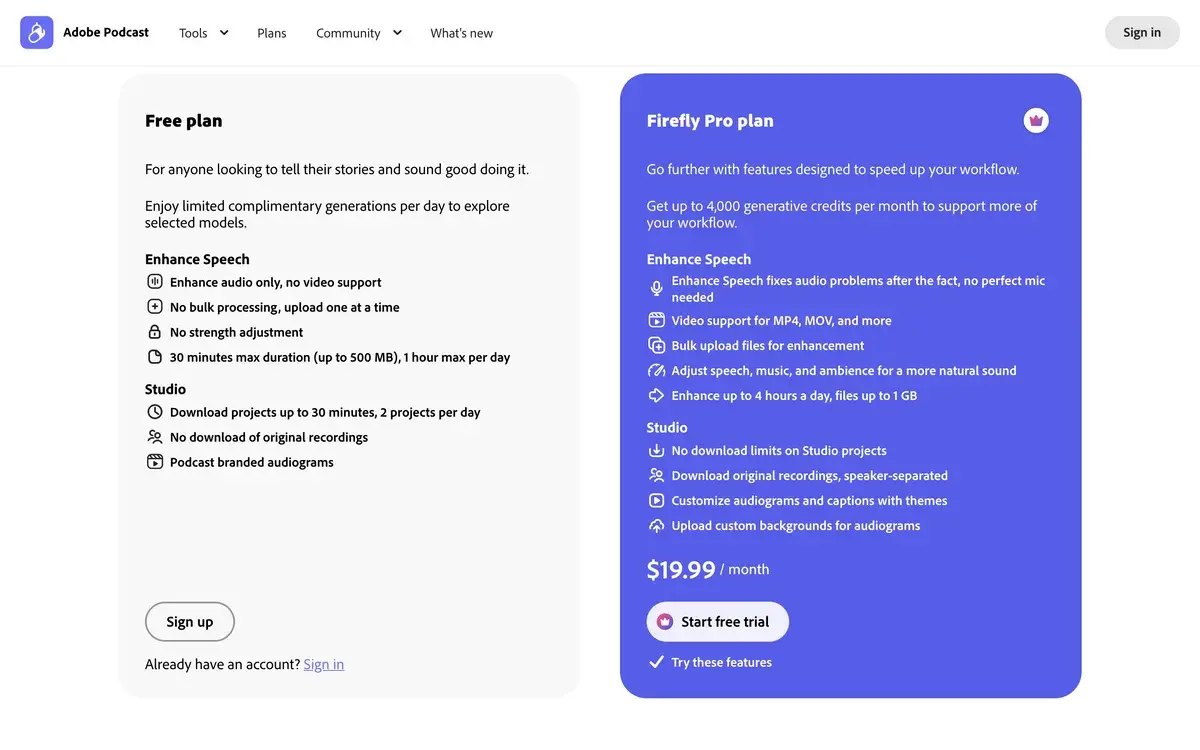
Free$0Enhance Speech (1GB files, 1hr max), basic recording, Mic CheckMost users, casual use
Adobe Express Premium$9.99/moIncludes Adobe Podcast advanced features + full Adobe Express suiteUsers wanting Adobe Express anyway
Adobe Creative Cloud$54.99/moIncludes Adobe Podcast + Audition, Premiere, full creative suiteProfessional audio/video creators

Pricing verified April 2026 from podcast.adobe.com and adobe.com/express/pricing.

For the vast majority of users the free tier covers actual usage indefinitely. The 1GB file size limit and 1-hour file length cover most podcast episodes, voiceover recordings, and meeting cleanup needs. Total monthly processing limits exist but are generous.

The paid Adobe Express subscription at $9.99/mo unlocks larger files and removes some quotas, but the value proposition only makes sense if you also want Adobe Express's other features (templates, video editing, social media tools). Buying Adobe Express purely for Adobe Podcast quota expansion is rarely worth it.

For high-volume podcast producers processing 20+ hours of audio per month, dedicated alternatives like Auphonic or Descript may offer better workflow integration than Adobe Podcast even at higher monthly cost.

What I think about Adobe Podcast

I have used Adobe Podcast occasionally for AIVario content needs and a few experiments with podcast-style recordings. My honest take is that this is one of the most genuinely useful free AI tools available in 2026, and one of the rare cases where "free with no catch" actually describes the product accurately.

The Enhance Speech output quality regularly surprises me. Recordings made in untreated rooms with cheap microphones come out sounding like they were captured in proper studios. The first time a user runs a problematic recording through it, the result feels genuinely magical. This is the rare AI tool that delivers more than the marketing suggests rather than less.

Two things I would flag honestly. First, the free tier limits are real even if generous. Heavy podcast producers will hit them and the upgrade path is awkward (you pay for Adobe Express which most podcast creators do not need). Second, the AI sometimes introduces subtle artifacts on heavily processed material, particularly on whispered speech or dramatic vocal performances. For most spoken word content the artifacts are imperceptible, but professional audio engineers will notice and may prefer manual processing in dedicated tools.

For solo creators, content teams without dedicated audio engineers, and anyone producing podcasts or videos at home, Adobe Podcast is essentially a free upgrade to your audio quality. There is no reason not to have an Adobe ID and run important recordings through Enhance Speech as a final step.

Use Cases

Solo podcaster cleaning weekly episodes. Records 45-minute episodes at home with a $80 USB microphone in an untreated office. Uploads finished episode WAV file to Adobe Podcast, processes for 5-8 minutes, downloads enhanced version. Replaces hiring a $50/episode audio engineer for cleanup.

Course creator recording video lessons. Records voice tracks in a small home office with audible HVAC noise. Adobe Podcast removes the HVAC, creates studio-quality voice for course videos. Course audio quality matches the production quality of paid courses on platforms like Coursera or MasterClass.

Remote team sharing meeting recordings. Important Zoom call had audio issues from one participant in a noisy environment. Recording is processed through Adobe Podcast before sharing with team members who could not attend. Replaces forcing everyone to suffer through degraded audio or schedule re-recording.

Journalist processing interview recordings. Records interviews in coffee shops, hotel lobbies, or on-location settings where ambient noise is unavoidable. Uses Adobe Podcast to clean recordings before transcription, improving transcription accuracy and listening experience for editors reviewing audio.

YouTuber recording without acoustic treatment. Bedroom or office recording space has reverb and room tone issues. Adobe Podcast processing as final step in audio workflow eliminates 80% of acoustic problems that would otherwise require room treatment investment ($200-1000 in panels and bass traps).

My Verdict

Adobe Podcast is AIVario's recommendation for free audio enhancement, period. The combination of genuine free tier (not a trial), high output quality, simple workflow, and Adobe-backed reliability makes it the default choice for solo creators and content teams without dedicated audio engineers.

The honest limitation is workflow integration. Adobe Podcast is a single-purpose tool. You upload files, you wait, you download files. For users editing podcasts in Descript or producing high-volume audio with multi-track requirements, integrated tools may serve better despite higher cost. For one-off enhancement of existing recordings, nothing beats free.

This is also one of the easier tools to evaluate yourself. The free tier requires only an Adobe ID and a sample recording. Process a real recording through Enhance Speech and judge the output. The improvement is either obviously valuable for your use case or it is not, and the answer typically becomes clear within the first 5 minutes of testing.

Note: Adobe does not have an affiliate program for AIVario. We earn no commission from Adobe Podcast usage. Our rating reflects genuine evaluation against alternatives.

Best for: Solo podcasters, YouTubers without acoustic treatment, course creators, journalists processing interview audio, content teams needing free audio cleanup, anyone with imperfect home recording setup Not ideal for: Music production (use Audacity or Adobe Audition), professional audio engineers needing precise control (use iZotope RX), heavy-volume podcast production (consider Auphonic), live meeting noise cancellation (use Krisp) Bottom line: Free, effective, no-catch AI audio enhancement that delivers genuinely impressive results on speech recordings. The free tier covers most real-world use cases indefinitely.

Related Tools

  • Krisp — live call noise cancellation, complementary use case to Adobe Podcast
  • Descript — full podcast/video editor with Studio Sound built in
  • Otter AI — meeting transcription, often paired with Adobe Podcast for cleaned audio + transcripts
  • ElevenLabs — AI voice generation, opposite use case (creating audio vs cleaning it)
  • Podcastle — podcast recording platform with built-in audio enhancement

Frequently Asked Questions about Adobe Podcast

Is Adobe Podcast really free?

Yes. Enhance Speech, the core feature most people come for, is genuinely free with no Adobe subscription required. You sign in with a free Adobe ID, upload audio, and get enhanced output. Free tier limits exist on file size and total monthly minutes processed, but for most podcast and content creator workflows the free tier is enough indefinitely.

How does Adobe Podcast compare to Krisp?

Different tools for different use cases. Krisp removes noise in real-time during live calls (Zoom, Meet, Teams). Adobe Podcast processes pre-recorded audio files after the fact. For live meeting noise cancellation use Krisp. For cleaning up recorded podcasts, voiceovers, or interview audio, Adobe Podcast does a noticeably better job.

Can Adobe Podcast remove echo and room reverb?

Yes, this is one of its strongest features. Echo from untreated rooms, hollow conference room sound, and bathroom-style reverb are mostly eliminated. The result sounds like the audio was recorded in a treated studio. It does not always work perfectly on heavily reverberant material but the improvement is consistent and often dramatic.

What audio formats does Adobe Podcast support?

Adobe Podcast accepts MP3, WAV, M4A, AAC, and most common audio formats. Maximum file size is 1GB on the free tier. Output can be downloaded as WAV (uncompressed) or MP3. There is no built-in support for video files; for podcast videos you need to extract the audio track first.

Does Adobe Podcast work on long files?

Free tier supports files up to 1 hour each, which covers most podcast episodes and meeting recordings. Paid Adobe Express subscription extends this for longer files. For very long recordings (multi-hour audiobooks, extended sessions) you may need to split files first.

Is Adobe Podcast good for music?

No, this is specifically a speech enhancement tool. The AI is trained on voice and treats music as noise to remove. For cleaning music recordings use a dedicated audio editor like Audacity, Adobe Audition, or iZotope RX. Adobe Podcast is great for spoken word and bad for everything else.

Will Adobe Podcast replace a real microphone?

Adobe Podcast does not literally replace good hardware, but the gap between cheap microphones and pro mics narrows significantly with Enhance Speech applied. A $30 USB mic processed through Adobe Podcast often sounds better than a $200 mic without processing. For solo creators on a budget, this is a meaningful equalizer.