InVideo AI

InVideo AI

★ Top rated
AI Video Generation

Text-to-video generator that assembles videos from stock footage, AI voiceover, and captions — built for faceless YouTube and marketing volume.

Free · $20/mo
📖 13 min read
Try InVideo AI for free

Affiliate link — we may earn a commission

Ready to try it?
InVideo AI
Free · $20/mo
Get started →
Affiliate link — we may earn a commission
Our rating
4.5/ 5
AIVario Editor's rating →

What is InVideo AI?

InVideo AI takes a text prompt, script, or blog post and assembles a complete video from stock footage, AI voiceover, and auto-generated captions. The free tier includes 4 monthly generations with watermark; paid plans range from $20/month for Plus to $48/month for Max with unlimited generations. Used primarily by faceless YouTube channel creators, marketers producing explainer videos, and content teams generating video at volume.

The category InVideo serves is specific: video content where the visual elements come from stock footage rather than original filming or cinematic AI generation. This is a distinct workflow from cinematic AI video tools (Runway, Luma) that generate entirely new visuals, and from traditional video editing tools that work with footage you record yourself. For the volume content production use case — daily YouTube uploads, weekly explainer videos, marketing content at scale — InVideo's approach fits the economics in ways the other categories do not.

What InVideo is built to do, exactly

Walk through a typical InVideo workflow because the abstract description does not capture how the product actually functions.

A YouTube creator focused on a topic niche (history, science, finance, true crime, current events — any explanatory or narrative content category) types a prompt: "Make a 5-minute video about the history of the Roman Empire's economic policies." InVideo generates a script, breaks it into scenes, selects stock footage matching each scene's content, generates AI voiceover narrating the script, adds captions, layers background music. The output is a complete video file, ready to upload.

The creator reviews the output, makes edits using InVideo's natural-language workflow editor ("replace the scene with the soldier with one showing coins," "make the voiceover slower in the middle section," "add this image at the 2-minute mark"), and exports the final version. Total time from prompt to upload-ready video: typically 10-30 minutes for a 5-minute video. Compared to filming, editing, and producing the same video traditionally — many hours per video — the time compression is meaningful.

This workflow is what InVideo is designed for. Whether the resulting videos represent "good content" is a separate question that depends on the creator's effort on script, niche selection, and audience fit; the tool produces capable assemblies of the content provided to it, but the content itself reflects the creator's work.

Who is it for?

Faceless YouTube channel creators producing daily or weekly content in narrative-driven niches (history, science, finance, true crime, technology explainers, listicles). The combination of script generation, automated assembly, and AI voiceover supports the production cadence these channels require. The stock footage approach fits content categories where original filming is impractical or unnecessary.

Marketers producing product explainer videos, brand storytelling content, social media campaigns, and educational marketing videos. The brand kit features support consistent visual identity across video output; the volume tiers support the campaign-pace production that marketing teams require.

Bloggers and content creators repurposing written content into video format. The blog-to-video workflow takes existing articles and produces video versions for YouTube, TikTok, or social distribution — meaningful for creators whose primary content lives in writing but who want to expand into video distribution.

Agencies producing video content at scale for SMB clients. The volume tiers support multi-client production; the natural-language editor lets non-video-specialists produce capable client deliverables. Margin economics work for use cases where dedicated video production is cost-prohibitive.

Educational content creators producing course videos, training content, and tutorial materials. AI voiceover handles narration without requiring instructor on-camera time; stock footage handles visual examples; the production pace supports curriculum development at scale.

InVideo is not the right pick for: cinematic creative work where original visuals matter (use Runway or Luma), content requiring on-screen presenters (use Synthesia or traditional filming), professional video production with high production values, brand content where stock-footage aesthetic does not fit brand standards, or one-off video projects where the per-video time investment of traditional production is acceptable.

Key Features

  • Text-to-video generation — prompt or script in, complete video out, with appropriate stock footage and voiceover
  • AI script generator — generate scripts from topic descriptions or briefs
  • AI voiceover — 50+ realistic voices across 20+ languages with adjustable pace and emphasis
  • Stock footage library — 16+ million clips and images licensed for InVideo-generated videos
  • Auto captions — styled subtitles generated automatically with brand customization options
  • Workflow editor — natural-language editing instructions ("change this scene," "make the music quieter")
  • Brand kit — apply consistent colors, fonts, logos across team or channel content
  • Multi-format export — horizontal 16:9 (YouTube), vertical 9:16 (TikTok, Reels, Shorts), square 1:1, custom dimensions
  • Background music library — royalty-free music tracks integrated into the editor
  • Voice cloning (Max tier) — train custom voice models for branded voiceover work
  • Translation — translate voiceover and captions into multiple languages
  • Workflow templates — reusable structures for common video formats (listicle, explainer, news update)

InVideo vs Competitors 2026

ToolApproachStock libraryVoice qualityFree tierPrice/mo
InVideo AIStock + AI voice assembly✅ 16M+✅ Strong✅ 4 videos/mo$20
PictoryLong-form repurposing⚠️ Decent✅ Good✅ Limited$19
SynthesiaAI avatar presenters❌ Avatar-focused✅ Strong⚠️ Demo only$30
HeyGenAI avatar presenters❌ Avatar-focused✅ Strong✅ Limited$24
VeedBrowser editor + AI features✅ Decent⚠️ Decent✅ Limited$18
CaptionsMobile-first social video⚠️ Limited✅ Strong✅ Limited$9.99
RunwayCinematic AI generation❌ Generated visuals✅ Limited$15
LumaCinematic AI generation❌ Generated visuals✅ Limited$9.99

Data verified April 2026 from each provider's pricing pages.

The clearest comparison is InVideo vs Pictory. Both target the faceless content creator audience with stock-footage-based workflows, but with different strengths. Pictory specializes in repurposing long-form content (podcasts, webinars, courses) into shorter formats; InVideo specializes in generating videos from prompts. For creators with existing long-form content to repurpose, Pictory often fits better. For creators producing original short-form video from topic prompts, InVideo fits better.

Synthesia and HeyGen serve a related but different use case — videos with AI avatars as on-screen presenters. For training content, corporate communications, and educational materials where a presenter face matters, avatars work. For faceless YouTube and marketing content where stock footage suffices, InVideo's approach is more economical.

VEED is a more general-purpose browser video editor with AI features added; less specialized for the text-to-video workflow that InVideo focuses on. For users wanting general video editing capability with occasional AI features, VEED. For users specifically wanting prompt-to-video assembly at volume, InVideo.

Runway and Luma represent the cinematic AI video category — entirely different production approach where visuals are generated rather than assembled from stock. The economics differ substantially: Runway/Luma produce more unique visuals at higher per-second compute cost; InVideo produces less unique visuals at much higher volume per dollar. For different use cases, both approaches are legitimate.

Pricing 2026

PlanPriceGenerations/moWatermarkBest for
Free$04 videos✅ YesCasual evaluation
Plus$20/mo60 videosActive creators, daily-cadence channels
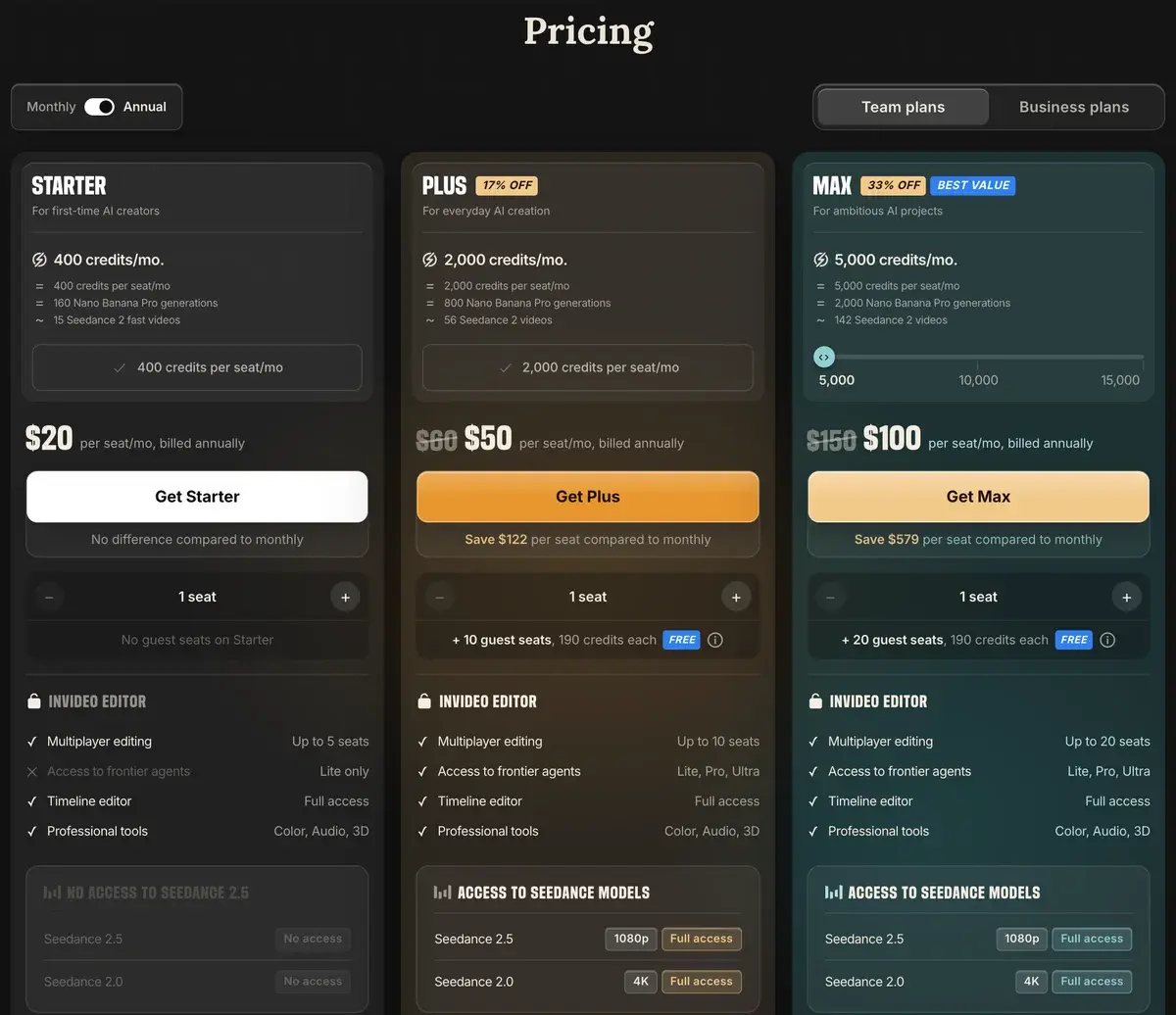
Max$48/moUnlimited + premium voicesHigh-volume creators, agencies
EnterpriseCustomCustomLarger teams with brand and security needs

Prices verified April 2026 from invideo.io/pricing. Annual billing offers ~30% off across paid tiers.

The pricing structure reflects volume-based use cases honestly. Free tier (4 videos/month with watermark) is for evaluation, not real use. Plus at $20/month for 60 videos is the practical entry point — supports daily YouTube uploads or 2-3 weekly cadences with margin. Max at $48/month for unlimited generations is for creators or small teams producing at the highest volume; the unlimited generation justifies the price for users who would otherwise hit Plus tier caps.

The math compared to traditional video production is favorable across most use cases. A creator who would spend hours per video on filming and editing now spends 15-30 minutes per video at $0.33-$0.80 per video at the Plus tier. For volume-driven content economics, this changes what is feasible.

Hands-on Notes

The first time you produce a complete YouTube video from a prompt in 15 minutes, the production economics of faceless content shift visibly. What used to require either filming yourself or paying for production now becomes a workflow that an individual creator can run multiple times per week. For the audience of faceless content creators specifically, this is the value proposition that earns the tool its market position.

The script generation is decent. Scripts produced from topic prompts are structurally sound, factually grounded for common topics, and pace appropriately for the requested duration. For specialized topics, niche-specific knowledge, or controversial content, the AI scripts need substantial editorial review — they default to safe, generic framings that may not match the creator's intended angle. Most serious creators write or heavily edit scripts rather than using fully AI-generated scripts as final.

Stock footage selection is the feature that most affects output quality. InVideo's selection algorithm matches scenes to script content reasonably well; the matches are not always optimal but are usually acceptable. The footage variety in the 16M+ library is genuinely broad enough that most topics find suitable visuals. For unusual niches or very specific visual requirements, manual footage replacement during workflow editing addresses the gaps.

AI voiceover quality is genuinely good on the Max tier. The premium voices sound natural, handle inflection and pacing reasonably well, and produce audio that most viewers will not immediately identify as AI-generated. Plus tier voices are competent but more clearly AI; for serious channel positioning, the Max tier upgrade is meaningful.

The natural-language workflow editor is useful for non-technical editing. "Replace the third scene with footage of mountains" or "make the voiceover slower in the introduction" produce appropriate edits without requiring video editing skills. This is the feature that makes InVideo accessible to creators without traditional video editing experience.

Where the limits show: original visual creativity is constrained by the stock library. Two channels using InVideo with similar prompts will produce visually similar videos because they draw from the same stock footage pool. For channels where visual originality is part of the brand, this constraint matters. For channels where the script and topic are the differentiators (which is most faceless YouTube content), the visual similarity is acceptable.

The other honest critique: AI scripts produce content with the slightly homogenous quality common to AI-generated text. Channels relying on AI-generated scripts at face value tend toward generic phrasing and predictable structure. Creators who edit scripts substantially or write their own produce better content; the tool can be used either way.

Use Cases

A solo YouTube creator running a faceless history channel produces 4-5 videos per week using InVideo Max. Scripts are written by the creator (research-heavy content where AI generation produces inadequate accuracy); InVideo handles assembly, voiceover, and captions. Channel grows from 5K to 80K subscribers over 18 months with this production model. Total InVideo spend: $48/month against meaningful ad revenue at scale.

A marketing team at a B2B SaaS produces explainer videos, customer story videos, and educational content using InVideo Plus. The brand kit ensures visual consistency; AI scripts handle initial drafts that the marketing team edits for brand voice; InVideo handles assembly. The team produces 30-50 videos quarterly without dedicated video production resources.

An agency producing social content for SMB clients uses InVideo Max across 8-10 active client accounts. Each client gets brand kit configuration; AI scripts produce drafts that account managers customize per client; production volume scales without proportional production time. Margin economics work because per-video production cost is meaningfully lower than traditional alternatives.

A blogger with 200+ articles uses InVideo to repurpose top-performing articles into video format for YouTube and TikTok distribution. Each article produces 1-2 video adaptations; cross-platform distribution expands content reach without doubling content production time. The blog-to-video workflow is one of InVideo's strongest use cases.

An online course creator uses InVideo for supplementary lecture videos in a course platform. AI voiceover handles narration without requiring the instructor to record everything personally; stock footage provides visual support for explanations. The course grows from 30 to 60+ lessons over a year without proportional production time investment.

Our Verdict

InVideo AI is the right tool for the specific use case it is designed for: producing videos at volume from text prompts using stock footage and AI voiceover. For faceless YouTube creators, marketing teams producing explainer videos, agencies serving SMB video needs, and content creators repurposing written content into video, InVideo earns its market position through workflow efficiency and reasonable output quality.

The honest considerations: stock-footage-based videos lack the visual originality of cinematic AI generation or original filming. AI scripts require editorial work to produce content that does not feel generic. The output reflects the workflow constraints — capable assemblies of stock and AI elements rather than uniquely creative video. For the volume content categories InVideo serves, these constraints are acceptable trade-offs; for cinematic or original creative work, they are limiting.

The pricing is fair for the value delivered. Plus at $20/month covers active creators; Max at $48/month covers high-volume use; Enterprise serves agency and team needs. Free tier is evaluation-only but adequate for that purpose. For users in the target use cases, InVideo is straightforwardly recommendable; for users outside the target use cases, the alternatives (Runway, Luma, Synthesia, traditional editing) cover different needs better.

Note: InVideo AI does not currently have an active affiliate program with AIVario. AIVario earns no commission from sign-ups. Our rating reflects ongoing use of the paid Plus tier across content production work.

Best for: Faceless YouTube channel creators, marketing teams producing video at volume, content agencies serving SMB clients, bloggers repurposing written content into video, online educators producing supplementary lecture content Not ideal for: Cinematic creative work (use Runway or Luma), content requiring on-screen presenters (use Synthesia or traditional filming), one-off projects where traditional production is acceptable, brand content where stock-footage aesthetic conflicts with brand standards Bottom line: A specialized tool for volume video production from text. Not creative video AI, not traditional editing — a different category that fits specific use cases well and serves the audience that has reasonable expectations of what stock-and-AI-voice assembly produces.

Related Tools

  • Pictory — closest direct alternative with stronger long-form repurposing positioning
  • Synthesia — alternative for content requiring AI avatar presenters
  • VEED.IO — more general video editor for users wanting broader editing capability
  • CapCut — free alternative for users editing recorded footage rather than generating from scratch
  • Suno AI — pairs with InVideo for custom background music in higher-tier productions

Frequently Asked Questions about InVideo AI

What does InVideo AI actually produce?

InVideo takes a text prompt, script, or blog post and assembles a complete video — selecting stock footage that matches the content, generating AI voiceover, adding captions, and layering background music. The result is a finished video file ready to upload to YouTube, social platforms, or wherever it is going. The output is professional-looking but stock-footage-driven rather than AI-generated cinematic video.

How much does InVideo AI cost?

InVideo AI has a free tier with 4 monthly video generations (with InVideo branding watermark). Paid plans start at $20/month for Plus (60 monthly generations, no watermark), $48/month for Max (unlimited generations + premium voices), and Enterprise custom pricing for teams. Annual billing offers ~30% off.

Is InVideo different from Pictory or Synthesia?

Yes. Pictory specializes in repurposing long-form content (podcast clips, course videos, webinar highlights) into short-form. Synthesia uses AI avatars as the on-screen presenter rather than stock footage. InVideo combines stock footage with AI voiceover for assembled videos without on-screen presenters. For faceless YouTube content and marketing explainers, InVideo's approach often fits better.

How is InVideo different from Runway or Luma?

Different categories of video AI. Runway and Luma generate cinematic AI video from text prompts — actual generated visuals, with significant compute cost per second. InVideo assembles videos from existing stock footage with AI voiceover layered on top — much cheaper to produce, less unique visually. For faceless content at volume, InVideo's economics work; for cinematic creative work, Runway or Luma produce more original results.

Are InVideo AI voiceovers good enough for YouTube?

The voice quality is genuinely good — most viewers will not immediately identify InVideo voiceovers as AI-generated, especially with the premium voices on Max tier. Quality varies by voice (some voices sound more natural than others) and by content type (factual content sounds more natural than emotional or persuasive content). For most YouTube faceless content categories, the voice quality clears the practical bar.

Can InVideo make TikTok and Shorts videos?

Yes, vertical 9:16 format is supported alongside standard horizontal 16:9. The Workflow editor handles aspect ratio adjustments, and the stock footage library has clips suitable for vertical formats. For creators producing across YouTube, TikTok, Instagram Reels, and Shorts, InVideo can produce the same content adapted to multiple formats from a single project.

Does InVideo own the stock footage rights?

InVideo's 16M+ stock library is licensed for use in InVideo-generated videos under the platform's terms. Users on paid plans get commercial usage rights for videos generated through InVideo, including monetization. Free tier outputs include InVideo branding and have more restricted commercial usage. Always verify current terms at invideo.io/terms before relying on commercial usage assumptions.

Is InVideo good for high-volume content production?

Yes, InVideo is specifically designed for volume. The Plus tier ($20/month for 60 videos) and Max tier ($48/month unlimited) support daily video production cadences. The script generator and workflow editor compress the per-video time to 10-15 minutes for a 5-minute video, which makes daily YouTube uploading or weekly TikTok schedules economically feasible for solo creators.