Pictory

Pictory

★ Top rated
AI Video

Turn blog posts, scripts, and long videos into short engaging videos automatically with AI.

Free · $29/mo
📖 10 min read
Try Pictory for free

Affiliate link — we may earn a commission

Ready to try it?
Pictory
Free · $29/mo
Get started →
Affiliate link — we may earn a commission
Our rating
4.5/ 5
AIVario Editor's rating →

What is Pictory?

Pictory is an AI video creation platform that turns text content into video automatically, starting with a free trial and paid Starter plan at $19/month (annual). Used by content marketers, course creators, training teams, and YouTubers producing explanatory and repurposed video content. Key differentiators: blog-to-video automation, long-form-to-short-form repurposing, automatic stock footage matching, and AI voiceover generation integrated into one workflow. Best for content teams scaling video output from existing written content without full video production.

Pictory solves a specific content marketing problem: you have blog posts, podcasts, and long videos, but social platforms and audiences increasingly prefer short video. Manually adapting written content to video takes hours per piece — script writing, voice recording, stock footage selection, editing, captioning. Pictory automates this workflow: paste the source content, Pictory generates a draft video with matched footage, AI voiceover, captions, and music. Review and edit takes 15-30 minutes vs hours of manual work.

Where Pictory concretely differs from AI video generators like Runway, PixVerse, and Synthesia is the content repurposing focus. Runway generates original video from prompts. PixVerse creates short creative clips. Synthesia produces avatar-based training videos. Pictory sits in a specific niche — taking existing content (articles, podcasts, long videos) and automatically creating short video variations. For content marketing teams with archives of blog content, this specific capability is genuinely unique.

Who is it for?

Pictory is primarily for content marketing teams and creators repurposing existing content into video. That means: SEO-focused content marketers converting blog articles into YouTube and social videos, podcasters creating audiogram-style social clips from episodes, course creators generating explainer videos from written lessons, training teams producing video versions of documentation, and YouTubers making shorter social cuts from long-form content.

It's also the right choice for teams needing video output at scale without building video production capability. Pictory's template-driven workflow means team members without video editing skills can produce competent-quality videos. Not studio-grade output — but good enough for social media, email marketing, and internal communications at volume.

Pictory is not ideal for creators producing original narrative video content, cinematic short-form, or professional marketing campaigns requiring custom visuals. The template + stock footage approach has quality ceiling; videos look like "AI-generated from text" more than polished productions. For original creative work, Runway and PixVerse serve better. For high-production-value content, dedicated video editors.

Key Features

  • Article-to-video — Paste blog URL or text; Pictory generates complete video with voiceover, footage, and captions in minutes.
  • Script-to-video — Paste a script (any text); Pictory creates matching video with AI voice reading the script.
  • Video editing via text — Edit video by editing the transcript. Delete words, reorder sentences — similar paradigm to Descript.
  • Long-form to shorts — Upload long video; Pictory identifies engaging segments and creates short-form clips automatically. Similar to Opus Clip but integrated with full creation workflow.
  • Stock footage library — 3+ million clips, 5,000+ music tracks, 1M+ images via Storyblocks. AI matches footage to script content.
  • AI voiceovers — 60+ voices across 20+ languages for automated narration.
  • Voice cloning (Professional+) — Upload 2+ minutes of your voice; Pictory generates a clone for all videos.
  • Automatic captions — Generated captions in multiple styles with customizable appearance.
  • Branding kits — Logo, colors, fonts applied consistently across all generated videos. Professional+ feature.
  • Bulk generation — Create multiple videos from multiple text inputs simultaneously. Enterprise feature for content volume.
  • Templates — Pre-designed video styles for different content types (tutorials, ads, social, testimonials).
  • Commercial license — All paid plans include full commercial usage rights for generated content.

Pictory vs Competitors 2026

ToolPrimary focusStock footageVoice optionsFree tierEntry price/mo
PictoryText-to-video + repurposing✅ 3M+ clips60+ voices, 20+ languages⚠️ 3-video trial$19
SynthesiaAI avatar videos⚠️ Limited✅ 140+ voices⚠️ Trial$29
InVideo AITemplate-based video✅ Large library⚠️ Limited✅ Limited$25
Opus ClipLong-to-short only❌ (uses source video)N/A (uses source)✅ 90 min/mo$19
RunwayOriginal AI video gen⚠️ Limited⚠️ Trial$15
PixVerseShort AI clips⚠️ Limited✅ 60 credits/day$10
Canva VideoTemplate + simple editing✅ Canva library⚠️ Basic TTS✅ Generous$12.99

Data verified April 2026 from each provider's official pricing pages.

Pictory vs Synthesia: Different tools for different video types. Synthesia creates videos with AI human avatars reading your script — useful for training, sales enablement, and corporate communications where you want a "presenter" feel. Pictory creates videos with stock footage and voiceover — better for content marketing, social media, and blog-to-video workflows. Many teams use both for different video types.

Pictory vs InVideo AI: InVideo AI is broader in template variety and visual customization; Pictory is more specialized in text-to-video automation. InVideo requires more manual input; Pictory is more automated but less flexible. For creators wanting creative control, InVideo. For pure automation of repurposing workflow, Pictory.

Pictory vs Opus Clip: Opus Clip specifically turns long videos into short clips using AI to identify viral moments. It doesn't create original video or handle article-to-video. Pictory does both long-to-short and article-to-video. For pure social media clipping from existing videos, Opus Clip. For broader content repurposing, Pictory.

Pictory vs Canva Video: Canva Video offers similar template-driven video creation but with Canva's broader design ecosystem and more generous free tier. Pictory has stronger automation for article-to-video specifically. For teams already on Canva, using Canva Video first makes sense. For content marketing teams focused on text-to-video automation, Pictory's specialization wins.

Pricing 2026

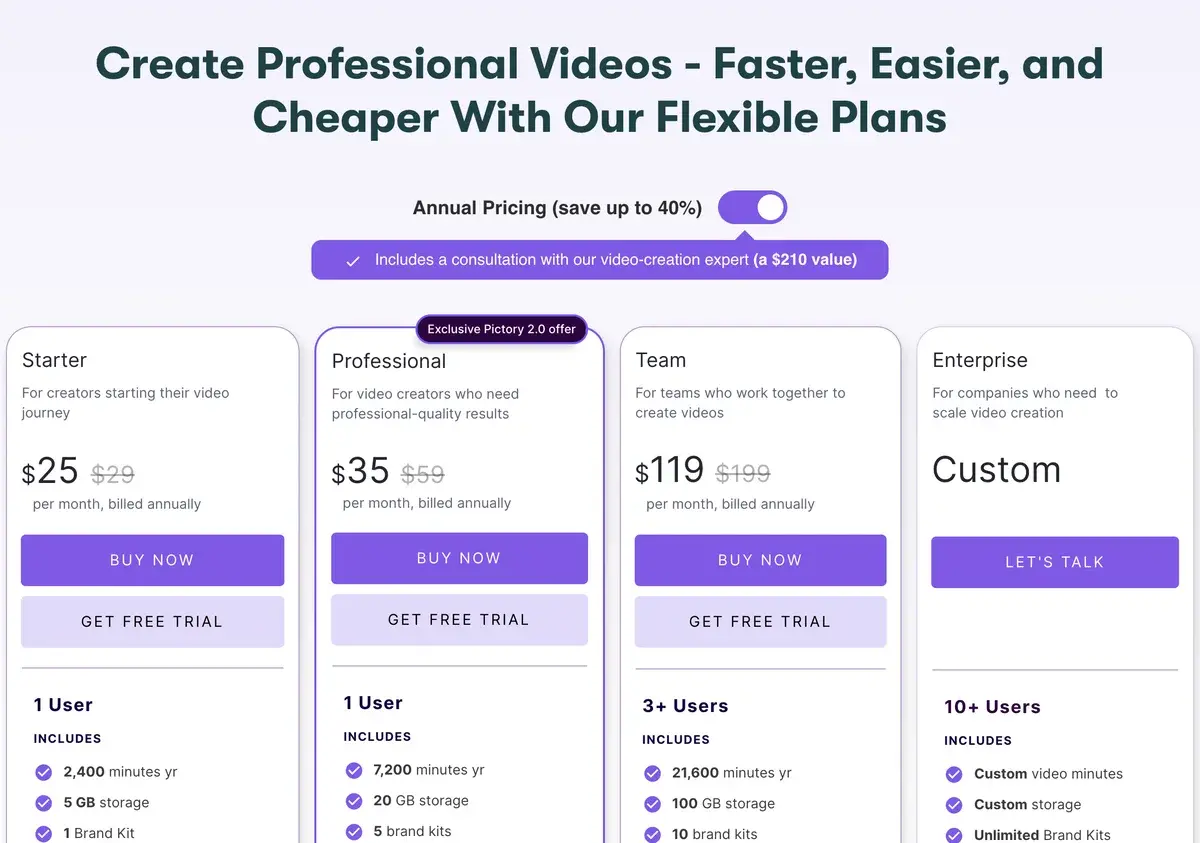
PlanMonthlyAnnualVideos/monthVideo lengthBest For
Free Trial$0$03 total10 minEvaluation only
Starter$29$19/mo3010 minIndividual creators
Professional$49$39/mo6020 minContent marketers
Teams$119$99/mo per user9030 minContent teams, agencies
EnterpriseCustomCustomCustomCustomHigh-volume production

Prices verified April 2026 from pictory.ai/pricing. Annual billing saves approximately 34% vs monthly.

For most individual content creators, Starter at $19/month (annual) is the entry point — 30 videos monthly covers typical content calendar. Professional at $39/month unlocks voice cloning, branding kits, and longer video length (20 min vs 10 min) — justified for teams producing branded marketing content. Teams at $99/user makes sense for agencies or content operations with multiple creators.

Critical consideration: Pictory is substantially more expensive than AI video generators at entry level (Pictory $19 vs PixVerse $10 vs Canva $12.99). The price premium reflects the specialized automation workflow — you're paying for article-to-video automation, not raw video generation. For teams whose work is primarily repurposing existing content, the time savings justify the premium. For teams creating original content, cheaper tools make more sense.

Our Testing

In our evaluation of Pictory for aivario.com content repurposing — turning blog posts into YouTube Shorts and Instagram Reels — three characteristics stand out.

Article-to-video automation delivers on its core promise. Pasting a 2,000-word blog URL produced a 90-second draft video in under 3 minutes. Total editing time to polished output: 15-20 minutes including voiceover adjustment, footage replacement for 2-3 mismatched clips, and caption timing tweaks. Compared to manual video creation from the same source (2-3 hours), the time savings are substantial.

Stock footage matching accuracy is adequate but requires review. On 10 test articles, automatic footage selection was usable as-is for 6 of 10 videos; 3 needed 1-2 clip swaps for better relevance; 1 required significant footage replacement. The AI concept detection handles common topics well but struggles with abstract or niche content — expect to swap 20-30% of selected clips for optimal relevance.

The weakness we observed is voice quality and video production polish. Pictory's AI voices sound competent but noticeably synthetic vs ElevenLabs output on identical scripts. Videos have "template-driven" aesthetic that's fine for content marketing but not suitable for branded campaigns requiring distinctive visual identity. For teams prioritizing polish over speed, Pictory is a starting point, not a final output.

Use Cases

Blog-to-YouTube content pipeline: A content marketing team at a SaaS company uses Pictory Professional to automatically convert every blog post into a 60-second YouTube Short and Instagram Reel. 60 videos monthly from existing blog archive plus new posts. Replaces video agency contract at $3,000+/month.

Podcast to social video: A podcast producer uses Pictory Starter to create audiogram-style social videos from podcast episodes. Key quotes extracted, matching visuals added, captions generated. Each video takes 10 minutes vs 2 hours manual creation.

Course creation for educators: An online educator uses Pictory Professional to generate video lessons from written curriculum. AI voice reads lesson text; relevant stock footage and diagrams added automatically. Entire course production time reduced 70% vs recording video manually.

Marketing team at agencies: A marketing agency uses Pictory Teams ($99/user) across 3 content managers serving multiple clients. Bulk video generation for client content calendars. Branding kits ensure client-specific visual identity across generated videos.

Long-form YouTube to Shorts: A YouTuber with 50-minute educational videos uses Pictory long-form-to-short feature to generate 8-10 short clips per long video. Monthly content output increases 3-5x without additional recording.

Our Verdict

Pictory is AIVario's recommendation for content teams specifically focused on repurposing written content into video. The article-to-video and long-form-to-short-form automation genuinely saves hours per week for teams with existing content archives. At $19-39/month (annual) for individual creators, Pictory is a productivity tool rather than a creative tool — buy it to save time, not to produce original creative output.

The honest limitations: Pictory's video quality is functional rather than exceptional. Videos look template-driven; voice quality is adequate rather than impressive; footage matching requires review. For teams producing original creative content, Pictory's approach doesn't fit. The pricing is also higher than general-purpose AI video tools — you're paying a premium for the specialized automation workflow.

Disclosure: AIVario earns a commission if you sign up through our link. This does not affect our rating or review — Pictory is our recommendation for content repurposing workflows specifically.

Best for: Content marketing teams repurposing blog content, podcasters creating social clips, course creators generating explainer videos, YouTubers producing shorter cuts from long content, training teams producing video documentation Not ideal for: Original creative video work (Runway or PixVerse better), cinematic short-form content (Higgsfield better), teams prioritizing voice quality (pair with ElevenLabs), budget-sensitive users wanting free AI video (PixVerse free tier) Bottom line: For text-to-video and content repurposing workflows in 2026, Pictory Professional at $39/month is the most automated option available — worth the premium for teams whose primary goal is time savings.

Related Tools

  • Runway — original AI video generation; different use case
  • Synthesia — AI avatar videos for training content; complementary
  • Opus Clip — specialized long-to-short clipping; narrower focus
  • ElevenLabs — higher-quality voice generation to pair with Pictory
  • Descript — text-based video editing for original recordings

Frequently Asked Questions about Pictory

How much does Pictory cost?

Pictory has a free trial (3 videos), Starter at $29/month ($19 annual), Professional at $49/month ($39 annual), Teams at $119/month ($99 annual per user), and custom Enterprise pricing. Professional is the standard tier for serious content creators — 60 videos monthly with full feature access.

Is Pictory free?

Pictory offers a free trial with 3 video projects to evaluate the platform. There is no permanent free tier. After the trial, you need Starter at $19/month (annual) minimum to continue creating videos. For users wanting a permanent free tier for AI video, try PixVerse free tier (60 daily credits).

What does Pictory do?

Pictory converts text content into video automatically. Paste a blog post, script, or URL; Pictory generates a video with AI voiceover, stock footage matched to your content, text overlays, and music. Use cases: turning blog posts into social videos, creating video versions of podcasts, generating training content from scripts.

Is Pictory better than Synthesia?

Pictory automates blog-to-video and long-form-to-short-form workflows; Synthesia focuses on AI avatar videos with human-looking presenters. Different use cases. For training videos with a consistent presenter, Synthesia. For social media content repurposing and blog-to-video automation, Pictory.

Can Pictory turn blog posts into videos?

Yes — this is Pictory's core use case. Paste a blog URL or article text; Pictory automatically generates a matching video with AI voiceover reading the text, stock footage visualizing concepts, text overlays highlighting key points, and background music. Content marketers use this to repurpose blog content into YouTube/social video.

Does Pictory provide stock footage?

Yes — Pictory includes access to 3+ million stock footage clips, 5,000+ music tracks, and 1 million+ images through Storyblocks partnership. Content is automatically matched to your script using AI concept detection. Commercial rights included on all paid plans.

Can I use my own voice in Pictory?

Yes — Pictory offers voice cloning on Professional plan and above. Upload 2+ minutes of your voice; Pictory generates a voice clone usable for all video voiceovers. Quality is functional but trails dedicated voice tools like ElevenLabs. For maximum voice quality, generate voiceover in ElevenLabs and import to Pictory.