Miro

Miro

★ Top rated
AI Whiteboard & Collaboration

Best-in-class online whiteboard with AI features layered in — the core product is the reason to use it, not the AI.

Free · $8/seat
📖 13 min read
Try Miro for free

Affiliate link — we may earn a commission

Ready to try it?
Miro
Free · $8/seat
Get started →
Affiliate link — we may earn a commission
Our rating
4.5/ 5
AIVario Editor's rating →

What is Miro?

Miro is the leading collaborative online whiteboard platform, free up to 3 boards with paid plans starting at $8/seat per month. Used by 100+ million users across product teams, design teams, consultants, agile coaches, and any group running workshops, brainstorming sessions, retrospectives, or collaborative planning. Key differentiators: the broadest template library in the category (1,000+ templates), deepest enterprise feature set, native AI sidekick features for common workshop tasks, and the largest user base providing strong network effects across consultants, partners, and trainers. Best for distributed teams running visual workshops and collaborative planning at any scale.

The honest framing on Miro AI: the AI features are useful additions to a fundamentally great product, not the reason to choose Miro. Miro has been the dominant collaborative whiteboard for years, and the reason it remains dominant in 2026 is the platform itself — the canvas, templates, real-time collaboration, integrations, and ecosystem — not the AI layer added through 2024-2025. This framing matters because Miro's marketing sometimes emphasizes "AI-powered whiteboard" when the reality is "great whiteboard with AI features."

The competitive landscape for collaborative whiteboards in 2026 is mature and stable. Miro, Mural, and FigJam are the three leaders, with Lucidspark, Whimsical, and several others serving overlapping niches. AI features have been added across all of them at roughly similar pace and capability. The choice between platforms is mostly about ecosystem fit (Miro for general use, FigJam if your team lives in Figma, Mural for structured design thinking workshops) rather than AI capability differences.

Who is it for?

Miro is built for distributed teams that work visually together — and the audience for "visual remote collaboration" turns out to be enormous. The clearest fit is product teams (PMs, designers, engineers) running discovery sessions, design reviews, sprint planning, and retrospectives. The combination of templates, real-time collaboration, and integrations with Jira, Linear, and Figma makes Miro the standard tool for distributed product work.

Consulting and professional services firms use Miro extensively for client workshops, strategy sessions, organizational design, and visual deliverables. The Enterprise features (SSO, audit logs, advanced security) support consulting deployments at scale. Many consulting firms have standardized on Miro to the point that Miro literacy is a hiring expectation.

Agile coaches, scrum masters, and engineering managers use Miro for retrospectives, planning poker, story mapping, and team rituals that benefit from visual collaboration. The retrospective templates alone justify Miro for many engineering teams; the broader workshop capability extends usage beyond ceremonies into ongoing planning.

UX researchers and design teams use Miro for affinity mapping, user journey mapping, customer journey synthesis, and research debriefs. The free-form canvas accommodates unstructured insights better than dedicated research tools; integrations with research platforms (Dovetail, Notably) handle the analysis workflow downstream.

Educators and trainers use Miro for interactive remote teaching, curriculum design, and student collaboration exercises. The free tier and education pricing make Miro accessible for academic use; the engagement features (anonymous voting, timer, music) support live workshop facilitation.

Distributed startups use Miro as the central visual collaboration tool across functions — strategy sessions, OKR planning, customer interview debriefs, design reviews. For remote-first companies, Miro often becomes core infrastructure alongside Slack, GitHub, and Notion.

It is not the right pick for: simple note-taking (Notion or Obsidian fit better), pure document creation (Google Docs or Notion fit better), task management and project execution (Linear, Asana, or ClickUp), or co-located teams that genuinely prefer physical whiteboards and do not need persistence or async collaboration.

Key Features

  • Infinite canvas — collaborative whiteboard with unlimited space, real-time multi-user editing
  • 1,000+ templates — pre-built workshop templates for retros, design thinking, planning, ideation, agile ceremonies
  • Sticky notes and shapes — comprehensive shape library with smart connectors and grouping
  • Smart diagramming — flowchart, mind map, ERD, BPMN, and architecture diagram tools with auto-layout
  • Miro AI — generate mind maps, diagrams, and summaries; AI sidekick for common workshop tasks
  • Voting and polling — facilitation features for group decision-making and prioritization exercises
  • Timer and async features — workshop timer, async voting, comments for distributed participation
  • Video and audio — embedded video chat (Talktrack), voice notes, recorded video playback for async sessions
  • Native integrations — 130+ integrations including Jira, Linear, Asana, Figma, Notion, Slack, Microsoft Teams, Zoom, Google Workspace
  • Apps and Marketplace — extensive third-party app ecosystem extending Miro for specific workflows
  • Enterprise features (Business+) — SSO, SAML, audit logs, advanced admin controls, data governance
  • Mobile and desktop apps — full editing on iOS, Android, macOS, Windows; not just viewer-mode

Miro vs Competitors 2026

ToolTemplate depthAI featuresEnterprise scaleFree tierPrice/seat
Miro✅ Best (1,000+)✅ Good✅ Best✅ 3 boards$8/seat
Mural✅ Strong✅ Good✅ Strong✅ Limited$9.99/seat
FigJam⚠️ Decent✅ Good✅ With Figma✅ Limited$5/seat
Lucidspark⚠️ Decent⚠️ Basic✅ Strong✅ Limited$9/seat
Whimsical⚠️ Limited⚠️ Basic⚠️ SMB ceiling✅ Limited$12/seat
Excalidraw⚠️ Basic❌ Self-host✅ FreeFree
Conceptboard⚠️ Decent⚠️ Limited✅ Strong✅ Limited$7.50/seat
Klaxoon⚠️ Workshop-focused⚠️ Basic✅ Strong✅ Limited$7/seat

Data verified April 2026 from each provider's official pricing pages.

Miro vs Mural: The most-asked direct comparison. Mural specializes in design thinking workflows with stronger structured templates for IDEO-style design sessions; Miro is more general-purpose with broader template variety and deeper enterprise features. For consultancies and design teams running formal design thinking, Mural often fits better; for general product, engineering, and consulting workshops, Miro covers more ground. Both are mature tools at similar pricing.

Miro vs FigJam: FigJam is Figma's whiteboard product, with the tightest integration into Figma design files. For teams already deep in Figma, FigJam reduces context switching and shares design assets across whiteboard and design workflows. FigJam's pricing ($5/seat) is lower than Miro's, and the integration is the key differentiator. For Figma-centric teams, FigJam is often the right pick. For teams using diverse design tools or non-design workflows, Miro's broader capability wins.

Miro vs Lucidspark: Lucidspark is from Lucid (Lucidchart's parent company) and integrates with Lucidchart for diagram-heavy workflows. Strong for structured diagramming-plus-collaboration use cases. Miro is broader for workshop and brainstorming work. The choice depends on whether your work skews toward formal diagramming (Lucid) or open collaboration (Miro).

Miro vs Whimsical: Whimsical specializes in flowcharts, mind maps, wireframes, and structured visual artifacts. It is faster and simpler than Miro for those specific use cases. Miro is more capable for free-form collaboration and unstructured workshops. Many product teams use both — Whimsical for individual flowcharts and wireframes, Miro for collaborative sessions.

Miro vs Excalidraw: Excalidraw is the open-source minimalist alternative — free, self-hostable, deliberately simple. For users who value minimalism and control, Excalidraw is excellent. For teams needing templates, integrations, and enterprise features, Miro is much more capable. Different products for different audiences.

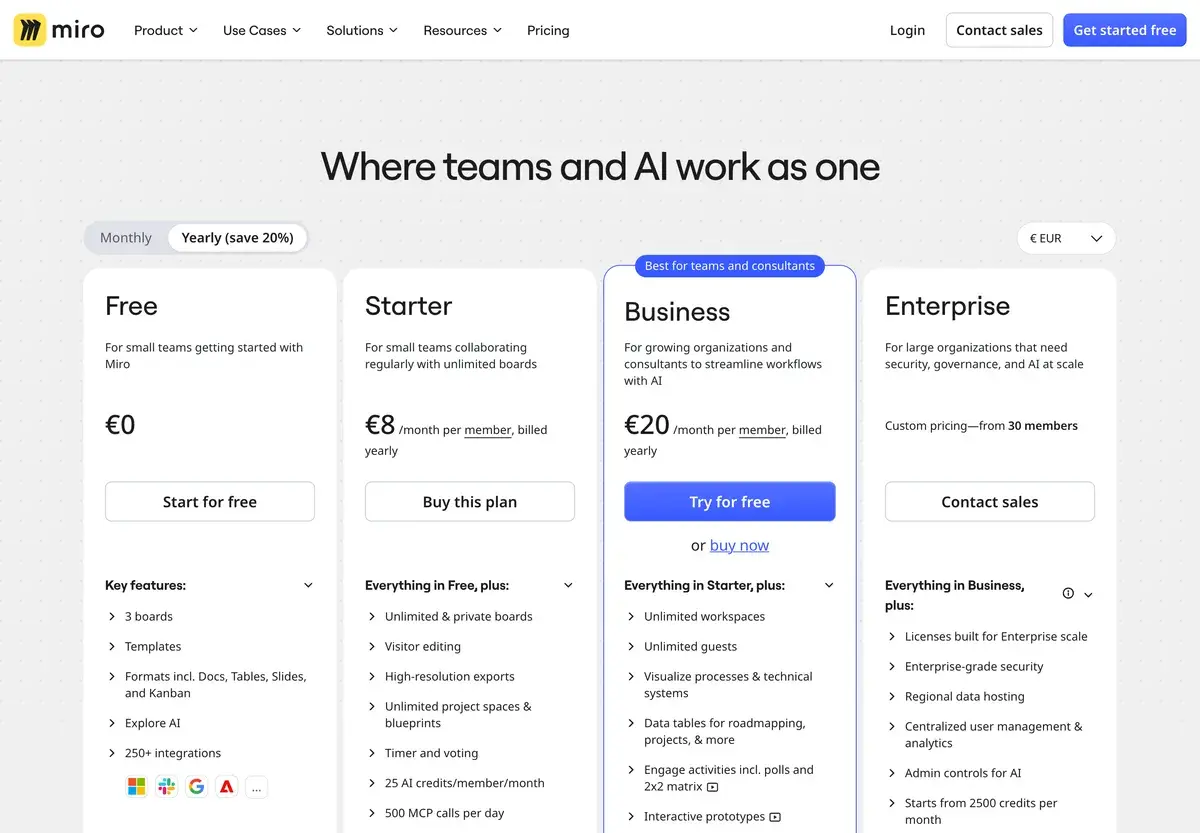
Pricing 2026

PlanPriceBoardsAI featuresBest for
Free$03 editable boardsBasic AICasual users, evaluation
Starter$8/seat/moUnlimited boardsStandard AI featuresSmall teams, solo professionals
Business$16/seat/moUnlimited + advancedFull AI features, SSO, advanced securityGrowing organizations
EnterpriseCustomUnlimited + customFull AI + data governance, dedicated supportLarger organizations, regulated industries

Prices verified April 2026 from miro.com/pricing.

The honest tier guide: the free tier (3 boards) is too limited for serious team use but useful for evaluation and small personal projects. Starter at $8/seat is the sweet spot for small teams and most individual professionals. Business at $16/seat is the right tier for organizations that need SSO, advanced security, or the full AI feature set. Enterprise pricing is opaque and varies; expect significant per-seat costs at scale, often justified by procurement, security, and compliance requirements that smaller organizations do not face. Annual billing offers ~20-25% off across paid tiers. Education and nonprofit discounts are available.

Hands-on Notes

The thing Miro does that no competitor matches at scale is being the standard. Joining a workshop link from a consulting firm, a design agency, a partner organization, or a job interview — it is almost always Miro. The network effects are real: facilitators design workshops in Miro because participants know how to use it; participants are familiar with Miro because facilitators design workshops in it. This kind of category dominance is hard to displace with feature parity from competitors.

The template library is the underrated feature. The 1,000+ templates cover essentially every workshop type — Lean Coffee, Crazy 8s, story mapping, retrospectives by half a dozen formats, design sprints by every major variant, OKR planning, business model canvas, value proposition canvas. For facilitators, templates eliminate the "build the workshop structure from scratch" overhead that previously consumed disproportionate prep time. The community-contributed templates expand the library further; high-quality patterns from facilitators and consultants are usually findable for any workshop type.

Real-time collaboration is solid and reliable. Multiple cursors, live editing, smooth sync across continents — the technical foundation for distributed collaboration works in ways that take work to appreciate because they are invisible when functioning correctly. Workshop facilitators with 20+ participants on a board rarely have technical issues that derail sessions, which is more than can be said for many enterprise SaaS products.

The AI features (Miro AI) are useful but oversold. Generating a mind map from a topic, summarizing a sticky note cluster, creating a flowchart from text — these features compress common tasks but do not transform the product. The honest framing is "Miro AI saves a few minutes per workshop on tasks that were already fast"; it does not enable workshops that were previously impossible. For active facilitators, the time savings add up. For occasional users, the AI features are nice but not the reason to use Miro.

Where Miro gets in the way: the canvas can become unwieldy on truly large boards. Workshops generating hundreds of sticky notes, dozens of frames, and complex structures can produce boards that load slowly and become hard to navigate. The recommended discipline is "one workshop per board" rather than "ongoing team board" — Miro performs better when boards have clear scope.

The other quiet criticism: pricing has moved up over the years. Miro is no longer the budget option in this category. For seat-constrained teams comparing Miro at $8/seat to FigJam at $5/seat, the per-seat math matters at scale. The trade-off is feature depth and ecosystem; for teams that genuinely use the full Miro capability, the premium is justified.

Use Cases

Distributed product team running discovery and planning: A product team across four time zones uses Miro for sprint planning, retrospectives, design reviews, and customer interview synthesis. The async features (voting, comments, recorded video) let teammates contribute on their own schedule. Templates compress the prep time per ceremony. Integration with Linear pushes prioritized backlog items directly to engineering.

Consulting firm running client workshops: A management consulting firm uses Miro Enterprise across all client engagements. Workshop deliverables become persistent artifacts that clients reference for months after sessions. Brand-templated workshop frameworks scale across consultants without per-engagement design work. Client onboarding to Miro is easier than to client-specific tools because most clients already know Miro.

Agile coach running team rituals: An agile coach supporting 6 engineering teams uses Miro for sprint retrospectives, story mapping, and quarterly planning. The retrospective templates rotate to keep the format fresh; voting features quickly identify team priorities; action items export to Jira. The coach saves 30+ minutes of prep per session compared to building from scratch.

UX research team synthesizing customer interviews: A UX research team conducts customer interviews, then uses Miro for affinity mapping and insight synthesis. The infinite canvas accommodates the messy first phase of synthesis where structure emerges from clustering. Insights export to Notion for the structured artifact phase. Many UX teams have standardized on this Miro-Notion workflow.

Distributed startup running OKR planning: A remote-first startup runs quarterly OKR planning sessions in Miro across leadership and team levels. The visual planning makes dependencies and trade-offs visible in ways spreadsheets do not. Outputs feed back into Notion or Linear for the execution phase. The ritual scales as the company grows because Miro accommodates more participants without changing the format.

Our Verdict

Miro is the right collaborative whiteboard for distributed teams in 2026, and the platform's leadership in this category is well-earned. The combination of canvas quality, template depth, integration ecosystem, and network effects makes Miro the safe default for visual collaboration work. The AI features added through 2024-2025 are useful additions that compress common tasks; they are not the reason to choose Miro.

The honest weaknesses: pricing has moved up and Miro is no longer the cheapest option in the category. Large boards can become unwieldy and slow. The AI features are good but not differentiated from Mural or FigJam's AI capabilities. And for teams already deep in specific ecosystems (Figma → FigJam, Lucid → Lucidspark), the integration logic of competing platforms often wins the practical evaluation.

For distributed product teams, consultancies, agile coaches, UX researchers, and any team running workshops at scale, Miro is straightforwardly recommended at the appropriate tier. For Figma-centric teams, FigJam often fits better. For design thinking specialists, Mural often fits better. For minimalists who value control over features, Excalidraw is the alternative.

Note: Miro does not currently have an active affiliate program with AIVario. AIVario earns no commission from sign-ups. Our rating reflects ongoing use of paid Business tier across team workshops and visual collaboration work.

Best for: Distributed product teams, consulting and professional services firms, agile coaches, UX research teams, distributed startups running visual workshops Not ideal for: Simple note-taking (use Notion or Obsidian), task management (use Linear or Asana), Figma-centric teams (FigJam often fits better), co-located teams that prefer physical whiteboards Bottom line: Best-in-class collaborative whiteboard whose AI features are nice additions, not the reason to choose it. The core product earns its place; the AI is a productivity layer on top.

Related Tools

  • Notion — common companion tool for the structured documentation phase after Miro workshops
  • Figma — design tool that integrates with Miro and offers FigJam as an alternative whiteboard
  • Linear — project management tool that pairs with Miro for visual planning to execution handoff
  • Fireflies — meeting assistant that pairs with Miro to capture both spoken and visual workshop content
  • Slack — collaboration hub where Miro boards are commonly shared and embedded

Frequently Asked Questions about Miro

How much does Miro cost?

Miro has a free Forever plan with 3 editable boards. Paid plans start at $8/seat per month for Starter (unlimited boards, basic AI), $16/seat for Business (advanced security, advanced AI features, single sign-on for teams), and Enterprise custom pricing for larger organizations. Annual billing offers ~20-25% off across paid tiers.

What does Miro AI actually do?

Miro AI generates mind maps from text prompts, summarizes clusters of sticky notes, creates flowcharts and diagrams from descriptions, generates content for templates, and provides AI sidekick features for common workshop activities. The features are useful additions but not transformative — Miro's value remains the collaborative whiteboard itself, with AI as a productivity layer that compresses common tasks.

Is Miro better than Mural or FigJam?

They are the three leaders in collaborative whiteboards in 2026, with overlapping but slightly different positioning. Miro has the broadest template library and the deepest enterprise feature set. Mural specializes in design thinking workflows and structured workshops. FigJam (from Figma) integrates tightest with Figma design files and product design workflows. Most teams pick based on existing tool ecosystem more than specific feature differences.

Can Miro replace physical whiteboards?

For distributed teams, Miro effectively replaces physical whiteboard sessions and often improves on them — every contribution is captured, no handwriting illegibility, infinite canvas, async participation possible, and the artifact persists indefinitely. For co-located teams, physical whiteboards still have advantages for spontaneous gatherings; Miro complements rather than replaces them. Hybrid teams typically use both.

Does Miro work well for technical diagrams?

Yes, Miro has strong support for system architecture diagrams, flowcharts, ERD diagrams, mind maps, and BPMN flows. The smart diagramming features and shape libraries cover most technical diagramming needs. For deeply technical formal diagramming (UML at scale, CAD-grade precision), dedicated tools like Lucidchart or specialized engineering software fit better. For most product and engineering team diagramming, Miro is sufficient.

Is Miro good for project management?

Miro is good for visual project planning, roadmapping, retrospectives, and workshops that intersect with project management — but it is not a project management tool. For task tracking, dependencies, and project execution, dedicated tools like Linear, Asana, ClickUp, or Jira are needed. Many teams use Miro for visual planning sessions and a separate PM tool for execution. Miro's integrations with these tools handle the handoff.

Can Miro AI summarize meetings?

Miro AI can summarize the contents of a Miro board (sticky notes, comments, mind maps), which captures the artifacts of a workshop. It does not transcribe spoken meetings — for that, you need a meeting assistant like Fireflies, Otter, or Granola. The combination of Miro for the visual collaboration and a meeting assistant for the conversation is a common setup for serious workshop teams.

Is Miro safe for sensitive content?

Miro publishes detailed security documentation, holds SOC 2 Type II and ISO 27001 certifications, supports SSO and SAML on Business and Enterprise tiers, and offers data residency options on Enterprise. AI features process board content through Miro's infrastructure with documented safeguards. For regulated industries, review Miro's data handling against compliance requirements before enabling AI features at scale.