What is Reclaim AI?
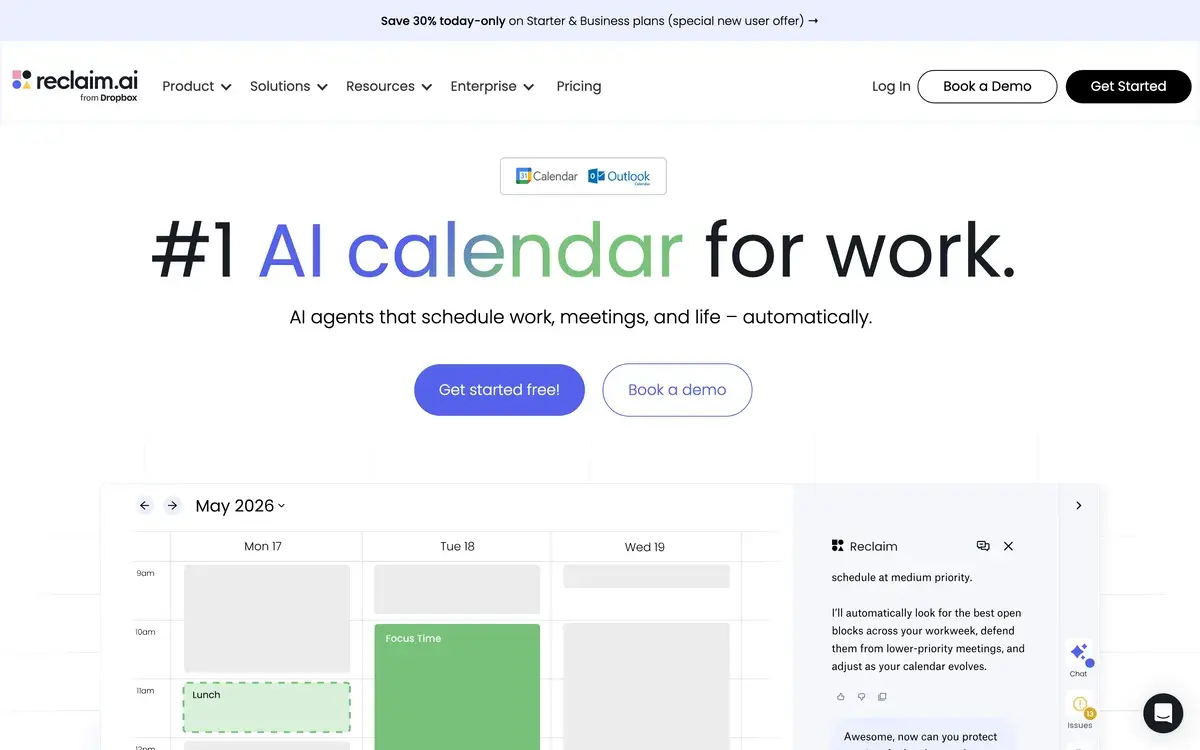
Reclaim AI is an AI scheduling assistant that connects to Google Calendar or Outlook and automatically schedules your tasks, habits, and meetings around your existing commitments, with a free tier and paid plans starting at $10/month. Built for knowledge workers, managers, and engineers who lose hours per week to manual calendar tetris and broken focus time. Used by teams at companies including Webflow, Vercel, Notion, Lattice, and Atlassian.
The pitch is narrower than most "AI productivity" tools: Reclaim does not try to be a project manager or task tracker. It treats your calendar as the source of truth and uses AI to make that calendar reflect your actual priorities — protecting deep work, scheduling tasks intelligently, and finding optimal times for recurring meetings.
Reclaim has two audience segments that converge in the product. Individual contributors use it to defend focus time against meeting overflow. Managers and team leads use Smart 1:1s and team scheduling to coordinate across busy calendars. The free tier covers most individual needs; team features start at $15/month per user.
Who is it for?
Reclaim AI is for knowledge workers whose calendars have crossed a complexity threshold where manual management costs more than the tool. The clearest fit is software engineers, product managers, and designers at companies running on Google Workspace or Microsoft 365 — people who own their schedule but operate in a meeting-heavy environment. The Habits feature protecting daily focus blocks is the killer feature for this segment.
Engineering managers and team leads use Smart 1:1s to coordinate recurring meetings across direct reports, finding times that respect everyone's existing focus rhythms. Sales managers run team standups with auto-scheduled prep blocks beforehand. Product managers use the Tasks integration to pull Linear or Jira tickets into the calendar with deadlines.
Founders and operators with chaotic, reactive calendars use Reclaim to bring structure — though if your work is genuinely project-based with shifting priorities, Motion's more aggressive auto-scheduling may fit better.
It is not the right tool for users with simple calendars (mostly meetings, few personal habits, no recurring focus needs) — Google Calendar's native features cover that case. It is also weaker than Sunsama for people who want to plan their day intentionally each morning rather than letting AI do the planning.
Key Features
- Smart Tasks — sync tasks from Asana, Todoist, ClickUp, Jira, Linear, and Trello; AI auto-schedules them into available time slots based on priority and deadline
- Habits — flexible recurring blocks (focus time, exercise, journaling, lunch) that AI places in the best slot each day rather than locking to a fixed time
- Smart 1:1s — AI finds the best recurring meeting time across two or more participants, recalculating if calendars shift
- Buffer Time — automatic transition time before and after meetings (configurable per meeting type) to avoid back-to-back calendar collisions
- Scheduling Links — Calendly-style links that respect your habits, focus blocks, and meeting cost preferences
- Meeting Cost Calculator — estimates the dollar cost of every meeting based on attendee salaries, surfaced before you accept
- People Analytics — see who you spend the most calendar time with and how much of that time is recurring
- Conflict Resolution — when a new meeting collides with a habit or task, AI proposes alternatives rather than just rejecting
- Decline Meetings — auto-decline meetings that violate "no-meeting" preferences (Friday afternoons, deep work blocks)
- Calendar Sync — works with Google Calendar and Outlook (Microsoft 365 and Outlook.com)
Reclaim AI vs Competitors 2026
| Tool | Auto-scheduling | Habits/focus | Task sync | Team features | Free tier | Price/mo |
|---|
| Reclaim AI | ✅ Defensive | ✅ Strong | ✅ 6+ integrations | ✅ Smart 1:1s | ✅ Lite | $10 |
| Motion | ✅ Aggressive | ⚠️ Basic | ✅ 5+ integrations | ⚠️ Limited | ❌ Trial | $19 |
| Sunsama | ❌ Manual | ⚠️ Daily review | ✅ 8+ integrations | ⚠️ Limited | ❌ Trial | $20 |
| Clockwise | ✅ Focus time | ✅ Strong | ❌ | ✅ Strong (team focus) | ✅ Free | $11 |
| Akiflow | ❌ Manual | ❌ | ✅ 10+ integrations | ❌ | ❌ Trial | $19 |
| TimeHero | ✅ Auto-plan | ⚠️ Basic | ✅ 6+ integrations | ⚠️ Limited | ❌ Trial | $5 |
| Calendly | ❌ Booking only | ❌ | ❌ | ✅ Strong | ✅ Free | $10 |
Data verified April 2026 from each provider's official pricing pages.
Reclaim vs Motion: The most common comparison. Motion is a project-planner that happens to use your calendar — it ingests every task and aggressively schedules everything, replanning continuously. Reclaim is a calendar-defender that keeps existing rhythms intact and only schedules new tasks where they fit. Motion fits chaotic schedules where everything must get done; Reclaim fits structured schedules where focus time matters more than throughput. Engineers and managers tend to prefer Reclaim. Founders and consultants juggling many small projects often prefer Motion.
Reclaim vs Sunsama: Different philosophies of calendar management. Sunsama assumes you plan your day intentionally each morning by manually pulling tasks into a daily plan. Reclaim assumes AI should plan most of your day so you can focus on doing the work. Sunsama suits people who want a planning ritual; Reclaim suits people who hate planning rituals.
Reclaim vs Clockwise: Closest direct competitor in spirit. Clockwise focuses heavily on team-wide focus time optimization — moving meetings across an entire team to consolidate focus blocks. Reclaim focuses more on individual habits and tasks, with team features as a secondary concern. Clockwise wins for engineering teams optimizing collective focus time. Reclaim wins for individuals managing their own complex calendar.
Reclaim vs Akiflow: Akiflow is a unified inbox and command-bar for tasks across tools, with manual calendar scheduling. Reclaim auto-schedules; Akiflow asks you to schedule. They serve different mental models — Akiflow rewards intentional planning, Reclaim rewards delegation to AI.
Reclaim vs Calendly: Different categories. Calendly is meeting booking; Reclaim is calendar AI. Reclaim's Scheduling Links cover the Calendly use case for most users, but Calendly remains stronger for high-volume external scheduling (sales teams, recruiters).
Pricing 2026
| Plan | Price | Key features | Best for |
|---|
| Lite | Free | 3 habits, basic smart scheduling, 1 calendar | Individual users testing the product |
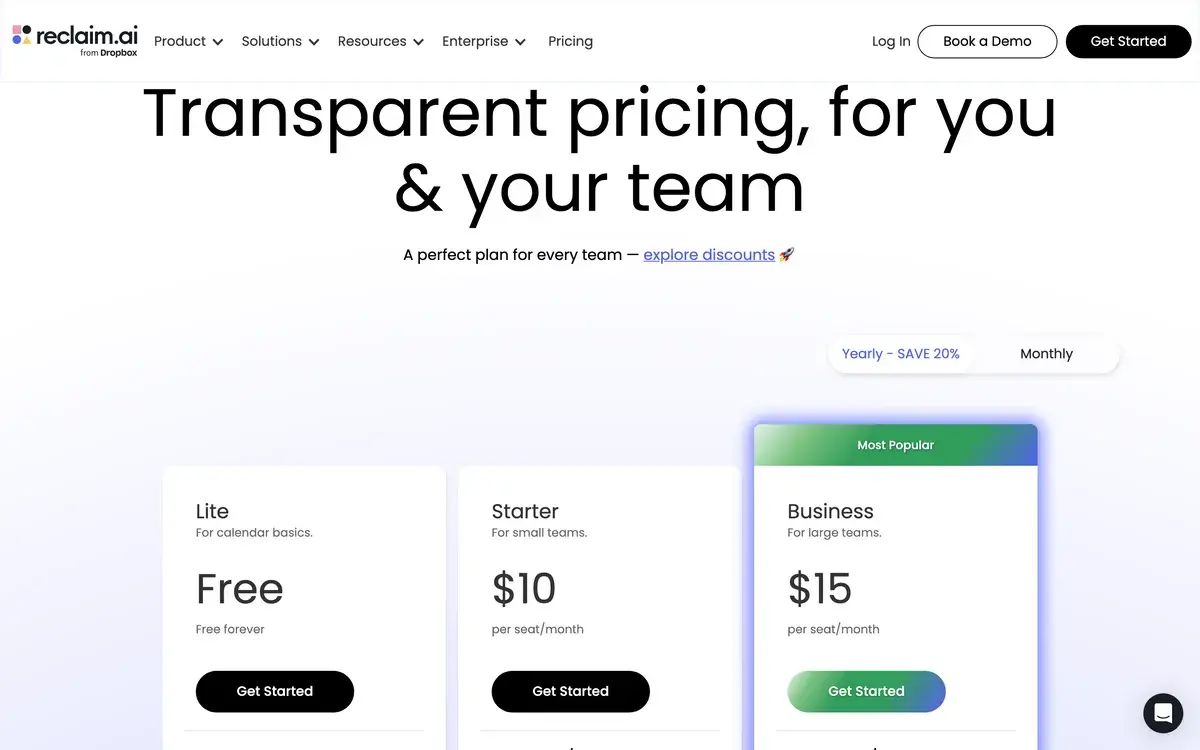
| Starter | $10/mo | Unlimited habits, task integrations, scheduling links, multiple calendars | Individual knowledge workers |
| Business | $15/mo per user | Smart 1:1s, team scheduling, meeting cost calculator, analytics | Teams of 3-50 |
| Enterprise | Custom | SSO, advanced admin, dedicated support, security review | Companies with security requirements |
Prices verified April 2026 from reclaim.ai/pricing.
The honest tier guide: Lite is genuinely usable for individuals with simple needs — three habits and basic smart scheduling cover most one-person workflows. Starter unlocks unlimited habits and task integrations, which is where the value compounds. Business is mainly worth it for the Smart 1:1s feature when you manage a team — most other features are available on Starter. Annual billing offers ~17% off.
Hands-on Notes
Reclaim is one of those tools that does not click for everyone, and the people for whom it does click tend to defend it like a niche album. The reason: most users do not actually need an AI calendar. If your week is mostly meetings with a few task blocks, Google Calendar plus a half-decent personal kanban gets you there. Reclaim earns its place when your calendar has gotten complicated enough that manually rearranging blocks is itself a recurring task.
Habits are the feature that converts skeptics. Configuring "deep work, 9-11am, flexible within mornings" once and then watching the AI find that slot every day — moving it when meetings encroach, defending it from new requests — is the kind of automation that pays for the subscription quickly. The Tasks integration with Linear, Asana, and Todoist is the second hook: tickets with realistic time estimates start showing up on the calendar where they belong, and you stop forgetting which deliverables need calendar space.
The honest weaknesses. Mobile experience trails the web app — the iOS and Android apps are functional but feel like companions, not primary interfaces. Habits drift over time as the surrounding calendar gets denser; periodic review every few weeks is part of the workflow. Outlook integration, while improved, still feels less polished than Google Calendar. And the AI sometimes makes choices you would not — usually small (the wrong day for a flexible habit) but occasionally annoying enough to warrant a manual override.
Reclaim is also a tool the marketing makes sound more general than it is. It is genuinely best for engineers, product managers, and managers in scheduled-but-not-chaotic environments. Founders with truly reactive calendars often bounce off it toward Motion. Users who want intentional daily planning tend to prefer Sunsama. Knowing which camp you are in saves a 14-day trial.
Use Cases
Engineer protecting deep work: A senior software engineer at a mid-stage startup has 12-15 weekly meetings across standups, sprint planning, design reviews, and 1:1s. They configure Reclaim with two daily focus habits and a weekly "no-meetings" Friday afternoon. After a few weeks, their measured focus time per week increases meaningfully, with most of the gain coming from auto-defended habits rather than user-side discipline.
Engineering manager with several reports: A manager runs weekly 1:1s plus their own focus work. Smart 1:1s finds optimal slots across each report's calendar, automatically rescheduling when sprint demos collide. The manager configures buffer time between 1:1s for note-taking and prep, and uses meeting cost calculator to flag expensive recurring team meetings for review.
Product manager syncing Linear tickets: A PM connects Reclaim to Linear and tags tickets with realistic time estimates. Reclaim auto-schedules these tasks into available calendar gaps with appropriate lead time before deadlines. The PM stops manually blocking time and trusts the auto-schedule for most work tasks.
Solo founder reducing reactive scheduling: A founder running an early-stage company has chaotic incoming meeting requests (investor calls, customer interviews, partner discussions). They use Reclaim's Scheduling Links with smart preferences ("never schedule before 11am, never on Fridays, always buffer 15 min") to remove manual back-and-forth. Sales calls land in pre-defined windows; the founder protects mornings for product work.
Sales manager coordinating team huddles: A sales manager runs weekly team huddles and biweekly 1:1s with several reps. Reclaim's team features ensure no meeting lands during a rep's pipeline review block, auto-rescheduling when conflicts emerge. Decline-meeting rules block meeting requests during designated outbound prospecting blocks.
Our Verdict
Reclaim AI is the right calendar tool for knowledge workers whose schedules have outgrown manual management but who want their existing rhythms protected rather than overhauled. We are quietly fond of it for the right user — Habits and Smart Tasks are the genuine value drivers, and Smart 1:1s adds real team value at the Business tier for managers running 5+ reports.
The honest weaknesses we keep noticing: habit drift over multi-week periods, lighter mobile experience, occasional AI choices that need manual override, and an Outlook integration that trails Google. None of these are dealbreakers; all of them are real.
For users with simple calendars, the free tier of Google Calendar is sufficient. For knowledge workers buried in meetings and competing priorities, Reclaim's auto-scheduling is one of the rare productivity tools that creates time rather than consumes it. The free Lite tier is generous enough to evaluate properly before paying.
Note: Reclaim AI does not currently have a public affiliate program with AIVario. AIVario earns no commission from sign-ups. Our rating reflects regular use of the paid Starter tier as a primary calendar.
Best for: Engineers, managers, product managers with complex calendars at companies on Google Workspace or Microsoft 365
Not ideal for: Users with simple calendars (Google Calendar suffices), users wanting intentional manual planning (use Sunsama)
Bottom line: If your calendar controls you more than you control it, Reclaim is the closest thing to a calendar autopilot that respects existing structure.
Related Tools
- Motion — closest alternative with more aggressive project-style auto-scheduling
- Sunsama — opposite philosophy: intentional manual daily planning instead of AI auto-schedule
- Asana — task source that integrates with Reclaim for auto-scheduled tasks
- Linear — engineering task tracker with strong Reclaim integration for auto-scheduled tickets
- Fathom — meeting note-taker that complements Reclaim's calendar management
Frequently Asked Questions about Reclaim AI
Is Reclaim AI free?
Yes, Reclaim AI has a free tier called Lite that includes basic smart scheduling, three habits, and unlimited tasks. Paid plans start at $10/month for Starter, $15/month for Business, and custom pricing for Enterprise. The free tier is genuinely usable for individuals — most paid features are team-oriented.
Does Reclaim AI work with Google Calendar only?
Reclaim AI works with Google Calendar and Microsoft Outlook (Microsoft 365 and Outlook.com). It does not work with standalone iCloud Calendar or providers like Fastmail. Most enterprise users are on Google Workspace or Microsoft 365 anyway, so this is rarely a blocker in practice.
How is Reclaim AI different from Motion?
Motion treats your day as a project to plan — every task gets aggressively auto-scheduled into available time slots. Reclaim leans toward time defense: it protects existing rhythms (focus blocks, habits, 1:1s) and only schedules new tasks where they fit. Motion suits founders and ICs with chaotic schedules; Reclaim suits managers and engineers who already have structure.
Can Reclaim sync with Asana, Todoist, or Linear?
Yes, Reclaim integrates with Asana, Todoist, ClickUp, Jira, and Linear to pull tasks with deadlines and auto-schedule them on your calendar. The integration is two-way: completing a task in Asana removes its calendar block. The integration is one of the strongest features and a key differentiator from most calendar AI tools.
How does Reclaim AI protect focus time?
Reclaim creates flexible 'Habits' for recurring focus blocks (deep work, exercise, learning) and uses AI to find the best slots each day. When meetings try to land on a habit slot, Reclaim auto-defends by either blocking or proposing alternatives. The protection is configurable — gentle suggestions to hard blocks.
Does Reclaim AI work for team meetings?
Yes, Reclaim's Smart 1:1s feature finds the best recurring meeting time across two or more team members, considering everyone's existing schedules and habits. Scheduling Links also respect team availability when set to round-robin or pooled mode. Team features unlock at the Business tier ($15/month per user).
What is the meeting cost calculator?
Reclaim's meeting cost calculator estimates the dollar cost of every meeting based on attendee salaries (you set company averages or per-person values). A weekly 60-minute team meeting with eight people might show as several hundred dollars of company time. The intent is awareness, not gating — visible cost numbers tend to reduce unnecessary recurring meetings.
Is Reclaim AI worth it over Google Calendar's built-in features?
For simple calendar management with mostly meetings, Google Calendar's native features are sufficient. Reclaim is worth it once you struggle with task overload, broken focus time, or scheduling 1:1s across busy team calendars. The clearest indicator: if you spend meaningful time each week manually rearranging your calendar, Reclaim will save you that time.