Sunsama is a daily planner that pulls tasks from tools such as Asana, Jira, Linear, Notion, Todoist, Gmail, Slack and Microsoft Teams into one list, then has you plan each day on your calendar and close it with a shutdown ritual. It has one plan: Pro costs $17 a month billed yearly or $22 monthly and includes unlimited integrations, the Sunny AI assistant, an MCP server for AI apps such as ChatGPT and Claude, and Zapier. Every account starts with a 14-day free trial with no credit card, and there is no free plan by design. Enterprise adds SSO, SAML, SCIM and audit logs.
✓Best for: Professionals juggling tasks across several work apps who want a deliberate daily planning routine and a realistic workload
✗Skip if: You want a free planner, or you want software to schedule your whole week for you automatically rather than planning it yourself
This analysis is based on documentation, public user reports, and vendor materials — not yet on our own hands-on testing. How we rate
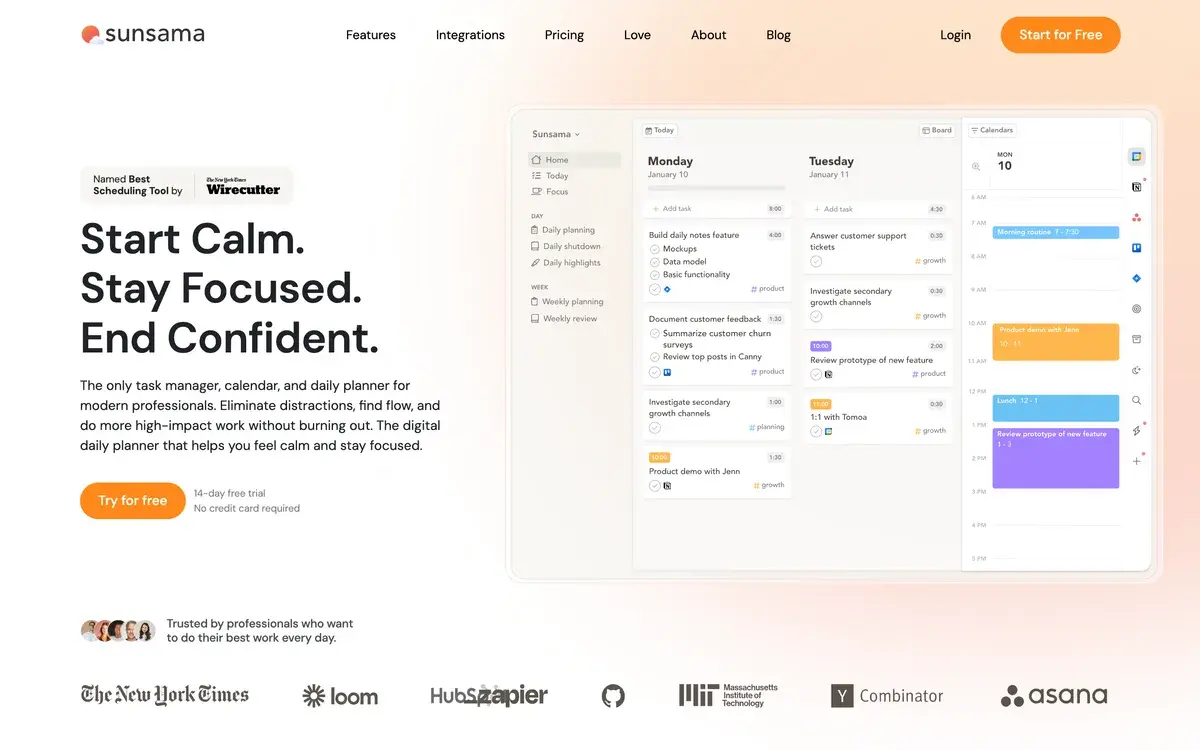
Sunsama homepage, captured Sep 30, 2026.
A daily planner built around a morning ritual
Sunsama is built on a simple idea: plan each workday deliberately, with a realistic amount of work, and end it on time. Each morning it walks you through a guided planning session: review what is left from yesterday, pull in tasks from your work apps, estimate how long each takes, and drag them onto your calendar next to your meetings. At the end of the day, a shutdown ritual records what you finished, and weekly planning and objectives keep the bigger picture in view.
The homepage slogan, "Start Calm. Stay Focused. End Confident.", describes the audience: professionals whose work is scattered across meetings, messages and several task tools, and who feel they are always behind. Wirecutter named Sunsama its best scheduling tool, and the company's newsletter on focus and productivity has more than 300,000 subscribers.
The app runs on the web, macOS, Windows, Linux, iOS and Android, and ships updates every week, documented in a public changelog. From September 2026 the desktop app requires macOS 13 or later, or 64-bit Windows or Linux; older machines can use the web app.
One inbox for tasks from every tool
Integrations are where Sunsama earns its price. It connects to project tools such as Asana, ClickUp, Jira, Linear, monday.com, Notion, Trello and Microsoft Planner, to task apps such as Todoist, Google Tasks and Microsoft To Do, to GitHub, and to Gmail, Outlook, Slack and Microsoft Teams, so an email or a Slack message can become a task. Calendar sync is two-way with Google, Outlook and Apple calendars, a CalDAV beta adds Fastmail and others, and Zapier connects thousands more apps.
Imported tasks keep their context: their priority, a preview of the Jira issue or Notion page, and a link back to the source. The effect is a single list of everything you might do today, from which you choose what actually fits. Features such as focus mode, a Pomodoro timer, break reminders, muting distracting apps and analytics of where time went support the same goal.
Sunny, Autoplan and the MCP server
Sunsama added AI in 2026 without changing its philosophy. Sunny, the built-in assistant, works in a chat panel beside your plan: ask it to move tasks, adjust the day or summarize what you finished last week, optionally for one channel. Since late September, Sunny shows a receipt for every change it makes, with a one-click undo and a link to the change, and asks for clarification instead of guessing when a request is ambiguous. A voice mode exists but is labeled experimental.
Autoplan, still in beta, applies rules you define to sort and plan tasks, with a review page for each run and undo that restores priorities. It moves Sunsama toward automatic scheduling while keeping you in charge of the result.
The MCP server matters for people who work in AI assistants. It lets apps such as ChatGPT and Claude, with your approval, read and create tasks, edit notes and read, post and edit task comments. Sunny and MCP both left beta on August 28, 2026. Sunsama's approval screen warns that an app's name and logo can be faked, a sensible precaution for any tool that grants an AI access to your work.
One plan, no free tier, no discounts
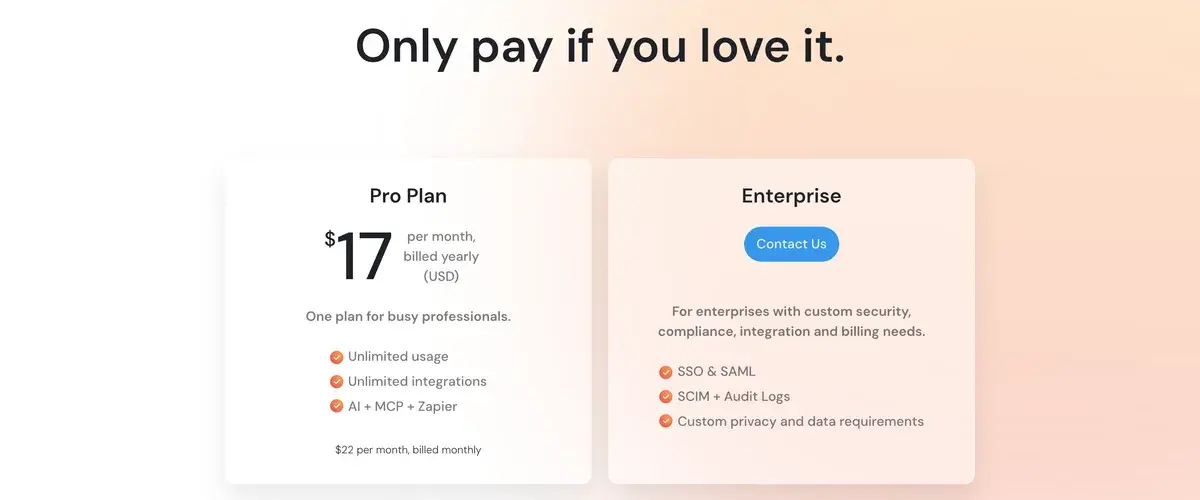
Sunsama's pricing page, checked September 30, 2026.
Sunsama sells one plan. Pro costs $17 a month billed yearly or $22 billed monthly, with unlimited use, unlimited integrations, AI, MCP and Zapier included. Enterprise, by quote, adds SSO and SAML, SCIM provisioning, audit logs and custom privacy and data requirements. The FAQ lower on the same page still quotes $20 yearly and $25 monthly per person, so the checkout price is the one to trust.
The pricing manifesto explains the rest. There is no free plan, because Sunsama believes free tiers create bad incentives; no lifetime deals; no Black Friday or other sales; prices in whole dollars; 20% off for paying yearly; and a 14-day trial that never asks for a credit card. Cancelling takes one question and one button. Sunsama also stresses that it is SOC 2 compliant and will fill in IT security questionnaires, since many companies require approval before a tool connects to work calendars and email.
At about $1 a workday, as the manifesto puts it, Sunsama costs more than most to-do apps. The value case rests on whether the daily ritual changes how your days go; the trial is long enough to find out.
Who gets the most from it
Sunsama suits professionals whose work arrives from many directions, such as managers, founders, engineers and consultants juggling Jira, Slack, email and meetings. Pulling all of it into one daily plan, with time estimates against real calendar space, is what stops the overcommitting that makes days run late.
It suits people less well who want the app to do the planning, since Sunsama's core is still deliberate manual planning. Teams wanting shared project management should keep a project tool and use Sunsama on top of it, and budget-conscious users will find no free tier to fall back on.
Sunsama against Motion, Reclaim and Todoist
Motion is the main alternative for people who want AI to schedule their tasks automatically and rearrange the week as things change. Reclaim AI protects focus time and habits in Google or Outlook calendars with less ceremony and a free plan. Task managers such as Todoist, Asana and Notion hold the tasks themselves, and Sunsama is designed to sit on top of them rather than replace them.
Sunsama's niche is the calm, ritual-based planner. People who want to think about their day each morning and end it on time are its audience; people who want to hand scheduling to software will be happier with Motion.
Related Tools
Motion: AI that schedules your tasks automatically
Reclaim AI: calendar time-blocking for focus and habits
Asana: project management that Sunsama can pull tasks from
Frequently Asked Questions about Sunsama
How much is Sunsama per month?
Pro costs $17 a month billed yearly or $22 billed monthly, in US dollars, according to Sunsama's pricing card in September 2026. The FAQ on the same page still quotes $20 yearly and $25 monthly per person, so confirm the amount at checkout. Every account starts with a 14-day free trial without a credit card, and Enterprise pricing is by quote.
Why doesn't Sunsama have a free plan?
By choice. Sunsama's pricing manifesto says free-forever plans create bad incentives and are not sustainable, and that it prices for profitability rather than growth. The same manifesto rules out lifetime deals, Black Friday sales and prices ending in 99, gives 20% off for paying yearly, and promises cancellation without going through support.
What does Sunsama's AI do?
Sunny, Sunsama's AI assistant, works in a chat panel: it can change your plan on request, summarize the work you completed over any date range, and show a receipt with one-click undo for every change it makes. Autoplan, in beta, sorts and plans tasks by rules you set. Sunny and the MCP server left beta on August 28, 2026; voice mode is still experimental.
Can ChatGPT or Claude work with Sunsama?
Yes. Sunsama runs an official MCP server, so AI apps such as ChatGPT and Claude can connect with your approval to read and create tasks, edit notes and read, post and edit task comments. Connections stay signed in while you use them, and the approval screen warns that an app's name and logo can be faked, so check where access is going.
How does Sunsama charge for teams?
Per person. When you add someone to your Sunsama workspace, they join your plan and the bill updates automatically, with a prorated charge for the rest of the month if they join mid-cycle. Enterprise adds SSO and SAML, SCIM provisioning, audit logs and custom privacy and data requirements for larger organizations.
Can I cancel Sunsama easily?
Yes. You can cancel at any time without contacting support: Sunsama asks why you are leaving and then shows a button to cancel. After cancelling you keep access until the end of the billing cycle. Because the trial needs no credit card, you are never charged unless you choose to subscribe.
Should I choose Sunsama or Motion?
Sunsama if you want a guided daily ritual where you decide what fits in the day and the app helps you stay realistic. Motion if you want AI to schedule tasks into your calendar automatically and reshuffle them as priorities change. Sunsama's Autoplan beta moves in Motion's direction, but planning by hand is still the core of Sunsama.