Motion

Motion

🔥 Hot
AI Calendar & Scheduling

AI calendar that automatically schedules your tasks and meetings around your priorities and deadlines.

$19/mo Pro · $34/mo Business · $9/mo Tasks-only
📖 13 min read
Try Motion for free

Affiliate link — we may earn a commission

Ready to try it?
Motion
$19/mo Pro · $34/mo Business · $9/mo Tasks-only
Get started →
Affiliate link — we may earn a commission
Our rating
4.5/ 5
AIVario Editor's rating →

What is Motion?

Motion is an AI-powered productivity platform that combines calendar, task management, and project management into a unified system where AI handles the scheduling decisions automatically. Founded in 2019, Motion has grown into one of the most popular AI productivity tools for professionals managing complex schedules with shifting priorities. The platform's core value proposition is replacing the cognitive load of manual scheduling with AI that adapts to your work patterns and deadlines.

The product evolved through 2024-2026 with significant AI improvements, broader integrations, and refined team features. The Motion app now serves as primary calendar and task system for many professionals, replacing the previous combination of Google Calendar plus separate task manager (Todoist, Things, Asana) with single integrated tool.

What makes Motion meaningfully different from "AI features added to existing calendars" is the AI-first design philosophy. Motion was built around the AI scheduling capability rather than retrofitting AI into traditional calendar tools. This shows in how seamlessly task management and calendar integrate, and how naturally the AI handles disruptions and replanning.

Who is it for?

Motion fits professionals whose schedules are complex enough that manual management becomes friction. The pricing reflects this audience — solo users with simple schedules don't get value proportional to cost. Specific user types where Motion makes sense:

  • Knowledge workers managing 20+ meetings/week with shifting priorities and deadlines.
  • Founders and executives balancing strategic work, customer meetings, team management, and operational tasks.
  • Consultants and freelancers managing multiple client engagements with conflicting demands.
  • Project managers coordinating across multiple projects with overlapping timelines.
  • Sales professionals managing pipeline activities, customer calls, and admin work.
  • People with ADHD or executive function challenges who benefit from AI handling scheduling decisions.
  • Solo founders and indie hackers with complex todo lists and calendar that need integration.
  • Small teams (3-15 people) wanting unified scheduling and task management.

User types where Motion may not fit:

  • People with simple, predictable schedules where Google Calendar plus basic task list works well.
  • Heavy email-driven workflows where most "tasks" are responding to messages rather than discrete work blocks.
  • Cost-sensitive users. $19/mo is meaningful subscription cost for solo use.
  • Users committed to specific tools (Notion, Todoist, Things) who don't want unified replacement.
  • Large enterprise teams needing complex permissions, compliance features, or specific platform integrations.
  • Manual scheduling preference. Some users prefer planning their own time and find AI scheduling intrusive.

Key Features

The Motion feature set centers on AI-driven productivity. The features below drive most adoption decisions.

AI Auto-Scheduling is the headline feature. Add a task with deadline and estimated duration; Motion places it in your calendar at the right time considering existing meetings, work hours, priorities, and other tasks. When conditions change (new meeting added, task duration extends, deadline shifts), Motion rebuilds the affected portion of your schedule automatically.

Task management with priorities, deadlines, durations, and dependencies. Tasks aren't just todo items — they're calendar blocks that get scheduled. This integration eliminates the typical "I have it on my todo list but never get to it" problem because tasks are automatically calendared.

Calendar view showing meetings and AI-scheduled tasks together. Drag and drop to reschedule manually when needed. Visual differentiation between meetings (fixed) and tasks (movable) makes the schedule readable at a glance.

Project management with project workspaces grouping related tasks and tracking progress against deadlines. Useful for managing multi-week initiatives across multiple smaller tasks. Less powerful than dedicated PM tools (Asana, Linear) but adequate for most project workflows.

Smart meeting scheduling with bookable links similar to Calendly but integrated with your AI-scheduled work. When someone books time, it automatically fits around your priority work rather than overwriting deep work blocks.

Time blocking for focus time, deep work, exercise, lunch, and other recurring blocks. AI respects these blocks when scheduling tasks. You can mark blocks as flexible or fixed depending on whether AI can move them.

Recurring tasks with intelligent scheduling — Motion handles "weekly review every Friday" by placing it appropriately each week rather than rigid time slot.

Mobile and desktop apps with full functionality across iOS, Android, Mac, and Windows. The mobile app is genuinely useful for adding tasks throughout the day and seeing what's next.

Browser extension lets you add tasks from any web page with one click. Useful for converting "things you discover online" into prioritized tasks without context switching.

Integrations with Slack, Zoom, Google Workspace, Microsoft 365, and others. Notification routing and meeting context flow between Motion and your other tools.

Team features (Business plan) with shared calendars, team task views, and team-wide priority management. Most useful for tightly-coupled teams where individual schedules affect each other.

Motion vs Competitors 2026

ToolStrengthPricingBest For
MotionIntegrated AI calendar + tasks$19/moComplex schedule professionals
Reclaim AIAI calendar with Google Calendar focusFree / $10/moCalendar-only AI scheduling
SunsamaDaily planning ritual$20/moMindful daily planning style
ClockwiseTeam meeting optimization$9/moTeam-wide meeting coordination
Asana + CalendarTask management + manual calendar$11/mo+Project-focused work
Linear + CalendarEngineering project management$8/user+Software engineering teams
Notion + CalendarFlexible knowledge base + calendar$10+/moNotion-standardized teams
Todoist + CalendarStrong task management$4-6/moSimple task-driven work

Pricing verified April 2026.

Motion vs Reclaim AI. Most direct competitor in AI calendar space. Motion is more integrated (calendar + tasks + projects in one) but more complex. Reclaim is calendar-focused with cleaner Google Calendar integration but less feature scope. Motion at $19/mo; Reclaim has free tier and $10/mo paid. For users wanting integrated task + calendar AI, Motion. For users primarily wanting smarter Google Calendar without task migration, Reclaim.

Motion vs Sunsama. Different design philosophies. Sunsama emphasizes daily planning ritual — manual planning with AI suggestions and review prompts. Motion automates scheduling — AI handles placement decisions automatically. Both at similar price ($19-20/mo). For mindful planning practitioners, Sunsama. For users wanting AI to handle scheduling automatically, Motion.

Motion vs Clockwise. Clockwise focuses on team meeting optimization — finding optimal meeting times, protecting focus time, reducing meeting fragmentation. Motion handles individual task scheduling alongside calendar. Different scopes. Many teams use both — Clockwise for meeting strategy, Motion for individual task scheduling.

Motion vs traditional combinations (Asana + Calendar, Notion + Calendar, etc.). Manual workflows pairing dedicated task tools with separate calendar applications work but require ongoing context switching. Motion's integrated AI replaces this manual coordination. Trade-off: Motion is less customizable than dedicated tools but eliminates the "what should I do next" friction.

Motion vs simple Google Calendar + Todoist. This combination at $4-6/mo is dramatically cheaper than Motion. For users with simple needs, the simple combination works fine. Motion's value emerges when scheduling complexity overwhelms manual management — tasks getting forgotten, deadlines missed, schedule constantly disrupted by meetings.

Pricing 2026

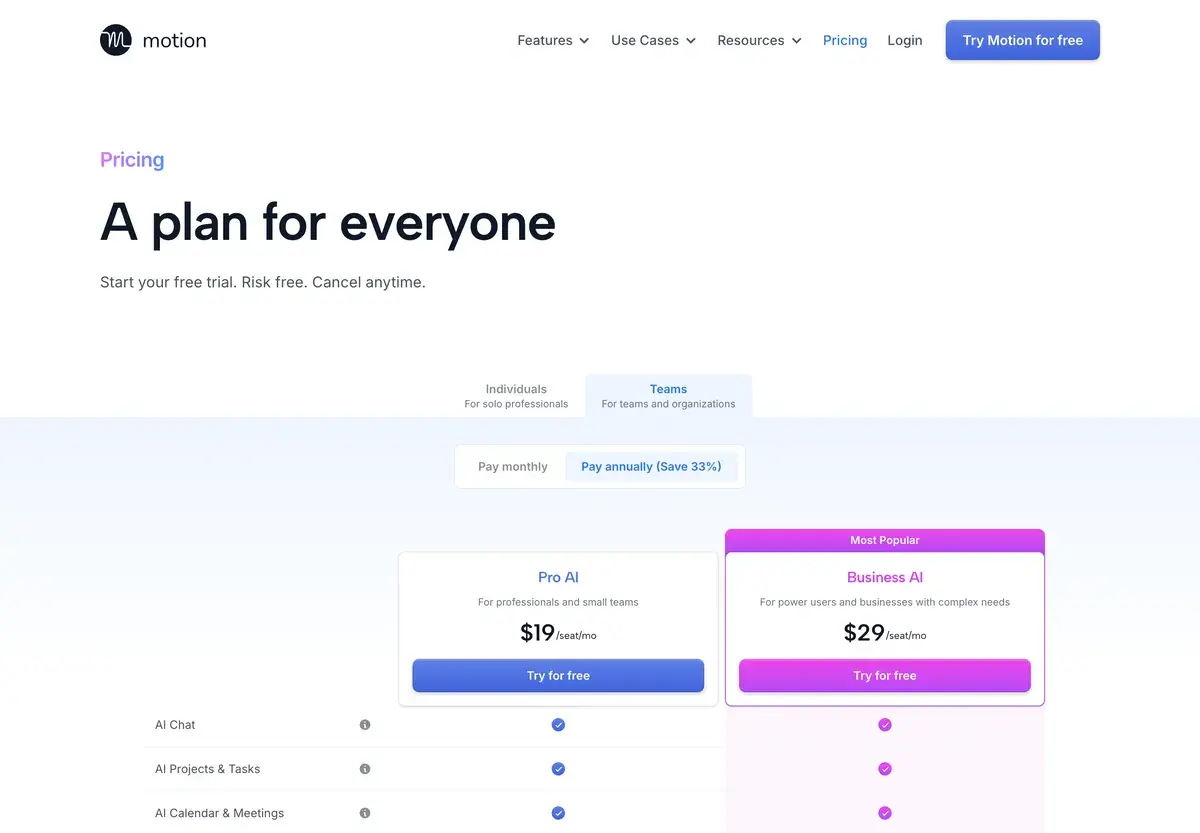
PlanMonthly CostKey FeaturesBest For
Tasks (Beta)$9/moTasks-only without calendar AIUsers wanting just AI task management
Pro$19/moFull Motion (calendar + tasks + projects + AI)Most professional users
Business$34/user/moAll Pro features + team managementSmall teams (3-15 people)
EnterpriseCustomCustom features and supportLarger organizations

Pricing verified April 2026 from usemotion.com/pricing. Annual billing offers ~25% discount.

The Tasks-only plan at $9/mo is newer offering for users wanting AI task management without calendar integration. Less common use case but reasonable for users committed to existing calendar tools.

Pro at $19/mo is Motion's primary offering and where most users settle. Includes everything: AI calendar, AI task scheduling, project management, integrations, mobile and desktop apps. Reasonable price for professional productivity tool.

Business at $34/user/mo adds team features. Cost increase is meaningful versus Pro — small teams often hesitate before upgrading from Pro. The team features deliver value for teams where schedule coordination matters but individual users gain less.

Enterprise pricing handles larger organizations needing SSO, advanced permissions, audit logs, and dedicated support. Pricing typically starts $100+/user/mo and scales with custom needs.

The pricing structure has remained stable through 2024-2026 despite competitive pressure. Motion has positioned on capability rather than discounting against alternatives like Reclaim AI ($10/mo) or basic productivity tools.

What I think about Motion

I evaluated Motion for AIVario research and have used it for personal productivity testing during the evaluation. AIVario doesn't currently use Motion in our workflow, but the platform deserves coverage given its market position in AI productivity.

What works well based on testing: the AI scheduling is genuinely useful when your schedule has real complexity. Adding a task with deadline and watching Motion automatically place it in available time becomes addictive after a week of use. The schedule rebuilding when conditions change happens fast enough that disruptions feel handled rather than catastrophic.

The integrated experience eliminates the "I had this on my list but forgot about it" problem that plagues separate task-and-calendar workflows. Tasks become scheduled commitments rather than aspirations.

What I would honestly flag based on testing: the AI scheduling can feel intrusive for some users. If you prefer manual control over your day, Motion's automatic decisions create friction. The platform is opinionated — you adapt to its scheduling philosophy more than vice versa. Some users appreciate this; others fight it for weeks before either adapting or churning.

The pricing at $19/mo is meaningful subscription cost for solo users. Compared to Reclaim AI at $10/mo for similar core capability, Motion's premium positioning requires justification through additional features. For users who use the integrated task management and project features, the premium is worth it. For users primarily wanting smarter calendar, Reclaim may fit better at lower cost.

The mobile app experience is well-built but not revolutionary. Adding tasks from mobile, checking next-up items, and rescheduling on the go all work fluidly. Power features happen primarily on desktop where the calendar visualization matters more.

For AIVario specifically, my work pattern is mostly content creation with relatively predictable rhythm rather than the meeting-heavy schedule where Motion shines most. I tested Motion but don't currently use it daily. If my work involved 20+ meetings weekly with shifting priorities, Motion would be on my "consider seriously" list.

For someone evaluating today: try the 7-day free trial during a typical work week. If the AI scheduling reduces your "what should I work on now" decisions meaningfully, it's worth the price. If you find yourself fighting Motion's decisions or preferring manual scheduling, the platform isn't for you regardless of how much marketing impressed you.

Use Cases

Founder balancing customer calls, team meetings, and strategic work. Pro at $19/mo. Adds tasks for fundraising prep, product strategy, customer follow-ups; Motion schedules around fixed meetings. When unexpected customer calls disrupt the schedule, AI rebuilds remaining work to maintain priorities.

Consultant managing 6 client engagements simultaneously. Pro at $19/mo. Each client's work tagged as project. Motion balances ongoing client work with new business development. Time-blocking ensures dedicated focus per client without manual juggling.

Sales rep with shifting pipeline activities. Pro at $19/mo. Tasks for prospecting, follow-ups, deal review, and admin work. Motion schedules higher-priority deal activities first; admin work fills available slots. When prospect meetings reschedule, Motion adapts the day automatically.

Project manager coordinating multi-project portfolio. Business at $34/mo with team features. Project workspaces track dependencies and milestones. Team-wide visibility into who's working on what when. Replaces complex spreadsheet tracking with integrated AI-managed system.

Person with ADHD wanting executive function support. Pro at $19/mo. Removes the constant "what should I do next" decision. Tasks get scheduled automatically; just look at calendar and work the next block. Many ADHD users report Motion meaningfully helps with task initiation and completion.

My Verdict

Motion is the right choice for professionals managing complex schedules where manual coordination has become friction. The AI scheduling delivers genuine productivity improvement when your work pattern matches the tool's strengths. For simpler schedules or manual planning preferences, Motion's premium pricing is hard to justify versus simpler alternatives.

The competitive landscape is broader than Motion vs Reclaim. Sunsama, Clockwise, and traditional combinations all serve overlapping audiences with different design philosophies. Motion specifically wins for users wanting AI to handle scheduling automatically across both calendar and tasks. Sunsama wins for mindful daily planners. Reclaim wins for calendar-only AI without task migration.

The 7-day free trial removes evaluation friction. Try Motion during a typical work week with real complexity. The platform either becomes invaluable within days or feels uncomfortable enough that you can return to manual scheduling without lost momentum.

For users with ADHD or executive function challenges, Motion deserves specific consideration. The automated decision-making removes cognitive load that disproportionately affects users with these challenges. Many users in this audience report Motion as transformative for productivity in ways generic productivity tools haven't achieved.

The price point at $19/mo positions Motion as professional productivity tool rather than mass market. For users where time savings of even 30 minutes/week matter financially, Motion easily pays for itself. For casual users with predictable schedules, simpler tools fit better economically.

Note: Motion has an affiliate program. AIVario application status pending. Our rating reflects evaluation based on platform usage and competitive analysis, not affiliate considerations.

Best for: Knowledge workers with 20+ meetings/week, founders balancing strategic and operational work, consultants managing multiple clients, project managers coordinating portfolios, sales professionals with shifting pipelines, people with ADHD or executive function challenges, solo founders with complex task lists, small teams (3-15) wanting unified scheduling Not ideal for: People with simple predictable schedules, heavy email-driven workflows, cost-sensitive users (Reclaim AI at $10/mo offers similar core capability), users committed to existing tool stacks (Notion, Todoist), large enterprise teams, manual scheduling preference users Bottom line: The leading AI-integrated calendar and task management platform. Best for professionals with genuine schedule complexity. Free trial removes evaluation friction; commit to Pro at $19/mo when AI scheduling reduces decision friction in your workflow.

Related Tools

  • Reclaim AI — primary alternative focused on Google Calendar integration
  • Sunsama — alternative for mindful daily planning style
  • Asana — project management alternative without calendar integration
  • Linear — project management for engineering teams
  • Notion AI — knowledge management integration alternative

Frequently Asked Questions about Motion

Is Motion worth $19/mo?

For professionals managing 30+ hours of meetings and deep work weekly with shifting priorities, yes. The AI scheduling that automatically reorganizes your day saves real cognitive load and prevents missed deadlines. For users with simple calendars and consistent schedules, $19/mo is overkill — Google Calendar plus a basic task manager covers their needs at much lower cost.

How does Motion compare to Reclaim AI?

Both are AI scheduling tools but with different positioning. Motion is more comprehensive (calendar, tasks, project management combined) while Reclaim is calendar-focused with deeper Google Calendar integration. Motion costs $19/mo; Reclaim has free tier and $10/mo paid. For users wanting integrated task + calendar AI, Motion. For users primarily wanting smarter calendar without changing task tools, Reclaim.

Does Motion work with Google Calendar?

Yes, Motion integrates with Google Calendar, Outlook Calendar, and iCloud Calendar. It can manage your entire calendar from Motion's interface or sync changes back to your native calendar. Most users start with Motion taking over scheduling decisions while keeping their existing calendar as the source of truth.

Can Motion handle team scheduling?

Yes, the Business plan at $34/user/mo includes team features — shared calendars, team task views, meeting scheduling across multiple calendars, and team-wide priority management. Most useful for small teams (3-15 people) where coordinating schedules across team members creates real friction. Larger organizations typically use dedicated team scheduling tools.

What's Motion's AI actually doing?

Motion's AI continuously rebuilds your schedule when conditions change — new meeting added, task duration changes, deadline shifts. It places tasks in available time slots based on priority, deadline, estimated duration, and your work pattern preferences. When something disrupts the schedule, it automatically rearranges remaining items to still hit deadlines or flags conflicts you need to resolve manually.

Does Motion have a free trial?

Yes, Motion offers a 7-day free trial with full feature access. No credit card required for trial signup. The trial gives you enough time to integrate Motion into a real work week and judge whether the AI scheduling fits your style. Most users either find significant value within the first week or determine the platform isn't for them.

Is Motion good for ADHD or executive function challenges?

Many users with ADHD report Motion helps with executive function — eliminating the cognitive load of constantly reprioritizing tasks and reorganizing schedules. The AI handles the 'what should I work on now' decision automatically, which is particularly valuable for people who struggle with that decision. It's not a substitute for ADHD treatment, but as a productivity tool it can be genuinely transformative for users with executive function challenges.