What is Replit?
A coding bootcamp student needs to build a portfolio project for the final week assignment — a small web app demonstrating full-stack capability. Traditional path: install Node.js or Python, configure development environment, set up Git, choose hosting platform, configure deployment, debug environmental issues, and somewhere in there, write the actual application. Total time before writing a single line of working code: hours, often a full day.
Replit takes this entire chain of setup work out of the equation. Open Replit in browser, pick a language, start writing code immediately. AI assists as the student writes; the code runs in the browser environment immediately; deployment to a public URL happens with one click. Total time from "I need to build this" to "deployed working app": measured in hours rather than days. For learning, prototyping, and rapid app development, this compression of setup overhead is the actual value Replit provides.
The product is positioned for use cases where development speed matters more than sophisticated infrastructure. Coding bootcamps and learners. Hackathon participants under time pressure. Founders prototyping ideas before committing to traditional development. Hobbyists building small apps. Educators creating coding lessons. For these audiences, Replit's browser-based environment with AI built in produces genuine workflow advantages.
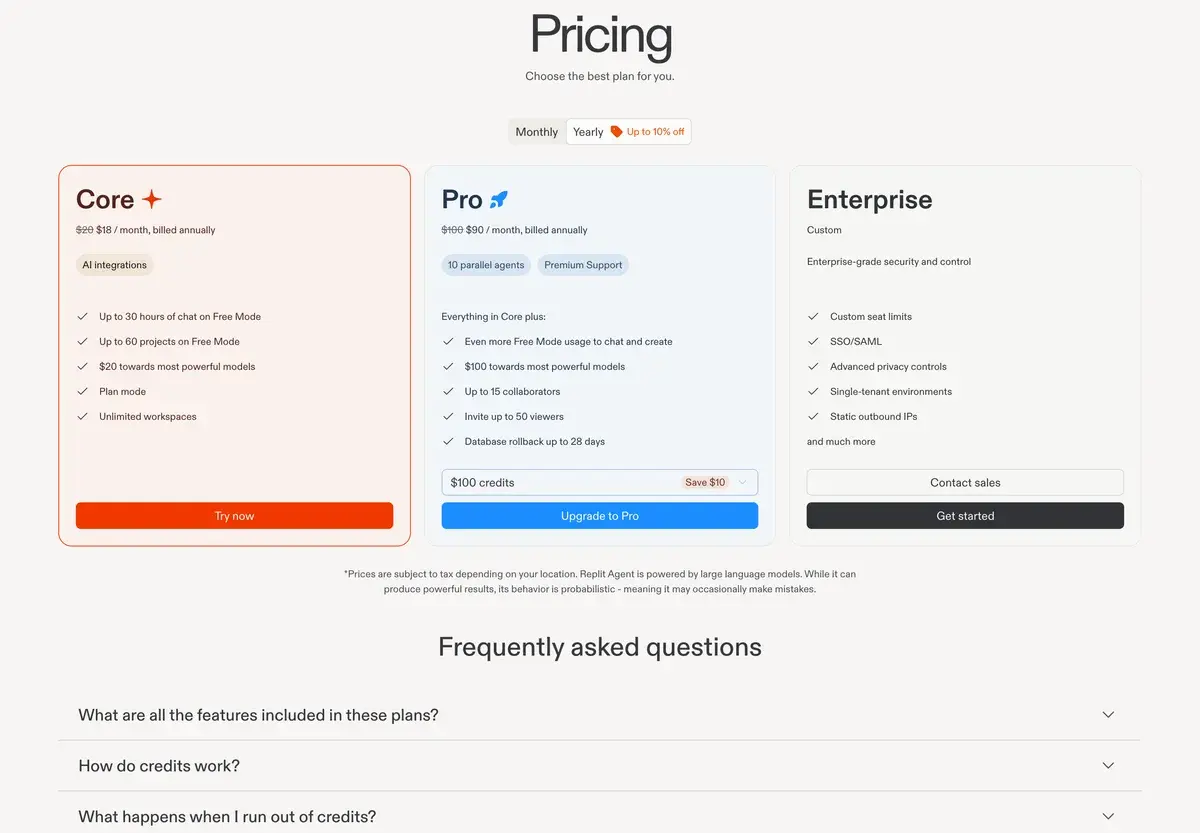
The pricing reflects this positioning. Free tier with basic AI and limited compute serves learners and casual users. Core tier at $25/month unlocks full AI (including Replit Agent), more compute resources, and always-on app hosting. Teams tier at $40/seat supports collaborative use. Enterprise pricing serves larger educational institutions and organizations.
For production-grade software development at serious scale, Replit is generally the wrong fit. The browser environment, hosted infrastructure, and platform-specific tooling work for small apps but become limitations for production systems requiring sophisticated infrastructure, CI/CD pipelines, monitoring, and scale-out architecture. The buying decision should be honest about whether your work fits the rapid-development use case Replit serves directly.
Where Replit fits
Coding bootcamps and educational settings where setup friction kills student progress. The browser-based environment removes the platform-and-environment configuration barriers that historically created friction in introductory coding courses. Many coding bootcamps now use Replit as the primary development environment for early courses.
Self-taught learners exploring new technologies and languages. Trying out a new language, framework, or pattern in Replit takes minutes versus hours for traditional setup. The AI features support learning by explaining code, helping debug, and accelerating the experimentation that teaches programming concepts.
Hackathon participants where time pressure makes setup overhead expensive. The combination of zero-setup environment, AI-assisted development, and one-click deployment fits hackathon time constraints directly. Many hackathon-winning projects in 2024-2025 were built on Replit because the speed advantage compounded across the compressed timeframe.
Founders prototyping product ideas before committing engineering investment. Validating a concept with a working prototype that can be shared with potential users takes hours in Replit; traditional development of the same prototype takes days or weeks. The validation speed matters when product direction is uncertain.
Hobbyists building personal projects, small games, automation scripts, and personal websites. The free tier covers most hobbyist use cases without subscription cost; Core tier serves more ambitious personal projects affordably.
Educators creating coding lessons, tutorials, and demonstration projects. Replit's shared project model supports lesson distribution; the integrated environment removes the "did the student set up correctly" question that complicates teaching coding remotely.
Small business operators building internal tools, automation, and small custom applications. For non-software-company use cases where sophisticated infrastructure is unnecessary, Replit's hosted environment covers the practical needs.
Replit is not the right pick for: serious production application development at scale (use traditional development setups with dedicated hosting), large team software engineering with complex CI/CD requirements, applications requiring sophisticated infrastructure or compliance posture, performance-critical systems, or developers who specifically want full control over their development environment and deployment infrastructure.
Key Features
- Browser-based IDE — full development environment running in any modern browser
- Replit Agent — autonomous AI agent that builds complete apps from natural language descriptions (Core tier and above)
- Ghostwriter AI — AI code completion and chat assistance throughout the IDE
- One-click deployment — instant hosting with public URL for any project
- Always-on apps — keep apps running continuously without manual restart (Core tier and above)
- Multiplayer collaboration — real-time collaborative editing similar to Google Docs for code
- 50+ language support — Python, JavaScript, TypeScript, Go, Rust, Java, C++, and most major languages
- Database integration — built-in databases (Replit DB, PostgreSQL) without separate infrastructure
- Replit Bounties — marketplace for paid coding tasks (separate from main subscription)
- Mobile apps — code on iOS and Android with full IDE functionality
- Templates — starter projects for common app types
- Custom domains — connect your own domain to deployed Replit apps
- Educational features — classroom management, assignment grading, student progress tracking
Replit vs Competitors 2026
| Tool | Setup overhead | AI integration | Deployment | Free tier | Price entry |
|---|
| Replit | ✅ Zero | ✅ Strong | ✅ Built-in | ✅ Generous | $25 |
| Cursor | ⚠️ Local IDE | ✅ Strong | ❌ External | ✅ Limited | $20 |
| Windsurf | ⚠️ Local IDE | ✅ Strong | ❌ External | ✅ Generous | $15 |
| GitHub Codespaces | ⚠️ Setup needed | ⚠️ Mid (Copilot) | ⚠️ External | ⚠️ Limited | $4/mo + compute |
| StackBlitz | ✅ Zero | ⚠️ Mid | ⚠️ Limited | ✅ Generous | $9 |
| CodeSandbox | ✅ Zero | ⚠️ Mid | ⚠️ Limited | ✅ Generous | $9 |
| Cloud9 (AWS) | ⚠️ AWS setup | ❌ | ✅ AWS integrated | ⚠️ Trial | AWS pricing |
| Glitch | ✅ Zero | ❌ | ✅ Built-in | ✅ Generous | $8 |
Data verified April 2026 from each provider's pricing pages.
The clearest competitive picture: Replit competes with StackBlitz, CodeSandbox, and Glitch in the browser-based development category, and with Cursor/Windsurf in the AI-first development category. Within the browser-based category, Replit has the strongest AI integration (Replit Agent specifically), the most language coverage, and the most mature deployment story. StackBlitz and CodeSandbox are stronger for specific frameworks (web frontend particularly) but weaker on broader language support.
Against Cursor and Windsurf, Replit serves a different audience. Those are AI-first IDEs for traditional development workflows; Replit is browser-based with integrated hosting. For developers wanting AI assistance in a familiar local IDE pattern, Cursor or Windsurf. For developers wanting hosted environment with AI built in, Replit. Different working styles for different audiences.
GitHub Codespaces serves developers in GitHub-aligned workflows wanting cloud-based development environments without the rapid-development positioning of Replit. For teams in serious development workflows, Codespaces fits better. For prototyping and learning, Replit's lower friction wins.
Pricing 2026
| Plan | Price | AI features | Best for |
|---|
| Free | $0 | Basic Ghostwriter, limited compute | Learning, casual use, hobby projects |
| Core | $25/mo | Full AI + Replit Agent | Active development, prototyping |
| Teams | $40/seat/mo | Full AI + collaboration | Small teams, educational settings |
| Enterprise | Custom | Full AI + admin features | Larger institutions, organizations |
Prices verified April 2026 from replit.com/pricing. Annual billing offers ~20% off paid tiers. Replit Agent is the headline feature unlocked at Core tier.
The pricing structure works for the target audiences. Free tier is generous enough for evaluation and casual use. Core at $25/month is the practical entry point for active development with Replit Agent access. Teams at $40/seat supports collaborative use cases including educational deployments.
The Core tier pricing is competitive with Cursor at $20/month and ChatGPT Pro at $20/month. The differentiation is the bundled hosted environment and deployment, which other AI development tools require separate hosting subscription to match. For users wanting AI development plus hosting in one subscription, Replit's pricing produces favorable economics.
For educational institutions, Teams pricing supports classroom deployment at predictable per-student costs. Many bootcamps deploy Replit Teams across student cohorts; the pricing fits educational economics better than enterprise alternatives.
Hands-on Notes
The first thing that affects practical use is how dramatically the setup-time compression changes the development experience. Starting a new project takes seconds rather than the hours that traditional environment setup requires. For users new to programming or experimenting with new tech stacks, this removes the most common friction point in early development work.
Replit Agent has improved meaningfully through 2024-2025. The agent now reliably builds working apps from natural language descriptions for many common app types — basic CRUD apps, simple SaaS prototypes, automation scripts, small games. The output requires editorial review and customization but produces functional starting points faster than building from scratch. For prototyping use cases specifically, the speed-up is meaningful.
Where Replit Agent gets weaker: complex apps with sophisticated architecture requirements, integrations with external systems requiring specific authentication or compliance setup, performance-critical applications, and apps requiring tooling beyond what Replit's hosted environment provides. The agent works within Replit's environment well; pushing beyond that environment produces friction.
The browser-based environment is genuinely capable for the use cases Replit serves. Code editing, running, debugging, version control, package management, environment configuration — all work in browser without local setup. Performance is adequate for small to mid-size projects; very large codebases may strain the browser environment but most Replit users do not work at that scale.
Multiplayer collaboration is one of the more underrated features. Pair programming in Replit feels similar to Google Docs collaboration — multiple cursors visible, edits synchronized in real time, voice and video integration available. For learning, hackathons, and small-team prototyping, this collaboration model produces real value.
The deployment story is functional but not differentiated. One-click deploy produces a working public URL; custom domain support handles brand needs; always-on apps maintain availability. For production-grade hosting (CDN configuration, sophisticated load balancing, custom infrastructure), traditional hosting platforms (AWS, Vercel, Netlify, Heroku) serve better.
Where Replit gets weaker: sophisticated production hosting needs. The platform's hosting works for small apps with modest traffic; serious production apps typically migrate to dedicated hosting platforms once they outgrow Replit's environment. For prototyping followed by migration to traditional infrastructure, Replit fits well; for trying to scale Replit-hosted apps to substantial production traffic, expect limitations.
The other practical observation: Replit's value depends heavily on whether your use case fits browser-based development. Developers comfortable with traditional local IDEs may find Replit's environment less productive for serious work; developers who specifically benefit from zero-setup hosted environment may find Replit transformative. The fit varies substantially by working style preferences.
Use Cases
A coding bootcamp deploys Replit Teams across 200 students per cohort. Zero-setup browser environment removes the platform-and-environment friction that historically blocked student progress in week 1; AI features support student learning; integrated deployment lets students share final projects easily. The educational pricing fits bootcamp economics; student outcomes improve through reduced setup friction.
A founder validates three product ideas in two weeks using Replit Agent on Core tier. Each prototype takes 1-2 days to build to demonstrable state; sharing prototypes with potential users gathers feedback that informs which direction to pursue further. Total tooling cost: $25/month. The validation speed exceeds what traditional development would have produced in the same timeframe.
A team participating in a 48-hour hackathon builds their winning project on Replit. The combination of zero-setup environment, multiplayer collaboration, AI-assisted development, and one-click deployment fits hackathon time pressure directly. The team's project would have been impossible to build to working-and-deployed state in 48 hours using traditional development infrastructure.
A small business owner builds an internal tool for inventory tracking using Replit Agent. Describing the requirements in natural language and letting the agent build the initial version, then customizing through manual edits, produces a working tool in days versus weeks of traditional development. The tool runs on Replit's hosted environment for the small business's modest traffic needs; total tooling cost remains affordable.
A senior engineer experimenting with a new programming language uses Replit free tier for initial exploration. Trying Rust patterns, exploring Go workflows, or testing TypeScript features happens in browser without committing to local setup. After determining the language fits the engineer's needs, traditional local development takes over for serious project work. This use case reveals Replit's strength as exploration environment versus production environment.
A solo developer building a SaaS product evaluates Replit vs traditional development setup. Despite Replit's appeal for prototyping, the developer chooses traditional setup (local VS Code + Vercel hosting) because the production trajectory benefits from infrastructure flexibility Replit cannot match. Replit serves the prototyping phase; the production phase moves to traditional infrastructure. This use case reveals where Replit's positioning hits limits — at production scale and complexity.
Our Verdict
Replit is the right development platform for use cases where development speed matters more than infrastructure sophistication — learning, prototyping, hackathons, small production apps, educational settings, and rapid concept validation. The combination of zero-setup browser environment, AI integration including Replit Agent, one-click deployment, and affordable pricing produces genuine workflow advantages for these audiences.
The honest considerations: serious production application development at scale typically benefits from traditional development setups with dedicated hosting platforms. Replit's hosted environment works well for small apps; pushing it beyond that scale produces friction. The buying decision should match Replit's strengths to your actual use case rather than trying to use Replit for production workflows it does not optimally serve.
The pricing is reasonable for the value delivered. Free tier serves learning and casual use; Core at $25/month covers active prototyping and small-app development; Teams at $40/seat supports educational and small-team use. The bundled hosted environment makes the Core pricing meaningfully better than AI-IDE-plus-separate-hosting alternatives.
For learners, prototypers, hackers, founders validating ideas, educators teaching coding, and small business operators building modest tools, Replit deserves serious consideration. For serious production engineering, traditional setups serve better. Match the buying decision to the actual development use case; Replit is excellent for some workflows and limiting for others.
Note: Replit does not currently have an active affiliate program with AIVario. AIVario earns no commission from sign-ups. Our rating reflects evaluation across prototyping and educational use cases alongside parallel use of Cursor and traditional development setups for comparison.
Best for: Coding bootcamps and learners, hackathon participants, founders prototyping product ideas, educators teaching coding, small business operators building internal tools, hobbyist coders, rapid concept validation
Not ideal for: Serious production application development at scale, large team software engineering with complex CI/CD requirements, performance-critical systems, applications requiring sophisticated infrastructure, developers wanting full control over their development environment
Bottom line: Excellent rapid-development platform with AI built in. Match to use cases where speed matters more than infrastructure sophistication; right tool for prototyping and learning, wrong tool for production-grade engineering.
Related Tools
- Cursor — AI-first IDE alternative for traditional development workflows
- Windsurf — AI-first IDE alternative for users wanting agentic coding in local environment
- Bolt — competing browser-based AI development platform with similar positioning
- Lovable — AI app builder alternative for non-developers building web apps
- GitHub Copilot — AI assistance alternative for traditional GitHub workflows
Frequently Asked Questions about Replit AI
How much does Replit cost?
Replit has a free tier with basic AI features and limited compute. Core is $25/month with full AI, more compute resources, always-on apps, and Replit Agent. Teams is $40/seat per month with collaboration features. Enterprise pricing is custom for larger organizations. Annual billing offers ~20% off paid tiers.
What is Replit Agent?
Replit Agent is the autonomous AI coding agent that builds apps from natural language descriptions — describe what you want, the agent generates code, runs it, debugs errors, and produces a working app. Available on Core tier and above. The capability is genuinely useful for rapid prototyping, learning new tech stacks, and building small apps where speed matters more than architectural sophistication.
Is Replit good for production apps?
For small-scale production yes, for serious production codebases generally no. Replit handles small apps with modest traffic well — landing pages, small SaaS products, internal tools, hobbyist projects. For production applications requiring sophisticated infrastructure (CI/CD, monitoring, scale, security), traditional development setups (local IDE + dedicated hosting) typically serve better. Replit's appeal is rapid development; production hosting is functional but not the platform's strength.
How is Replit Agent different from Cursor or Devin?
Different positioning. Cursor is an AI-first IDE for traditional development workflows. Devin is an autonomous agent for engineering team backlog tasks. Replit Agent is an autonomous agent specifically optimized for full app generation in Replit's hosted environment. For users wanting to build complete small apps from prompts in browser-hosted environment, Replit Agent fits directly. For traditional development workflows or backlog automation, Cursor or Devin fit better respectively.
Can I learn to code on Replit?
Yes, Replit is one of the better platforms for learning to code. The browser-based environment removes setup friction; the AI features support learning by explaining code and helping debug errors; the integrated deployment lets learners share their projects easily. For coding bootcamps, students, and self-taught developers, Replit accommodates the learning workflow well at affordable pricing.
Does Replit support all programming languages?
Yes, Replit supports 50+ programming languages including Python, JavaScript, TypeScript, Java, C++, Go, Rust, PHP, Ruby, and most major languages. The AI features (Ghostwriter completion, Replit Agent) work best with mainstream languages but provide some support across the broader language set. For specialized or less common languages, dedicated tools may produce better AI assistance.
Is Replit good for hackathons?
Yes, Replit is excellent for hackathons. The combination of zero-setup browser environment, AI-assisted rapid development, multiplayer collaboration, and one-click deployment fits hackathon time pressure directly. Many hackathon winners in 2024-2025 built their projects on Replit because the development speed exceeded what traditional setups could match in compressed timeframes.