Researched
This analysis is based on documentation, public user reports, and vendor materials — not yet on our own hands-on testing. How we rate
Clay repriced everything, and most advice about it is stale
On March 11, 2026, Clay executed the largest pricing change in its history. Three self-serve tiers became two. The credit system split in half. Marketplace data costs came down sharply.
That's a problem if you're researching Clay right now, because the internet is full of confident, detailed, thoroughly outdated guides explaining the difference between Starter, Explorer and Pro. Those plans are no longer sold. If a page tells you CRM sync requires the $800 tier, it's describing a product that stopped existing five months ago.
Here's what replaced it.
Two plans, not three
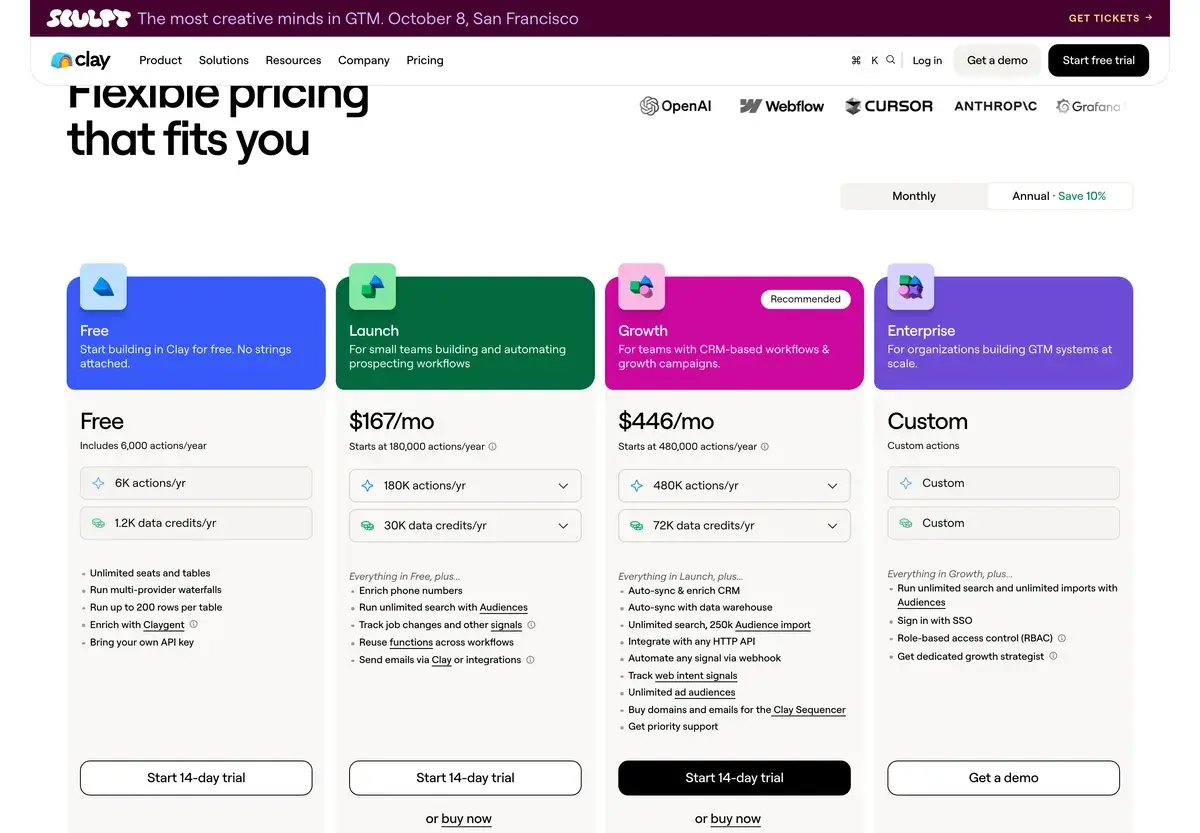
| Plan | Monthly | Annual | Data Credits | Actions |
|---|
| Free | $0 | — | 100/mo | 500/mo |
| Launch | $185 | ~$167 | 2,500/mo | 15,000/mo |
| Growth | $495 | ~$446 | 6,000/mo | 40,000/mo |
| Enterprise | Custom | From ~$30K/yr | Negotiated | Negotiated |
A detail the comparison tables usually miss: Launch and Growth are sliders, not fixed prices. Both carry published entry points well below the headline figures — Launch opens considerably lower and expands as you add credits. If you've been quoted "$185 minimum," that's the headline configuration, not the floor.
The other thing worth sitting with is what moved down. Growth at $495 carries the feature set that used to cost $800 on Pro, including native CRM integration. For teams that specifically needed CRM sync and were staring at the old price, this is a substantial improvement.
Every plan includes unlimited seats. Clay doesn't bill for people.
Two credit pools, and why that matters
This is the change that requires actual thought rather than just a new number in your spreadsheet.
Data Credits pay for pulling information — running a contact through the provider marketplace to find an email address, a mobile number, a funding round, a tech stack signal.
Actions pay for workflow operations — the steps that push a row through your table, including AI columns, conditional logic and pushes to external tools.
They are separate pools that do not substitute for each other. You can burn through your Data Credits in the third week of the month while sitting on thirty thousand unused Actions, and there is nothing you can do with the Actions to fix that. Or the reverse, if your tables are AI-heavy and enrichment-light.
The rollover rules differ too. Data Credits roll over, capped at twice your monthly allocation. Actions reset every month with no rollover at all. Underuse your Actions and they're simply gone.
Practically, this means workflow design now has a budget dimension it didn't have before. A table built to enrich aggressively and process lightly has a different cost profile than one built the other way, even if both handle the same number of prospects.
The line item nobody budgets for
Clay charges Data Credits for every enrichment attempt. Not every successful enrichment — every attempt.
Run a waterfall that checks three providers for a prospect's email. All three come back empty because the contact left the company eighteen months ago and your list hasn't been touched since. You have paid for three queries and received nothing.
Multiply that across a list where a meaningful share of records are stale, and the arithmetic gets ugly quickly. Reporting on this puts silent consumption from failed lookups in the range of twenty to thirty percent of a monthly allocation on older data.
The fix is unglamorous and completely within your control: filter and clean the input list before it touches an enrichment column. Kill obvious bad records, deduplicate, drop rows missing the fields your waterfall depends on. Every row you remove before enrichment is credits you keep.
Two smaller costs to know about. Top-up credits — the ones you buy when you run out mid-month — carry a markup of roughly 30%, down from about 50% before March. And if you don't consistently use your allocation, the rollover cap means you're paying for capacity you'll never recover.
If you're already a customer
Legacy pricing is grandfathered indefinitely. If you're on Starter, Explorer or Pro, Clay isn't forcing you off, and there's no deadline hanging over you.
But the window to move between legacy tiers closed on April 10, 2026. So if you're on Explorer and were planning to step up to Pro eventually, that path is shut. Your options now are staying where you are or migrating to the current lineup.
Whether that migration makes sense depends on your specific consumption. The math genuinely favors some legacy customers and not others — Pro at $800 versus Growth at $495 looks obvious until you compare the actual credit allocations against your usage history. Pull your last three months of consumption before deciding anything.
How we researched this
We haven't run Clay as a paying customer through a full outbound program, and we're not going to pretend otherwise. This page is research, not a field report.
What that involved: reading Clay's current published plan structure and credit documentation, then cross-referencing against independent pricing analyses published between March and August 2026 — including several that verified their figures directly against Clay's live pricing page, one as recently as early August. Where numbers disagreed, we noted the disagreement rather than picking a favorite. Where the vendor documents something clearly, we went with the vendor.
The March overhaul made this unusually messy to research, because a large share of the material available online was written before it and hasn't been revised. Several pages we found still confidently list Explorer as a current plan. We've tried to be explicit about what changed and when, because that's the thing likely to cost you money if you get it wrong.
What research can't tell you: how Clay feels to build in after six weeks, whether the AI research columns produce personalization your prospects actually respond to, or how long your team takes to become productive. Those are hands-on questions and we'd be inventing answers if we gave them.
The learning curve is the real cost
Clay isn't hard in the way that a badly designed tool is hard. It's hard in the way that a spreadsheet is hard — enormous capability, minimal guidance, and the quality of what you get out depends entirely on how well you built it.
Teams that succeed with Clay have someone who enjoys this. Someone who will happily spend a Tuesday afternoon figuring out whether reordering a waterfall improves hit rate, or testing three prompt variants for a research column. That person exists on some teams and not others, and their presence predicts outcomes better than budget does.
Teams that fail with Clay usually bought it expecting a better version of a sequencer, discovered it's a build-it-yourself system, and quietly stopped opening it. The subscription keeps renewing. Nobody wants to admit the platform they championed isn't being used.
Be honest about which team you are before you spend $185 a month.
Who this is actually for
Outbound teams at volume. If you're contacting hundreds of prospects a month and generic templates have stopped working, Clay's research-driven personalization is the point.
Agencies running client campaigns. Unlimited seats plus reusable table structures means the effort you invest compounds across accounts.
RevOps building list infrastructure. Waterfall enrichment across dozens of providers is genuinely hard to replicate with individual subscriptions.
Founders doing their own GTM — but only if you're technical and enjoy systems. Otherwise the tool will outlast your patience.
Where it doesn't fit: low-volume targeted outbound where you research fifteen accounts by hand and do it better than any tool would. Inbound-led businesses. Teams without anyone to own it. And anyone who needs results in week one — Clay pays off over months, not days.
Against the alternatives
Against Apollo.io: Apollo is a database with a sequencer attached, and it's much cheaper and faster to learn. Clay is orchestration infrastructure. The comparison isn't really fair in either direction — a lot of Clay users have Apollo plugged in as one of their data sources.
Against Instantly.ai and Smartlead: these are sending platforms. They handle deliverability, warmup and inbox rotation, which Clay doesn't do. The natural architecture is Clay for building the enriched list, one of these for sending it. They're complements, not substitutes.
Against Lemlist: Lemlist does personalization at the message layer with a much gentler learning curve. If your personalization needs are "insert something relevant about their company," Lemlist gets you there faster and cheaper. If they're "research each prospect properly and write from what we find," that's Clay's territory.
Against HubSpot AI: HubSpot is your system of record. Clay feeds it. Not a competitive comparison.
Against building it yourself: technically possible — buy provider APIs directly, write the orchestration, manage the waterfalls. Some teams do. You're trading a subscription for engineering time and ongoing maintenance, and Clay's post-March marketplace rates make that trade harder to justify than it was.
Pricing 2026
| Plan | Price | What you get |
|---|
| Free | $0 | 100 Data Credits, 500 Actions, 200-row table limit, 100+ providers |
| Launch | $185/mo · ~$167 annual | 2,500 Data Credits, 15,000 Actions, unlimited seats |
| Growth | $495/mo · ~$446 annual | 6,000 Data Credits, 40,000 Actions, CRM integration, API access |
| Enterprise | From ~$30,000/yr | Negotiated volume, dedicated support |
| Top-up credits | ~30% markup | Down from ~50% before March 2026 |
Checked August 2026. Clay replaced Starter ($149), Explorer ($349) and Pro ($800) with Launch and Growth on March 11, 2026; legacy customers keep their pricing indefinitely, but switching between legacy tiers closed April 10, 2026. Launch and Growth are configurable sliders with entry points below the headline figures. Data marketplace costs were reduced substantially in the same overhaul. Annual billing saves roughly 10%. Verify current figures on Clay's pricing page before committing.
Clean your lists before enriching them. Failed lookups cost the same as successful ones. This is the single highest-leverage thing you can do about your Clay bill.
Design workflows with both credit pools in mind. Running out of Data Credits while holding unused Actions is a design problem, not a plan problem.
Start monthly. Annual saves 10% and locks you in before you know your consumption. Your first month won't look like your fourth.
Don't buy it without an owner. The tool rewards someone who enjoys building systems. Without that person it becomes an expensive unused tab.
Our Verdict
Clay does something no other tool in this category does. Orchestrating a hundred-plus data providers into waterfalls, layering AI research on each prospect, and generating personalization from that research — as a single system rather than a stack of subscriptions held together with Zapier — is genuinely differentiated. For outbound teams operating at real volume, it's the strongest option available.
The March overhaul improved things for buyers. Growth at $495 carries what Pro carried at $800. Marketplace data costs dropped substantially. Top-up markup fell. This is unusual — repricings normally go the other direction.
The dual-credit system is the part to actually understand. Two pools, different rollover rules, no substitution between them. It rewards deliberate workflow design and punishes building on autopilot.
The reservations haven't changed. Clay is expensive relative to simpler tools, and $185 a month is a real commitment for a small team. The learning curve is steep enough that plenty of subscriptions go unused. And the credit model means your bill depends on decisions you make inside the product, which is either flexibility or unpredictability depending on your temperament.
For a GTM team with volume, technical capability and someone who'll own it: strong recommendation. For a founder doing light outbound or a team hoping to buy their way out of a process problem: something simpler will serve you better and cost a fraction as much.
Note: AIVario earns no commission from Clay. This page is based on published documentation and independent pricing research rather than an extended paid deployment.
Best for: High-volume outbound teams, agencies running client GTM, RevOps building enrichment infrastructure, technical founders who enjoy building systems
Not ideal for: Low-volume targeted outreach, inbound-led businesses, teams without a dedicated owner, anyone needing results within days
Bottom line: The most capable GTM data platform available, repriced in the buyer's favor in March. Worth it if you have the volume and the person to run it — overkill and underused if you don't.
- Apollo.io — simpler and cheaper prospecting database with built-in sequencing
- Instantly.ai — cold email sending and deliverability, pairs naturally with Clay
- Smartlead — inbox rotation and warmup for high-volume sending
- Lemlist — lighter-weight personalization with a gentler learning curve
- Gong — conversation intelligence on the other side of the funnel
- HubSpot AI — the CRM Clay typically feeds into
Frequently Asked Questions about Clay
What does Clay cost in 2026?
Free at $0 with 100 Data Credits and 500 Actions per month, Launch at $185 per month with 2,500 Data Credits and 15,000 Actions, and Growth at $495 per month with 6,000 Data Credits and 40,000 Actions. Annual billing takes roughly 10% off, bringing those to about $167 and $446. Enterprise is custom and typically starts around $30,000 a year. Both paid plans are sliders rather than fixed prices — the published entry points sit below the headline figures, so you can start smaller and expand.
What happened to Starter, Explorer and Pro?
Clay retired all three for new customers on March 11, 2026. Starter at $149 and Explorer at $349 were folded into Launch. Pro at $800 was replaced by Growth at $495, which carries the Pro feature set at a lower price — including CRM integration, which previously required the $800 tier. Existing customers on any legacy plan can stay on it indefinitely, but the window to switch between legacy tiers closed on April 10, 2026. If you're reading pricing advice that references Explorer, it's out of date.
What's the difference between Data Credits and Actions?
Data Credits pay for pulling information from Clay's provider marketplace — finding an email, a phone number, a company detail. Actions pay for the workflow operations that move rows through your table, including AI steps and integrations. The two pools are separate and don't substitute for each other, which is the part that surprises people. A workflow heavy on enrichment can exhaust Data Credits while Actions sit largely unused, or the reverse. Data Credits roll over up to twice your monthly allocation; Actions reset each month and don't roll over at all.
Do failed lookups still cost me?
Yes, and this is the most expensive thing to not know. Clay charges Data Credits for every enrichment attempt regardless of whether it returns anything. Run a three-provider waterfall against a stale list where none of the providers have a match, and you've paid for three queries and received nothing. On older or poorly sourced lists this can quietly absorb a meaningful share of your monthly allocation. Filtering and deduplicating inputs before enrichment isn't an optimization — it's basic budget control.
How many seats do I get?
All of them. Clay's plans include unlimited seats, and pricing is entirely usage-based, so adding people to the workspace costs nothing. This is genuinely different from most sales tooling, where headcount drives the bill. Your cost is a function of how many rows you process and how many modules each row touches — not how many people are logged in.
Is Clay worth it versus Apollo?
They solve different problems that look similar from outside. Apollo.io is a database plus a sequencer: you search, you filter, you send, and it's affordable and quick to learn. Clay is infrastructure — it orchestrates dozens of providers in waterfalls, runs AI research on each prospect, and builds personalization from that research. If your outbound is straightforward, Apollo is cheaper and faster to get value from. If you're building genuinely researched, non-generic outbound at volume, Clay does something Apollo can't. Plenty of teams run Apollo as one of the data sources inside Clay.
What did the March overhaul change besides the tiers?
Clay cut data marketplace costs substantially — reporting at the time put reductions between 50% and 90% across most providers, which materially changes cost-per-enriched-contact. It also reduced the markup on top-up credits from roughly 50% to roughly 30%. Both changes work in the buyer's favor. The dual-credit system arrived at the same time and is the piece that requires you to think differently about workflow design.
Should I buy annual or monthly?
Monthly first, unless you already know your volume. Annual billing saves around 10% and delivers your credits upfront, which sounds attractive, but it commits you for twelve months before you understand your actual consumption pattern. Clay's cost is driven by workflow design as much as by volume, and most teams' first month of usage looks nothing like their fourth. Run monthly until your credit burn stabilizes, then convert.