Brave Leo is the AI assistant built into the Brave browser on Windows, Mac, Linux, Android and iOS. It summarizes and answers questions about the page, PDF or Google Doc you have open, drafts and translates text, and uses Brave Search for current information, with no account needed on the free tier. Free Leo includes models such as Claude 4.5 Haiku, Llama 4 and Qwen 3; Leo Premium costs $14.99 a month, covers up to 10 devices and adds higher limits plus larger models including Claude 4.6 Sonnet and Opus and DeepSeek v3.1. Brave hosts every model itself, keeps no logs and does not train on your chats.
✓Best for: Brave users who want a capable assistant for the page in front of them without creating an account or having chats stored
✗Skip if: You want the newest frontier models, image generation or deep integration with Google or Microsoft apps, or you do not use Brave as your browser
This analysis is based on documentation, public user reports, and vendor materials — not yet on our own hands-on testing. How we rate
Brave Leo homepage, captured Sep 29, 2026.
An assistant that lives in the browser, not in a tab
Leo is Brave's answer to the question every browser maker is trying to answer: where should the AI sit? Brave's answer is next to the page. Click the Leo icon in the toolbar, or type in the address bar and choose "Ask Leo", and a sidebar opens that can read the tab you are on. Ask it to summarize an article, pull the key numbers from a PDF, explain a paragraph, translate a page or draft a reply, and it works from that context without copying and pasting.
The same assistant runs in Brave on Windows, macOS, Linux, Android and iOS. It analyzes PDFs, Google Docs and Google Sheets, uses Brave Search to add current information to its answers, can organize and gather open tabs by topic, and since 2025 can draw on several tabs at once through multi-tab context. On iOS it also takes questions by voice.
Leo is not trying to be ChatGPT. It is a browser feature that makes everyday reading and writing faster, with privacy as the reason to choose it over the assistants other browsers now ship.
What Brave does with your prompts
Privacy is the part of Leo that Brave explains in the most detail. When you ask something, the browser sends your latest prompt, the context of the current conversation and, when needed, the relevant content of the page. Brave says it does not collect identifiers such as your IP address, does not store or log conversations after a response is generated, discards the conversation data from its servers when the session ends, and does not use chats to train models.
Your chat history exists only in your browser's local storage, can be deleted with "Clear Leo data" or switched off entirely, and temporary chats are never saved. On June 30, 2025, Brave moved every model to its own infrastructure, including Anthropic's Claude models, so no Leo traffic goes to the original model makers. Free Leo needs no account. Premium requires one only to verify payment, and Brave issues unlinkable tokens so the subscription cannot be tied to what you ask.
That combination is unusual, since most assistants either require an account, keep conversations on their servers or use them for training by default. Leo does none of the three.
Free Leo or Premium: the model list decides
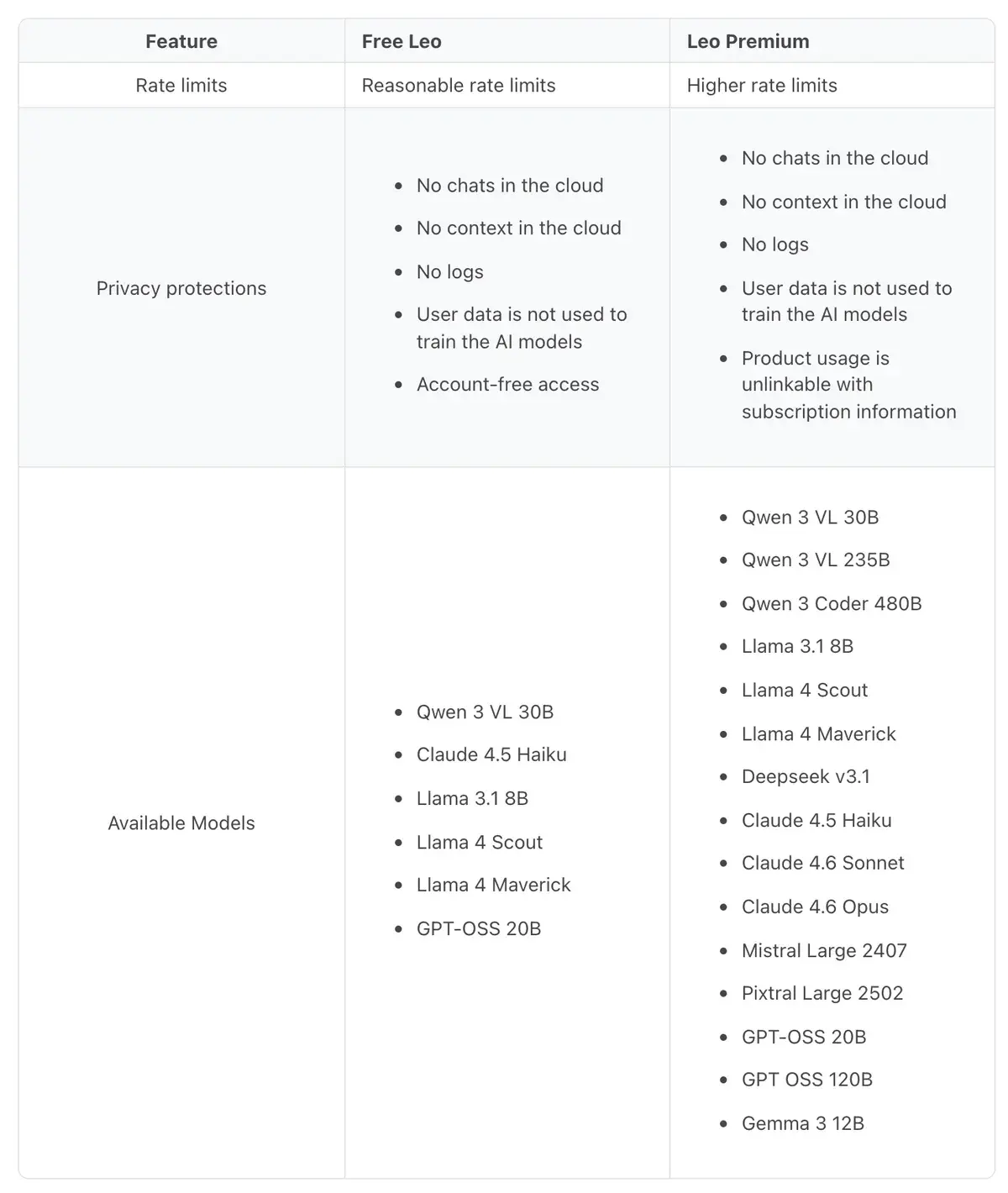
Brave's model table, captured September 29, 2026. Brave notes that the lineup changes from time to time.
The free tier is more useful than most: Claude 4.5 Haiku handles everyday summaries and writing well, Llama 4 Maverick and Qwen 3 VL, a model that reads images, cover general questions, and GPT-OSS 20B adds another option. Limits are described only as "reasonable", which in practice means they tighten when traffic is high.
Premium's value sits in the second column: Claude 4.6 Sonnet and Opus are the strongest writing and reasoning models in the list, DeepSeek v3.1 and Qwen 3 Coder 480B help with code, and Mistral Large and Pixtral Large add European models. An Automatic mode picks a model per request on both tiers, and you can set a default in Leo's settings.
What neither tier offers is the newest flagship from OpenAI or Google, image generation, or voice conversations. Leo's lineup trails the frontier by design, because Brave hosts the models itself.
$14.99 a month, ten devices, no identity
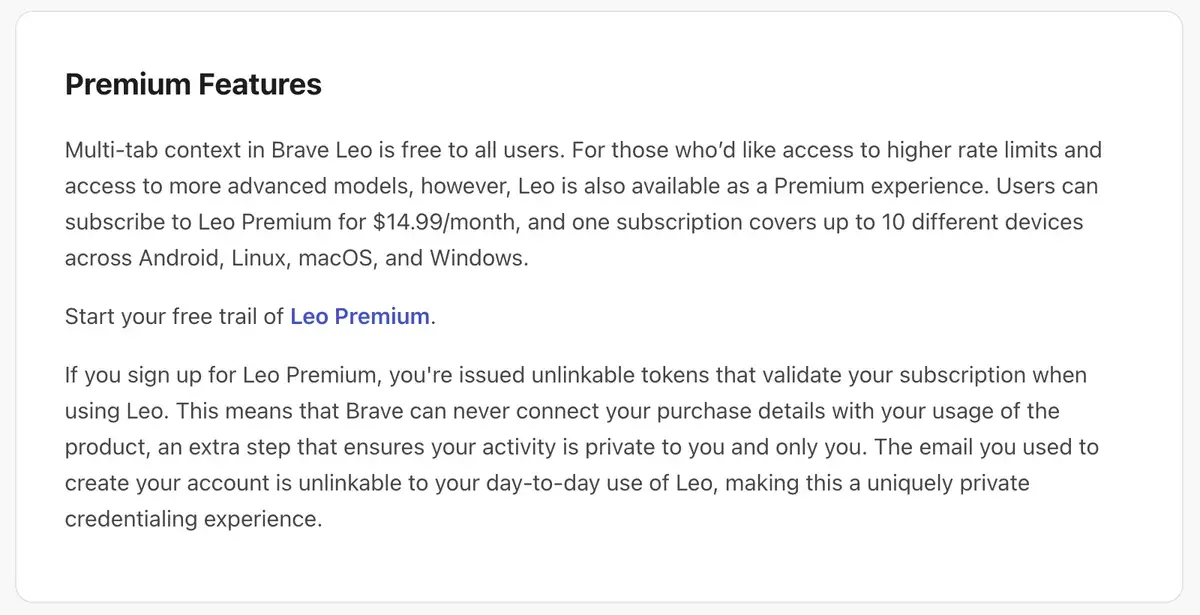
Brave's own help center states the Premium price. Checkout happens at account.brave.com after you sign in.
Leo Premium costs $14.99 a month, and a free trial is available. One subscription covers up to 10 devices across Android, Linux, macOS and Windows, which makes it cheap for a household or a person with several machines. Brave's help center lists no iOS device in that sentence, so iPhone users should check how an App Store purchase links to the rest before paying.
Compared with the $20 plans from ChatGPT, Claude and Gemini, Premium is cheaper, and the privacy guarantees are stronger. It also buys less: those subscriptions include their companies' newest models, image generation, voice modes and agents. Premium makes sense for Brave users who hit the free limits and value privacy more than the frontier.
Bring your own model, including ChatGPT through the API
Bring Your Own Model lets you connect Leo to a model you choose. The model can run on your own computer through a local server, or at a remote API endpoint. For people running open models locally, this turns Leo into a private front end for their own hardware, where nothing leaves the machine at all.
The same feature connects OpenAI's models, with a catch that trips people up: it needs an OpenAI API key, not a ChatGPT subscription. You create a key on OpenAI's platform, then add a label, the model name, the endpoint and the key in Leo's settings, and OpenAI bills you per token. Brave's privacy protections do not extend to third-party endpoints, since your prompts then go to that provider.
Skills, memory and the agent still in testing
Several additions since 2025 make Leo more personal. Customization and memory let you tell Leo about yourself and have it remember your preferences across chats. Skills, available from Brave 1.85 on desktop and Android, save prompts you use often behind a slash command, so typing /eli5 explains the page in plain language or /fact-check runs your own checking instructions. Skills are stored locally and follow the same no-logs policy.
The most ambitious feature is AI browsing, an agent that can visit websites, compare products, fill shopping carts, look for promo codes and complete multi-step tasks. In September 2026 it was experimental, available only in Brave Nightly 1.87 or later on desktop, and free to test. Brave is candid about the risks: agents can be manipulated by instructions hidden in web pages, so it runs AI browsing in an isolated browser profile, checks that actions match your intent and advises against sensitive tasks.
The trade-offs of a privacy-first assistant
Leo's privacy-first design has real costs, starting with the models. Hosting every model itself means Brave offers capable open models and Claude, but not the newest flagships that ChatGPT and Gemini subscribers get. There is no image generation, no voice conversation mode and no deep research feature. And Leo works only inside Brave, so switching browsers means leaving it behind.
Rate limits are also vague: Free Leo promises reasonable limits that vary with traffic, and Premium promises higher ones, without numbers. For people who use an assistant for hours a day, a $20 subscription elsewhere buys more capacity and capability.
Leo beside Gemini in Chrome, Copilot in Edge and Comet
Every major browser now has an assistant. Chrome builds in Gemini, with Google's latest models tied to your Google account, and Edge builds in Microsoft Copilot. Both are more capable and both are tied to accounts and to their companies' data practices. Comet from Perplexity goes further, with an agent that acts on websites as a core feature; OpenAI tried the same with ChatGPT Atlas, then shut it down in August 2026 and moved its browsing agent into the ChatGPT desktop app.
Leo's niche is the reader who wants help with pages without handing a big AI company a history of everything they read. For that person, the free tier is one of the best-value assistants available, and Premium is a reasonable upgrade when the limits start to pinch.
No. Leo is free inside the Brave browser, with no account or sign-up, and the free tier includes models such as Claude 4.5 Haiku, Llama 4 Scout and Maverick, Qwen 3 VL and GPT-OSS 20B under what Brave calls reasonable rate limits. Leo Premium, at $14.99 a month, raises those limits and adds larger models.
Does Brave keep my Leo conversations?
Brave says it does not store or log conversations after a response is generated, does not retain your IP address, discards conversation data from its servers when the session ends and never uses chats for training. Chat history lives only on your device, can be turned off, and temporary chats are not saved at all. Since June 30, 2025, Brave hosts every Leo model, including Claude, on its own infrastructure.
What does Leo Premium add?
Higher rate limits and more models, including Claude 4.6 Sonnet and Opus, DeepSeek v3.1, Qwen 3 Coder 480B and Mistral Large. It costs $14.99 a month, one subscription covers up to 10 devices on Android, Linux, macOS and Windows, and a free trial is available. Brave validates Premium with unlinkable tokens, so it cannot connect your payment details to what you ask Leo.
Can I use ChatGPT or a local model inside Leo?
Yes, through Bring Your Own Model. You can point Leo at a model running on your own computer or at a remote endpoint. For OpenAI's models you need an OpenAI API key, since a ChatGPT subscription does not work: you add the model name, the API endpoint and your key in Leo's settings, and pay OpenAI per token.
Does Brave Leo work on iPhone and Android?
Yes. Leo is available in Brave on Android and iOS as well as on Windows, macOS and Linux, opened from the browser menu on phones. On iOS you can also ask Leo questions by voice. Note that Brave lists Premium's 10-device coverage for Android, Linux, macOS and Windows, so check how an iOS purchase is handled before subscribing.
What is AI browsing in Brave?
An experimental agent that lets Leo browse on your behalf: visiting sites, comparing products, filling shopping carts and completing multi-step tasks. In September 2026 it was available only in Brave Nightly 1.87 or later on desktop, without a Premium subscription. Brave warns that agentic browsing carries real risks such as prompt injection, runs it in an isolated profile and advises against sensitive tasks.
Is Brave Leo better than ChatGPT?
For privacy, yes: Leo needs no account, keeps no logs and does not train on your chats, while ChatGPT trains on conversations unless you opt out. For raw capability, no: ChatGPT's own models, image generation, voice and agents go further than Leo's hosted open and Claude models. Leo is the better tool for quick questions about the page you are reading.