Krea AI

Krea AI

★ Top rated
AI Image Generation

Real-time AI image generation that responds to your sketches as you draw — designed for designers who want AI as a brainstorming partner.

Free · $10/mo
📖 13 min read
Try Krea AI for free

Affiliate link — we may earn a commission

Ready to try it?
Krea AI
Free · $10/mo
Get started →
Affiliate link — we may earn a commission
Our rating
4.5/ 5
AIVario Editor's rating →

What is Krea AI?

Imagine you are sketching a rough concept for a product — a kitchen appliance, a piece of furniture, anything visual. As you draw, the rough sketch transforms into a polished render in real time, updating as you add lines or adjust shapes. The transformation happens fast enough that the AI feels less like a separate generation tool and more like a layer responding to your hand. Adjust the sketch, the render adjusts. Change the prompt describing the desired style, the render shifts style. The creative loop runs at the speed of thought rather than the speed of waiting.

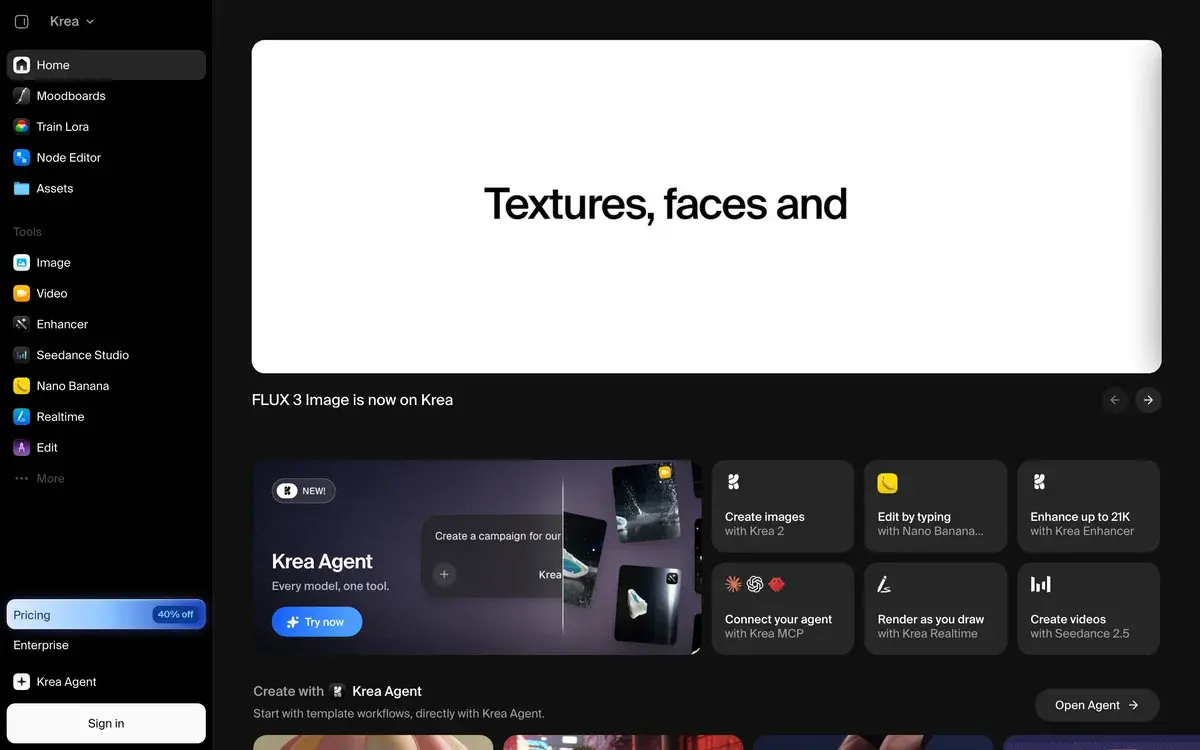
This is what Krea AI is built around. The product offers many of the same underlying capabilities as competing AI image tools — text-to-image generation, image enhancement, video generation, multi-model access — but the defining feature is real-time generation that responds to ongoing input. For designers and visual creators who want AI as a brainstorming partner rather than a finishing tool, the working experience is meaningfully different from prompt-based alternatives.

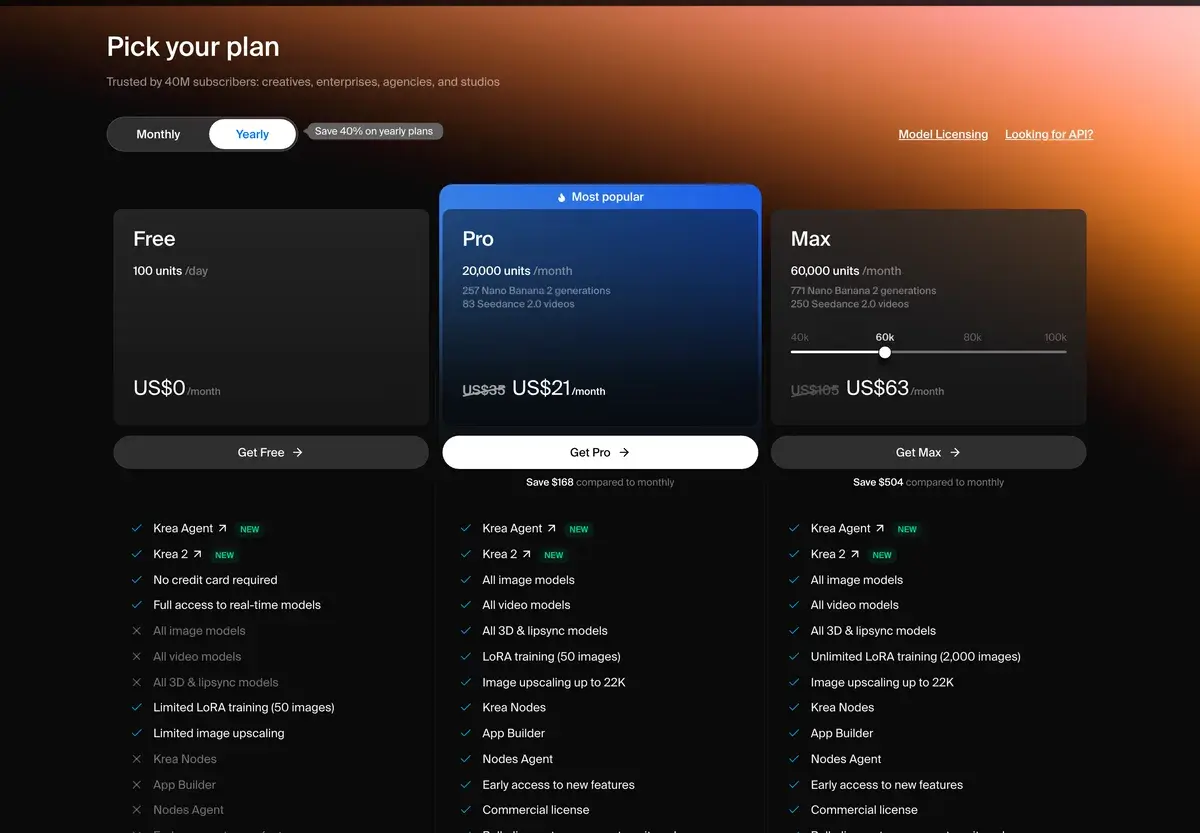
The free tier offers limited generations; paid plans range from $10/month (Basic) through $60/month (Max). The product is positioned for designers, illustrators, and visual creators who want AI integrated into their creative process rather than as a separate generation step.

What Krea does that other tools don't

Most AI image generators follow a discrete request-response pattern: write a prompt, wait, receive image, refine prompt, wait again. The wait time and the discontinuous nature of this loop affect creative work in ways that matter. When you cannot see how a small parameter change affects output without waiting through another full generation, you tend to over-commit to prompt structures and under-explore variations.

Krea's real-time generation removes this friction. Adjusting a slider, modifying a sketch, or tweaking a prompt produces visual feedback within a second or two. The tight feedback loop matches how visual brainstorming actually works — iterative, exploratory, responsive to small adjustments. For designers used to working in continuous-feedback tools (Photoshop with live filters, 3D software with viewport rendering), this feels natural. For designers used to discrete generation tools, the difference takes a session or two to internalize and then becomes hard to give up.

The multi-model platform aspect is the second differentiator that matters in regular use. Krea provides access to FLUX, Stable Diffusion variants, and several other image models through one interface. For creative work, the ability to test the same prompt across models — without subscribing separately to each — produces meaningful workflow value. Different models excel at different visual styles; having them in one tool lets you pick the right model for each project.

The Image Enhancer is the feature most users discover later and end up using often. Existing images, low-quality references, sketches, photos that need polish — Krea's enhancement produces meaningful upscaling and detail addition. The quality is competitive with dedicated upscalers like Magnific, with the advantage of being part of an integrated workflow.

Who is it for?

Designers — graphic designers, product designers, industrial designers — who want AI integrated into ideation and concepting workflows. The real-time generation matches how design exploration happens; the multi-model access provides flexibility for different visual problems. For the design audience, Krea fits the working style better than prompt-based alternatives.

Illustrators and concept artists using AI as reference generation, style exploration, or starting points for original work. The real-time loop supports the iterative refinement that characterizes good concept work; the enhancement features handle the moment when you need to polish a reference or starting image.

Art directors and creative directors who use AI for client presentations, mood boards, and visual exploration during creative briefs. The speed of iteration supports the rapid back-and-forth of creative direction work; outputs serve as starting points for further development rather than finished deliverables.

Architects and interior designers using AI for visualization, conceptual rendering, and client communication. The real-time generation supports walking clients through design directions live; the enhancement features polish rough renders into presentation-ready images.

Marketing creatives producing visual content for campaigns, social media, and brand materials where iteration speed matters. The multi-model access provides flexibility across different campaign visual styles; the workflow supports the volume of creative variations modern marketing requires.

Krea is not the right primary tool for: users wanting prompt-and-go generation without iterative workflow (Midjourney is more direct), text-heavy designs where typography matters most (Ideogram is stronger), high-stakes commercial work requiring indemnification (Adobe Firefly is the legally safer choice), or non-visual users who want AI as a black-box image generator.

Key Features

  • Real-time generation — visual outputs update as you sketch, adjust parameters, or modify prompts
  • Multi-model platform — access to FLUX, Stable Diffusion, and other image generators within one interface
  • Image Enhancer — upscale and add detail to existing images, sketches, or low-quality inputs
  • Video generation — text-to-video and image-to-video for creative video work
  • Brand training — train custom models on your visual style for brand-consistent outputs
  • Sketch-to-image — start from a rough sketch and generate refined visuals from it
  • Style transfer — apply visual styles from reference images to new generations
  • Inpainting and outpainting — edit specific areas of images or extend beyond original boundaries
  • Real-time canvas — live drawing canvas with AI overlay for ongoing creative iteration
  • Aspect ratio control — standard formats plus custom dimensions for different output needs
  • API access — programmatic generation for developers building Krea into custom workflows

Krea AI vs Competitors 2026

ToolReal-timeMulti-modelEnhancementVideoFree tierPrice/mo
Krea AI✅ Best in class✅ Strong✅ Strong✅ Decent✅ Limited$10
Midjourney❌ Discrete❌ Single model⚠️ Basic upscale$10
FLUX (BFL)⚠️ Provider-dependentN/A (single model)⚠️ Provider-dependentVariableVariable
Ideogram❌ Discrete⚠️ Basic✅ 10/day$8
Adobe Firefly❌ Discrete❌ Adobe model✅ Strong✅ Strong✅ 25 credits$4.99
Recraft❌ Discrete⚠️ Basic✅ Limited$12
DALL-E 3 (ChatGPT)❌ Discrete✅ With ChatGPTBundled
MagnificN/A (enhancement only)N/A✅ Best in class$39

Data verified April 2026 from each provider's pricing pages.

The clearest comparisons are Krea vs Midjourney and Krea vs Adobe Firefly.

Against Midjourney, Krea offers a fundamentally different workflow. Midjourney produces higher peak image quality and has stronger artistic style coherence; Krea offers real-time iteration and multi-model access. For finished hero imagery and pure visual art, Midjourney often wins on output quality. For creative workflows where the iteration matters more than peak per-image quality, Krea wins on workflow.

Against Adobe Firefly, the trade-off is workflow innovation versus commercial safety. Firefly offers commercial indemnification and Creative Cloud integration that Krea does not match. Krea offers real-time generation and multi-model flexibility that Firefly does not match. For commercial work where indemnification matters, Firefly. For creative exploration where workflow matters, Krea.

The multi-model aspect is the feature that differentiates Krea from any single-model platform. FLUX produces strong results for some prompts; Stable Diffusion variants for others; the ability to test across models in one tool produces better outcomes than committing to one model upfront.

Pricing 2026

PlanPriceGenerationsReal-timeBest for
Free$0Limited monthlyCasual evaluation
Basic$10/moMore generations⚠️ LimitedSolo users, occasional creative work
Pro$35/moHigh volume + premium models✅ FullActive designers and creators
Max$60/moUnlimited + all features✅ Full + advancedHeavy users, agencies, professionals

Prices verified April 2026 from krea.ai/pricing. Annual billing offers ~20% off across paid tiers.

The honest tier guide: the free tier is for evaluation, not regular use. Basic at $10/month covers occasional creative work but constrains the real-time generation that defines Krea's value. Pro at $35/month is the practical entry point for active designers — full real-time generation, premium model access, sufficient generation volume for typical creative workflows. Max at $60/month removes generation caps and is justified for heavy users running Krea as a primary creative tool.

The pricing is mid-tier in the AI image generation category — more expensive than Ideogram or Firefly Standalone, less expensive than Midjourney's higher tiers, comparable to Recraft Pro. For users where the real-time workflow earns its place, the pricing is fair; for users who would not use the real-time features regularly, the cost is harder to justify against cheaper alternatives.

Hands-on Notes

The first time you use Krea's real-time generation, the workflow difference shows immediately. Adjusting a slider that controls "stylization strength" and watching the image update as you move it produces a creative experience that prompt-and-wait tools cannot match. After a session or two, the discrete generation pattern of Midjourney or DALL-E starts to feel oddly slow — even though the absolute generation time is similar, the loss of continuous feedback affects how exploration works.

The multi-model access is the feature that most affects practical daily use. Some creative briefs benefit from FLUX's stronger photorealism; others from Stable Diffusion variants' more painterly outputs. Having both in one tool means matching model to project rather than committing to one model's strengths and weaknesses. For users producing varied creative work, this flexibility is meaningful.

The Image Enhancer is genuinely strong. We have used Magnific for enhancement work in the past, and Krea's enhancement quality holds its own — not always equal to Magnific at the absolute peak, but close enough that staying in one integrated tool produces better workflow than juggling multiple tools per project.

The video features are competent but not the product's strength. For users specifically wanting cinematic AI video, Luma or Runway produce better results. For users whose creative workflow is primarily image-driven with occasional video needs, Krea's video features handle the use case adequately within the integrated workflow.

Where Krea gets weaker: peak per-image artistic quality. Midjourney still produces more aesthetically polished images for hero use cases. The real-time generation involves trade-offs that affect output quality at the absolute peak. For users prioritizing finished visual art over iterative workflow, this trade-off matters.

The other practical consideration: real-time generation is computationally intensive, which affects pricing and free-tier experience. The free tier is meaningfully constrained on real-time use; the Pro tier ($35/month) is where the real-time experience becomes unconstrained enough for actual creative work. Users evaluating Krea on the free tier sometimes miss the real-time experience that defines the product because the free tier limits it.

Use Cases

A senior product designer at a hardware company uses Krea Pro for early-stage design exploration. Sketching rough product forms and seeing real-time renders helps test directions faster than producing rendered concepts traditionally. Outputs are not finished deliverables — they are exploration artifacts that inform subsequent CAD and rendering work. The compression of the exploration phase from days to hours changes how design iteration happens.

A concept artist at a game studio uses Krea Max for environmental concept work. Real-time generation supports the iterative refinement that characterizes good concept art; multi-model access provides flexibility across different visual styles needed for different game environments. The artist still produces final concepts in traditional digital painting tools; Krea handles the exploration and starting-point generation.

An interior designer uses Krea for client presentations during scoping. Walking clients through design directions with real-time generation supporting live conversation produces better client buy-in than presenting pre-rendered options. Clients see their input affect outputs in real time, which changes the dynamic of the design conversation.

A marketing creative director uses Krea Pro for campaign visual exploration. Generating dozens of variations across different visual directions in one session — using the multi-model access to test FLUX's photorealistic outputs against Stable Diffusion's stylized variants — produces better campaign visual decisions than committing to one direction early.

A small design agency uses Krea Max across the team for client work spanning brand identity, marketing materials, and creative direction. The multi-model access serves diverse client visual requirements; the real-time generation supports the agency's rapid iteration culture; the enhancement features handle the polish-existing-assets workflow that defines much agency creative work.

Our Verdict

Krea AI is a strong option for designers, creative professionals, and visually-driven users who want AI integrated into iterative creative workflows. The real-time generation feature genuinely changes the working experience compared to discrete prompt-based tools; the multi-model access provides flexibility that single-model platforms cannot match. For the right audience, Krea fits creative thinking better than alternatives.

For users prioritizing peak per-image artistic quality, Midjourney often produces better hero outputs. For users needing commercial indemnification, Adobe Firefly is the legally safer choice. For users wanting the cheapest functional AI image tool, Ideogram or DALL-E through ChatGPT cover most needs at lower cost. Krea's specific value is the workflow innovation; users who would not benefit from real-time iteration may find alternatives more practical.

The Pro tier at $35/month is where Krea's value proposition fully unlocks. The free tier and Basic tier limit the real-time experience that defines the product. For evaluation purposes, this matters — the free tier may not produce the experience that justifies upgrading.

Note: Krea AI does not currently have an active affiliate program with AIVario. AIVario earns no commission from sign-ups. Our rating reflects ongoing use of the paid Pro tier across creative exploration work.

Best for: Designers, illustrators, art directors, architects, marketing creatives, anyone whose creative work benefits from real-time AI iteration Not ideal for: Users wanting prompt-and-go generation (use Midjourney or Ideogram), high-stakes commercial work requiring indemnification (use Adobe Firefly), text-heavy designs (use Ideogram), users on tight budget without need for real-time features Bottom line: A genuinely different AI image tool — workflow-first rather than output-first. The right choice for designers and creative professionals; less obvious for users who want simpler generation.

Related Tools

  • Midjourney — peak quality alternative for finished visual art
  • Adobe Firefly — commercially indemnified alternative for client work
  • Ideogram — typography specialist for text-heavy designs
  • Runway — dedicated video AI for users prioritizing cinematic video
  • Figma — design tool that pairs with Krea for the design-and-AI workflow

Frequently Asked Questions about Krea AI

How much does Krea AI cost?

Krea has a free tier with limited generations. Paid plans start at $10/month for Basic (more generations, basic features), $35/month for Pro (real-time generation, premium models), and $60/month for Max (unlimited generations, all models, video features). Annual billing offers ~20% off across paid tiers.

What makes Krea different from Midjourney or DALL-E?

The real-time generation feature is the core differentiator. Where Midjourney and DALL-E require you to write a prompt and wait for results, Krea generates images as you sketch or adjust parameters — the visual updates within seconds of any change. For designers brainstorming visual concepts, this real-time loop produces a fundamentally different working experience than prompt-based tools.

Does Krea include access to multiple AI models?

Yes, Krea is structured as a multi-model platform giving access to FLUX (Black Forest Labs), Stable Diffusion variants, and other image generators within one interface. This contrasts with single-model platforms (Midjourney) where you are locked into one model. For creative work that benefits from comparing outputs across models, Krea's multi-model approach is genuinely useful.

Can Krea enhance existing images?

Yes, the Image Enhancer is one of Krea's strongest features — it upscales images, adds detail, and refines low-quality inputs into usable creative assets. The enhancement quality is competitive with dedicated upscalers (Topaz, Magnific), with the advantage of being part of an integrated creative workflow rather than a separate tool.

Does Krea support video generation?

Yes, Krea added AI video generation capabilities through 2024-2025. The video features handle text-to-video and image-to-video workflows, with quality competitive with mid-tier video AI tools. For pure cinematic video work, dedicated tools like Luma or Runway often produce better results; for creative workflows where image and video work happen together, Krea's integration matters more than the marginal video quality gap.

Is Krea good for non-designers?

It works for non-designers but the product's strengths are most apparent for users who think visually. The real-time generation pattern assumes you have visual intent you want to refine; users who want to type a prompt and get a finished image often find Midjourney or Ideogram more direct. For designers, illustrators, art directors, and visually-driven creators, Krea's workflow fits how creative thinking actually works.

Is Krea AI safe for commercial use?

Krea provides commercial usage rights on paid plans. The underlying models (FLUX, Stable Diffusion) have varying licensing situations regarding training data; Krea does not provide explicit commercial indemnification the way Adobe Firefly does. For high-stakes commercial work where copyright indemnification matters, Firefly is the safer choice; for most commercial creative work where standard usage rights are sufficient, Krea is fine.