Otter.ai is an AI meeting notetaker that joins Zoom, Microsoft Teams and Google Meet, transcribes the conversation live and produces summaries, action items and an AI chat over everything said. Basic is free with 300 transcription minutes a month and 30 minutes per conversation. Pro costs $8.33 per user a month billed yearly or $16.99 monthly for 1,200 minutes and meetings up to 90 minutes. Business costs $19.99 yearly or $30 monthly for unlimited meetings up to 4 hours. In April 2026 Otter repositioned itself as a conversational knowledge engine with an MCP server and a desktop app.
✓Best for: Professionals and teams who want automatic notes, summaries and searchable transcripts of their Zoom, Teams and Meet calls
✗Skip if: You transcribe mostly in languages beyond Otter's six, or you need long recordings on a free plan
This analysis is based on documentation, public user reports, and vendor materials — not yet on our own hands-on testing. How we rate
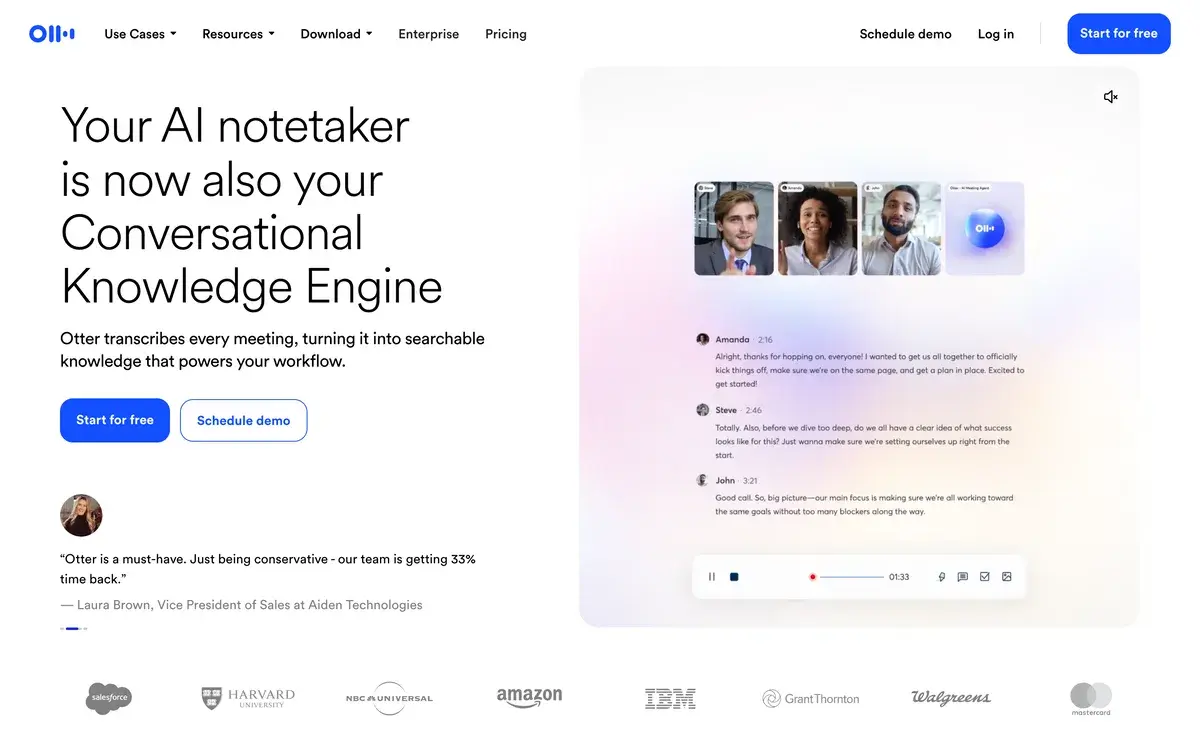
Otter.ai homepage, captured Sep 28, 2026.
From meeting bot to knowledge engine
Otter joins your Zoom, Microsoft Teams and Google Meet calls as a participant, records them and writes a live transcript with speaker names. After the meeting it produces a summary with action items and an outline, and AI Chat answers questions about one meeting or all of them, such as what a client said about pricing last month. It also records in-person conversations through its iOS, Android and desktop apps.
In April 2026 Otter changed how it describes itself. The homepage now reads "Your AI notetaker is now also your Conversational Knowledge Engine": the idea is that meetings add up to searchable, cross-referenced company knowledge rather than a pile of transcripts. The launch brought an expanded MCP server, so AI assistants can read your meetings, AI Chat across conversations and Otter for Desktop.
Basic, Pro, Business and Enterprise prices
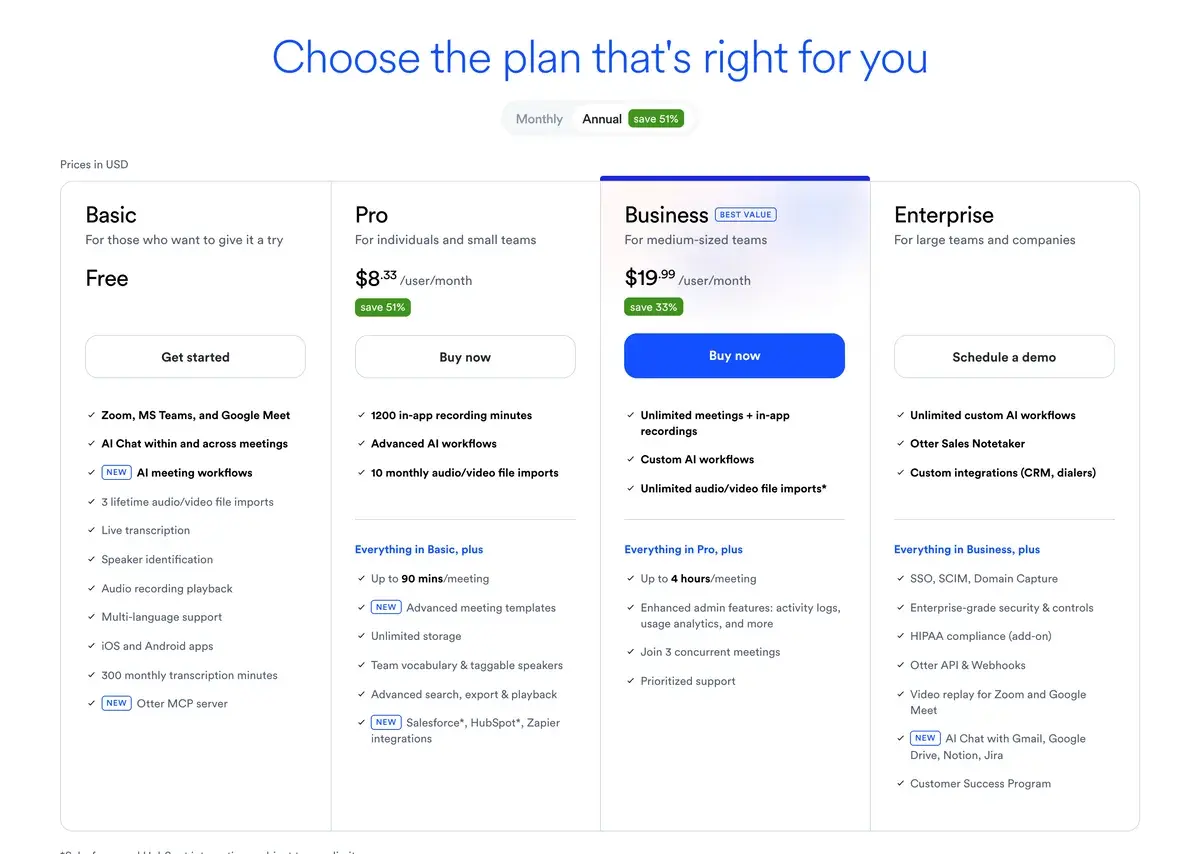
Otter's plans on annual billing, screenshot taken September 28, 2026.
Plan
Yearly (per user, per month)
Monthly
Meeting minutes a month
Longest meeting
Workspace
Basic
Free
Free
300
30 minutes
Up to 5 members
Pro
$8.33
$16.99
1,200
90 minutes
Up to 5 billed users
Business
$19.99
$30
Unlimited
4 hours
Up to 25 billed users
Enterprise
Custom
Custom
Unlimited
4 hours
Unlimited
Otter says annual billing saves 51% on Pro and 33% on Business. Enterprise adds SSO and SCIM, HIPAA compliance as an add-on, the Otter API and webhooks, video replay for Zoom and Meet, and the Otter Sales Notetaker.
The limits that decide the plan
Otter's plans differ less in features than in caps, and three of them matter.
Meeting length is the first. Free stops at 30 minutes per conversation and Pro at 90, so anyone who runs two-hour workshops or long interviews needs Business.
Monthly minutes are the second. Pro's 1,200 minutes are 20 hours of meetings a month, about an hour a day across working days; minutes reset each month and do not roll over.
AI Chat questions are the third, and the easiest to overlook: 20 a month on Free, 50 on Pro and 200 on Business. If you plan to ask Otter questions across your meeting history every day, Pro's allowance goes quickly.
Limit
Basic
Pro
Business
Imported files
3 in total
10 a month
Unlimited
Imported file minutes
300 a month
1,200 a month
6,000 a month
Meetings at the same time
1
2
3
Conversation history
25 most recent
Unlimited
Unlimited
AI Chat questions
20 a month
50 a month
200 a month
Custom vocabulary
5 terms
100 names and 100 terms
800 names and 800 terms per team
Live transcripts versus language and length limits
Otter's live transcript is its best feature: text appears as people speak, with speaker names, which helps anyone following a fast call or captioning it for colleagues. Beyond video calls, the phone and desktop apps record in-person meetings, lectures and interviews, and Salesforce and HubSpot sync, Zapier and now the MCP server carry meeting content into CRMs and AI assistants.
The constraints are just as concrete. Transcription covers six languages, English, Spanish, French, German, Japanese and Chinese, which leaves out many global teams. The 30-minute cap turns Free into a trial for most meetings, and Pro's 90-minute limit and 50 AI questions push heavy users to Business. Like most notetakers, Otter joins calls as a visible participant, which some clients and interviewees object to, so tell people you are recording.
Other notetakers and how they differ
International teams often choose Fireflies, which transcribes far more languages and connects to more tools. Fathom records and transcribes Zoom, Meet and Teams calls for free without a minute cap, with AI summaries limited on the free plan. Granola takes notes from your own device, so no bot joins the call, and Read AI adds meeting analytics such as engagement and talk time.
Matching the plan to your calendar
Pro billed yearly, about $100 a year, suits consultants, journalists, students and managers with up to an hour of meetings a day that rarely run past 90 minutes. Teams with long workshops, interviews over 90 minutes or daily use of AI Chat across their history need Business. Before paying, run Basic on a few real calls to check transcription quality with your accents and audio setup.
Related Tools
Fireflies: AI notetaker with broad language and integration coverage
Basic is free. Pro costs $8.33 per user a month billed yearly, about $100 a year, or $16.99 month to month. Business costs $19.99 per user a month billed yearly or $30 monthly, and Otter was running a promotion of $24 for the first three months of monthly Business. Enterprise is priced on request. All prices are in US dollars.
How many minutes does Otter's free plan include?
Basic includes 300 transcription minutes a month for meetings and recordings, with a limit of 30 minutes per conversation, three imported audio or video files over the lifetime of the account and access to your 25 most recent conversations. It joins Zoom, Microsoft Teams and Google Meet and includes 20 AI Chat questions a month.
What limits does Otter Pro have?
Pro gives each user 1,200 transcription minutes a month for meetings and recordings, plus 1,200 minutes of imported files, meetings up to 90 minutes, 10 imported files a month, unlimited conversation history and 50 AI Chat questions. It allows two meetings at once and up to five billed users in a workspace. Unused minutes do not roll over.
What does Otter Business add?
Unlimited meeting and recording minutes, meetings up to 4 hours, 6,000 minutes of imported files and unlimited imports, three meetings at once, 200 AI Chat questions per user, admin features such as activity logs and usage analytics, and workspaces of up to 25 billed users, with prioritized support.
Can ChatGPT or Claude read my Otter meetings?
Yes, through Otter's MCP server, which is available on every plan including Basic. It lets AI assistants that support MCP search and use your meeting notes and transcripts, subject to the permissions you grant.
Which languages does Otter transcribe?
English, Spanish, French, German, Japanese and Chinese. That is enough for most business meetings in those languages, but teams working in others need a tool with broader language coverage, such as Fireflies or Notta.
Is Otter better than Fireflies or Fathom?
Otter is strongest at live transcription and its own mobile and desktop recording, and its free plan is usable for short calls. Fireflies covers far more languages and integrations, and Fathom's free plan records and transcribes without a minute cap, though it limits AI summaries. Sales teams should also look at Otter's Enterprise Sales Notetaker.