Vizard is an AI clipping tool that turns long videos, podcasts and webinars into short vertical clips with speaker detection, captions, AI emojis and B-roll, and posts them to social channels. It charges 1 credit per minute of video. Free gives 60 credits a month with 720p exports and a watermark. Creator costs $29 a month or $14.50 billed yearly for 600 credits a month with 4K and scheduling, and Business costs $39 or $19.50 with a shared workspace at $5 per extra seat.
✓Best for: Podcasters, coaches and marketers who clip hours of long video a month and want the most minutes for the price
✗Skip if: You need a full editor for long-form work, or you only make a few short videos a month and the free tier covers you
This analysis is based on documentation, public user reports, and vendor materials — not yet on our own hands-on testing. How we rate
Vizard homepage, captured Sep 26, 2026.
A budget clipper with an agent on top
Vizard is a clipper. Paste a YouTube link or upload a long recording, and it returns a set of short vertical clips for TikTok, Instagram Reels, YouTube Shorts and LinkedIn, with speaker detection to keep the right person in frame, auto-reframing, subtitles, AI emojis, highlighted keywords and optional AI B-roll. The clips land in an editor where you can trim, restyle captions, translate subtitles and add your brand template, then publish or schedule them to your social accounts.
The newer parts of the product, Vizard Agent and an AI Studio, point toward creating videos by instruction, but the reason most people choose Vizard is still the clipping.
Plans
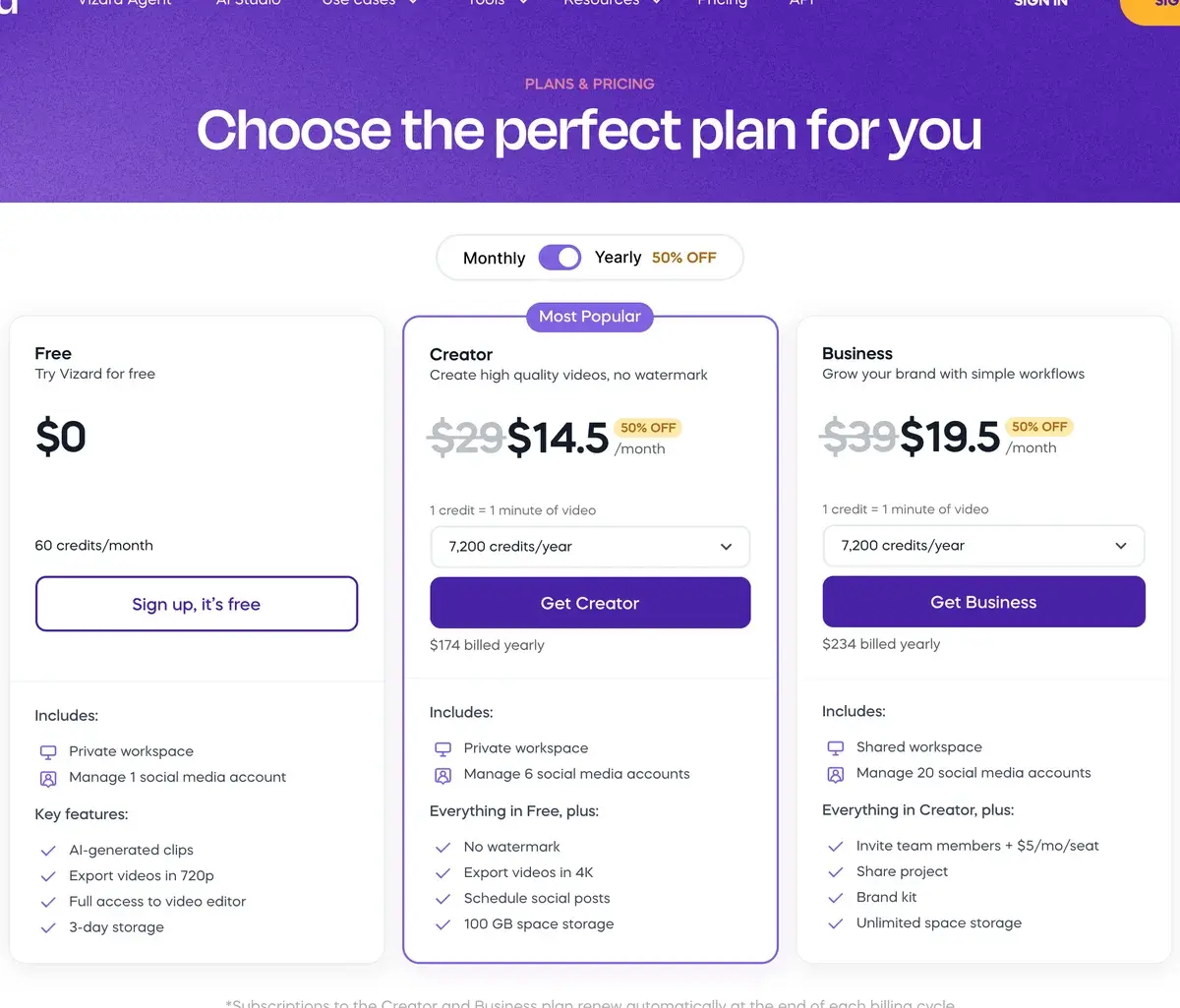
Vizard's plans on yearly billing, checked September 26, 2026.
Plan
Monthly
Yearly (per month)
Credits
Highlights
Free
$0
$0
60 a month
720p exports up to 10 minutes, watermark, 1 social account, 3-day storage
Creator
$29
$14.50 ($174 a year)
From 600 a month
No watermark, 4K, 6 social accounts, scheduling, 100 GB storage
Business
$39
$19.50 ($234 a year)
From 600 a month
Shared workspace, $5 per extra seat, 20 social accounts, brand kit, unlimited storage
One credit is one minute of video. Both paid plans start at 600 credits a month and can be bought with larger allowances; yearly subscribers see the same allowance as 7,200 credits a year. Uploads on paid plans can be up to 600 minutes and 30 GB.
What a clip costs
Because Vizard and OpusClip both price by minutes of source video, they compare cleanly:
Plan
Price
Minutes of source a month
Cost per hour of source
Vizard Free
$0
60
$0
Vizard Creator, yearly
$14.50 a month
600
about $1.45
Vizard Creator, monthly
$29
600
about $2.90
OpusClip Pro, yearly
$14.50 a month
300
about $2.90
OpusClip Pro, monthly
$29
300
about $5.80
At the same yearly price, Vizard gives twice OpusClip's minutes. For a daily podcast or a weekly multi-hour stream, that difference decides the plan.
Ten hours a month, 4K and posting on every plan
Vizard's case is minutes for the money: ten hours of source video a month on Creator, billed yearly at $14.50, covers most podcasters and coaches without extra packs. Creator also accepts 4K uploads and exports clips in 4K of any length, where many clippers keep top resolution for higher tiers, and direct posting and scheduling to multiple accounts, Google Drive export and an API on every plan make it easy to put clipping on autopilot.
Where it falls short
It is a clipper, not an editor for long-form work; use Descript or a desktop editor for the full episode. OpusClip's virality score and deeper editing features, such as Premiere Pro export and dubbing, go further than Vizard's. And the free plan's 720p, 10-minute export limit and watermark keep it firmly in trial territory.
Vizard for agencies and teams
Business is priced for small teams rather than per seat from the start: $19.50 a month billed yearly for the workspace, plus $5 a month for each additional member. A four-person agency therefore pays about $34.50 a month for a shared workspace, shared projects, a brand kit, unlimited storage and up to 20 connected social accounts, enough to run clips for several clients from one place.
The credit allowance belongs to the workspace, so size it by the total hours of footage your clients send each month, not by headcount. By comparison, OpusClip bundles its team workspace into Pro, with two seats per credit pack and up to four users.
Vizard against OpusClip, Submagic and Captions
OpusClip is the best-known clipper and the one to compare first: more features and a virality score, half the minutes per dollar. Submagic is for polishing short clips with animated captions and effects rather than finding them. Captions edits talking-head footage with AI styles, and VEED is a general browser editor with strong subtitles.
Creator billed yearly is the value plan
Podcasters, coaches, consultants, agencies and event marketers who clip a lot of long video on a budget get the most from Vizard. Run one episode through the free plan; if the clip picks work for your content, Creator billed yearly is the value plan, and Business makes sense once several people share the workspace.
Related Tools
OpusClip: the best-known AI clipper, with a virality score
Submagic: animated captions and effects for short clips
Descript: edit podcasts and video by editing the transcript
Frequently Asked Questions about Vizard
What do Vizard's Creator and Business plans cost?
Creator costs $29 a month, or $14.50 a month billed yearly ($174 a year). Business costs $39 a month, or $19.50 billed yearly ($234 a year), plus $5 a month for each additional team member. Both start at 600 credits a month. Yearly billing halves the price, and custom plans are available through sales.
What does the Vizard free plan include?
Sixty credits a month, so an hour of source video, with AI-generated clips, the full video editor, 720p exports up to 10 minutes long, uploads up to 60 minutes and 1 GB, one social account and three days of storage. Watermark removal and 4K export start on Creator.
Is Vizard cheaper than OpusClip?
Per minute of source video, yes. Vizard's Creator plan billed yearly gives 600 credits a month for $14.50, while OpusClip's Pro plan at the same $14.50 a month billed yearly gives 300. That puts Vizard at about $1.45 per hour of source video against OpusClip's $2.90, though OpusClip adds its virality score and a larger feature set.
Does Vizard export in 4K?
Yes, on Creator and Business, which accept 4K uploads up to 30 GB and 600 minutes long and export clips of any length in 4K. The free plan uploads up to 1080p and exports at 720p, with a 10-minute limit on exports.
Can Vizard post clips to social media?
Yes. All plans can publish directly to social platforms; the free plan connects one account, Creator six and Business twenty, and paid plans can schedule posts. Business also adds shared projects and a brand kit for teams, and exports can be saved to Google Drive.
Does Vizard have an API?
Yes, on every plan, with rate limits that rise with the plan: 1 request a minute and 10 an hour on Free, 3 and 20 on Creator, and 10 and 60 on Business. It suits automating clipping for a regular podcast or video feed rather than high-volume processing.
What is Vizard Agent?
Vizard Agent is a newer mode on Vizard's site for creating videos by instruction rather than clipping existing footage, alongside an AI Studio. The core product remains the clipper: paste a link or upload a long video and Vizard returns a set of ready-to-post short clips.